
1. Produktet er slutview
The MakerHawk TC819 is a versatile plug-in thermostat temperature controller designed for precise temperature management in various environments. It features an external temperature detector, allowing users to set specific start and stop temperatures for both heating and cooling applications. This device aims to optimize energy consumption while maintaining desired temperature conditions.

Billede 1.1: Forside view of the MakerHawk TC819 Thermostat Temperature Controller, showing the digital display, control buttons, and external temperature probe.
2. Nøglefunktioner
- Plug-in Thermostat Temperature Controller: Equipped with an external temperature detector for accurate readings. Supports both heating and cooling modes with customizable start and stop temperatures. Operates on 230V AC 50HZ with a maximum output of 16A (3680W). Note: For US regions, the maximum load is typically 1800W due to 120V AC supply.
- Nedtællingsfunktion: Allows setting a countdown timer to automatically turn the device on or off, providing flexible temperature control for various scenarios.
- Fem driftstilstande: Includes TC MODE (temperature control), CD TC ON MODE (countdown to turn on temperature control), CD TC OFF MODE (countdown to turn off temperature control), CD ON MODE (countdown to turn on), and CD OFF MODE (countdown to turn off).
- Multifunktionalitet: Supports switching between Celsius (℃) and Fahrenheit (℉) units, temperature correction for precise calibration, and a memory function that retains settings after power loss. The display backlight can be optionally turned off for convenience.
- Bred kompatibilitet: Suitable for a broad range of applications including greenhouses, reptile enclosures, incubators, glass containers, freezers, refrigerators, heaters, home brewing, animal breeding rooms, fermentation, and heating pads.

Image 2.1: Visual representation of key features including Celsius/Fahrenheit switching, heating/refrigeration, temperature calibration, memory, reset, backup memory, lock screen protection, backlit LCD, and high accuracy.

Billede 2.2: Eks.amples of diverse applications for the TC819 temperature controller.
3. Produktkomponenter
The TC819 thermostat consists of the following main components:
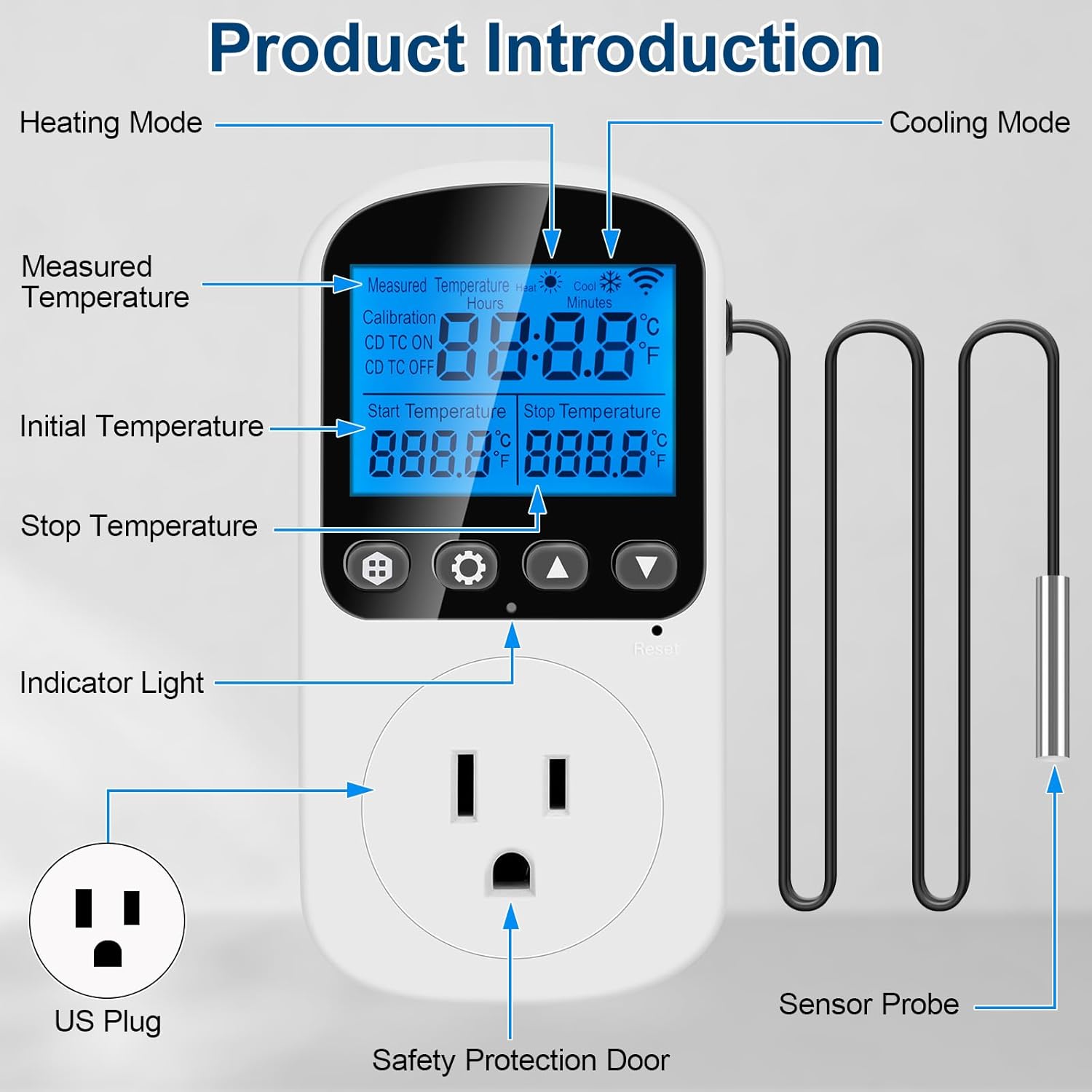
Image 3.1: Labeled diagram of the TC819 components.
- Measured Temperature Display: Shows the current temperature detected by the sensor.
- Heating Mode Indicator: Illuminates when the device is actively heating.
- Cooling Mode Indicator: Illuminates when the device is actively cooling.
- Indledende temperaturindstilling: The temperature at which the connected device will activate (start).
- Stop Temperature Setting: The temperature at which the connected device will deactivate (stop).
- Indikatorlys: Giver visuel feedback om enhedens status.
- US stik: For connecting the thermostat to a standard US power outlet.
- Safety Protection Door: Covers the outlet for enhanced safety.
- Sensorprobe: External probe for accurate temperature detection. The cable length is approximately 170cm (67 inches).
4. Opsætning og grundlæggende betjening
Familiarize yourself with the control buttons and their functions:

Image 4.1: Button functions and basic operations.
- Switch Modes / Confirm Button (⬛): Press to cycle through the 5 operating modes. Also used to confirm settings.
- Set Up Button (⚙): Press to enter setting mode for parameters.
- Op-knap (▲): Increases numerical values or navigates up in menus.
- Ned-knap (▼): Decreases numerical values or navigates down in menus.
4.1. Temperature Unit Switching (℃/℉)
Sådan skifter du mellem Celsius (℃) og Fahrenheit (℉):
- In the non-setting state (normal display mode), press and hold the "Set Up" (⚙) key for approximately 3 seconds.
- The display will switch between ℃ and ℉. Release the button when the desired unit is shown.
4.2. Baggrundslysstyring
The display backlight can be controlled as follows:
- To turn off the backlight, press the "Down" (▼) knappen.
- To turn the backlight on again, press any button.
4.3. Hukommelsesfunktion
All current settings on the TC819 will be automatically saved and retained even after a power outage or disconnection.
5. Driftstilstande
The TC819 offers five distinct operating modes to suit various temperature control needs. Cycle through these modes by pressing the "Switch Modes / Confirm" (⬛) knappen.

Billede 5.1: Overview of the five operating modes.
- TC Mode (Temperature Control Mode):
This is the standard temperature control mode. The device will continuously monitor the temperature and activate/deactivate the connected appliance based on the set start and stop temperatures. If the start temperature is lower than the stop temperature, it operates in heating mode. If the start temperature is higher than the stop temperature, it operates in cooling mode.
- CD TC ON Mode (Countdown to Turn On Temperature Control Mode):
In this mode, the device will first count down for a specified duration. Once the countdown finishes, the thermostat will automatically switch to and begin operating in TC Mode (temperature control mode) with your pre-set temperature parameters.

Billede 5.2: Eks.ample of setting CD TC ON mode for 30 minutes before temperature control begins.
- CD TC OFF Mode (Countdown to Turn Off Temperature Control Mode):
This mode allows the thermostat to run in TC Mode (temperature control mode) for a specified duration. After the countdown ends, the temperature control function will automatically cease, and the connected appliance will turn off.

Billede 5.3: Eks.ample of setting CD TC OFF mode to run temperature control for 45 minutes.
- CD ON Mode (Countdown to Turn On):
In this mode, the device will count down for a set period. Once the countdown reaches zero, the power output will turn ON, activating the connected appliance. The appliance will remain on until manually turned off or a different mode is selected.

Billede 5.4: Eks.ample of setting CD ON mode for a 30-minute countdown before power output turns on.
- CD OFF Mode (Countdown to Turn Off):
This mode allows the connected appliance to run for a specified countdown duration. After the countdown completes, the power output will turn OFF, deactivating the appliance.

Billede 5.5: Eks.ample of setting CD OFF mode to turn off power output after 45 minutes.
6. Temperaturkalibrering
The TC819 allows for temperature calibration to ensure accuracy with your specific environment or other measuring devices. The calibration range is from -9.9℃ to 9.9℃.

Image 6.1: Steps for temperature calibration.
- Long press the "Switch Modes / Confirm" (⬛) button for 5 seconds to enter the real-time temperature calibration mode. The first row of the LCD will show "CALIBRATION".
- Use the "Up" (▲) and "Down" (▼) buttons to adjust the calibration value.
- Long press the "Switch Modes / Confirm" (⬛) button for 5 seconds again to exit and save the calibration modifications.
7. Sikkerhedsoplysninger
The MakerHawk TC819 is designed with safety in mind. Please observe the following:

Image 7.1: Safety features of the TC819.
- Strømspecifikationer: The device operates on 230V AC 50HZ with a maximum output of 16A (3680W). For regions with 120V AC supply (e.g., USA), the maximum safe load is typically 15A (1800W). Do not exceed the specified wattage for your region to prevent overheating and potential hazards.
- Konstruktion: Features high conductivity copper plates for efficient power transfer and a safety protection door over the outlet. The casing is made from PC flame retardant material for added safety.
- Placering: Ensure the thermostat is plugged into a properly grounded outlet. Avoid placing the unit where it might block access to adjacent power plugs on a power strip or wall outlet due to its size.
- Sensorpleje: The wires from the controller to the temperature sensor are designed for durability. Avoid excessive bending or sharp kinks that could damage the internal wiring.
8. Specifikationer
| Attribut | Værdi |
|---|---|
| Mærke | MakerHawk |
| Modelnavn | JK-TC819 |
| Produktdimensioner | 6.35 cm D x 8.13 cm B x 12.19 cm H (2.5 cm D x 3.2 cm B x 4.8 cm H) |
| Controller type | Tryk knap |
| Farve | Hvid |
| Specifikke anvendelser af produktet | Air Conditioner (and other temperature control systems) |
| Temperaturkontrol type | Termostatisk |
| Inkluderede komponenter | Temperature control socket + sensor |
| Strømkilde | Elektrisk med ledning |
| Varens vægt | 6.6 ounce (187 gram) |
| Voltage | 230 volt (AC) |
| Display Type | LED |
| Baggrundsbelysning | Ja |
| Wattage | 3680W (maks.) |
| Oprindelsesland | Kina |
| Batterier påkrævet | Ingen |

Image 8.1: Product dimensions of the TC819.
9. Fejlfinding
- Displaying "E1" Error: This indicates that the sensor is disconnected or the detected temperature is below -40°C (-40°F). Check the sensor connection and ensure it is within the operational temperature range.
- Displaying "E2" Error: This indicates a short circuit in the sensor or the detected temperature is above 120°C (248°F). Inspect the sensor for damage and ensure the environment is within the operational temperature range.
- Thermostat Not Turning Off Appliance: If the thermostat fails to cut power to the appliance when the stop temperature is reached, immediately unplug the appliance and the thermostat. This could indicate a malfunction. Ensure the thermostat's wattage limit is not exceeded. If the issue persists after a reset, discontinue use and contact support.
- Difficulty Switching to Fahrenheit: Ensure you are in the normal display mode (not setting mode) and press and hold the "Set Up" (⚙) button for at least 3 seconds.
- Fysisk obstruktion: The unit is designed to be compact but may block adjacent outlets on a power strip or wall socket. Consider using a short extension cord or a different outlet configuration if this is an issue.
9.1. Nulstil funktion
To reset the device to factory default values, locate the small reset hole on the unit. Use the provided reset tool (a small plastic cylinder) or a thin, pointed object (like a paperclip) to press the button inside the reset hole.
10. Produktvideo
Watch this official product video for a visual guide on the MakerHawk TC819 Thermostat Temperature Controller's features and operation.
Video 10.1: An instructional video demonstrating the features and usage of the MakerHawk TC819 Thermostat Temperature Controller, including its various modes and settings.
11. Garanti og support
For warranty information and technical support, please refer to the documentation included with your product packaging or contact MakerHawk customer service directly through their official website or the platform where the product was purchased. Ensure you have your model number (TC819) and purchase details ready when contacting support.