
Produkt overview
The Singtronic KA-3000Pro is a professional DJ/KJ mixing amplifier designed for high-quality audio processing and control. It features a massive 3000W output, advanced equalization, DSP processing, and comprehensive connectivity options.
- Max Output: 1500W + 1500W Watts
- Console Separate Adjustment
- Music Low, Mid, High, Balance, Volume Controls
- Master Microphone Volume Control
- Master Music Volume Control
- DSP Digital Sound Processor
- Fjernbetjening med fuld funktion
- Microphone Volume Controls for Low, Mid, High, Echo, Balance, Volume for individual microphones
- Microphone Feedback Controller (FBX1, FBX2, FBX3)
- 16 Bit Digital Key Controls
Sikkerhedsoplysninger
WARNING: To prevent electric shock, do not remove cover. Refer servicing to qualified personnel. Removing rear panel module to access sensitivity switch.
Always ensure proper ventilation and avoid blocking the cooling fan. Operate the unit within the specified voltage (115 Volts) and frequency (60Hz).
Opsætning
Front Panel Features and Controls
The front panel provides comprehensive controls for microphones, music, and various effects. Familiarize yourself with these controls for optimal performance.
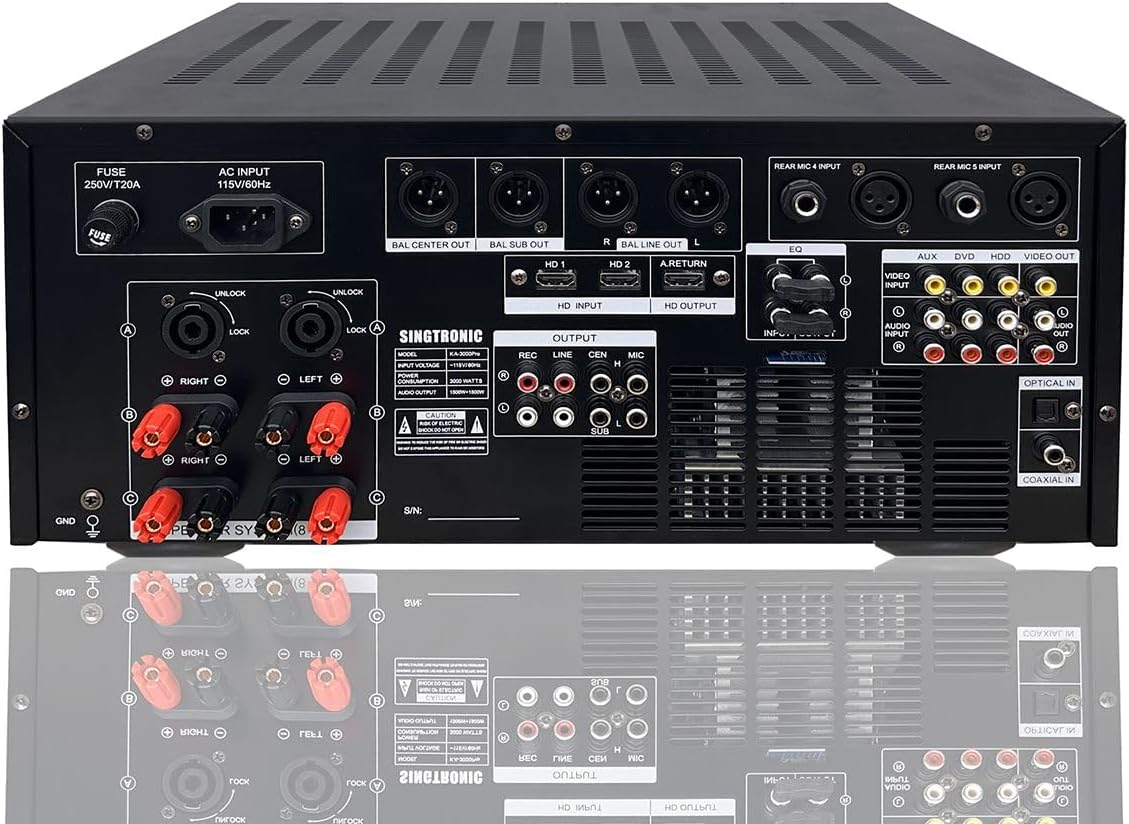
Billedbeskrivelse: En detaljeret view of the Singtronic KA-3000Pro mixing amplifier's front panel. Key features highlighted include individual microphone volume, balance, echo, low, mid, and high controls for MIC 1, MIC 2, and MIC 3. Also visible are the headphone output, subwoofer and center channel frequency and volume controls, left and right graphic equalizers, music master volume, mic master volume, and power switch. The digital display shows input status and playback information.
Bagpaneltilslutninger
The rear panel houses all the necessary input and output connections for integrating the amplifier ind i dit lydsystem.
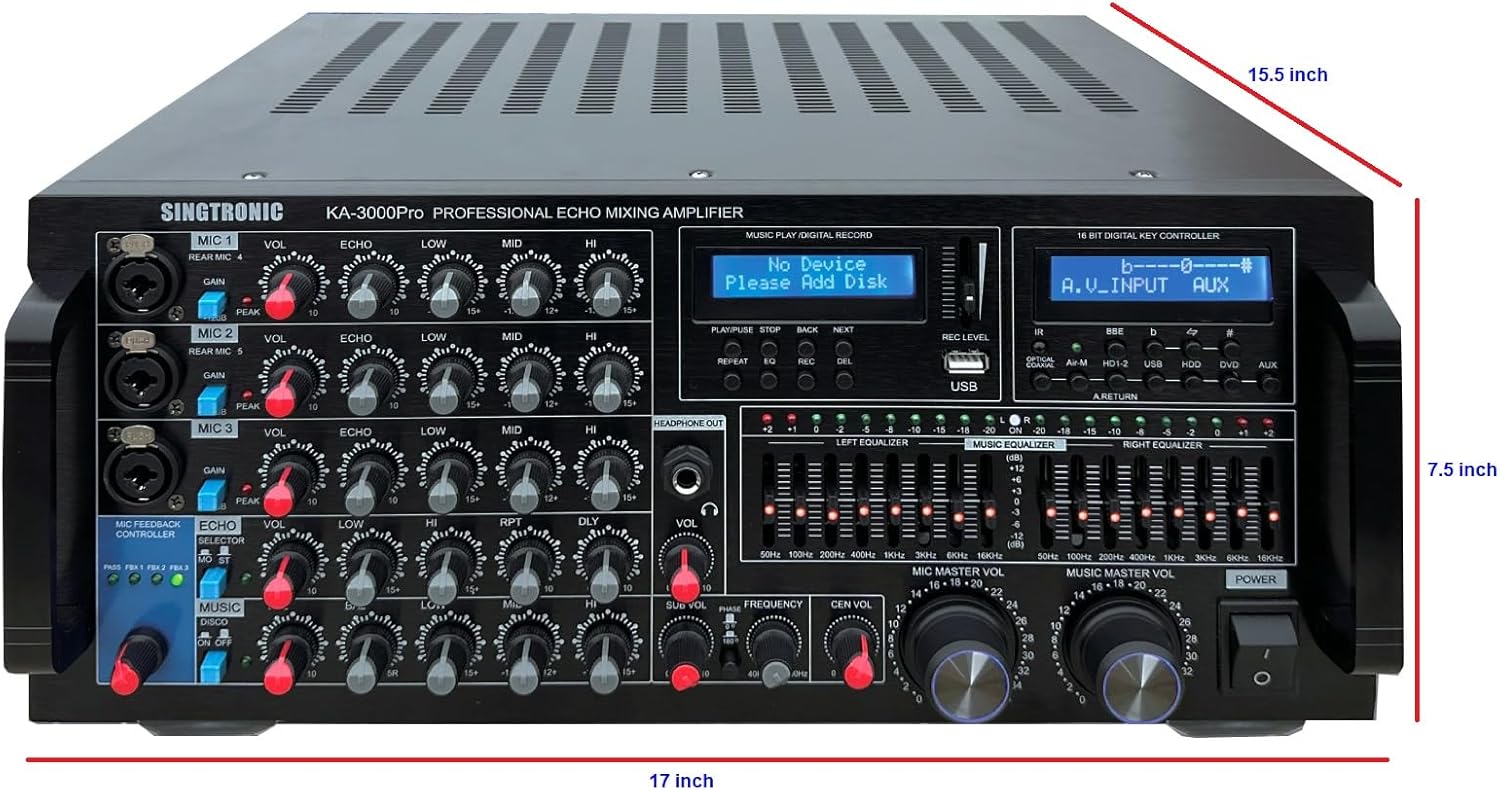
Billedbeskrivelse: En omfattende view of the Singtronic KA-3000Pro mixing amplifier's rear panel. It displays various input/output options including AC input, fuse, speaker system connections (8-16 Ω), balanced line outputs (R/L), keyboard and guitar inputs, MIC 1-5 inputs, HDMI inputs (HD1, HD2) and output, video inputs/outputs (AUX, DVD, HDD), audio inputs/outputs (REC, LINE, SUB, MIC), optical in, and coaxial in. A warning label regarding electric shock is also visible.
Højttalerforbindelser
Connect your speakers to the "SPEAKER SYSTEM (8-16 Ω)" terminals. Ensure correct polarity (red for positive, black for negative) for optimal sound quality. The unit supports both Speakon and banana plug connections.

Billedbeskrivelse: Nærbillede view of the speaker system connections on the rear panel of the Singtronic KA-3000Pro. It shows two Speakon connectors labeled "A" and "B" with unlock/lock mechanisms, and six banana plug terminals (three red for positive, three black for negative) for Right and Left channels, supporting 8-16 Ohm speakers. The "GND" terminal is also visible.
Audio/Video-indgange og -udgange
Utilize the HDMI, Optical, Coaxial, and RCA inputs for various audio and video sources. The HDMI ARC (Audio Return Channel) allows for seamless audio routing from compatible Smart TVs. The unit also provides RCA outputs for recording, line out, subwoofer, and microphone.
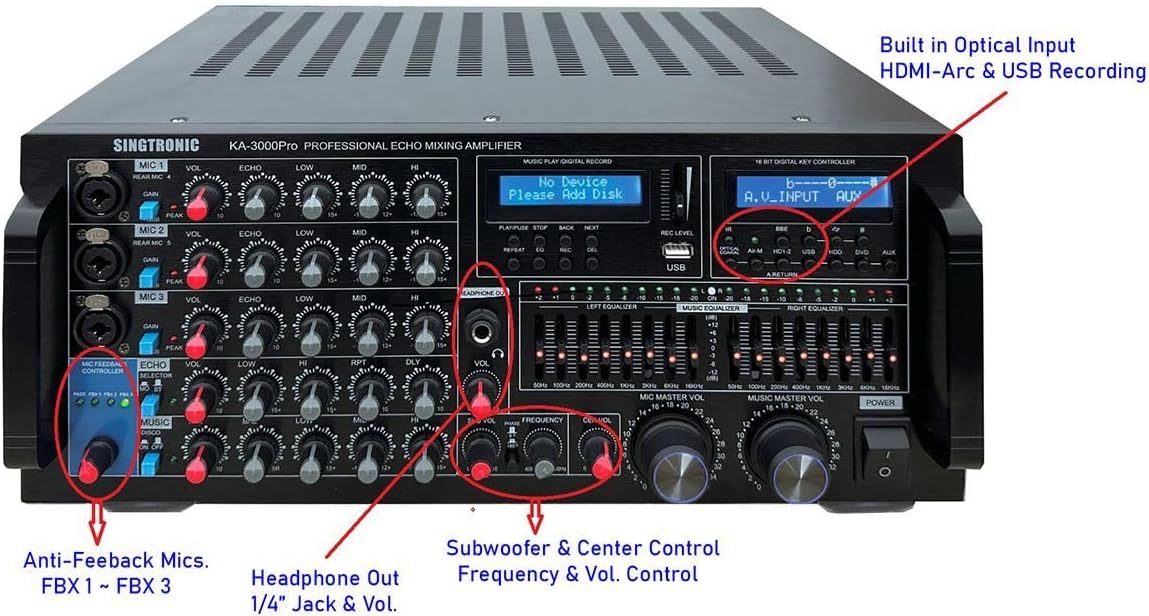
Billedbeskrivelse: An annotated image of the Singtronic KA-3000Pro front panel, highlighting key features such as Anti-Feedback Mics (FBX1~FBX3), Headphone Out (1/4" Jack & Vol.), Subwoofer & Center Control (Frequency & Vol. Control), and Built-in Optical Input, HDMI-Arc & USB Recording. The various knobs for microphone and music control are also visible.
Mikrofonforbindelser
De amplifier supports multiple microphones with individual controls. Use the 1/4" jack inputs on the front panel or the XLR/1/4" combo inputs on the rear panel for microphones 1-5, keyboard, and guitar.

Billedbeskrivelse: Et nærbillede view of the microphone input section on the front panel of the Singtronic KA-3000Pro. It shows individual volume, balance, echo, low, mid, and high controls for three microphones (MIC 1, MIC 2, MIC 3). Each microphone input also has a gain switch and a peak indicator. Additional controls for guitar and keyboard are also present.
Betjeningsvejledning
Tænd/sluk
Press the POWER button on the front panel to turn the unit on or off. Ensure all connections are secure before powering on.
Valg af input
Use the input selection buttons (OPTICAL, COAXIAL, Air-M, HD1-2, USB, HDD, DVD, AUX) on the front panel to choose your desired audio source.
Microphone Adjustments
Each microphone input (MIC 1, MIC 2, MIC 3) has dedicated controls for Volume, Balance, Echo, Low, Mid, and High frequencies. Adjust these to achieve your desired vocal sound. The Microphone Feedback Controller (FBX1, FBX2, FBX3) helps eliminate unwanted feedback.
Music Adjustments
The MUSIC section provides controls for Low, Mid, High, and Balance to tailor the music's frequency response. The dual 8-band graphic equalizer allows for precise shaping of the music and vocal frequencies.
Master volumenkontrol
The MIC MASTER VOL and MUSIC MASTER VOL knobs control the overall volume levels for microphones and music respectively. Adjust these to balance the vocals and background music.
USB-afspilning og -optagelse
Insert a USB flash drive into the USB port. Use the PLAY/PAUSE, STOP, BACK, NEXT, REPEAT, EQ, REC, and DEL buttons to control playback and recording functions. The REC LEVEL slider adjusts the recording volume.
Bluetooth-forbindelse
Select the Bluetooth input. Pair your smartphone or tablet with the amplifier to stream unlimited karaoke songs from YouTube or other apps.
Digital nøglekontrol
The 16 BIT DIGITAL KEY CONTROLLER allows you to adjust the pitch of the music up or down to match your vocal range.
Officiel produktvideo
Watch this video for a detailed explanation of the KA-3000ProII Karaoke Amplifier's features and functions.
Videobeskrivelse: An official product video from SINGTRONIC INC. demonstrating the features and connectivity options of the KA-3000ProII Karaoke Amplifier. The video showcases the front panel controls, rear panel inputs/outputs, and highlights key functionalities like equalization, microphone adjustments, and various connectivity options.
Opretholdelse
To ensure the longevity and optimal performance of your Singtronic KA-3000Pro ampLifier, følg disse vedligeholdelsesretningslinjer:
- Rensning: Brug en blød, tør klud til at rengøre enhedens yderside. Undgå at bruge flydende rengøringsmidler eller opløsningsmidler, da de kan beskadige overfladen eller de indvendige komponenter.
- Ventilation: Ensure that the ventilation slots on the top and rear of the unit are not obstructed. Proper airflow is crucial to prevent overheating.
- Opbevaring: Når den ikke er i brug i længere perioder, skal den opbevares ampOpbevar apparatet på et køligt, tørt sted væk fra direkte sollys og ekstreme temperaturer.
- Strømledning: Regularly inspect the power cord for any signs of damage. If damaged, replace it immediately with an approved cord.
- Udskiftning af sikring: If the unit stops working, check the fuse located near the AC input on the rear panel. Replace it with a fuse of the same type and rating (250V/T20A).
Fejlfinding
If you encounter any issues with your Singtronic KA-3000Pro amplifier, refer to the following troubleshooting tips:
- Ingen strøm:
- Kontroller, om netledningen er korrekt tilsluttet til begge ampstrømforsyningen og stikkontakten.
- Kontroller, at stikkontakten fungerer.
- Inspect and replace the fuse if it is blown (located near the AC input on the rear panel).
- Ingen lydoutput:
- Ensure the speakers are correctly connected to the amplifier's speaker terminals with proper polarity.
- Check that the input source is correctly selected and playing audio.
- Adjust the Master Music Volume and Master Microphone Volume knobs.
- Verify that individual microphone volumes are not set to minimum.
- If using digital inputs (Optical/Coaxial), ensure your source device's audio output is set to PCM (not Dolby Digital or DTS), as the amplifier may not decode these formats directly.
- Mikrofonfeedback:
- Activate the Microphone Feedback Controller (FBX1, FBX2, FBX3) on the front panel.
- Reduce the microphone volume or adjust the microphone's position relative to the speakers.
- Adjust the microphone's Low, Mid, and High EQ settings.
- Problemer med Bluetooth-parring:
- Sørg for ampLifieren er i Bluetooth-tilstand.
- Check that Bluetooth is enabled on your source device and it is within range.
- Forget the device on your source and try pairing again.
Specifikationer
| Feature | Detalje |
|---|---|
| Max output | 1500W + 1500W Watts |
| Varens vægt | 35 pund |
| Produktdimensioner | 15 x 7.5 x 17 tommer |
| Varemodelnummer | KA-3000Pro |
| Strømkilde | Elektrisk med ledning |
| Voltage | 115 volt |
| Antal kanaler | 3 |
| Forbindelsesteknologi | Bluetooth, HDMI, USB |
Garanti og support
For warranty information or technical support, please refer to the documentation included with your product or visit the official SINGTRONIC webwebsted. Behold din købskvittering som købsbevis i tilfælde af garantikrav.