
Indledning
This manual provides essential instructions for the installation, operation, and maintenance of your Generic 240W Power Supply Unit (PSU). This PSU is designed for compatibility with specific computer models, including dc7800 and dc7900 series, and is identified by part numbers such as PS-6241-7HP, PC6014, DPS-240MB-1, 437798-001, 437352-001, 437351-001, and 437797-001. Please read this manual thoroughly before proceeding with installation or use.
Sikkerhedsoplysninger
Overhold altid følgende sikkerhedsforanstaltninger for at forhindre personskade eller beskadigelse af udstyret:
- Ensure the computer is completely powered off and disconnected from the main power outlet before installation or maintenance.
- Åbn ikke strømforsyningsenheden casing. There are no user-serviceable parts inside, and dangerous voltages er til stede.
- Avoid installing the PSU in environments with excessive moisture, dust, or extreme temperatures.
- Handle the PSU by its casing, avoiding contact with internal components or circuit boards.
- Ensure proper grounding of the computer system.

This image shows the product label affixed to the power supply, providing critical information such as part numbers (PS-6241-7HP, 437351-001, 437797-001), input/output voltage and current ratings, and important safety warnings. The serial number is 00214134 and a barcode with CT-530510BM7W83BJ is visible.
Opsætning og installation
- Udpakning: Carefully remove the power supply from its packaging. Inspect for any visible damage.
- Systemforberedelse:
- Power off your computer completely.
- Disconnect the power cord from the wall outlet and from the computer.
- Open the computer case according to your computer's manufacturer instructions.
- Removing the Old PSU (if applicable):
- Disconnect all power cables from the motherboard, drives, and other components.
- Unscrew the old PSU from the computer case and carefully remove it.
- Installing the New PSU:

En samlet view of the 240W power supply unit, clearly indicating the 'Black Small 24P' connector, along with the model identifiers PS-6241-7HP, PC6014, and DPS-240MB-1.
- Gently slide the new 240W PSU into the designated bay in your computer case.
- Secure the PSU with the appropriate screws.
- Connect the 24-pin ATX power connector to the motherboard. Ensure it clicks into place.
- Connect any additional power cables required for your components (e.g., CPU, SATA drives, PCIe graphics cards if applicable). Refer to your computer's motherboard manual for specific connection points.

En detaljeret view of the 24-pin ATX power connector, which is the main power connector for the motherboard.
- Afslutning af sagen: Once all connections are secure, close the computer case.
Betjeningsvejledning
After installation, follow these steps to power on your system:
- Connect the computer's power cord to the PSU and then to a grounded electrical outlet.
- Press the power button on your computer. The system should boot normally.
- Observe for any unusual noises or smells. If any occur, immediately power off the system and disconnect the power cord.
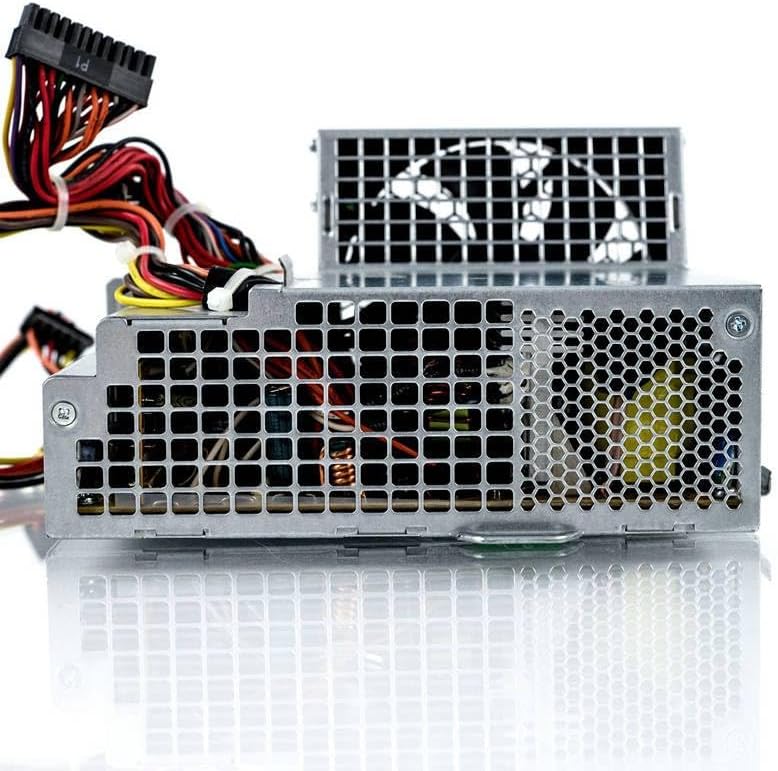
Dette billede viser sideprofile of the power supply unit, featuring the integrated cooling fan and the ventilation grilles designed for optimal airflow.
Opretholdelse
Proper maintenance ensures the longevity and optimal performance of your PSU:
- Fjernelse af støv: Periodically (e.g., every 6-12 months), power off and unplug your computer. Open the case and use compressed air to gently clear dust from the PSU's fan and ventilation grilles. Ensure the fan blades do not spin excessively during cleaning.
- Ventilation: Ensure the computer case has adequate airflow and that the PSU's vents are not obstructed. Avoid placing the computer in enclosed spaces that restrict air circulation.
- Miljøforhold: Operate the PSU within recommended temperature and humidity ranges to prevent premature failure.
Fejlfinding
| Problem | Mulig årsag | Løsning |
|---|---|---|
| Computeren tænder ikke. | Loose power connections, faulty power outlet, PSU switch off, or faulty PSU. |
|
| Systemustabilitet eller tilfældige nedlukninger. | Insufficient power, overheating, or faulty PSU. |
|
| Høj blæserstøj fra strømforsyningen. | Dust accumulation, fan bearing wear, or fan obstruction. |
|
Specifikationer
- Mærke: Generisk
- Modelnumre: PS-6241-7HP, PC6014, DPS-240MB-1, 437798-001, 437352-001, 437351-001, 437797-001, ZZlH_DNC_18305
- Output Wattage: 240 watt
- Formfaktor: ATX
- Kompatible enheder: Personal Computer (specifically dc7800, dc7900 series)
- Connector Type: ATX (24-pin main connector)
- Afkølingsmetode: Luft
- Maksimal indgang Voltage: 240 volt
- Minimum input voltage: 230 Volt AC
- System Bus Connector Type: 2 Pin (referring to specific auxiliary connectors)
Garantioplysninger
This product is covered by a standard manufacturer's warranty. Please retain your proof of purchase for warranty claims. For specific warranty terms and conditions, refer to the documentation provided at the time of purchase or contact the seller directly. The typical return policy allows for returns within 30 days of purchase.
Kundesupport
For technical assistance, troubleshooting beyond this manual, or warranty inquiries, please contact the seller or the manufacturer's customer support. Provide your product model number (ZZlH_DNC_18305) and proof of purchase when seeking support.