
1. Introduktion
This manual provides detailed instructions for the installation, operation, and maintenance of your DB Drive SPRO2500.4 4-Channel Class AB AmpLæs venligst denne manual grundigt, inden du forsøger at installere eller betjene den, for at sikre korrekt brug og for at forhindre skader på enheden eller dit køretøjs lydsystem. Gem denne manual til senere brug.
2. Sikkerhedsoplysninger
Overhold altid følgende sikkerhedsforanstaltninger under installation og drift:
- Frakobl køretøjets negative batteripol, før du påbegynder elektrisk arbejde.
- Sørg for, at alle ledninger er korrekt ført og fastgjort for at forhindre klemning, snit eller kortslutning.
- Brug passende ledningsføring til strøm- og jordforbindelser som angivet i denne manual.
- Installer ampOpbevaringsenheden på et sted, der giver tilstrækkelig ventilation for at forhindre overophedning.
- Undgå at montere ampopbevar apparatet i områder med direkte sollys, overdreven varme, fugt eller støv.
- Forsøg ikke at åbne eller ændre ampOverlad al service til kvalificeret personale.
- Wear eye protection when working with tools and electrical components.
3. Opsætning og installation
3.1 Udpakning
Fjern forsigtigt amplifier from its packaging. Inspect the unit for any signs of damage. If damage is found, contact your dealer immediately.
3.2 Monteringssted
Choose a mounting location that is dry, well-ventilated, and protected from physical damage. Ensure sufficient space around the amplifier for air circulation. Secure the amplifier firmly to a solid surface using appropriate hardware.
3.3 Ledningsforbindelser
Proper wiring is crucial for optimal performance and safety. Refer to the diagram below for terminal identification.

Billede: Rear panel of the DB Drive SPRO2500.4 amplifier showing power, ground, remote, fuse, and speaker output terminals.
- Strøm (BATT+): Connect a 4-gauge power cable directly from the positive (+) terminal of the vehicle's battery. Install an in-line fuse holder (not supplied) within 18 inches (45 cm) of the battery.
- Jord (GND): Connect a 4-gauge ground cable from the amplifier's GND terminal to a clean, unpainted metal surface of the vehicle's chassis. Ensure a solid electrical connection.
- Fjernbetjening (REM): Connect a 18-gauge remote turn-on wire from your head unit's remote output to the ampforsyningens REM-terminal. Denne ledning tænder amptænd og sluk for støjrelæet med din hovedenhed.
- Speaker Outputs (CH1-CH4): Connect your speakers to the appropriate output terminals. The SPRO2500.4 supports 4-channel stereo operation or 2-channel bridged operation. Refer to the specifications for minimum impedance requirements.
- Sikringer: De amplifier is equipped with internal fuses. Do not attempt to replace them.
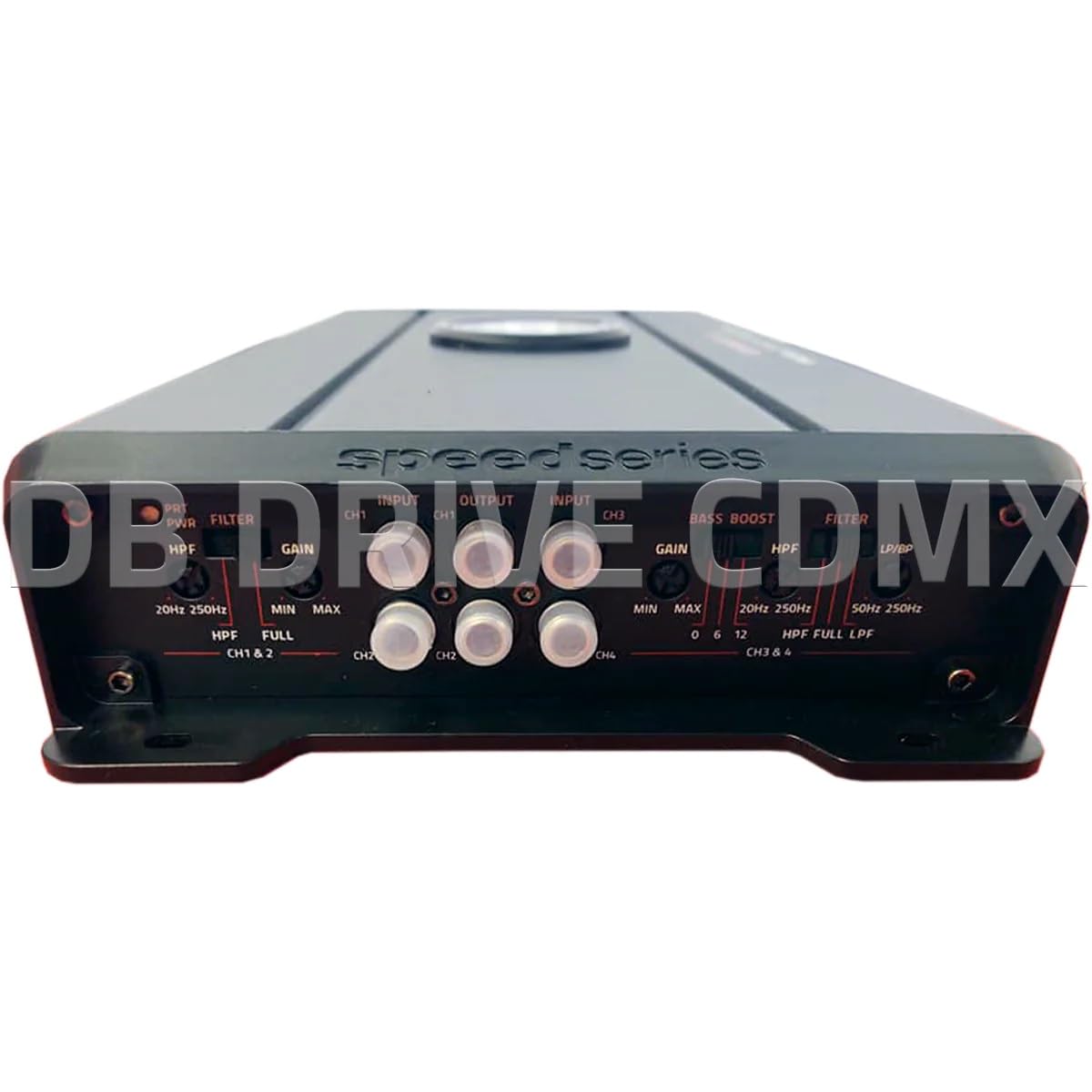
Billede: Front panel of the DB Drive SPRO2500.4 amplifier showing input, gain, filter, and bass boost controls.
3.4 Control Panel Settings
The front panel features controls for fine-tuning the amplifier's audio output:
- Input (CH1/CH2, CH3/CH4): Tilslut RCA-kabler fra din hovedenheds for-amp outputs to these inputs.
- Gain (CH1&2, CH3&4): Justerer indgangsfølsomheden for ampså den matcher udgangsniveauet på din hovedenhed. Start med minimumsforstærkningen og øg langsomt, indtil den ønskede lydstyrke opnås uden forvrængning.
- Filter (HPF/FULL/LPF): Selects the crossover mode for the respective channels.
- HPF (Højpasfilter): Allows frequencies above the set point to pass, blocking lower frequencies. Useful for full-range speakers.
- LPF (lavpasfilter): Allows frequencies below the set point to pass, blocking higher frequencies. Useful for subwoofers.
- FULD: Allows all frequencies to pass without filtering.
- HPF/LPF Frequency Controls: Adjusts the cutoff frequency for the selected HPF or LPF.
- Bass Boost: Provides an adjustable bass enhancement at a specific frequency. Use sparingly to avoid distortion.
4. Betjeningsvejledning
Once all connections are made and verified, you can power on your audio system. The amplifier will turn on automatically with your head unit via the remote wire.
- Indledende opstart: Tænd din hovedenhed. ampStrømindikatoren på strømforsyningen skal lyse.
- Lydjustering: Start with the head unit volume low. Gradually increase the volume and adjust the amplifier's gain controls until the desired sound level is reached without audible distortion.
- Crossover Tuning: Adjust the HPF and LPF settings according to your speaker types and desired sound characteristics. For full-range speakers, use HPF to remove low bass. For subwoofers, use LPF.
- Bass Boost: If desired, slowly increase the bass boost control to enhance low frequencies. Overuse can lead to distortion and potential speaker damage.
5. Vedligeholdelse
The DB Drive SPRO2500.4 ampLifier kræver minimal vedligeholdelse for at sikre langsigtet ydeevne.
- Rensning: Tør regelmæssigt af ampRengør ydersiden af apparatet med en blød, tør klud. Brug ikke skrappe kemikalier eller slibende rengøringsmidler.
- Ventilation: Sørg for, at ampLifierens køleribber er fri for støv og snavs for at opretholde korrekt varmeafledning.
- Tilslutningskontrol: Occasionally check all wiring connections for tightness and corrosion. Loose connections can cause performance issues or damage.
6. Fejlfinding
Hvis du oplever problemer med din amplifier, refer to the following common issues and solutions:
| Problem | Mulig årsag | Løsning |
|---|---|---|
| Ingen strøm / Amplifer tænder ikke | Sprunget sikring, løs strøm-/stel-/fjernbetjeningsledning, defekt fjernbetjeningsstartsignal. | Check in-line fuse near battery. Verify all power, ground, and remote connections are secure. Test remote wire for 12V when head unit is on. |
| Ingen lydudgang | RCA cables disconnected, speaker wires disconnected or shorted, gain set too low, head unit volume too low. | Check RCA input connections. Verify speaker wiring for proper polarity and no shorts. Increase gain and head unit volume. |
| Forvrænget lyd | For høj forstærkning, forkerte delefiltre, beskadigede højttalere, dårlig jordforbindelse. | Reducer forstærkningen. Juster HPF/LPF-indstillingerne. Undersøg højttalerne for skader. Sørg for, at jordforbindelsen er solid. |
| AmpOverophedning af væske | Utilstrækkelig ventilation, for lav impedans, langvarig høj effekt. | Sørg for tilstrækkelig luftgennemstrømning omkring amplifier. Verify speaker impedance meets specifications. Reduce volume or allow ampvarmebeholder til afkøling. |
If these steps do not resolve the issue, contact DB Drive customer support or a qualified car audio technician.
7. Specifikationer
The following table details the technical specifications for the DB Drive SPRO2500.4 amplivligere:

Billede: Detailed specifications sheet for the DB Drive SPRO2500.4 amplivligere.
| Feature | Specifikation |
|---|---|
| Amplivligere klasse | Klasse A/B |
| Kanaler | 4-kanal |
| Output Power (RMS @ 14.4VDC, 2Ω) | 4 x 500W |
| Output Power (RMS @ 14.4VDC, 4Ω) | 4 x 250W |
| Output Power (RMS @ 14.4VDC Bridged) | 2 x 1000W |
| Strømforsyning Input Voltage | 12.0VDC til 14.8VDC |
| THD (100Hz @ 1Ω) | 0.04 % |
| Frequency Response (3dB) | 20Hz - 250Hz |
| Damping Factor (1KHz @ 4Ω) | 100 |
| S/N Ratio (as weighted @ 1 Volt) | 99dB |
| Indgangsfølsomhed | .20mV - 5.0V RMS |
| Minimum belastningsimpedans | 2Ω |
| Input | Pre i RCA |
| Crossover filterhældning | 12dB |
| Crossover Filter Range in Mono | 24dB |
| Channel 1-2 HPF Range | 20Hz - 250Hz |
| Channel 3-4 HPF Range | 20Hz - 250Hz |
| Channel 3-4 LPF/BPF Range | 50Hz - 250Hz |
| Selectable Bass Boost CH 1-2 or 3-4 | 0 - 6dB - 12dB |
8. Garanti og support
DB Drive products are designed and manufactured to the highest quality standards. For specific warranty information, please refer to the warranty card included with your product or contact your authorized DB Drive dealer.
Kundesupport:
For technical assistance or support, please contact:
DB Research L.L.P
302 Hanmore Industrial Parkway
Harlingen, TX 78550 USA
Telefon: 877-787-0101
Local: 956-421-4513