
1. Introduktion
Thank you for choosing the MOKA SFX Electric Confetti Cannon MK-CN07. This device is designed to create spectacular confetti effects for various events such as DJ performances, stage shows, weddings, parties, nightclubs, concerts, and more. This manual provides essential information for safe operation, setup, maintenance, and troubleshooting to ensure optimal performance and longevity of your confetti cannon.
2. Sikkerhedsoplysninger
Please read all safety warnings and instructions carefully before operating this device. Failure to do so may result in injury or damage to the product.
- Sørg altid for, at enheden er placeret på en stabil, plan overflade.
- Keep a safe distance from the nozzle when operating. Do not look directly into the nozzle.
- Do not insert any objects into the confetti outlet.
- Ensure the power supply matches the device's requirements (110V 60Hz or 220V 50Hz).
- Disconnect power before cleaning, maintenance, or when the device is not in use.
- This device is for indoor use or covered outdoor use only, protected from moisture.
- Opbevares utilgængeligt for børn og uautoriseret personale.
- Use only approved confetti cartridges or bulk confetti suitable for this machine.
3. Pakkens indhold
Bekræft, at alle nedenstående varer er inkluderet i din pakke:
- 1 x MOKA SFX Electric Confetti Cannon (MK-CN07)
- 1 x strømkabel
- 1 x DMX kabel
- 1 x Remote Control (requires 23A battery, not included)
- 1 x brugermanual

Image: Contents of the MOKA SFX Electric Confetti Cannon package.
4. Produktet er slutview
The MOKA SFX Electric Confetti Cannon MK-CN07 is a robust and versatile device designed for dynamic confetti effects. It features a compact aluminum design, adjustable confetti dispersion, and multiple control options.

Billede: Forside view of the MOKA SFX Electric Confetti Cannon.
Nøglefunktioner:
- Adjustable Confetti Dispersion: Manual angle adjustment up to 180 degrees for precise control over confetti direction and spread.
- Kompakt design: Ideal for venues with limited space, easily integrating into event setups.
- Enhanced DMX Signal Transmission: Ensures accurate and rapid DMX signal transmission, minimizing delays.
- Alsidige kontrolmuligheder: Supports manual operation, remote control, and DMX compatibility.
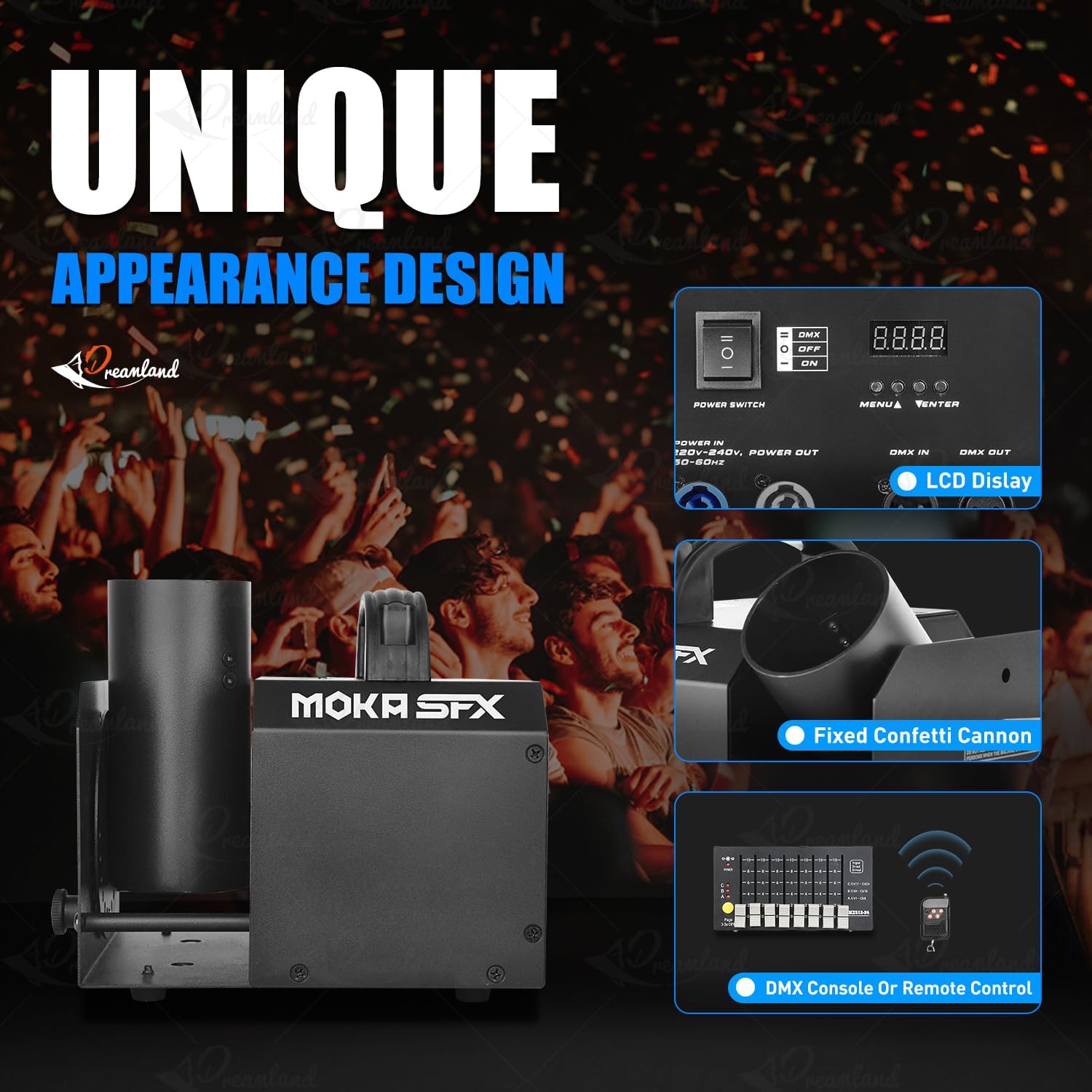
Image: Control panel and key features of the confetti cannon.

Image: Manual angle adjustment mechanism.
5. Opsætning
- Udpakning: Carefully remove the confetti cannon and all accessories from the packaging. Inspect for any signs of damage.
- Placering: Position the machine on a stable, flat surface. Ensure there is adequate space around the device for operation and safety.
- Confetti Loading: Insert the confetti cannon cartridge into the designated slot on the machine. Ensure it is securely seated. If using bulk confetti, load it into the appropriate compartment according to the machine's design.
- Vinkeljustering: Manually adjust the nozzle angle up to 180 degrees to achieve the desired confetti dispersion direction. Use the adjustment knob or lever if available.
- Strømtilslutning: Connect the power cable to the machine and then to a suitable power outlet (110V 60Hz or 220V 50Hz).
- Styreforbindelse (valgfrit):
- DMX kontrol: Connect a DMX cable from your DMX controller to the DMX IN port on the confetti cannon. If linking multiple units, connect from DMX OUT of the first unit to DMX IN of the next.
- Fjernbetjening: Ensure the remote control has a working 23A battery installed.
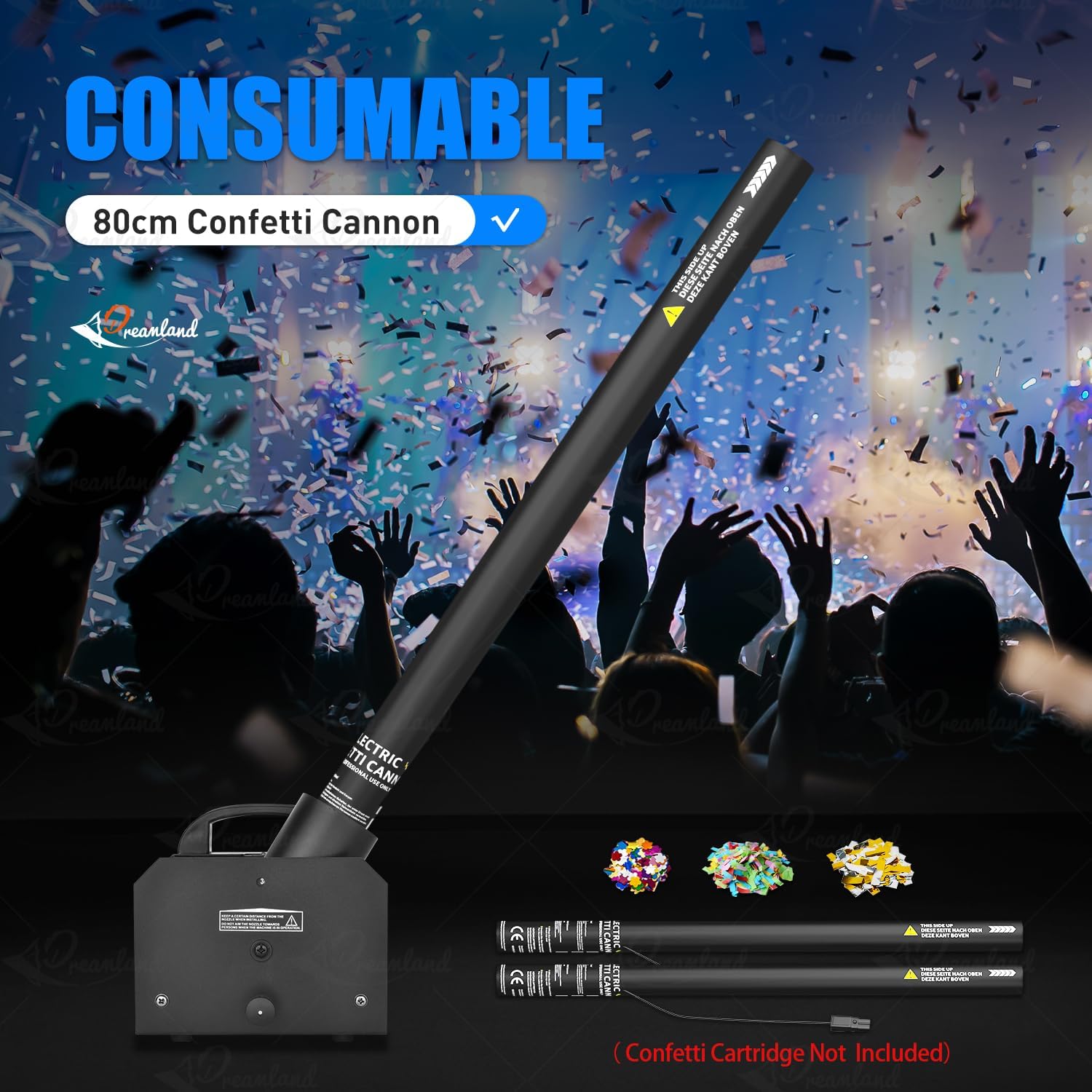
Image: Loading a confetti cannon consumable into the machine.
6. Betjeningsvejledning
Tænder:
Flip the main power switch to the 'ON' position. The LCD display (if present) will illuminate, indicating the machine is ready.
Kontroltilstande:
The MOKA SFX Electric Confetti Cannon offers multiple control options:
- Manuel betjening: Some models may have a direct trigger button on the unit for immediate confetti release.
- Fjernbetjening: Use the provided wireless remote control to activate the confetti effect. Press the designated button on the remote to trigger the confetti. Ensure the remote has a fresh 23A battery.
- DMX512 kontrol: For professional setups, connect the machine to a DMX controller.

Image: Available control modes: DMX512 and Remote Control.
DMX drift:
The device uses 5 DMX channels. Refer to your DMX controller's manual for specific programming instructions. Typically, one channel will control the confetti release, while others might control effects like angle or duration if applicable.
- Set the DMX address on the confetti cannon using the onboard display and buttons (MENU, UP, DOWN, ENTER).
- Consult the DMX chart in the full user manual for channel assignments and values.
- Use your DMX controller to send commands to the assigned channels to trigger confetti effects.
7. Vedligeholdelse
Regular maintenance ensures the longevity and reliable operation of your confetti cannon.
- Rensning: After each use, especially after large events, clean any residual confetti from the machine, particularly around the nozzle and internal mechanisms. Use a soft, dry cloth. Do not use liquids or abrasive cleaners.
- Inspektion: Periodically check all cables, connections, and the housing for any signs of wear or damage. Replace damaged parts immediately.
- Opbevaring: Opbevar enheden et tørt og støvfrit miljø, når den ikke er i brug.
8. Fejlfinding
If you encounter issues with your MOKA SFX Electric Confetti Cannon, refer to the following common problems and solutions:
| Problem | Mulig årsag | Løsning |
|---|---|---|
| Maskinen tænder ikke. | Ingen strøm, defekt kabel, strømafbryder slukket. | Check power cable connection, ensure power switch is ON, test power outlet. |
| Confetti does not launch. | No confetti loaded, remote battery dead, DMX signal issue. | Ensure confetti is loaded correctly. Replace remote battery. Check DMX connections and address settings. |
| Weak confetti effect. | Low power, clogged nozzle, incorrect confetti type. | Ensure stable power. Clean the nozzle. Use recommended confetti. |
| Fjernbetjening virker ikke. | Fuldt batteri, uden for rækkevidde, interferens. | Replace 23A battery. Operate within range. Minimize interference. |
9. Specifikationer
Detailed technical specifications for the MOKA SFX Electric Confetti Cannon MK-CN07:
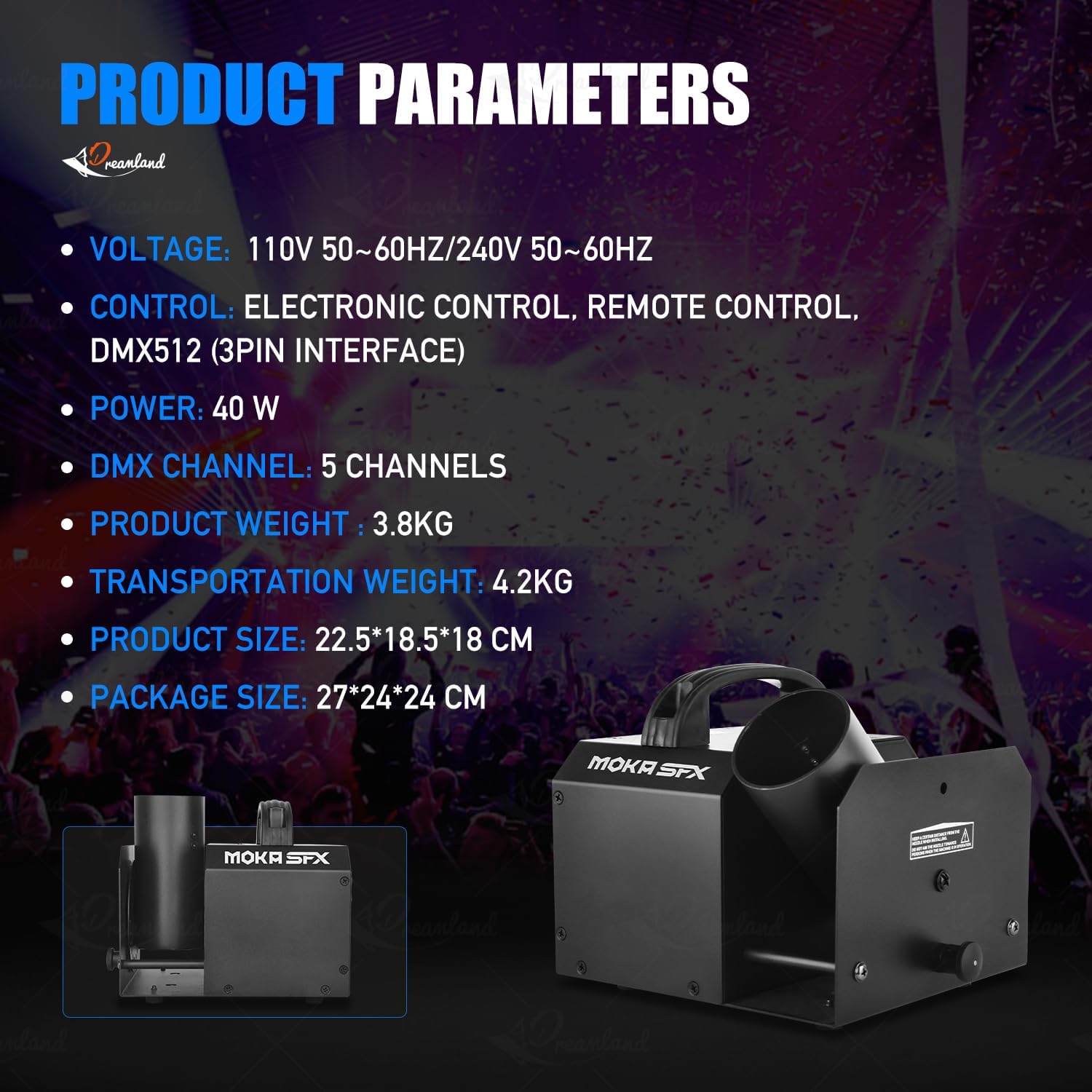
Billede: Produktparametre overview.
| Feature | Detalje |
|---|---|
| Modelnummer | MK-CN07 |
| Voltage | 110V 60Hz / 220V 50Hz |
| Magt | 25W |
| Nettovægt | 3.6 kg (ca. 7.9 lbs) |
| Bruttovægt | 5.0 kg (ca. 11 lbs) |
| Maskinens dimensioner (L x B x H) | 19.5 x 18.5 x 17.5 cm (ca. 7.7 x 7.3 x 6.9 tommer) |
| Pakkedimensioner (L x B x H) | 24 x 24 x 29 cm (ca. 9.4 x 9.4 x 11.4 tommer) |
| Vinkeljustering | Manual 180 degrees |
| Kontroltilstande | Remote Control, DMX512, Electric Control |
| DMX kanaler | 5CH |
| Materiale | Aluminium |
| Farve | Sort |
| Batterier medfølger | Nej (til fjernbetjening) |

Billede: Produktets dimensioner.
10. Garanti og support
MOKA SFX products are manufactured to high-quality standards. For warranty information, please refer to the documentation provided with your purchase or contact your retailer. If you require technical support or have questions not covered in this manual, please contact MOKA SFX customer service through their official webwebstedet eller dit købssted.