
Indledning
The Digitek DTP 010 is a 10-inch teleprompter designed for content creators using smartphones or DSLR cameras. This device allows users to read scrolling text while maintaining direct eye contact with the camera, enhancing video production quality for vlogging, live streaming, interviews, and presentations. It features a foldable design for portability, wide-angle lens support, and includes a Bluetooth remote for convenient operation.
Hvad er der i æsken
Kontroller venligst, at alle nedenstående komponenter er inkluderet i din pakke:
- Teleprompter (x1)
- Fjernbetjening (x1)
- Quick Assembly Accessory (x1)
- Telefon Clamp (x1)
- Foam Ring (x1)
- Solhætte (x1)
- Microfiber Cloth (x1)
- Telefon Clamp Accessory (x1)
- 1/4 C-Ring Screw (x1)
- Lens Adapter Rings (9 Pcs: 49mm, 52mm, 55mm, 58mm, 62mm, 67mm, 72mm, 77mm, 82mm)
- Easy Carry Bag (x1)

Image: All components included in the Digitek DTP 010 Teleprompter package.
Produktegenskaber
- Sammenklappeligt og bærbart design: The 10-inch teleprompter is compact and designed for easy transport.
- Universal kompatibilitet: Supports both smartphones and DSLR cameras.
- Wide-Angle Lens Support: Ensures clear, distortion-free text reflection.
- Convenient Carry Case: A protective case is included for safe storage and transportation.
- Objektivadapterringe: Nine adapter rings are provided for various lens sizes (49mm, 52mm, 55mm, 58mm, 62mm, 67mm, 72mm, 77mm, 82mm).
- Holdbar byggekvalitet: Constructed from ABS material for a lightweight yet sturdy structure.
- Bluetooth Remote & App Control: Allows for wireless script scrolling via a dedicated app.
- Hurtig montering: Designet til ligetil opsætning.

Image: Key features of the Digitek DTP 010 Teleprompter, including DSLR/MILC shooting, smartphone shooting, app compatibility, Bluetooth remote, smartphone/tablet prompting, lens adapter rings, portable carrying case, and foldable design.
Opsætningsinstruktioner
1. Udpakning og første montering
- Fjern forsigtigt alle komponenter fra bæretasken.
- Unfold the teleprompter unit. The beam-split glass will automatically position itself.

Image: Demonstrates the simple setup and folding mechanism of the teleprompter for protection and storage.
2. Mounting the Teleprompter
- Attach the teleprompter to a tripod or light stand using the 1/4-inch mounting screws located on the bottom. The unit has three bottom screws for secure attachment.
- Optional accessories like microphones or fill lights can be mounted using the two 1/4-inch mounting screws on top of the teleprompter.

Image: Illustrates the teleprompter mounted on a tripod, showing the foam ring for lens fitting and top mounting points for accessories.
3. Attaching Your Camera or Smartphone
- Til DSLR-kameraer: Select the appropriate lens adapter ring for your camera lens. Screw the adapter ring onto your lens, then attach the camera to the teleprompter unit. Ensure the lens is centered with the beam-split glass.
- Til smartphones: Use the provided phone clamp. Secure your smartphone in the clamp og fastgør clamp to the designated slot on the teleprompter.
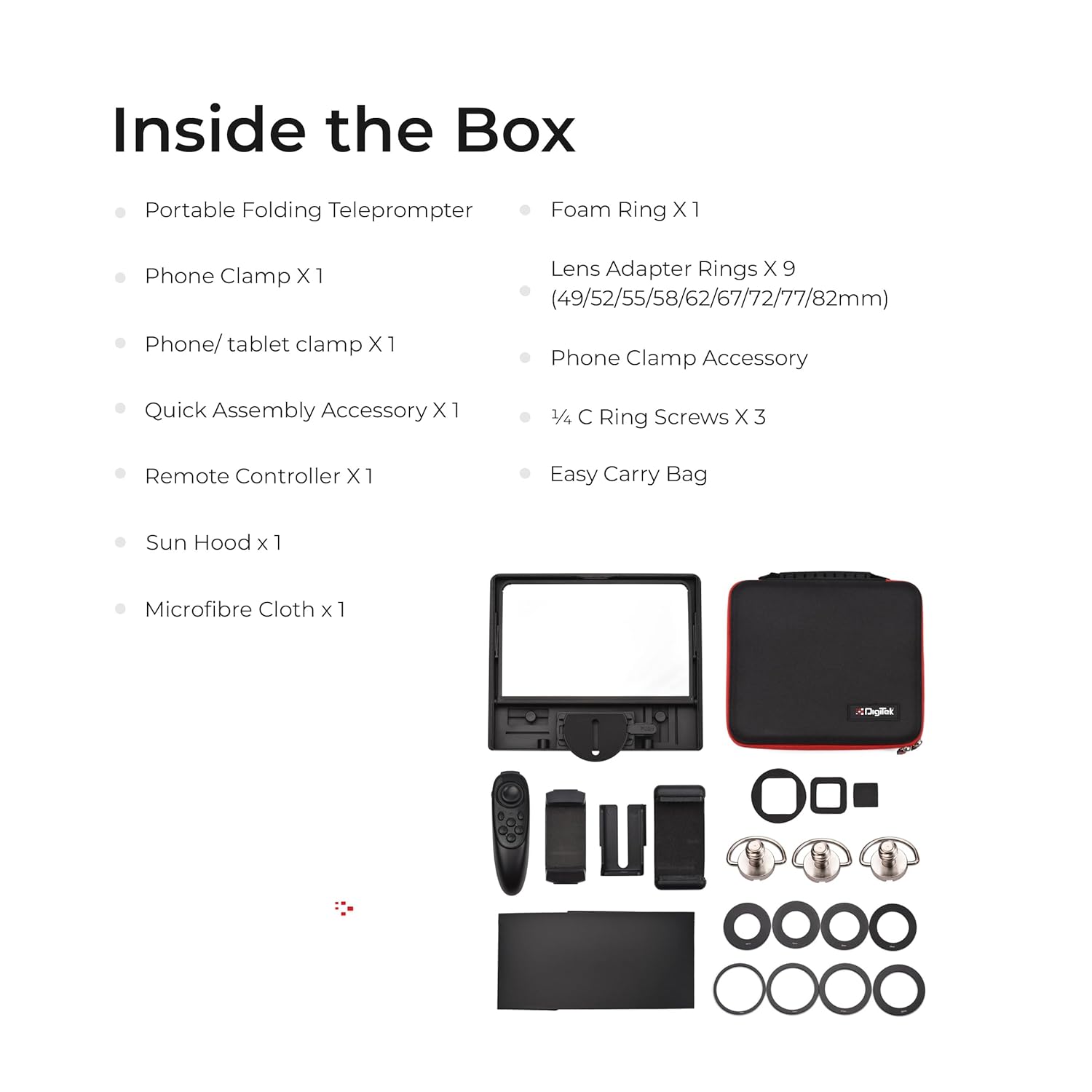
Image: The Digitek DTP 010 teleprompter configured for both smartphone and DSLR camera use.
4. Installing the Sun Hood
- Attach the sun hood to the front of the teleprompter. This accessory helps prevent external light interference and improves the visibility of the prompted text, especially in bright environments.

Image: A user attaching the sun hood to the teleprompter to enhance visibility in bright lighting conditions.
5. Optional Add-ons for Stability
For heavier tablets or enhanced stability, optional accessories such as a telescopic support rod, clamp, mini hot shoe, and 1/4 to 1/4 screw can be integrated with the DTP 010.
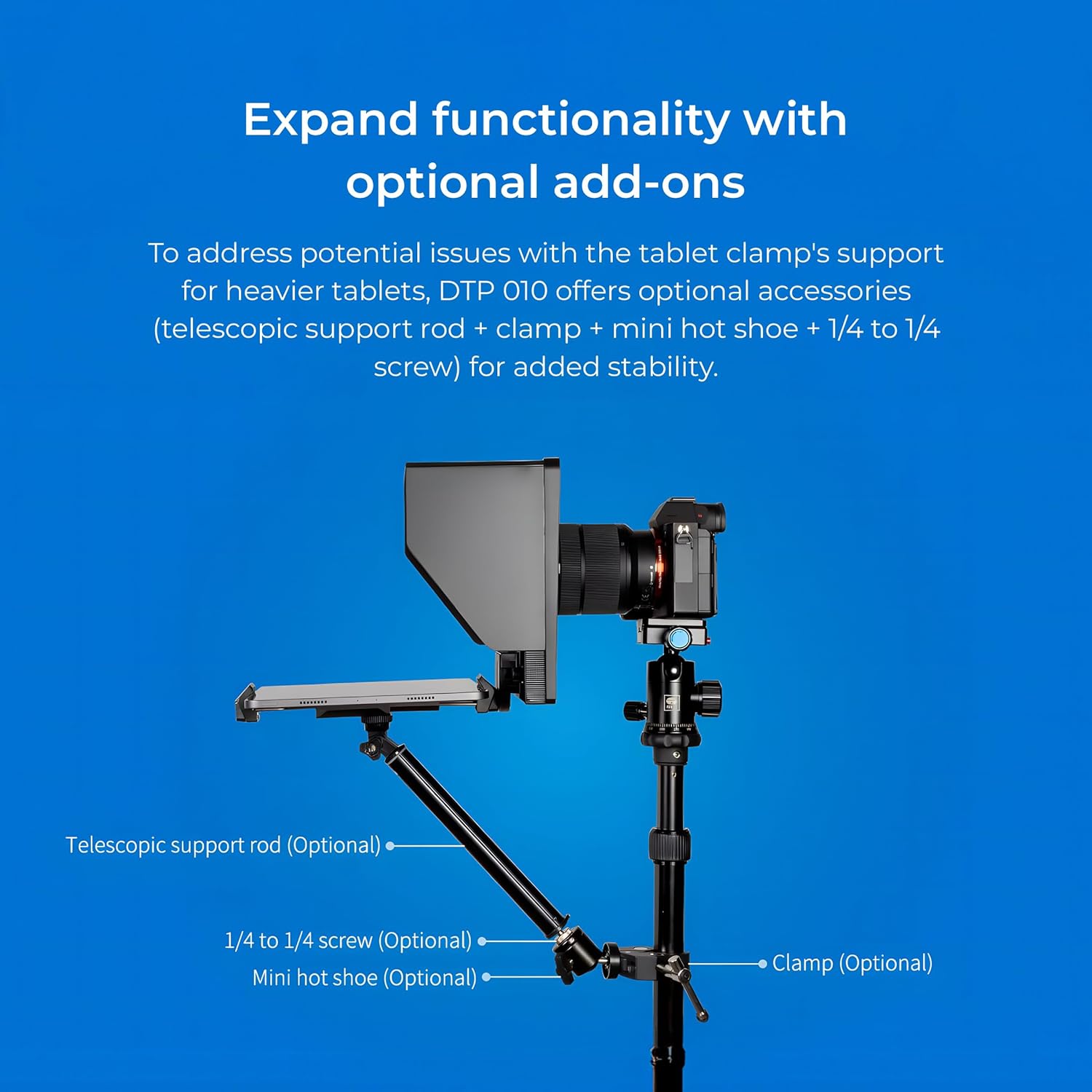
Image: Diagram showing how optional accessories like a telescopic support rod, clamp, mini hot shoe, and 1/4 to 1/4 screw can be added for increased stability, especially with heavier tablets.
Betjeningsvejledning
1. App Installation and Script Preparation
- Download the compatible teleprompter application for your iOS or Android device. Refer to the QR code or instructions provided in the quick start guide for the recommended app.
- Prepare your script within the application.
2. Connecting the Bluetooth Remote
- Sørg for, at Bluetooth er aktiveret på din smartphone eller tablet.
- Tænd Bluetooth-fjernbetjeningen.
- Pair the remote with your device via the Bluetooth settings.
- Open the teleprompter app and confirm the remote is connected and functional.
3. Brug af fjernbetjeningen
The remote control provides various functions for managing your script:
- Afspil/pause: Start or stop the script scrolling.
- Up-speed up / Down-slow down: Adjust the scrolling speed.
- Left-font zoom out / Right-font zoom in: Change the font size of the text.
- Menu: Access app menu options.
- Previous Page / Next Page: Navigate through script pages.
- Loop Play: Enable continuous looping of the script.
- Horizontal/Vertical Screen Switch: Change the orientation of the displayed text.
- Vælge File / Exit / Turn On/Off: Vælge files, exit modes, or power the remote.
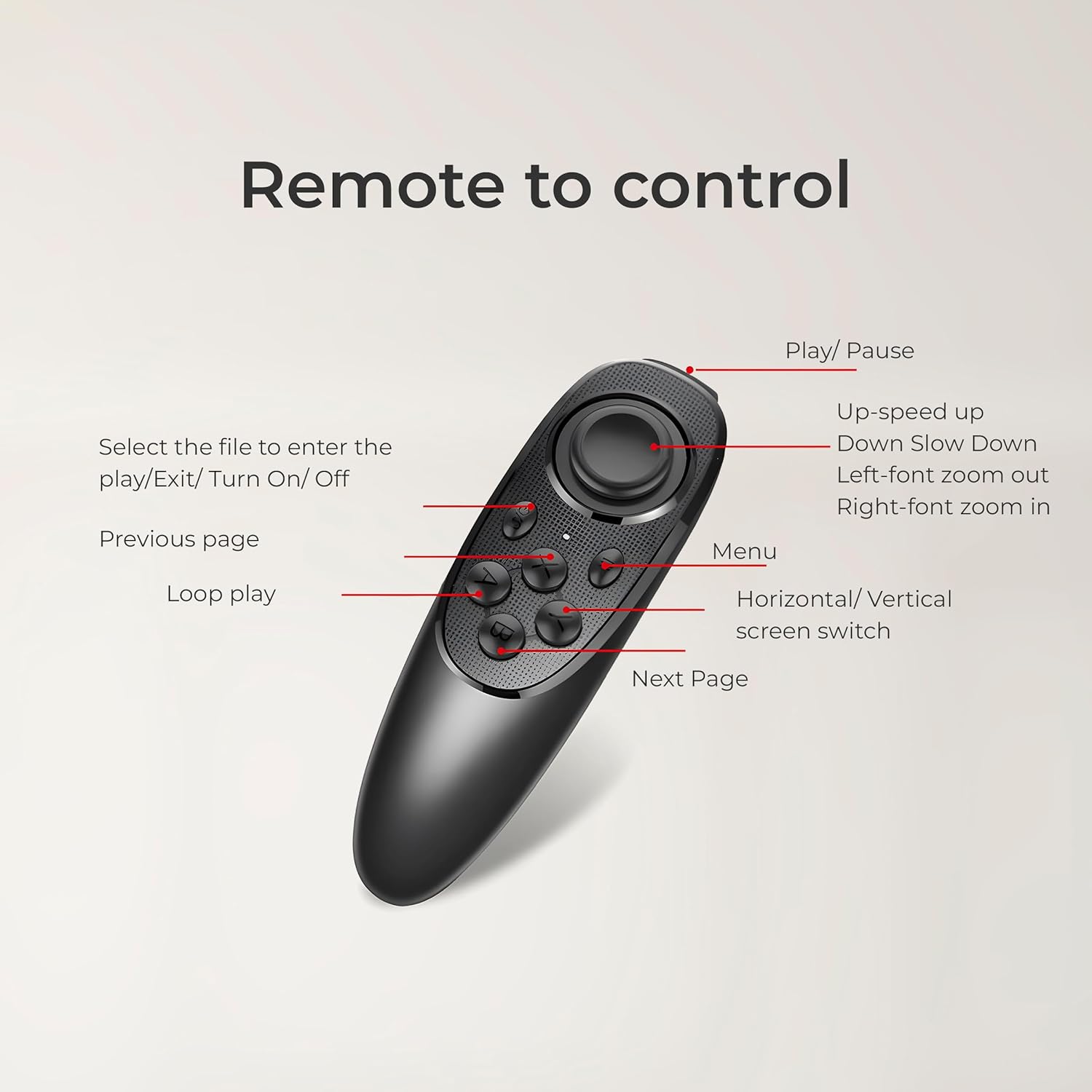
Image: Detailed diagram illustrating the buttons and their corresponding functions on the Digitek DTP 010 remote control.

Image: A user managing their presentation from a distance using the wireless remote control for the teleprompter.
Opretholdelse
Proper maintenance ensures the longevity and optimal performance of your teleprompter.
- Rengøring af glasset: Use the provided microfiber cloth to gently wipe the beam-split glass. For stubborn smudges, a small amount of lens cleaning solution can be applied to the cloth, not directly to the glass. Avoid abrasive materials.
- Generel rengøring: Wipe the exterior of the teleprompter with a soft, dry cloth. Do not use harsh chemicals or solvents.
- Opbevaring: When not in use, fold the teleprompter and store it in its protective carrying case to prevent dust accumulation and physical damage. Keep it in a cool, dry place away from direct sunlight.
- Batteripleje (fjernbetjening): If the remote control will not be used for an extended period, consider removing its batteries to prevent leakage.
Fejlfinding
If you encounter issues with your Digitek DTP 010 teleprompter, refer to the following common problems and solutions:
- Fjernbetjeningen reagerer ikke:
- Ensure the remote has fresh batteries and is powered on.
- Verify that Bluetooth is enabled on your smartphone/tablet and the remote is successfully paired.
- Close and reopen the teleprompter application.
- If using a specific app (e.g., Feelworld teleprompter app), ensure it is updated to the latest version and compatible with your device and remote. Some apps may have specific pairing requirements. - Text Not Clear or Distorted:
- Check if the beam-split glass is clean. Use the microfiber cloth to remove any smudges or dust.
- Ensure your camera lens is properly aligned with the center of the teleprompter's opening.
- Adjust the brightness of your smartphone/tablet screen. - Camera/Smartphone Not Fitting Securely:
- For DSLR cameras, ensure you are using the correct size lens adapter ring and that it is securely screwed onto your lens.
- For smartphones, ensure the phone clamp is properly attached and tightened. - Screws Not Compatible/Loose:
- Verify that you are using the correct screws for the intended mounting points. The kit includes 1/4 C-Ring screws for various attachments.
- If a screw feels incompatible, do not force it. Contact customer support for assistance. - Light Leakage/Glare on Screen:
- Ensure the sun hood is correctly installed and fully extended. This accessory is designed to minimize external light interference.
Specifikationer
| Modelnummer | DTP-010 |
| Produktdimensioner | 21.6 x 18 x 2.7 cm |
| Varens vægt | 400 g |
| Kompatibilitet | Smartphones, DSLR Cameras |
| Lens Adapter Rings | 49mm, 52mm, 55mm, 58mm, 62mm, 67mm, 72mm, 77mm, 82mm (9 Pcs) |
| Materiale | ABS |
| Kontrolmetode | Bluetooth Remote, Mobile App (iOS & Android) |
| Oprindelsesland | Kina |
Garanti og support
For warranty information, product support, or any inquiries, please contact the manufacturer directly.
- Fabrikant: IMS Mercantiles Pvt. Ltd.
- Adresse: 704, 7th floor, Ring Road Mall, Sec-3, Rohini, Delhi 110085
- Toll-Free Support Number: 1800-123-544-444
Gem venligst din købskvittering som købsbevis i tilfælde af garantikrav.