
1. Introduktion
This manual provides detailed instructions for the SUUNY H10 Pro Smartwatch. Please read this guide thoroughly to ensure proper use and optimal performance of your device. The H10 Pro features a 1.9-inch HD screen, Bluetooth calling, NFC access control, and comprehensive health monitoring.
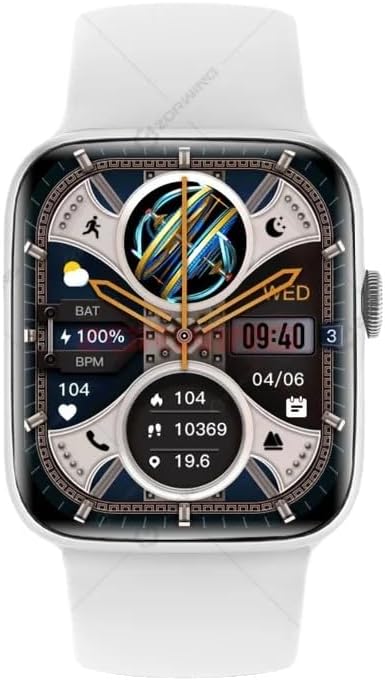
Figure 1: SUUNY H10 Pro Smartwatch (Silver model with white strap)
2. Pakkens indhold
Bekræft, at alle varer er til stede i din produktpakke:
- 1 x SUUNY H10 Pro Smartwatch
- 1 x magnetisk ladekabel
- 1 x brugermanual
- 1 x original æske
3. Opsætning
3.1. Opladning af smartwatchet
Before initial use, fully charge your SUUNY H10 Pro Smartwatch. The device uses magnetic wireless charging.
- Tilslut det magnetiske opladningskabel til en USB-strømadapter (medfølger ikke).
- Place the smartwatch on the magnetic charging base. Ensure the charging pins align correctly with the watch's charging points.
- The watch screen will indicate charging status. A full charge typically takes approximately 2 hours.
3.2. Appinstallation og enhedsparring
For at få adgang til dit smartwatchs fulde funktionalitet skal du installere den tilhørende applikation på din smartphone og parre enhederne.
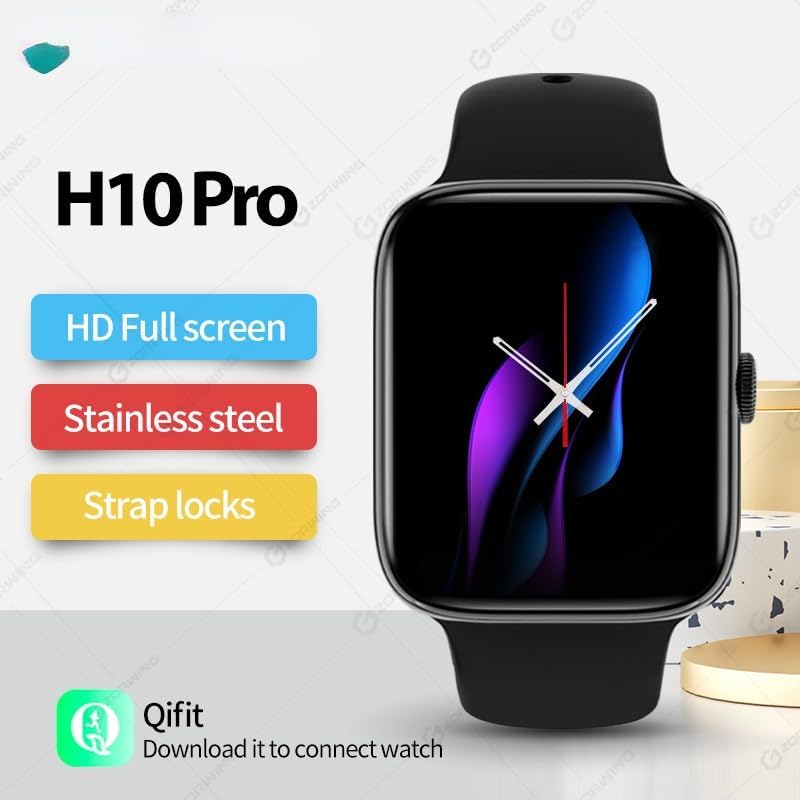
Figure 2: H10 Pro features and Qifit app information
- Download the Qifit App: Søg efter "Qifit" in your smartphone's app store (Google Play Store for Android or Apple App Store for iOS) and install it.
- Aktiver Bluetooth: Sørg for, at Bluetooth er aktiveret på din smartphone.
- Open Qifit App: Launch the Qifit application and follow the on-screen instructions to create an account or log in.
- Par enhed: Within the Qifit app, navigate to the device pairing section. The app will search for available devices. Select "H10 Pro" or a similar device name from the list.
- Bekræft parring: A pairing request may appear on both your phone and smartwatch. Confirm the pairing on both devices.
Note: For GPS positioning, the smartwatch relies on the Qifit mobile phone software to push location information to the watch. The watch does not have a built-in GPS chip.
4. Betjeningsvejledning
4.1. Grundlæggende navigation
The H10 Pro Smartwatch features a 1.9-inch HD full touch screen and a smart rotary knob for navigation.
- Berøringsskærm: Swipe left, right, up, or down to access different functions and menus. Tap to select items.
- Smart Rotary Knob: Rotate the knob to scroll through menus or adjust settings. Press the knob to return to the home screen or confirm selections.
- Cover Screen to Turn Off: Covering the screen with your palm can turn off the display.
4.2. Bluetooth-opkald
Once paired with your smartphone, the H10 Pro allows you to make and receive calls directly from your wrist.
- Foretage opkald: Access the dialer function on the watch to input numbers or select contacts from your synced phonebook.
- Modtagelse af opkald: When a call comes in, the watch will display the caller ID. You can answer or reject the call directly from the watch.
4.3. NFC Access Control
The smartwatch includes a built-in NFC chip for access control functionality. There is no dedicated NFC software icon on the watch.
- Understøttede kort: The NFC function supports IC door cards with a frequency of 13.56 MNZ. It does not support other NFC functions like mobile payments.
- Registreringsproces: To use the watch as an access card, you must register its NFC ID with your access control system. This typically involves adding the watch's NFC identifier through the access control system's administration interface (e.g., at a community property management office for encrypted access control).
- Fingerprint Locks: For fingerprint locks, enter the administrator mode, then select "add card" and "write" to register the watch.
4.4. Sundhedsovervågning
The H10 Pro provides various health monitoring features:
- Heart Rate Monitoring: Real-time heart rate tracking. Access this feature from the main menu or a dedicated widget.
- Søvnovervågning: Tracks sleep patterns and quality. Wear the watch during sleep for accurate data.
- Skridttæller: Tæller dine skridt i løbet af dagen.
- Stillesiddende påmindelse: Giver dig besked, når du har været inaktiv i for lang tid.
4.5. Multisportstilstande
The smartwatch supports various multi-sport modes to track your exercise activities. Select the appropriate mode before starting your workout for accurate data recording.
4.6. AI-stemmeassistent
Utilize the integrated AI voice assistant for quick commands and information retrieval. Activate the assistant through the watch interface and speak your commands.
4.7. Musik kontrol
Control music playback on your paired smartphone directly from the watch. This includes playing, pausing, skipping tracks, and adjusting volume.
4.8. Always-On Display & Custom Watch Faces
The H10 Pro supports an always-on display mode. You can also customize the watch face from a selection of pre-installed options or personalize it further through the Qifit app.
4.9. Sprogindstillinger
The smartwatch supports the following languages:

Figure 3: Supported languages for the H10 Pro Smartwatch
- engelsk
- spansk
- portugisisk
- tyrkisk
- arabisk
- Thai
- vietnamesisk
To change the language, navigate to the settings menu on your watch.
5. Vedligeholdelse
5.1. Retningslinjer for vandtæthed
The SUUNY H10 Pro Smartwatch is designed with "life waterproof" capabilities, meaning it can withstand daily activities such as hand washing and exposure to rain. However, it is important to adhere to the following guidelines to prevent damage:
- Må ikke nedsænkes: The watch is not suitable for swimming, bathing, or prolonged submersion in water.
- Avoid Corrosive Liquids: Prevent contact with corrosive liquids such as hand sanitizer, soap, or detergents, as these can penetrate the watch and cause damage to internal components.
- Undgå varmt vand: Do not expose the watch to hot water or steam (e.g., in saunas or hot showers).
5.2. Rensning
Sådan bevarer du dit smartwatchs udseende og funktionalitet:
- Tør skærmen og kabinettet af med en blød, fnugfri klud.
- Om nødvendigt lidt dampSkyl kluden med vand, men undgå for meget fugt.
- Rengør opladningskontakterne med jævne mellemrum for at sikre effektiv opladning.
6. Fejlfinding
- Uret tænder ikke: Sørg for, at uret er fuldt opladet. Tilslut det til opladeren, og vent et par minutter, før du forsøger at tænde det.
- Kan ikke parres med telefon:
- Sørg for, at Bluetooth er aktiveret på din telefon og uret.
- Make sure the Qifit app is installed and running.
- Genstart både uret og din telefon, og prøv derefter at parre igen.
- Sørg for, at uret ikke allerede er parret med en anden enhed.
- Unøjagtige sundhedsdata: Sørg for, at uret sidder tæt på dit håndled, men ikke for stramt. Rengør sensoren på bagsiden af uret.
- NFC-adgang virker ikke:
- Verify that the access card system uses 13.56 MNZ IC cards.
- Confirm that the watch's NFC ID has been correctly registered with the access control system.
- Ensure the watch is held close enough to the reader.
- GPS'en virker ikke: The watch uses your phone's GPS via the Qifit app. Ensure your phone's GPS is active and the Qifit app has location permissions.
7. Specifikationer
Detailed technical specifications for the SUUNY H10 Pro Smartwatch:
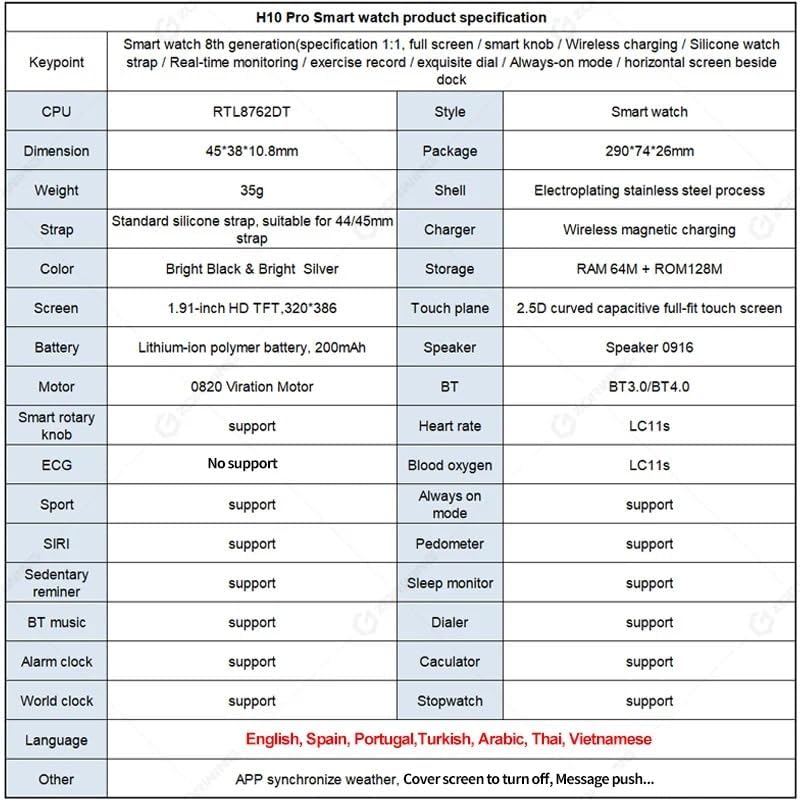
Figure 4: H10 Pro Smartwatch detailed specifications
| Feature | Specifikation |
|---|---|
| Mærke | SUUNY |
| Modelnummer | H10 Pro (2023) |
| Processor | RTL8762DT |
| Dimensioner | 45 x 38 x 10.8 mm |
| Etui materiale | Electroplated Stainless Steel |
| Rem | Standard Silicone, suitable for 44/45mm straps |
| Oplader | Magnetisk trådløs opladning |
| Opbevaring | RAM 64M + ROM 128M |
| Skærm | 1.9-inch HD TFT, 320 x 386 resolution |
| Berøringspanel | 2.5D Curved Capacitive Full-fit Touch Screen |
| Batteri | 200 mAh Polymer Lithium-ion Battery |
| Højttaler | 0916 højttaler |
| Motor | 0820 Vibration Motor |
| Bluetooth | Dual Bluetooth (BT3.0/BT4.0) |
| Operativsystem | Android (kompatibel med iOS) |
| Understøttede funktioner | Heart Rate Monitoring, Sleep Monitoring, Multi-Sport Modes, Always-on Display, AI Voice Assistant, Pedometer, Sedentary Reminder, BT Music, Dialer, Alarm, Calculator, World Clock, Stopwatch, NFC Access Control (13.56 MNZ IC cards) |
| GPS | Via smartphone (Qifit app) |
| Understøttede sprog | English, Spanish, Portuguese, Turkish, Arabic, Thai, Vietnamese |
8. Garanti og support
Information regarding product warranty and specific support contacts is not available in the provided product details. Please refer to the seller or manufacturer's official website for warranty terms and customer support options.