
1. Introduktion
This manual provides comprehensive instructions for the SUUNY W&O X9+ Ultra 2 Smartwatch. It covers device setup, operation, maintenance, and troubleshooting to ensure optimal performance and user experience. The X9+ Ultra 2 is a feature-rich smartwatch designed for daily use, offering advanced functionalities such as gesture control, Bluetooth calling, NFC, AI-generated watch faces, and integrated ChatGPT.
2. Pakkens indhold
Upon opening your SUUNY W&O X9+ Ultra 2 Smartwatch package, please verify that all the following items are included:
- SUUNY W&O X9+ Ultra 2 Smartwatch
- Silicone Watch Strap (x2)
- Nylon Alpine Loop Strap
- Ladekabel
- Brugervejledning (dette dokument)
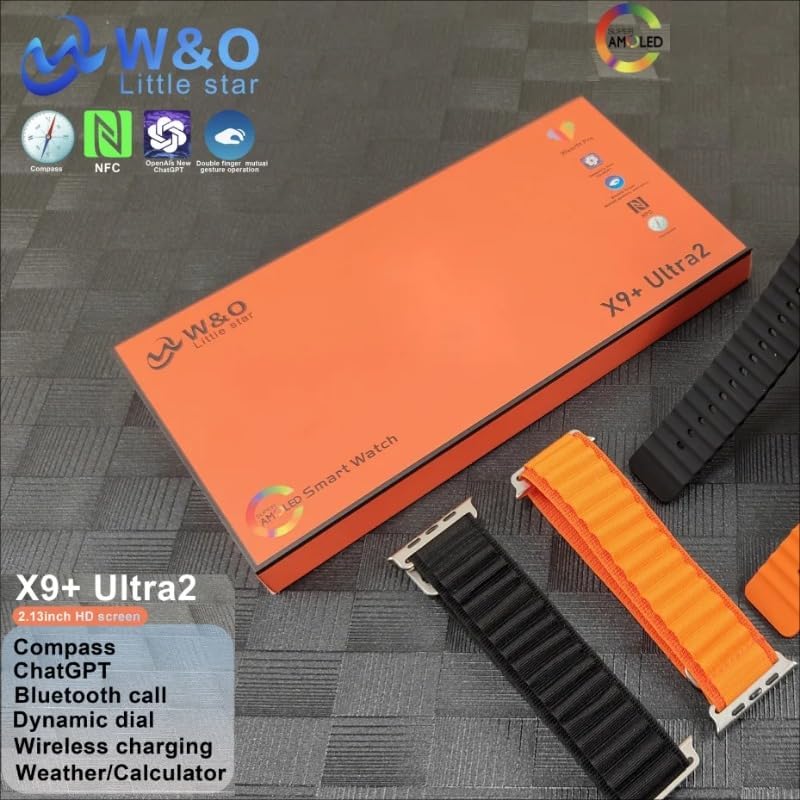
Image: The SUUNY W&O X9+ Ultra 2 Smartwatch packaging, displaying the watch body, two silicone straps, and an alpine nylon strap.

Image: The SUUNY W&O X9+ Ultra 2 Smartwatch box, featuring icons for NFC, ChatGPT, and Compass, along with the "W&O Little Star" logo.
3. Opsætning
3.1 Opladning af smartwatchet
- Tilslut opladningskablet til en USB-strømadapter (medfølger ikke) eller en computers USB-port.
- Attach the magnetic end of the charging cable to the charging contacts on the back of the smartwatch. Ensure it snaps into place securely.
- The watch display will indicate charging status. Allow approximately 2-3 hours for a full charge.
3.2 Parring med din smartphone
To unlock the full potential of your smartwatch, pair it with your smartphone using the Wearfit Pro application.
- Download Wearfit Pro app fra din smartphones appbutik (App Store til iOS, Google Play Store til Android).
- Sørg for, at Bluetooth er aktiveret på din smartphone.
- Open the Wearfit Pro app, register or log in, and follow the on-screen instructions to add a new device.
- Select "X9+ Ultra 2" from the list of available devices.
- Bekræft parringsanmodningen på både din smartphone og smartwatch.
4. Betjeningsvejledning
This section details the various functions and features of your SUUNY W&O X9+ Ultra 2 Smartwatch.

Image: The SUUNY W&O X9+ Ultra 2 Smartwatch displaying a vibrant, abstract watch face with the current date and time.
4.1 Grundlæggende navigation
- Touchskærm: Stryg til venstre/højre, op/ned for at navigere i menuer og få adgang til forskellige funktioner. Tryk for at vælge.
- Sideknap(per): Typically used for power on/off, returning to the home screen, or accessing the app menu. Refer to the watch's on-screen prompts for specific button functions.
4.2 Bevægelseskontrol
The smartwatch supports gesture control for convenient interaction. Specific gestures can be used to answer or hang up calls, and to dismiss alarms. Refer to the Wearfit Pro app settings for customization and detailed gesture instructions.
4.3 Bluetooth-opkald
Once paired with your smartphone, the X9+ Ultra 2 allows you to make and receive calls directly from your wrist. Ensure the Bluetooth connection is stable for clear audio.
- Besvarelse af opkald: When a call comes in, tap the green answer icon on the watch screen or use the designated gesture.
- Foretage opkald: Få adgang til opkaldsfunktionen eller kontaktlisten på dit ur for at starte et opkald.
4.4 NFC-funktionalitet
The integrated NFC (Near Field Communication) allows for various convenient functions, such as access control or quick pairing with compatible devices. Configure NFC settings within the Wearfit Pro app.
4.5 AI-Generated Watch Faces
Personalize your smartwatch with unique AI-generated watch faces. Explore the options available in the Wearfit Pro app to customize your display.
4.6 ChatGPT-integration
Access ChatGPT directly from your smartwatch for quick information, queries, or conversational interactions. This feature requires an active internet connection via your paired smartphone.
4.7 Lokal lagring og afspilning
With 1GB of internal memory, the smartwatch supports local audio playback and recording functions. Transfer audio files from your smartphone via the Wearfit Pro app to enjoy music directly from your watch.
4.8 Smart Island Feature
The Smart Island feature provides dynamic notifications and quick access to ongoing activities, such as calls, timers, or music playback, in an intuitive display area.
4.9 Mini-Games
The smartwatch includes a selection of mini-games for entertainment. Access them through the app menu on your watch.
4.10 Muslim Prayer Function
A dedicated Muslim prayer function is included, providing prayer times and other relevant features. Configure this feature within the watch settings or the Wearfit Pro app.
5. Vedligeholdelse
5.1 Rengøring af dit smartwatch
- Tør urets skærm og kabinet af med en blød, fnugfri klud.
- Til genstridige pletter, let dampRengør kluden med vand. Undgå at bruge skrappe kemikalier eller slibende materialer.
- Rengør opladningskontakterne regelmæssigt for at sikre effektiv opladning.
5.2 Generel pleje
- Avoid exposing the smartwatch to extreme temperatures or direct sunlight for prolonged periods.
- While the watch may have some water resistance, avoid submerging it in water or exposing it to high-pressure water jets unless explicitly stated in the specifications.
- Handle the watch with care to prevent drops or impacts.
6. Fejlfinding
Hvis du støder på problemer med dit smartwatch, kan du se følgende almindelige løsninger:
- Uret tænder ikke: Sørg for, at uret er fuldt opladet. Tilslut det til opladeren, og vent et par minutter, før du forsøger at tænde det.
- Kan ikke parres med smartphone:
- Sørg for, at Bluetooth er aktiveret på din telefon og uret.
- Make sure the Wearfit Pro app is installed and running.
- Genstart både din telefon og smartwatch.
- Glem enheden i din telefons Bluetooth-indstillinger, og prøv at parre igen.
- Notifikationer vises ikke: Check notification settings in both the watch and the Wearfit Pro app. Ensure all necessary permissions are granted to the app on your smartphone.
- Unøjagtige data (skridt, puls): Sørg for, at uret sidder tæt på dit håndled, hverken for løst eller for stramt.
- Kort batterilevetid: Reduce screen brightness, disable unnecessary features, and limit background app refresh.
7. Specifikationer
| Feature | Detalje |
|---|---|
| Mærke | SUUNY |
| Model | X9+ Ultra 2 |
| Skærmstørrelse | 2.13 inches (AMOLED, 410 x 502 resolution) |
| Forbindelse | Bluetooth, NFC |
| Særlige funktioner | Bluetooth Call, Gesture Control, ChatGPT, Smart Island, AI Watch Faces, Mini-Games, Muslim Prayer Function |
| Hukommelseslagringskapacitet | 1 GB |
| Kompatible enheder | Smartphone |
| Målgruppe | Mænd |
| Farve | Sort |
8. Garanti og support
For garantioplysninger og kundesupport henvises til den dokumentation, der fulgte med dit køb, eller kontakt forhandleren. Gem dit købsbevis i tilfælde af garantikrav.
For further assistance, visit the official SUUNY W&O webwebsted eller kontakt deres kundeserviceafdeling.