
Indledning
This manual provides comprehensive instructions for the installation, use, and maintenance of your BoxWave ClearTouch Crystal Screen Protector, specifically designed for the Autophix 9610 device. This product is engineered to provide a clear protective layer, safeguarding your device's screen from scratches and dust while maintaining optimal visual clarity.
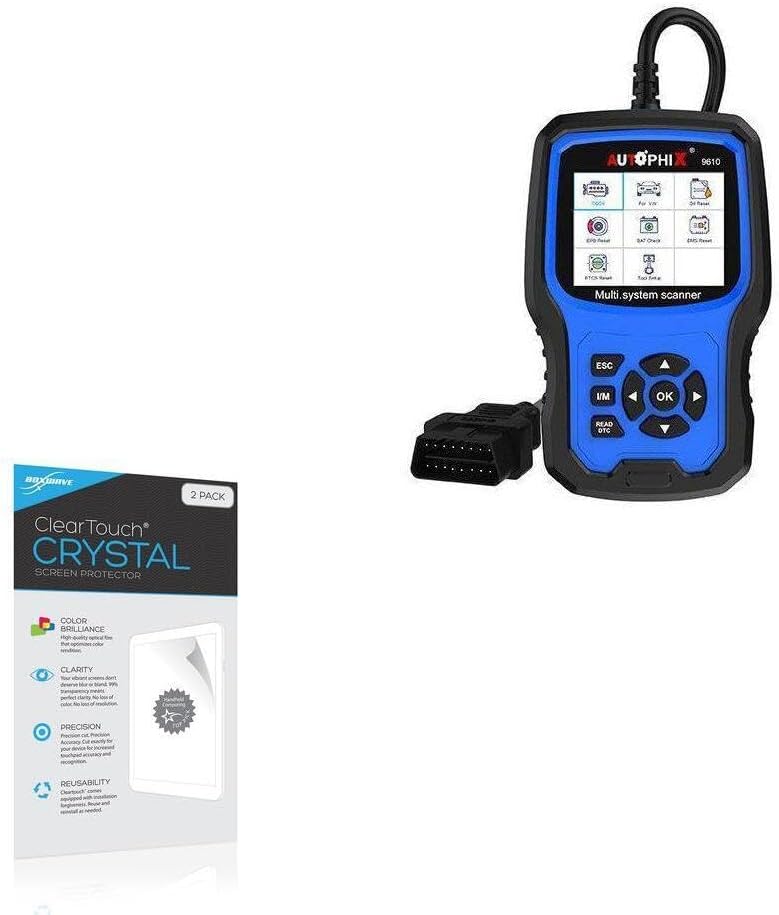
Image: The BoxWave ClearTouch Crystal Screen Protector packaging shown alongside the Autophix 9610 device it is designed to protect. This illustrates the product's intended use.
Produktegenskaber
- Perfekt pasform: Precision-cut to match the exact dimensions of the Autophix 9610 device, ensuring full screen coverage. Each package includes two screen protectors.
- Enestående klarhed: Features a glass-like clarity with ultra-high 99% visual transparency, preserving the vibrant colors and original display quality of your device.

Image: A visual representation of the screen protector's high definition clarity, shown as a transparent overlay on a colorful background, emphasizing its ability to maintain visual quality.
- Holdbarhed: Constructed from high-grade thermoplastics, providing robust protection against scratches and dust.
- Residue-Free Adhesion: Utilizes a glueless adhesive that bonds securely to the screen without leaving any sticky residue upon removal.
- Inkluderet tilbehør: Each package contains two ClearTouch Crystal screen protectors, a ClearTouch Applicator card, and a microfiber cleaning cloth for a smooth installation process.

Image: The complete contents of the screen protector package, including the two screen protectors, the applicator card, and the microfiber cleaning cloth, ready for use.

Billede: En detaljeret view of the individual accessories provided with the screen protector: an applicator card for smooth application, a microfiber cleaning cloth for preparing the screen, and a dust removing sticker for final dust removal.
Installationsvejledning
Follow these steps carefully for optimal installation of your BoxWave ClearTouch Crystal Screen Protector:
- Forbered dit arbejdsområde: Choose a clean, dust-free environment. Wash your hands thoroughly to avoid transferring oils or dirt to the screen or protector.
- Clean the Device Screen: Use the provided microfiber cleaning cloth to thoroughly wipe down the Autophix 9610 screen. Ensure all dust, smudges, and fingerprints are removed. For stubborn marks, a small amount of screen cleaner (not included) can be used, followed by drying with the microfiber cloth.
- Fjern støv: Use the dust removing sticker (if included, or any adhesive tape) to gently dab the screen and lift any remaining dust particles. Inspect the screen closely under good lighting.
- Juster skærmbeskytteren: Carefully peel back a small portion of the protective film from the adhesive side of the screen protector (usually labeled "Step 1" or similar). Align the exposed edge of the screen protector with one edge of your device's screen. Take your time to ensure precise alignment with the device's display area and any cutouts (e.g., for sensors or cameras, though unlikely on this device).
- Påfør beskytteren: Once aligned, slowly and steadily lower the rest of the screen protector onto the device's screen, peeling off the remaining protective film as you go.
- Udglat bobler: Use the ClearTouch Applicator card (or a credit card wrapped in the microfiber cloth) to gently push out any air bubbles towards the edges of the screen. Start from the center and work your way outwards.
- Afsluttende inspektion: Once applied, gently peel off the top protective film (if present, usually labeled "Step 2"). Re-inspect the screen for any remaining bubbles or dust. Small air gaps around the edges may take up to 2 days of regular use to fully clear out due to the special low-tack adhesive.
Driftsmæssige overvejelser
Once installed, the BoxWave ClearTouch Crystal Screen Protector operates passively, providing continuous protection. Its high transparency ensures that the functionality and visual quality of your Autophix 9610 screen remain unaffected. You can interact with your device as usual, enjoying the added benefit of scratch and dust resistance.
Opretholdelse
To ensure the longevity and clarity of your screen protector:
- Regelmæssig rengøring: Use the provided microfiber cloth to gently wipe the screen protector to remove fingerprints and smudges. For more persistent marks, slightly dampen the cloth with water or a mild, screen-safe cleaner.
- Undgå barske kemikalier: Do not use abrasive cleaners, alcohol, or ammonia-based solutions, as these can damage the screen protector's coating.
- Beskyt mod skarpe genstande: While the protector offers scratch resistance, extreme pressure or very sharp objects can still cause damage.
Fejlfinding
| Spørgsmål | Mulig årsag | Løsning |
|---|---|---|
| Air Bubbles After Installation | Trapped air during application. | Use the applicator card to gently push bubbles towards the nearest edge. For small bubbles, they may dissipate naturally over 1-2 days due to the adhesive's properties. |
| Dust Particles Under Protector | Screen not thoroughly cleaned before application. | If dust is significant, carefully lift the nearest corner of the protector, use a dust-removing sticker or tape to lift the particle, then reapply. Ensure to work in a dust-free environment. |
| Edges Not Sticking Properly | Improper alignment or dust/oil on edges. | Ensure the screen is clean. For minor edge lifting, gently press down with the applicator card. The low-tack adhesive may take up to 2 days to fully adhere around the edges. If the issue persists, consider using the second screen protector provided. |
Specifikationer
| Attribut | Detalje |
|---|---|
| Mærke | BoxWave |
| Modelnummer | bw-863-47000-0 |
| Kompatibilitet | Autophix 9610 |
| Materiale | High-grade Thermoplastics (PET) |
| Gennemsigtighed | 99% Visual Transparency |
| Pakkens indhold | 2x Screen Protectors, 1x Applicator Card, 1x Microfiber Cleaning Cloth |
| Varens vægt | 19.84 g |
| Dato først tilgængelig | 7. februar 2024 |
Garanti og support
For any questions, concerns, or support regarding your BoxWave ClearTouch Crystal Screen Protector, please refer to the BoxWave official website or contact their customer service directly. While specific warranty details are not provided in this manual, BoxWave is committed to customer satisfaction and offers assistance for their products.
For mere information, besøg: www.boxwave.com