1. Introduktion
This manual provides detailed instructions for the installation, operation, and maintenance of your RONGJI 9-inch Android Car Radio. This unit is specifically designed for Suzuki Vitara models manufactured between 2005 and 2015. Please read this manual thoroughly before installation and use to ensure proper functionality and safety.
2. Sikkerhedsoplysninger
- Professionel installation anbefales: På grund af kompleksiteten af køretøjers elektriske systemer anbefales professionel installation for at forhindre skader på enheden eller dit køretøj.
- Strømafbrydelse: Always disconnect the vehicle's battery before performing any electrical work to avoid short circuits or electrical shock.
- Ledningsføring: Ensure all wiring connections are secure and properly insulated to prevent electrical hazards. Refer to the wiring diagram provided.
- Kørselssikkerhed: Do not operate the unit's advanced features or watch videos while driving. Distracted driving can lead to accidents.
- Temperatur: Undgå at udsætte enheden for ekstreme temperaturer eller direkte sollys i længere perioder.
3. Pakkens indhold
Bekræft, at alle komponenterne nedenfor er inkluderet i din pakke:

Image: Components included in the RONGJI 8 Core Car Radio package, showing RCA cables, reversing camera cable, USB cables, microphone, 4G antenna, and GPS antenna.
- Hovedenhed (9-tommer Android bilradio)
- Plastic Bezel (Dash Kit for Suzuki Vitara 2005-2015)
- Power Plug/Harness
- RCA-kabelsæt
- Indgangskabel til bakkamera
- USB-kabler (flere)
- Ekstern mikrofon
- GPS antenne
- 4G Antenna (for 8 Core models)
4. Opsætning og installation
Before proceeding with installation, ensure your vehicle is compatible. This unit is designed for Suzuki Vitara models from 2005 to 2015. It is recommended to consult a professional for installation.

Image: A visual comparison showing the original car radio dashboard and the dashboard after the RONGJI 9-inch Android Car Radio has been installed, demonstrating a seamless fit.
4.1 Køretøjskompatibilitetskontrol
Carefully compare your vehicle's center console and the back of your factory radio socket with the product images and specifications. If unsure, contact customer support with photos of your vehicle's dashboard and original radio connections for verification.
4.2 Grundlæggende installationstrin (generel vejledning)
- Afbryd batteriet: Sluk for køretøjet, og afbryd den negative pol på bilbatteriet.
- Fjern fabriksradio: Fjern forsigtigt den eksisterende fabriksmonterede radio og instrumentbrætbeklædning. Se din bils servicehåndbog for specifikke instruktioner.
- Tilslut ledningsnet: Connect the provided power plug/harness to the vehicle's wiring. Ensure all connections match the vehicle's original wiring.
- Tilslut antenner: Connect the GPS antenna and 4G antenna (if applicable) to the corresponding ports on the new head unit. Position the antennas in a location with clear signal reception.
- Tilslut USB- og RCA-kabler: Connect any necessary USB cables for external devices and RCA cables for auxiliary inputs/outputs (e.g., reversing camera, external amplivligere).
- Monter hovedenhed: Securely mount the RONGJI head unit into the dashboard opening using the provided plastic bezel and mounting brackets.
- Gentilslut batteri: Tilslut køretøjets batteri igen, og test enhedens funktionalitet, før du samler instrumentbrættet helt igen.
- Afsluttende samling: Genmonter alle instrumentbrætbeklædningsdele.
5. Betjeningsvejledning
5.1 Tænd/sluk og grundlæggende navigation
- Tænd: Enheden tændes automatisk, når køretøjets tænding tændes.
- Sluk: Enheden slukker automatisk, når køretøjets tænding slukkes.
- Berøringsskærm: Navigate the Android interface by tapping, swiping, and pinching on the 9-inch capacitive touch screen.
5.2 CarPlay og Android Auto
The unit supports both wireless and wired Car-Play and Android Auto for seamless smartphone integration.

Image: Displays the user interfaces for Car-Play and Android Auto, showing various app icons and media controls, indicating both wired and wireless connectivity options.
- Trådløs forbindelse: Enable Bluetooth and Wi-Fi on your smartphone. Pair your phone with the car radio via Bluetooth. Follow the on-screen prompts to initiate wireless Car-Play or Android Auto.
- Kablet forbindelse: Connect your smartphone to the car radio using an original USB cable. The system will automatically detect and launch Car-Play or Android Auto.
5.3 Bluetooth-funktioner
The built-in Bluetooth module supports hands-free calling and audio streaming.
- Parring: Go to the Bluetooth settings on the car radio and enable Bluetooth. Søg efter available devices on your smartphone and select the car radio's Bluetooth name to pair.
- Håndfri opkald: Once paired, you can make and receive calls directly from the car radio's interface. The unit has a built-in microphone and supports an external microphone for clearer audio.
- Bluetooth musik: Stream audio from your smartphone's music player to the car radio.
5.4 FM/AM-radio med RDS
Access various radio stations with stable frequency reception.

Image: Shows the FM radio interface with station presets and frequency display, alongside the Digital Sound Processor (DSP) equalizer settings for audio customization.
- Automatisk søgning: Brug den automatiske scanningsfunktion til at finde og gemme tilgængelige radiostationer.
- Manuel indstilling: Indstil manuelt til de ønskede frekvenser.
- RDS (Radio Data System): Displays station information such as station name, program type, and traffic announcements where available.
5.5 GPS-navigation
The unit features a built-in GPS module and supports online and offline navigation.

Image: Illustrates the GPS navigation interface with a map displaying routes and real-time traffic, and a diagram showing the car radio connected to WiFi for online services.
- Onlinekort: Connect to Wi-Fi or a mobile hotspot to use online navigation applications.
- Offlinekort: Download maps for specific regions for navigation without an internet connection. Access this feature through the navigation app's menu.
5.6 Wi-Fi-forbindelse
Connect the car radio to a Wi-Fi network or mobile hotspot to access online features.
- Tilslutter: Gå til Indstillinger > Netværk og internet > Wi-Fi. Vælg det ønskede netværk, og indtast adgangskoden.
- Ansøgninger: Once connected, you can download apps, browse the internet, and stream media.
5.7 Ratbetjening (SWC)
The unit supports your vehicle's existing steering wheel controls for convenient operation.

Image: Demonstrates the split-screen feature displaying two applications simultaneously, and an illustration of how steering wheel controls can be used to manage the car radio.
- Opsætning: Access the SWC settings in the unit's menu. Follow the on-screen instructions to map your vehicle's steering wheel buttons to the desired functions (e.g., volume up/down, track skip, mode change).
5.8 Opdelt skærmfunktion
Multitask by displaying two applications simultaneously on the screen.
- Aktivering: While an app is open, long-press the recent apps button or drag an app to one side of the screen to activate split-screen mode. Select another app to fill the remaining space.
6. Nøglefunktioner
The RONGJI Android Car Radio offers a range of advanced features for an enhanced driving experience:
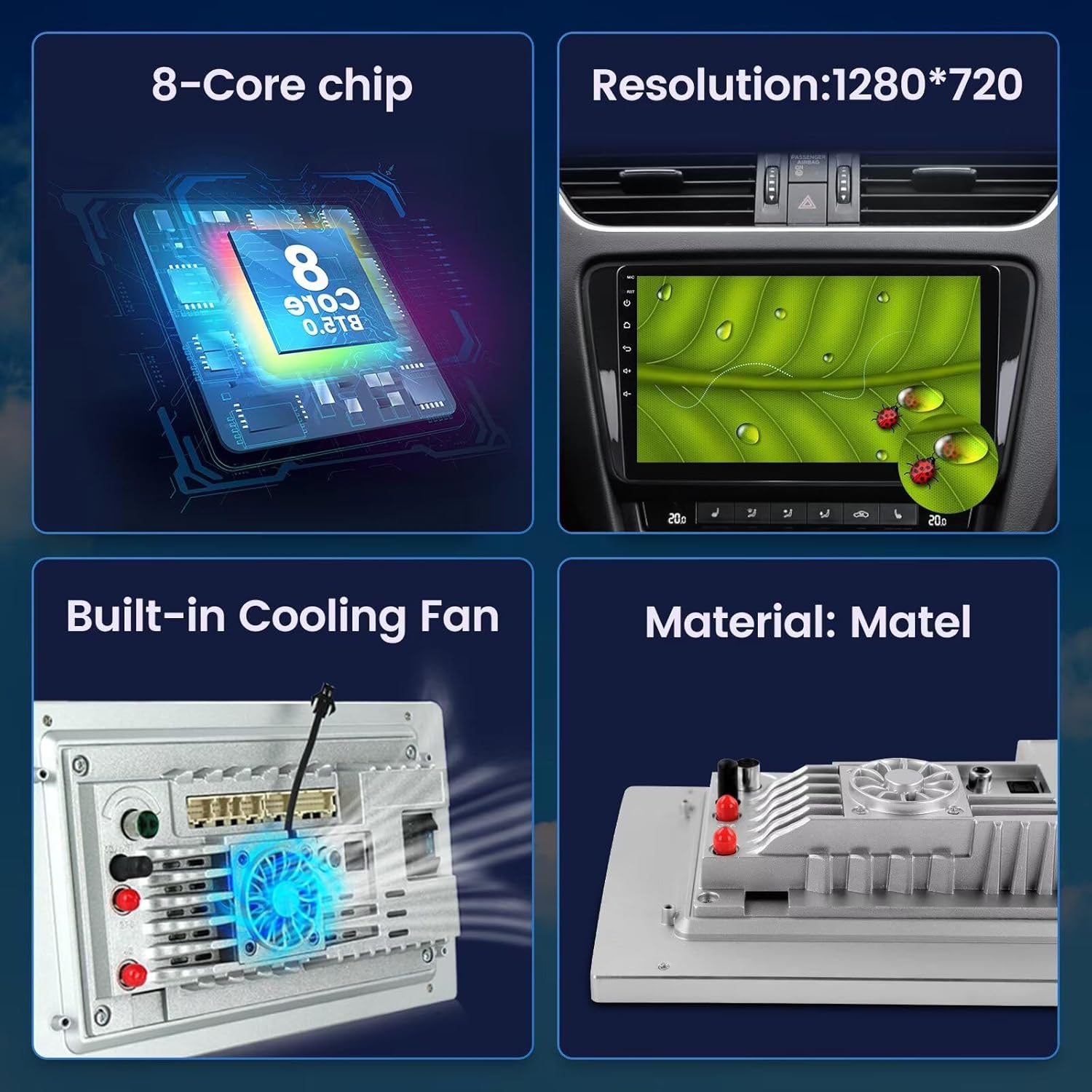
Image: Highlights key hardware components including the 8-Core chip, 1280*720 resolution display, built-in cooling fan, and the material construction of the unit.
- Operativsystem: Android 13.0 OS for a modern and responsive user experience.
- Processor: Octa-Core CPU for fast performance and smooth multitasking.
- Hukommelse: 4GB RAM and 32GB ROM for ample storage and efficient operation.
- Vise: 9-inch IPS Capacitive Touch Screen with 1280*720 resolution for clear visuals and responsive interaction.
- Smartphone-integration: Built-in Wireless Car-Play and Android Auto for seamless connectivity with iOS and Android devices.
- Lyd: Built-in DSP (Digital Sound Processor) with EQ settings for customizable and high-quality audio output.
- Forbindelse: Integrated Bluetooth for hands-free calling and music streaming, and built-in Wi-Fi for internet access.
- Navigation: Built-in GPS module with an external GPS antenna for accurate online and offline navigation.
- Radio: FM/AM radio with RDS support for enhanced radio listening.
- Køling: Built-in cooling fan to maintain optimal operating temperature.
- Bag View Kamerasupport: Compatible with aftermarket rear view cameras (camera not included) for safer parking and reversing.
7. Specifikationer
Detailed technical specifications for the RONGJI 9-inch Android Car Radio (Model B0CX52D2FD):
| Feature | Specifikation |
|---|---|
| Mærke | RONGJI |
| Modelnavn | B0CX52D2FD (For Suzuki Vitara 2005-2015) |
| Operativsystem | Android 13 |
| CPU | Octa Core |
| VÆDDER | 4 GB |
| Hukommelseslagringskapacitet | 32 GB |
| Skærmstørrelse | 9 tommer |
| Display Type | LCD |
| Berøringsskærmtype | Kapacitiv |
| Opløsning | 1280*720 |
| Særlige funktioner | Bluetooth, Touchscreen, Wireless Android Auto, Wireless Car-play, Built-in DSP |
| Forbindelsesteknologi | Bluetooth, WiFi |
| GPS-navigation | Built-in GPS module, supports Worldwide maps |
| Radio | FM/AM med RDS |
| Kontrolmetode | Touch, Steering Wheel Control |
| Human-Interface Input | Mikrofon, berøringsskærm |
| Fabrikant | Shenzhen Rongji Electronics Co., Ltd |
8. Fejlfinding
If you encounter issues with your RONGJI car radio, refer to the following common problems and solutions:
- Ingen strøm:
- Kontroller alle strømtilslutninger og sikringer.
- Sørg for, at køretøjets batteri er korrekt tilsluttet og opladet.
- Ingen lyd:
- Bekræft højttalerforbindelser.
- Check volume settings and ensure the unit is not muted.
- Confirm audio output settings are correct.
- GPS-signaltab:
- Sørg for, at GPS-antennen er korrekt tilsluttet og placeret med en klar overflade view af himlen.
- Check for obstructions that might block the signal.
- Problemer med Bluetooth-forbindelse:
- Sørg for, at Bluetooth er aktiveret på både bilradioen og din smartphone.
- Slet tidligere parringer, og forsøg at parre enhederne igen.
- Genstart begge enheder.
- Berøringsskærm reagerer ikke:
- Genstart enheden.
- Sørg for, at skærmen er ren og fri for snavs.
- Car-Play/Android Auto Not Connecting:
- For wired connection, use an original, high-quality USB cable.
- For wireless, ensure Bluetooth and Wi-Fi are active and paired correctly.
- Check your phone's settings for Car-Play/Android Auto permissions.
Hvis disse trin ikke løser problemet, bedes du kontakte kundesupport for yderligere assistance.
9. Vedligeholdelse
- Rengøring af skærm: Brug en blød, fnugfri klud til forsigtigt at tørre skærmen af. Ved genstridige pletter, tør let afampRengør kluden med vand eller et skærmsikkert rengøringsmiddel. Undgå skrappe kemikalier.
- Softwareopdateringer: Tjek regelmæssigt for softwareopdateringer via enhedens indstillinger eller producentens webwebstedet for at sikre optimal ydeevne og adgang til nye funktioner.
- Generel pleje: Hold enheden fri for støv og snavs. Undgå at spilde væsker på enheden.
10. Garanti og support
Your RONGJI car radio is covered by a standard manufacturer's warranty. Please refer to the warranty card included with your product for specific terms and conditions, including warranty duration and coverage details. Keep your proof of purchase for warranty claims.

Image: A customer service representative with contact information for support.
Kundesupport
For teknisk assistance, fejlfinding eller garantiforespørgsler, kontakt venligst vores kundesupportteam:
E-mail: Rongji08@outlook.com
When contacting support, please provide your product model number (B0CX52D2FD) and a detailed description of the issue.