
Indledning
This manual provides detailed instructions for the installation, operation, and maintenance of your Aigo Darkflash DK353 ARGB Mid-Tower Gaming PC Case. Please read this manual carefully before proceeding with installation to ensure proper setup and optimal performance.

Figur 1: Side view of the Aigo Darkflash DK353 PC case, showcasing the tempered glass side panel and internal components.
Nøglefunktioner
- Bundkort support: ATX / M-ATX / ITX
- Sidepanel: Hærdet glas
- I/O-porte: 1 x USB 3.0, 2 x USB 2.0, HD-lyd
- Drive Bays: 2 x HDD / 4 x SSD
- Udvidelsespladser: 7
- Fan Support: Front: 3 x 120mm; Top: 2 x 120mm or 2 x 140mm; PSU Cover: 2 x 120mm; Rear: 1 x 120mm
- Støtte til væskekøling: Front: 360mm / 240mm / 120mm radiators
- Max VGA Length: 340 mm
- Max CPU-kølerhøjde: 165 mm
- Understøttelse af strømforsyning: Bottom mount, up to 200mm length
- Included Fans: 4 x CL6 ARGB Fans (120x120x25mm, 1100 RPM, 26.0dB max noise)
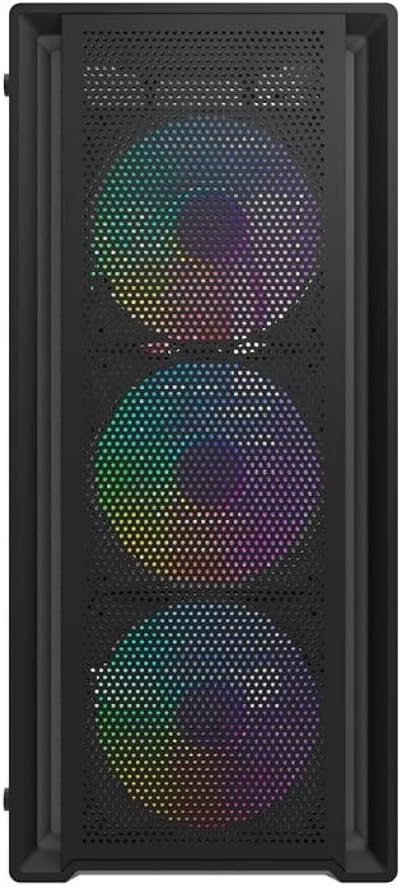
Figur 2: Forside view of the Aigo Darkflash DK353 PC case, highlighting the mesh front panel and the three pre-installed ARGB fans.
Pakkens indhold
Kontroller venligst, at alle varer er til stede i pakken:
- Aigo Darkflash DK353 PC Case
- Brugervejledning (dette dokument)
- Accessory Screws Kit
- 4 x CL6 ARGB-blæsere
Opsætningsinstruktioner
Follow these steps to set up your Aigo Darkflash DK353 PC case:
- Udpakning: Carefully remove the PC case from its packaging. Inspect for any damage during transit.
- Fjernelse af sidepanel: Locate and remove the screws securing the tempered glass side panel. Gently slide or pivot the panel to remove it. Repeat for the solid side panel if necessary.
- Installation af bundkort: Install the appropriate standoffs for your motherboard form factor (ATX, M-ATX, ITX). Carefully place your motherboard into the case and secure it with screws.
- Installation af strømforsyning: Install your power supply unit (PSU) into the dedicated compartment at the bottom of the case. Secure it with screws from the rear.
- Drev installation: Install your HDDs and SSDs into the designated drive bays. Refer to the case's internal layout for specific bay locations.
- Komponentinstallation: Install your CPU cooler, graphics card (VGA), and any other expansion cards into their respective slots. Ensure maximum length and height clearances are respected.
- Installation af ventilator og radiator: The case comes with 4 pre-installed ARGB fans. If installing additional fans or liquid cooling radiators, refer to the fan support section for compatible sizes and locations.
- Kabelstyring: Route all power and data cables neatly behind the motherboard tray to ensure optimal airflow and a clean build.
- Frontpanelforbindelser: Connect the front panel I/O cables (USB 3.0, USB 2.0, HD Audio, Power, Reset, LED) to the corresponding headers on your motherboard.
- Afsluttende samling: Reattach the side panels, ensuring they are securely fastened.

Figur 3: Eksploderet view of the Aigo Darkflash DK353 PC case, illustrating the removable tempered glass side panel, solid side panel, and internal layout for component installation.
Betjening af dit pc-kabinet
Once all components are installed and connected, you can power on your system. The Aigo Darkflash DK353 case is designed to provide optimal airflow and aesthetics for your gaming PC.
- Power knap: Tryk på tænd/sluk-knappen på I/O-panelet på forsiden for at tænde computeren.
- ARGB-belysning: The included CL6 ARGB fans feature customizable lighting. Connect the ARGB cables to a compatible motherboard header or a dedicated ARGB controller (if included or purchased separately) to manage lighting effects.
- USB-porte: Use the front panel USB 3.0 and USB 2.0 ports for connecting peripherals and external devices.
- Lydstik: The HD Audio jacks allow for easy connection of headphones and microphones.

Figure 4: Angled top-front view of the Aigo Darkflash DK353 PC case, highlighting the accessible front I/O panel with USB ports and audio jacks, and the top ventilation mesh.
Opretholdelse
Regelmæssig vedligeholdelse er med til at sikre levetiden og ydeevnen af dit pc-kabinet og komponenterne.
- Støvrensning: Periodically clean dust filters (if present) and internal components using compressed air or a soft brush. Ensure the system is powered off and unplugged before cleaning.
- Udvendig rengøring: Tør de udvendige overflader af med en blød, damp klud. Undgå slibende rengøringsmidler eller opløsningsmidler, der kan beskadige finishen eller det hærdede glas.
- Kabelhåndteringstjek: Kontrollér lejlighedsvis kabelføringen for at sikre, at ingen kabler blokerer luftstrømmen eller ventilatorens drift.
Fejlfinding
If you encounter issues with your PC case, consider the following common solutions:
- Ingen strøm:
- Sørg for, at strømforsyningen er korrekt tilsluttet og tændt.
- Kontroller, at kablet til tænd/sluk-knappen på frontpanelet er korrekt tilsluttet bundkortet.
- Fans Not Spinning/No ARGB Lighting:
- Check if fan power cables are securely connected to the motherboard or fan controller.
- Ensure ARGB cables are properly connected to a compatible ARGB header or controller.
- Consult your motherboard manual for ARGB software control.
- Front USB/Audio Ports Not Working:
- Verify that the front panel USB and HD Audio cables are correctly connected to the corresponding headers on your motherboard.
- Check your motherboard's BIOS/UEFI settings to ensure USB/Audio ports are enabled.
Specifikationer
| Feature | Detalje |
|---|---|
| Model | DK353-BK |
| Materiale | 0.5mm SPCC Steel, Tempered Glass |
| Bundkort support | ATX / M-ATX / ITX |
| Sidepanel | Hærdet glas |
| I/O-porte | 1 x USB 3.0, 2 x USB 2.0, HD-lyd |
| Drive Bays | 2 x HDD / 4 x SSD |
| Udvidelsesslots | 7 |
| Ventilatorstøtte (foran) | 3 x 120 mm |
| Ventilatorstøtte (øverst) | 2 x 120 mm eller 2 x 140 mm |
| Fan Support (PSU Cover) | 2 x 120 mm |
| Ventilatorstøtte (bag) | 1 x 120 mm |
| Væskekølingsstøtte (foran) | 360 mm / 240 mm / 120 mm |
| Maksimal VGA-længde | 340 mm |
| Max CPU kølerhøjde | 165 mm |
| PSU support | Bottom, up to 200 mm |
| Dimensioner (L x B x H) | 385 x 195 x 449 mm |
| Inkluderet fans | 4 x CL6 ARGB-blæsere |
| Fan Dimensioner | 120 x 120 x 25 mm |
| Blæserhastighed | 1100 ± 10 % RPM |
| Støjniveau for ventilator | 26.0dB (MAX) |
| Ventilator luftstrøm | 32.18 CFM |
| Statisk tryk i ventilatoren | 0.62 mm H²O |
| Ventilatorlejetype | Riffel |
Garanti og support
For garantioplysninger og teknisk support henvises til producentens officielle webwebstedet eller kontakt deres kundeservice. Gem din købsbevis til garantikrav.
Fabrikant: Aigo