
Indledning
The Keychron V3 Max is a highly customizable TKL (Tenkeyless) mechanical keyboard designed for versatility and performance. It features QMK/VIA support for advanced customization, offering seamless connectivity through 2.4 GHz wireless, Bluetooth 5.1, and wired USB-C options. Built with a gasket design and sound-absorbing foam, it provides a comfortable typing experience. The keyboard is hot-swappable, allowing users to easily change switches without soldering, and is compatible with macOS, Windows, and Linux operating systems.
Hvad er der i æsken
Upon unboxing your Keychron V3 Max keyboard, please ensure all the following items are present:
- 1x Fully Assembled Keyboard (including Case, PCB, PC Plate, Sound Absorbing Foam, Stabilizers, Keycaps, and Switches)
- 1x Type-C til Type-C kabel
- 1x Type-A til Type-C adapter
- 1x forlængeradapter til modtager
- 1x Type-A 2.4 GHz modtager
- 1x Type-C 2.4 GHz-modtager
- 1x Keycap aftrækker
- 1x Skruetrækker og Unbrakonøgle

Image: Contents of the Keychron V3 Max package, showing the keyboard, various cables, adapters, and tools like a keycap puller and screwdriver.
Opsætning
Tilslutningsmuligheder
The Keychron V3 Max offers three connection modes:
- 2.4 GHz trådløst: For a fast and stable connection with a 1000 Hz polling rate. Use the included Type-A 2.4 GHz receiver. The receiver is typically stored in the back edge of the keyboard.
- Bluetooth 5.1: Connects to up to three devices for seamless multitasking. Ideal for devices without a USB port or for switching between multiple systems.
- Kablet (USB-C): A reliable connection for charging and direct data transfer. Use the provided USB-C to USB-C cable and Type-A adapter if needed.
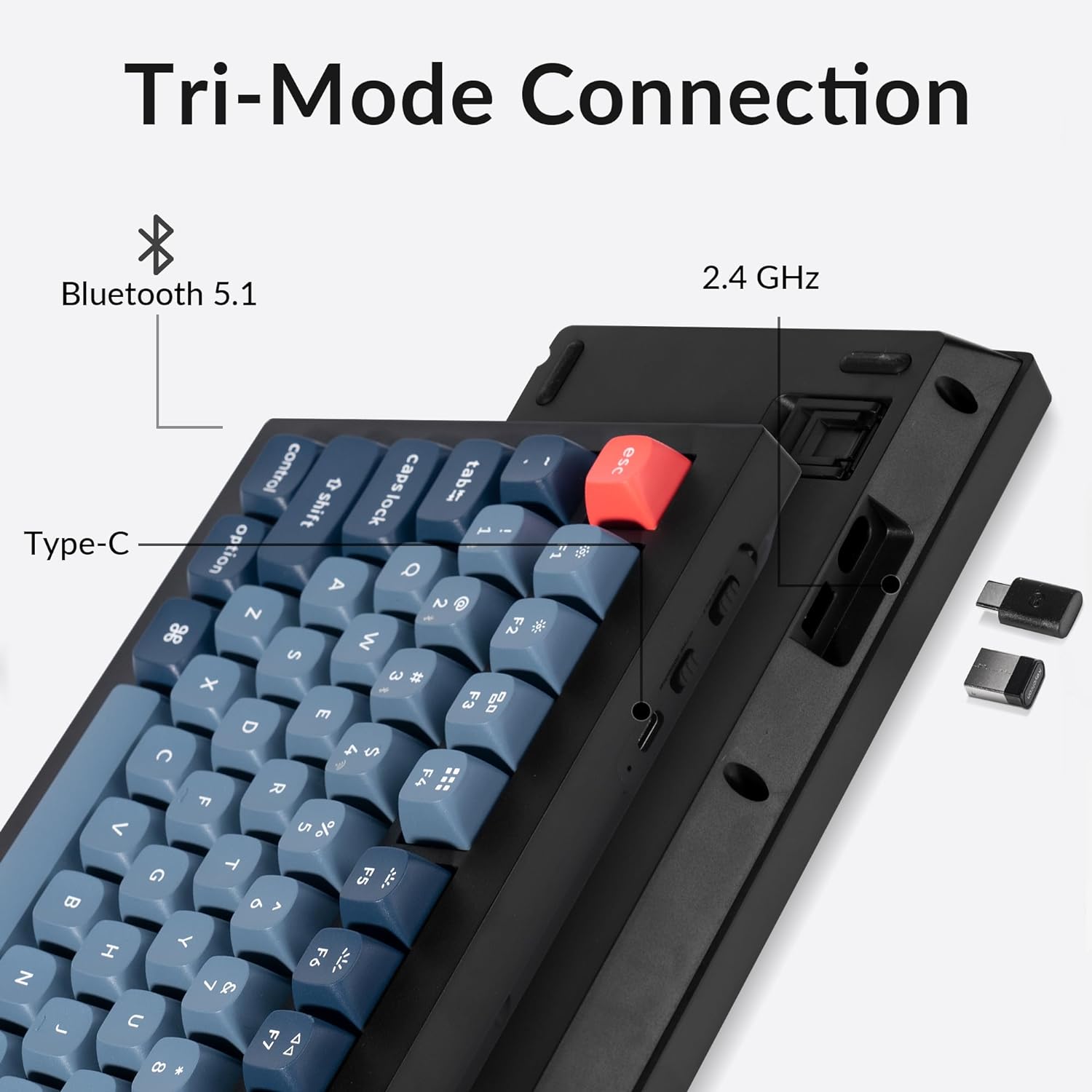
Billede: Side view of the Keychron V3 Max keyboard highlighting the three connectivity options: Bluetooth 5.1, 2.4 GHz wireless (with dongle), and Type-C wired connection.
Operativsystemkompatibilitet
The V3 Max is designed for broad compatibility across various operating systems:
- MacOS: Fully supported with a system toggle and additional keycaps for Mac layouts.
- Windows: Fully compatible with Windows devices.
- Linux: Supports Linux systems.
Use the system toggle switch located on the keyboard to select your operating system for optimal key mapping.

Image: A Keychron V3 Max keyboard positioned between a macOS display and a Windows display, illustrating its cross-platform compatibility.
Betjeningsvejledning
QMK/VIA-tilpasning
The Keychron V3 Max supports QMK/VIA, allowing for extensive customization of key functions, macros, and lighting effects. VIA is a powerful software that enables real-time key remapping and macro programming without needing to flash new firmware. Download the VIA software from the official Keychron webwebstedet til dit operativsystem.

Image: A graphical representation of the QMK/VIA software interface, showing how to remap keys and customize layers on the V3 Max keyboard.
Hot-swap-switche
The V3 Max features a hot-swappable PCB, meaning you can change the mechanical switches without soldering. This allows for easy customization of typing feel. The PCB supports both 3-pin and 5-pin MX-style mechanical switches.
Sådan udskifter du en kontakt:
- Use the included keycap puller to carefully remove the keycap from the desired switch.
- Use the included switch puller to gently grip the switch and pull it straight up.
- Juster stifterne på den nye kontakt med hullerne på printkortet, og tryk den godt ned, indtil den klikker på plads. Sørg for, at stifterne ikke er bøjede.
- Udskift tastaturdækslet.

Image: Close-up of the Keychron V3 Max keyboard demonstrating the hot-swappable feature, with several keycaps and switches removed, and a switch puller visible.
RGB-baggrundsbelysning
The keyboard features south-facing RGB LEDs, designed to provide optimal illumination for non-shine-through PBT keycaps. You can customize the RGB lighting effects and colors using the VIA software or through onboard shortcuts (refer to the quick start guide for specific key combinations).

Image: A close-up of the Keychron V3 Max keyboard showing the south-facing RGB LEDs glowing beneath the keycaps, highlighting the switch mechanisms.
tasterne
The V3 Max comes with OSA profile double-shot PBT keycaps. These keycaps are known for their durability, oil resistance, and resistance to legend fading, providing a consistent typing feel over time. The non-shine-through design complements the south-facing RGB lighting.

Billede: En sideprofile view of the Keychron V3 Max keyboard, emphasizing the sculpted OSA profile and texture of the double-shot PBT keycaps.
Opretholdelse
Korrekt vedligeholdelse sikrer dit Keychron V3 Max-tastaturs lange levetid og optimale ydeevne.
- Rensning: Regularly dust the keyboard with compressed air. For deeper cleaning, remove keycaps using the provided keycap puller and wipe them with a damp cloth. Clean the keyboard plate with a soft, dry cloth.
- Skiftepleje: If switches feel inconsistent, they can be removed and re-seated. For persistent issues, consider replacing individual switches using the hot-swappable feature.
- Kabelstyring: Undgå skarpe bøjninger eller for meget træk i USB-C-kablet for at forhindre skader.
- Opbevaring: Når tastaturet ikke er i brug, skal det opbevares et rent og tørt sted, væk fra direkte sollys og ekstreme temperaturer.
Fejlfinding
If you encounter issues with your Keychron V3 Max, refer to the following common problems and solutions:
| Problem | Mulig årsag/løsning |
|---|---|
| Keys repeating or double input |
|
| Keyboard not connecting via 2.4 GHz |
|
| Problemer med Bluetooth-forbindelse |
|
| RGB-belysningen virker ikke eller er inkonsekvent |
|
| Keyboard loses programming (macros, lighting) |
|
Specifikationer
| Feature | Detalje |
|---|---|
| Mærke | Keychron |
| Modelnavn | V3 Max |
| Forbindelsesteknologi | 2.4 GHz trådløs, Bluetooth 5.1, USB-C kablet |
| Kompatible enheder | macOS, Windows, Linux systems |
| Tastaturbeskrivelse | Customizable Mechanical TKL Keyboard |
| Særlige funktioner | Backlit (RGB), Hot-Swappable, QMK/VIA Programmable |
| Farve | Brown Switch (variant specific) |
| Stil | Classic TKL |
| Materiale | ABS Plastic Enclosure |
| Switch Type | Tactile (Gateron Brown or similar) |
| Tastaturlayout | QWERTY |
| Antal nøgler | 87 |
| Afstemningsfrekvens | 1000 Hz (2.4 GHz wireless and wired) |
| tasterne | OSA Profile Dobbelt shot PBT |
Garanti og support
Keychron products typically come with a limited warranty covering manufacturing defects. For specific warranty terms and duration, please refer to the warranty information provided with your product packaging or visit the official Keychron webwebsted.
For technical support, troubleshooting assistance beyond this manual, or warranty claims, please contact Keychron customer support directly through their official website. Ensure you have your product model and purchase details ready when contacting support.
Officiel nøglering Webwebsted: www.keychron.com