
1. Introduktion
Thank you for choosing the Sharp 50FQ5EG 50-inch QLED 4K Google TV. This manual provides essential information for setting up, operating, maintaining, and troubleshooting your new television. Please read it thoroughly before use and keep it for future reference.
Nøglefunktioner:
- 50-inch QLED 4K Ultra HD Display with 144 Hz Refresh Rate
- Google TV Operating System with Google Assistant and Chromecast built-in
- Harman/Kardon Hybrid Speaker System with Dolby Atmos
- Dolby Vision IQ, HDR10, HLG Support
- Multiple Connectivity Options: 4 x HDMI 2.1, 2 x USB, Bluetooth 5.3, Wi-Fi, Ethernet
- Frameless Aluminum Design
Inkluderede komponenter:
- Sharp 50FQ5EG Television
- Sokkelstativ
- Fjernbetjening (kræver 2 AAA-batterier, medfølger)
- Instruktionsmanual
- Strømkabel
2. Sikkerhedsoplysninger
For at sikre sikker drift og forhindre skader, bedes du overholde følgende sikkerhedsforanstaltninger:
- Strømforsyning: Connect the TV only to an AC 220V, 50Hz power outlet. Do not overload power outlets.
- Ventilation: Sørg for tilstrækkelig ventilation omkring tv'et. Bloker ikke ventilationsåbningerne.
- Væske og fugt: Do not expose the TV to rain, moisture, or dripping/splashing liquids. Do not place objects filled with liquids on the TV.
- Varmekilder: Hold tv'et væk fra varmekilder såsom radiatorer, varmeapparater, komfurer eller andre varmeproducerende apparater.
- Rensning: Tag stikket til tv'et ud af stikkontakten før rengøring. Brug en blød, tør klud. Brug ikke flydende rengøringsmidler eller sprayrengøringsmidler.
- Service: Forsøg ikke selv at servicere dette produkt. Overlad al service til kvalificeret servicepersonale.
- Børn: Supervise children to ensure they do not play with the TV or remote control.
3. Opsætning
3.1 Udpakning
Tag forsigtigt tv'et og alt tilbehør ud af emballagen. Gem emballagematerialerne til senere transport eller service.
3.2 Attaching the Pedestal Stand
Hvis du ikke vægmonterer tv'et, skal du montere den medfølgende sokkel:
- Placer tv'et med forsiden nedad på en blød, flad overflade for at forhindre, at skærmen beskadiges.
- Juster stativets komponenter med monteringshullerne i bunden af tv'et.
- Fastgør stativet med de medfølgende skruer. Sørg for, at stativet er ordentligt fastgjort, før du placerer TV'et oprejst.

Billede: Nærbillede view of the TV's pedestal stand and integrated Harman/Kardon speakers.
3.3 Vægmontering (valgfrit)
The Sharp 50FQ5EG supports VESA wall mounts with a standard of 200 x 200 mm. Use M6 screws (not included) with a length appropriate for your wall mount bracket. Consult a professional for wall mounting to ensure safety and proper installation.
3.4 Tilslutning af eksterne enheder
Connect your external devices to the TV's ports. The TV features 4 HDMI 2.1 ports, 2 USB ports, Ethernet, and an optical audio output.
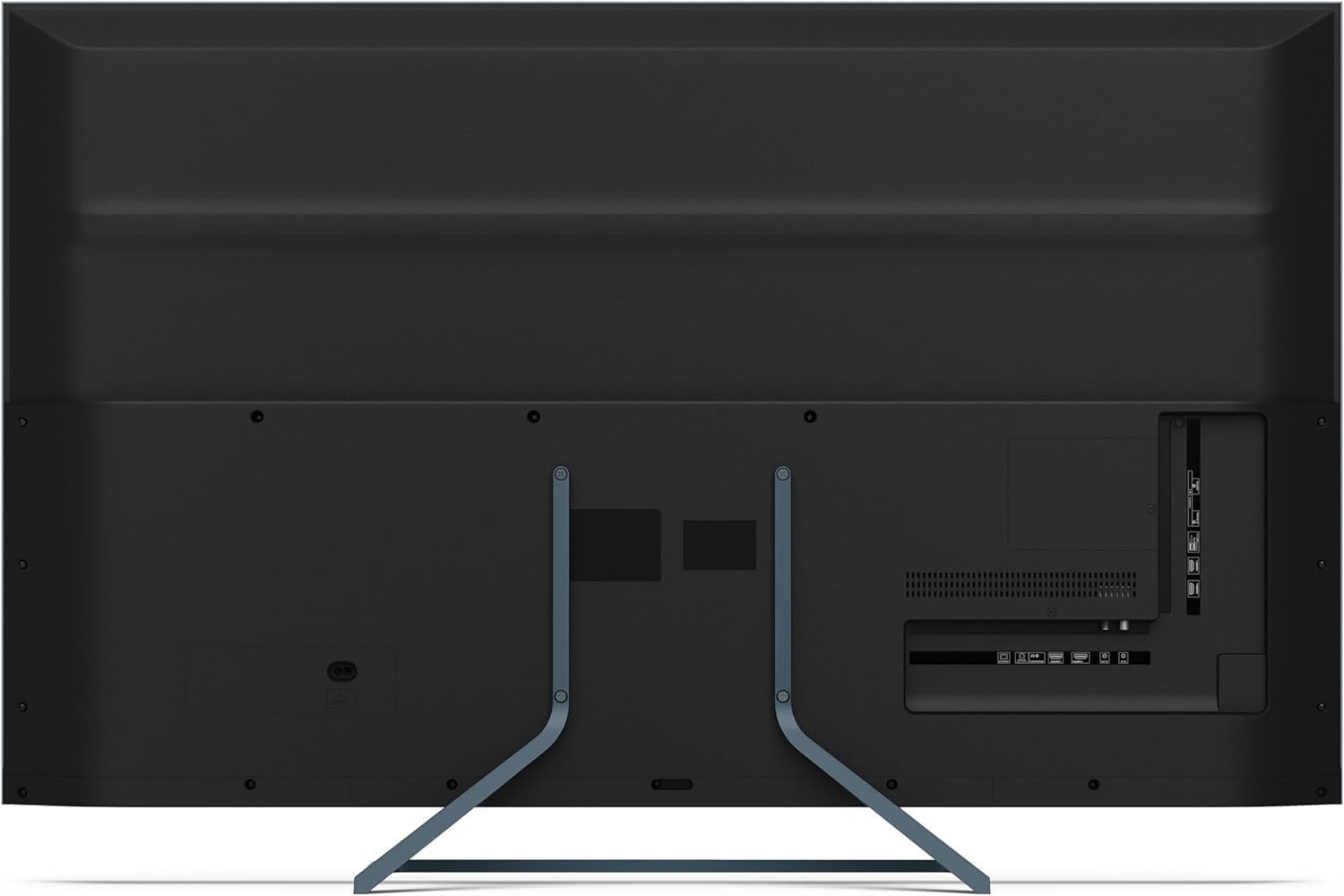
Billede: Bagside view of the television displaying the arrangement of HDMI, USB, and other connectivity ports.
- HDMI: Connect Blu-ray players, game consoles, or set-top boxes. HDMI 2.1 supports eARC and ALLM for enhanced audio and gaming.
- USB: Tilslut USB-lagerenheder til medieafspilning.
- Ethernet: Til en kablet internetforbindelse.
- Magt: Tilslut strømkablet til tv'et og derefter til en stikkontakt.
3.5 Første opstart og Google TV-opsætning
- Sæt tv'et i en stikkontakt.
- Tryk på tænd/sluk-knappen på fjernbetjeningen eller tv'et.
- The TV will guide you through the initial setup process, including language selection, network connection (Wi-Fi or Ethernet), and Google account sign-in.
- Fjernbetjeningsparring: During initial setup, you may need to pair the Bluetooth remote control. Follow the on-screen instructions, typically involving pressing specific buttons on the remote simultaneously.
4. Betjening af tv'et
4.1 Fjernbetjening
The included remote control uses Bluetooth for enhanced functionality. It allows navigation, voice control via Google Assistant, and quick access to various features.
4.2 Google TV-grænseflade
The Google TV interface organizes your content from various streaming services and apps. Use the remote's directional pad to navigate through menus, select apps, and browse content.

Image: The television screen showing the Google TV home interface with recommended content and installed applications.
4.3 Billedindstillinger
Your Sharp 50FQ5EG TV features advanced picture technologies:
- QLED Q-Colour: Provides vibrant and accurate color reproduction.
- 4K Ultra HD: Delivers sharp and detailed images.
- 144 Hz opdateringshastighed: Ensures smooth motion, especially beneficial for gaming and fast-paced content.
- Dolby Vision IQ, HDR10, HLG: Supports various High Dynamic Range formats for enhanced contrast and brightness.
- AQUOS Motion: Improves motion clarity by reducing blur.
- Eco Sensor: Justerer automatisk lysstyrken baseret på de omgivende lysforhold.
Access picture settings through the TV's menu to customize brightness, contrast, color, and other display options.
4.4 Lydindstillinger
The TV is equipped with a Harman/Kardon Hybrid Speaker System and supports Dolby Atmos for immersive audio.
- Harman/Kardon Speakers: Delivers clear sound with powerful bass.
- Dolby Atmos: Giver en tredimensionel lydoplevelse.
Adjust sound modes, equalizer settings, and volume levels via the TV's audio menu.
4.5 Forbindelse
- Wi-Fi/Ethernet: Opret forbindelse til dit hjemmenetværk for internetadgang og streaming.
- Bluetooth 5.3: Tilslut trådløse hovedtelefoner, soundbars eller andre Bluetooth-aktiverede enheder.
- Google Cast: Cast content from your mobile devices or computer directly to the TV.
4.6 Brug af applikationer
The Google TV platform provides access to a wide range of applications from the Google Play Store, including:
- Netflix, Amazon Prime Video, HBO, Disney+, Movistar+, DAZN, Atresmedia
- KODI, IPTV, Steamlink, Twitch, VLC, YouTube
- Puffin TV Browser, Spotify, Deezer, TuneIn Radio
Navigate to the 'Apps' section on the Google TV home screen to browse, download, and manage your applications.
5. Vedligeholdelse
5.1 Rengøring af tv'et
- Skærm: Tør forsigtigt skærmen af med en blød, fnugfri klud. Ved genstridige mærker, tør let afampRengør kluden med vand eller en specialiseret skærmrens (påfør den på kluden, ikke direkte på skærmen).
- Legeme: Tør tv'ets ramme og stativ af med en blød, tør klud.
- Brug ikke: Abrasive cleaners, alcohol, benzene, or thinners, as these can damage the TV's surface.
5.2 Softwareopdateringer
Dit tv modtager muligvis softwareopdateringer for at forbedre ydeevnen og tilføje nye funktioner. Sørg for, at dit tv har internetforbindelse for at modtage disse opdateringer automatisk, eller tjek manuelt efter dem i indstillingsmenuen.
6. Fejlfinding
Hvis du støder på problemer med dit tv, kan du se følgende almindelige problemer og løsninger:
| Problem | Mulig løsning |
|---|---|
| Ingen strøm | Kontroller, om strømkablet er korrekt tilsluttet til tv'et og stikkontakten. Sørg for, at der er strøm i stikkontakten. Prøv en anden stikkontakt. |
| Intet billede, men der er lyd | Kontrollér inputkilden. Sørg for, at eksterne enheder er tændt og tilsluttet korrekt. Prøv et andet HDMI-kabel. |
| Ingen lyd, men billedet er til stede | Check the volume level. Ensure mute is not activated. Check audio output settings (e.g., internal speakers, external soundbar). |
| Fjernbetjeningen reagerer ikke | Replace the batteries. Ensure there are no obstructions between the remote and the TV. Re-pair the Bluetooth remote if necessary (refer to initial setup). |
| Kan ikke oprette forbindelse til Wi-Fi | Check your router and modem. Ensure the Wi-Fi password is correct. Try restarting the TV and your router. |
| Apps Not Working/Freezing | Ensure the TV has a stable internet connection. Try clearing the app's cache or reinstalling the app. Restart the TV. |
Hvis problemet fortsætter efter at have prøvet disse løsninger, bedes du kontakte kundesupport.
7. Specifikationer

Image: Technical drawing illustrating the width, height, and depth of the television with and without its stand.
| Feature | Specifikation |
|---|---|
| Modelnummer | 50FQ5EG |
| Skærmstørrelse | 50 tommer |
| Displayteknologi | QLED, LED |
| Opløsning | 4K Ultra HD (3840 x 2160) |
| Opdateringshastighed | 144 Hz |
| HDR-understøttelse | Dolby Vision IQ, HDR10, HLG |
| Operativsystem | Google TV |
| Lydudgang | 2.1 Channel Harman/Kardon Speakers, 15W Max Power, Dolby Atmos |
| Forbindelse | 4 x HDMI 2.1, 2 x USB 2.0, Bluetooth 5.3, Wi-Fi, Ethernet |
| VESA Monteringsstandard | 200 x 200 mm |
| Dimensioner med stativ (B x H x D) | 113.22 x 73.89 x 23.2 cm |
| Mål uden stativ (B x H x D) | 113.22 x 66.87 x 6.0 cm |
| Vægt (uden stativ) | 11.5 kg |
| Strømforbrug (drift) | 84 watt |
| Årligt energiforbrug | 64 kWh/år |
| Kontrolmetode | Voice (Google Assistant), Remote Control |
| Farve | Anthracite Grey Aluminum |
8. Garanti og support
8.1 Garantioplysninger
This Sharp 50FQ5EG television comes with a Begrænset garanti. Please refer to the warranty card included with your product or visit the official Sharp webwebstedet for detaljerede vilkår og betingelser vedrørende dækning, varighed og serviceprocedurer.
8.2 Kundesupport
For technical assistance, troubleshooting beyond this manual, or warranty claims, please contact Sharp customer support. Contact details can typically be found on the Sharp official webwebstedet eller i den dokumentation, der fulgte med dit tv.