
1. Introduktion
This manual provides detailed instructions for the installation, operation, and maintenance of your WEILAILIFE 8MP 4K PoE Security Camera System. This system features 8-megapixel (4K) resolution cameras, Power over Ethernet (PoE) for simplified installation, two-way audio communication, 130° ultra-wide-angle lenses, and advanced AI human detection. Please read this manual thoroughly before using the product to ensure proper setup and functionality.
2. Pakkens indhold
Bekræft, at alle nedenstående varer er inkluderet i din pakke:
- 1 x 4K 8MP 8-Channel Network Video Recorder (NVR) with 1TB HDD
- 4 x 4K 8MP Cameras
- 4 x 18.2m LAN Cables for Cameras
- 1 x USB-mus
- 1 x 1m HDMI-kabel
- 1 x NVR Power Adapter (48V2A)
- 1 x fjernbetjening
- 1 x 1m LAN Cable
- 1 x Instruction Manual & Warning Label
- 4 x Camera Mounting Screw Packs
3. Opsætning
The WEILAILIFE security camera system is designed for easy plug-and-play installation. Follow these steps to set up your system:
- Tilslut NVR'en: Connect the NVR to a power source using the provided power adapter. Connect the NVR to a monitor via the HDMI or VGA port, and connect the USB mouse for navigation.
- Tilslut kameraer: Connect each camera to the NVR using the provided LAN cables. The PoE technology will supply power and video signal through a single cable.
- Netværksforbindelse (valgfrit for fjernadgang): Til fjernbetjening viewing, connect the NVR to your router using the provided 1m LAN cable.
- Strømtilstande: The cameras support dual power interfaces. For distances exceeding standard PoE range (up to 200m), an additional power source can be used.

Figure 3.1: Camera Power Modes. The system supports PoE for distances up to 200m, with an option for an additional power adapter for extended range.

Figure 3.2: Plug-and-Play Connection. Cameras connect directly to the NVR via LAN cables, providing power, video, and audio.

Figure 3.3: IP66 Waterproof Connector. Ensure the waterproof connector is properly installed for outdoor camera use.
4. Betjeningsvejledning
4.1. Tovejslyd
The system supports two-way audio, allowing you to communicate with individuals near the camera using the dedicated mobile application. This feature enables real-time conversations, such as speaking to a delivery person at your door.

Figure 4.1: Two-Way Audio Communication. Interact with visitors or deter intruders directly through the camera.
4.2. Fjernovervågning
Få adgang til live videofeeds og optagede filmtage from anywhere using the free 'Honestview' or 'Eseecloud' app on your smartphone (iOS/Android), tablet, or computer. The system supports multiple users (up to 4) viewing streams simultaneously.

Figure 4.2: Remote Access. Monitor your property from various devices, including smartphones, tablets, and PCs.
4.3. Bevægelsesdetektion og advarsler
Leveraging advanced recognition algorithms and infrared detection, the system sends real-time notifications to your device when abnormal activity is detected. Dual detection (PIR & AI) minimizes false alarms from leaves, clouds, animals, or insects, significantly improving accuracy over traditional motion detection.

Figure 4.3: PIR & AI Dual Detection. The system accurately identifies human movement while reducing false alarms.
4.4. Optagelsestilstande
NVR'en understøtter forskellige optagetilstande, der passer til dine behov:
- Planlagt optagelse: Indstil specifikke tider for kontinuerlig optagelse.
- Manuel optagelse: Start and stop recording manually as needed.
- Optagelse af bevægelsesdetektering: Optager kun, når der registreres bevægelse, hvilket sparer lagerplads.

Figure 4.4: Recording Options. Choose between continuous, scheduled, or motion-activated recording.
5. Funktioner
5.1. 4K 8MP Ultra-High Resolution
The 3264 x 2488 high-resolution security cameras provide clear and detailed images, ensuring 24/7 security for your home or business. Even at night, you can see everything within 24 meters.
5.2. 130° Ultra-Wide Angle Lens
Equipped with a 130° wide-angle optical lens, the cameras capture a broad field of view, minimizing blind spots and enhancing surveillance coverage. This allows for clear recording and monitoring of large areas.
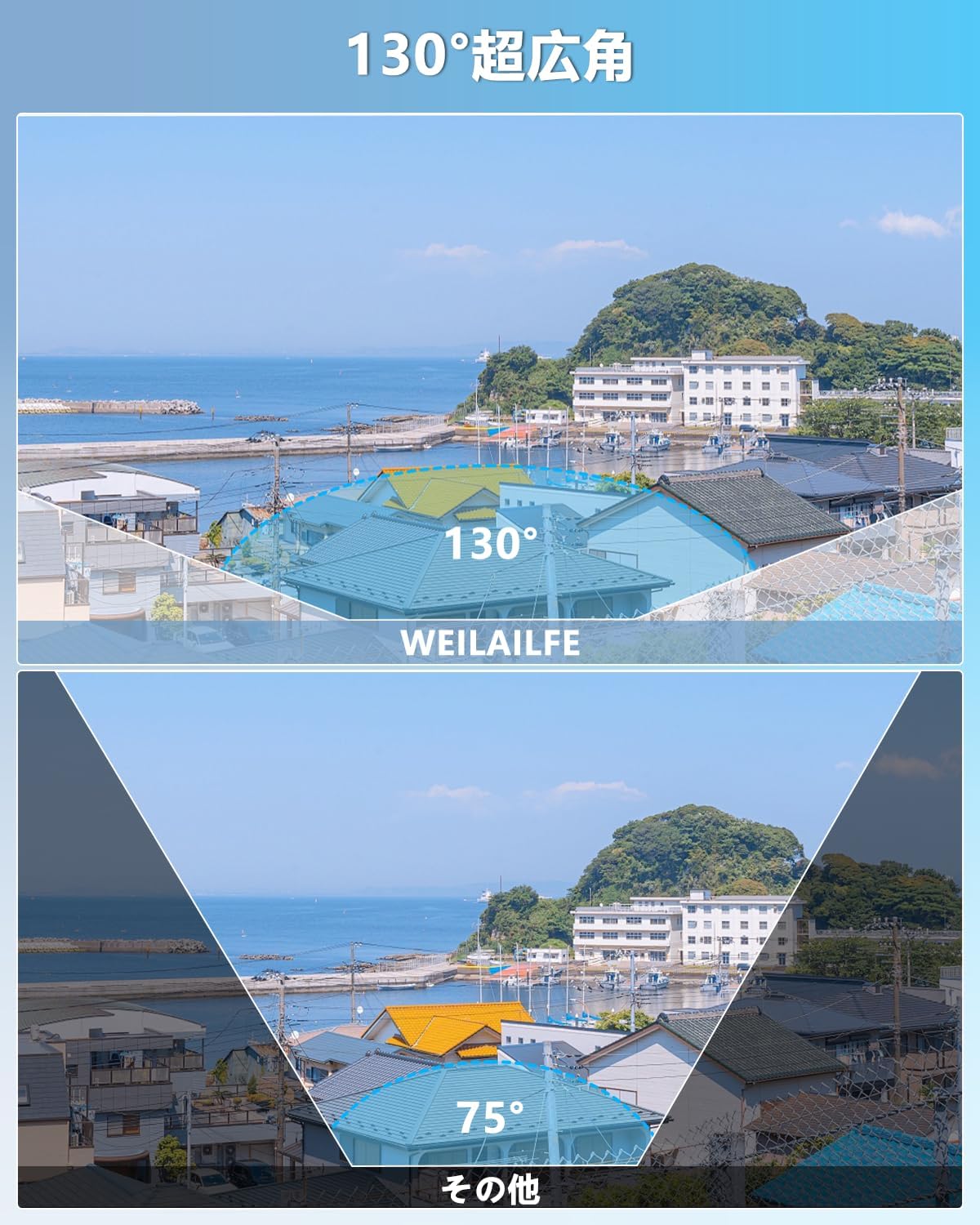
Figure 5.1: 130° Ultra-Wide Angle. Capture more of your surroundings with an expanded field of view.
5.3. H.265 Compression Technology
The system utilizes H.265 compression, which allows for more than double the recording time compared to H.264 while maintaining image quality. This technology also improves processing speed by 50%, enabling smoother viewing even with slower internet connections.

Figure 5.2: H.265+ Compression. Efficiently store more footage without compromising video quality.
5.4. IP66 vejrbestandigt design
With an IP66 dustproof and waterproof rating, the cameras are built to withstand harsh weather conditions, effectively preventing dust and rain from affecting performance. This makes them suitable for both indoor and outdoor installation.

Figure 5.3: IP66 Weatherproof. Reliable surveillance in various weather conditions, from -25°C to 50°C.
5.5. Nattesyn
The IR-LED system automatically activates infrared mode in low-light conditions, providing clear night vision up to 20 meters. This ensures continuous monitoring even in complete darkness.

Figure 5.4: Automatic Day/Night Switching. The camera adapts to lighting conditions for optimal visibility.
5.6. Udvidelsesmuligheder
The system is expandable, allowing you to add up to 8 cameras in total to meet your surveillance needs. This flexibility makes it suitable for various locations such as offices, gardens, shops, or villas.

Figure 5.5: Expandable System. Add up to 8 cameras to cover all desired areas.
5.7. AI WDR Function
The AI WDR (Wide Dynamic Range) function adjusts the balance between bright and dark areas in surveillance footage, enhancing image clarity and detail. This is particularly useful in scenes with high contrast.

Figure 5.6: AI WDR Function. Improves image clarity in high-contrast lighting conditions.
5.8. Fleksibel opbevaring
The system includes a built-in 1TB hard drive and supports H.265+ compression, which reduces required storage capacity by 50% while providing clear images. The internal hard drive automatically overwrites old footage and can be expanded up to 6TB. Cloud storage options are also available.

Figure 5.7: Storage Options. Utilize the built-in HDD or cloud storage for continuous recording.
6. Vedligeholdelse
To ensure optimal performance and longevity of your security camera system, regular maintenance is recommended:
- Clean Camera Lenses: Periodically wipe camera lenses with a soft, damp cloth to remove dust and smudges that may affect image clarity.
- Tjek forbindelser: Ensure all cable connections (power, LAN, HDMI/VGA) are secure and free from damage.
- Softwareopdateringer: Check for and install any available firmware updates for the NVR and cameras to ensure the latest features and security patches.
- Harddiskens tilstand: Overvåg NVR'ens harddisktilstand via systemindstillingerne for at forhindre datatab.
- Miljøfaktorer: Ensure cameras are not obstructed by foliage or other objects that could interfere with their field of view or trigger false alarms.
7. Fejlfinding
If you encounter any issues with your WEILAILIFE security camera system, refer to the common problems and solutions below. If the problem persists, please contact customer support.
| Problem | Mulig årsag | Løsning |
|---|---|---|
| Intet billede på skærmen | Loose cable connection, NVR not powered, incorrect input source on monitor. | Check HDMI/VGA cables, ensure NVR is powered on, select correct input on monitor. |
| Kameraet viser ikke video | LAN cable issue, camera not powered (PoE), camera malfunction. | Check LAN cable connection, ensure NVR PoE ports are active, try connecting camera to a different port or NVR. |
| Ingen fjernadgang | NVR ikke forbundet til internettet, forkerte app-indstillinger, firewallproblemer. | Ensure NVR is connected to router, verify app network settings, check router firewall. |
| Hyppige falske alarmer | Motion detection sensitivity too high, environmental factors (e.g., moving branches). | Adjust motion detection sensitivity, define specific detection zones to exclude irrelevant areas. |
| Ingen lyd | Microphone/speaker disabled, volume too low, audio settings incorrect. | Check camera and NVR audio settings, ensure volume is up on viewing enhed. |
8. Specifikationer
| Feature | Detalje |
|---|---|
| Mærke | WEILAILIFE |
| Modelnummer | WEILAI-POEHL+XKWK |
| Forbindelsesteknologi | Wired IEEE802.11a/n/f |
| Videooptagelsesopløsning | 4K 2160P, 8MP (3264×2488) |
| Særlige funktioner | 4K 8MP, PIR & Dual Detection, Two-Way Audio, Expandable, Remote Monitoring |
| Antal kanaler | 8 |
| Maksimal hukommelseskapacitet | 1 TB (kan udvides op til 6 TB) |
| Strømtype | Strømledning |
| Operativsystem | Linux |
| Kompatible enheder | Camera, Smartphone, Tablet, TV, Desktop PC |
| Kamerabeskrivelse | 130° Ultra Wide Angle & Two-Way Audio, 8MP & AI Human Detection |
| Nattesyn | 845nm 3 Infrared Dot Matrix Lamps Super Night Vision |
| Night Vision Range | 20 meter |
| Billedhastighed | 15 fps |
| Optagetilstand | Tidsplan, manuel |
| USB-porte | 2 |
| Hardware-interface | HDMI, USB, VGA |
| Linsetype | Vidvinkel |
| Felt af View | 130 grader |
| Signalformat | Digital |
| Optisk sensorteknologi | CMOS |
| Anbefalet brug | Udendørs, Indendørs |
| Produktets vægt | 3.9 kg |
| Oprindelse | Kina |
| Product Body Size | 30 x 26 x 18 cm |
9. Garanti og support
WEILAILIFE is committed to providing high-quality products and excellent customer service. Our products undergo strict quality control during manufacturing and inspection.
9.1. Garantioplysninger
Dette produkt leveres med en et års gratis garanti fra købsdatoen. Gem venligst din købsbevis i tilfælde af garantikrav.

Figure 9.1: 12-Month Warranty. Your product is covered for one year.
9.2. Kundesupport
If you have any questions, concerns, or require assistance with your product, please do not hesitate to contact our support team. We offer Japanese language support via email and aim to respond within 24 hours.
- E-mail: info-jp@weilailifetech.com
- Webwebsted: jp.weilailifetech.com
You can also connect with us via LINE for quick support:

Figure 9.2: WEILAILIFE LINE Service. Scan the QR code to connect for support.
Direkte link: https://lin.ee/EqPKtnq
Our service center is located at: Chiba-ken, Chiba-shi, Inage-ku, Tendai 5-8-9, Rose Avenue Inage Tendai 1F.