1. Produktet er slutview
The Generic Wireless Bluetooth Headphones AH-806 are designed to provide a high-fidelity audio experience with the convenience of wireless connectivity. Featuring a foldable design for portability and a built-in microphone for calls, these headphones are suitable for various uses including gaming, music, and sports.
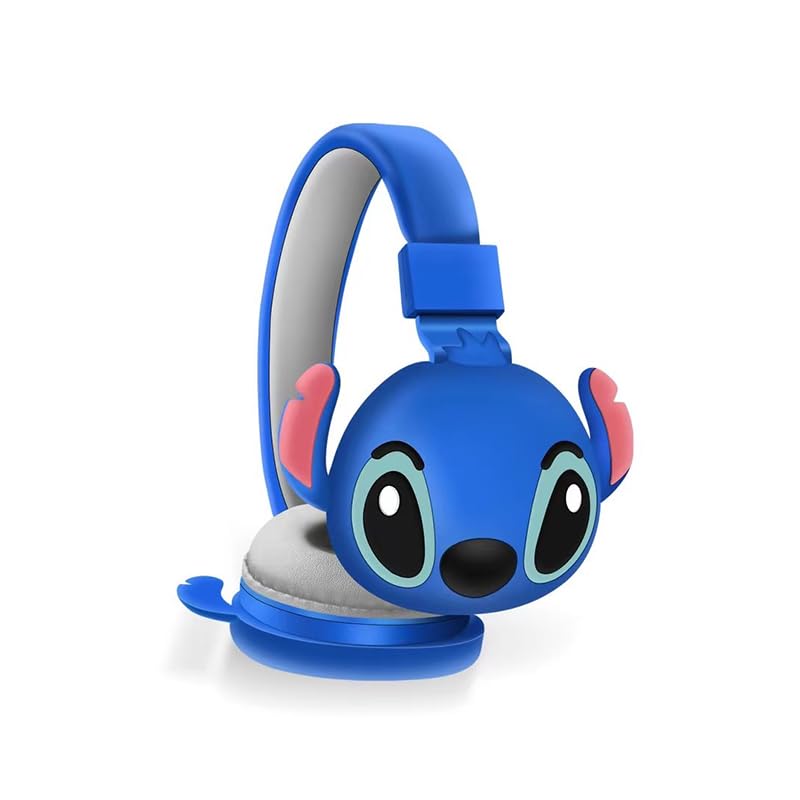
Billede 1.1: Forside view of the AH-806 Wireless Bluetooth Headphones, featuring a blue color and a Stitch character design on the earcups.
Nøglefunktioner:
- Foldet design: Conveniently folds for easy portability and storage in bags or suitcases, making it an ideal companion for travel.
- HIFI Stereo Sound: Equipped with a 13mm driver diameter for high-fidelity stereo sound, suitable for various audio content.
- Indbygget mikrofon: Enables hands-free calling and communication.
- Passiv støjreduktion: Oversize earcups provide passive noise reduction for an immersive listening experience.
- Alsidig brug: Designed for video games, general audio listening, HiFi audio, and sports activities.
2. Pakkens indhold
Markér venligst feltet for følgende elementer:
- 1 x Wireless Bluetooth Headphones AH-806
- 1 x Brugermanual (dette dokument)
- 1 x Charging Cover
- 1 x USB Type-C-adapter

Image 2.1: Packaging of the AH-806 Headphones, illustrating the product and its accessories.
3. Opsætningsvejledning
3.1. Opladning af hovedtelefonerne
- Locate the USB Type-C charging port on the headphones.
- Connect the provided USB Type-C adapter to the charging port.
- Sæt den anden ende af USB-kablet i en kompatibel USB-strømkilde (f.eks. en computers USB-port eller en vægadapter).
- The LED indicator on the headphones will illuminate to show charging status. It will typically turn off or change color once fully charged.
Note: For optimal battery life, fully charge the headphones before first use.
3.2. Bluetooth-parring
- Sørg for, at hovedtelefonerne er fuldt opladede.
- Tænd: Press and hold the Power button on the headphones until the LED indicator flashes, indicating pairing mode.
- Aktiver Bluetooth: On your device (smartphone, tablet, laptop), go to the Bluetooth settings and ensure Bluetooth is turned on.
- Søg efter Enheder: Your device will scan for available Bluetooth devices. Look for "AH-806" or a similar name in the list.
- Forbinde: Select "AH-806" from the list to initiate the connection. Once connected, the LED indicator on the headphones may change to a solid light or flash slowly.
- You are now ready to use your headphones.
Hvis du bliver bedt om en adgangskode, skal du indtaste "0000" (fire nuller).
4. Betjeningsvejledning
4.1. Tænd/sluk
- Tænd: Tryk på tænd/sluk-knappen og hold den nede i cirka 3 sekunder, indtil LED-indikatoren lyser.
- Sluk: Tryk på tænd/sluk-knappen og hold den nede i cirka 5 sekunder, indtil LED-indikatoren slukker.
4.2. Musikafspilning
- Afspil/pause: Press the Multi-function button (often the Power button or a dedicated Play/Pause button) once.
- Næste nummer: Tryk og hold på lydstyrke op-knappen eller en dedikeret Næste nummer-knap.
- Forrige nummer: Tryk og hold på lydstyrke ned-knappen eller en dedikeret Forrige nummer-knap.
- Lydstyrke op: Tryk kort på lydstyrke op-knappen.
- Skrue ned for lyden: Tryk kort på lydstyrke ned-knappen.
4.3. Opkaldsstyring
- Besvar/afslut opkald: Press the Multi-function button once during an incoming call to answer, and once again to end the call.
- Afvis opkald: Press and hold the Multi-function button for approximately 2 seconds during an incoming call to reject it.
- Genopkald sidste nummer: Tryk to gange på multifunktionsknappen.
4.4. Folding Design
The headphones feature a foldable design for enhanced portability. Gently fold the earcups inwards towards the headband until they are compact. This reduces the overall size of the headphones, making them easier to store and carry.
5. Vedligeholdelse og pleje
- Rensning: Use a soft, dry, lint-free cloth to clean the headphones. Do not use abrasive cleaners, alcohol, or chemical solvents, as these may damage the surface.
- Opbevaring: When not in use, store the headphones in a cool, dry place, away from direct sunlight and extreme temperatures. Utilize the folding feature to save space.
- Undgå vand: Disse hovedtelefoner er ikke vandtætte. Undgå udsættelse for vand, fugt eller for høj luftfugtighed.
- Håndteres med forsigtighed: Tab ikke hovedtelefonerne, skil dem ikke ad eller forsøg at reparere dem selv. Dette kan ugyldiggøre garantien og forårsage skade.
6. Fejlfinding
| Problem | Mulig løsning |
|---|---|
| Hovedtelefonerne tændes ikke. | Ensure the headphones are fully charged. Connect them to a power source using the provided USB Type-C adapter. |
| Kan ikke parre med Bluetooth-enhed. |
|
| Ingen lyd eller lav lydstyrke. |
|
| Lyden er forvrænget eller intermitterende. |
|
7. Specifikationer
| Feature | Detalje |
|---|---|
| Modelnavn | AH-806 |
| Forbindelsesteknologi | Trådløs |
| Trådløs kommunikationsteknologi | Bluetooth |
| Materiale | Plast, stof |
| Specifikke anvendelser af produktet | Gaming, Music, Sport |
| Kompatible enheder | Smartphones, Tablets, Laptops, Desktops, Gaming Consoles |
| Kabelfunktion | Uden kabel |
| Kontrolmetode | Fjern |
| Antal genstande | 1 |
| Audio driver type | Dynamisk driver (13 mm) |
| Ørestykke form | Over Ear |
| Fabrikant | MOPIKI |
| Særlige funktioner | Noise Cancellation (Passive) |
| Farve | r.blå |
| Øreplacering | Over Ear |
| Formfaktor | Over Ear |
8. Garanti og support
This product is manufactured by MOPIKI. For specific warranty information, please refer to the documentation provided at the time of purchase or contact your retailer.
For technical support or inquiries, please contact the retailer or manufacturer directly. Keep your purchase receipt as proof of purchase.
Note: As per the provided product information, specific warranty details are not available in this manual.


