
T10M Pro+
Brugermanual til Vortex T10M Pro+ tablet
Model: T10M Pro+
1. Introduktion
Thank you for choosing the Vortex T10M Pro+ Tablet. This manual will guide you through the features and functions of your new device, ensuring a smooth and enjoyable user experience. Please read this manual carefully before using your tablet.
Hvad er der i æsken
Upon unboxing your Vortex T10M Pro+ Tablet, please verify that all the following items are present:
- Vortex T10M Pro+ Tablet
- Oplader
- Skærmbeskytter
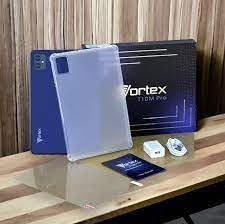
Image: Contents of the Vortex T10M Pro+ Tablet box. This includes the tablet, a clear protective case, the power adapter, and a screen protector, all neatly arranged on a wooden surface.
2. Produktet er slutview
Familiarize yourself with the physical components and key features of your Vortex T10M Pro+ Tablet.
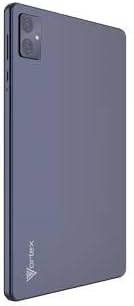
Billede: Bagside view of the Vortex T10M Pro+ Tablet. The tablet has a sleek, dark finish with the 'Vortex' logo subtly placed at the bottom. The camera module is visible in the upper left corner.

Billede: Detaljeret view of the back of the Vortex T10M Pro+ Tablet, highlighting its specifications. Printed details include '10.1-inch Brilliant Display', '5MP Front Camera', '8MP Rear Camera', 'MTK6766 Processor', 'Quad-Core, 4GB+64GB', '5000mAh Mega Battery', and 'Android 12'.
3. Opsætning
3.1. Opladning af enheden
Before first use, fully charge your tablet. Connect the provided charger to the tablet's charging port and plug it into a power outlet. The battery indicator on the screen will show charging progress.
3.2. Inserting SIM/MicroSD Card
The Vortex T10M Pro+ supports 4G LTE connectivity and expandable storage. To insert a SIM card (for mobile data) or a microSD card (for additional storage):
- Find SIM-/microSD-kortbakken på siden af tabletten.
- Brug det medfølgende SIM-kortudløserværktøj til at åbne bakken.
- Carefully place the SIM card(s) and/or microSD card into the designated slots, ensuring correct orientation.
- Skub forsigtigt bakken tilbage i tabletten, indtil den klikker på plads.
3.3. Første opstart
Press and hold the Power button located on the side of the tablet until the Vortex logo appears. Follow the on-screen prompts to complete the initial setup, including language selection, Wi-Fi connection, and Google account setup.
4. Betjeningsvejledning
4.1. Grundlæggende navigation
Your tablet runs on Android 13.0. Use touch gestures for navigation:
- Tryk på: Vælg et element, eller åbn en app.
- Stryg: Rul gennem skærme eller lister.
- Knib for at zoome: Zoom ind eller ud på fotos og web sider.
- Langt tryk: Få adgang til kontekstmenuer eller flyt ikoner.
4.2. Tilslutning til Wi-Fi
Sådan opretter du forbindelse til et Wi-Fi-netværk:
- Gå til Indstillinger > Netværk og internet > Internettet.
- Slå Wi-Fi til.
- Vælg det ønskede netværk fra listen, og indtast adgangskoden, hvis du bliver bedt om det.
4.3. Using Mobile Data (4G LTE)
If you have inserted a valid SIM card with an active data plan:
- Gå til Indstillinger > Netværk og internet > SIM-kort.
- Ensure Mobile data is enabled for your SIM.
4.4. Kamerabetjening
Tabletten har et 8MP bagkamera og et 5MP frontkamera.
- Åbn kamera-appen.
- Tryk på udløserknappen for at tage et billede.
- Skift mellem forreste og bageste kamera ved hjælp af kamera-til/fra-ikonet.
4.5. Administration af lagerplads
Your tablet comes with 64GB of internal storage. You can expand this using a microSD card up to 128GB. To view lagerforbrug, gå til Indstillinger > Opbevaring.
5. Vedligeholdelse
5.1. Rensning
Brug en blød, fnugfri klud til at rengøre skærmen og tablettens kabinet. Undgå at bruge skrappe kemikalier eller slibende materialer.
5.2. Softwareopdateringer
Periodically check for software updates to ensure your tablet has the latest features and security patches. Go to Indstillinger > System > Systemopdatering.
5.3. Batteripleje
For at forlænge batterilevetiden:
- Undgå ekstreme temperaturer.
- Lad ikke batteriet aflades helt ofte.
- Tag stikket ud af opladeren, når batteriet er fuldt opladet.
6. Fejlfinding
Dette afsnit omhandler almindelige problemer, du kan støde på med din tablet.
| Spørgsmål | Mulig løsning |
|---|---|
| Tabletten tænder ikke | Sørg for, at batteriet er opladet. Tryk på tænd/sluk-knappen og hold den nede i mindst 10-15 sekunder for at fremtvinge en genstart. |
| Problemer med Wi-Fi-forbindelse | Genstart tabletten og din Wi-Fi-router. Glem netværket i indstillingerne, og genopret forbindelsen. |
| Apps er langsomme eller går ned | Close background apps. Clear app cache (Settings > Apps > [App Name] > Storage > Clear cache). Restart the tablet. |
| Storage full message | Slet unødvendigt files or apps. Move media to a microSD card. |
7. Specifikationer
Detailed technical specifications for the Vortex T10M Pro+ Tablet.
| Feature | Specifikation |
|---|---|
| Modelnavn | T10M Pro+ Tablet (Unlocked) Blue 10.1" 64GB 4GB GSM 4G LTE + Wifi 8MP |
| Skærmstørrelse | 10.1 tommer |
| Max skærmopløsning | 1280 x 800 pixel |
| Opdateringshastighed | 120 Hz |
| Processor | MediaTek, 2 GHz |
| VÆDDER | 4 GB |
| Intern opbevaring | 64 GB |
| Udvidelig opbevaring | MicroSD (up to 128GB) |
| Operativsystem | Android 13.0 |
| Bagkamera | 8 MP |
| Forreste kamera | 5 MP |
| Forbindelse | 4G LTE, Wi-Fi, Bluetooth, GPS |
| Batteritype | Lithium-ion |
| Gennemsnitlig batterilevetid | 18 timer |
| Produktdimensioner | 10.1 x 5 x 3 tommer |
| Farve | Sort |
8. Garantioplysninger
This product is covered by a manufacturer's warranty. Please refer to the warranty card included with your purchase or visit the manufacturer's official webwebstedet for detaljerede vilkår og betingelser vedrørende garantidækning, varighed og reklamationsproces.
9. Support
For further assistance, technical support, or service inquiries, please contact the manufacturer's customer support. Contact information can typically be found on the product packaging, the manufacturer's webwebstedet eller garantidokumentationen.
Ask a question about this manual
Ask about setup, troubleshooting, compatibility, parts, safety, or missing instructions. Manuals+ will review the question and use this page’s manual context to help answer it.