
1. Introduktion
This manual provides detailed instructions for the installation, operation, and maintenance of your Moen Sip Chrome Traditional Drinking Water Beverage Faucet (Model F7600). This faucet is designed to provide convenient access to filtered drinking water directly from your kitchen sink, offering a stylish and functional addition to your home.

Image 1.1: The Moen Sip Chrome Traditional Drinking Water Beverage Faucet, featuring a high-arc spout and a single lever handle in a polished chrome finish.
The Moen Sip faucet is compatible with Moen under-sink filtration systems (sold separately), allowing you to enjoy clean, crisp cold drinking water and reduce the need for plastic water bottles.
2. Sikkerhedsoplysninger
WARNING: Read all instructions carefully before installation and use to prevent injury or property damage.
- Sluk altid for hovedvandforsyningen, inden du påbegynder installation eller vedligeholdelse.
- Brug passende personlige værnemidler, såsom sikkerhedsbriller, under installationen.
- Sørg for, at alle forbindelser er sikre og fri for lækager, før vandforsyningen genoprettes.
- This faucet is designed for cold drinking water only. Do not connect to hot water lines unless specified by a compatible filtration system.
- Ensure proper ventilation when working under sinks.

Image 2.1: Moen faucets are certified for safe drinking water by NSF 61 standards, ensuring quality and safety.
3. Opsætning og installation
3.1 Pakkens indhold
Kontroller, at alle komponenter er til stede, før installationen påbegyndes:
- Moen Sip Beverage Faucet (Model F7600)
- Monteringshardware
- Connection Hoses
- Installationsvejledning (denne vejledning)
Note: Moen filtration systems (e.g., F9800 Advanced Carbon Filtration System or F9900 Reverse Osmosis System) are sold separately and are required for filtered water functionality.
3.2 Installationstrin
- Forbered installationsområdet: Turn off the main water supply to your kitchen sink. Clear the area under the sink for access.
- Monter vandhanen:
- Insert the faucet body into the pre-drilled hole on your countertop or sink. The faucet requires a single hole installation.
- From underneath the sink, secure the faucet using the provided mounting hardware (washer and mounting nut). Tighten firmly but do not overtighten.

Billede 3.1: En eksample of an under-sink setup, illustrating the space required for faucet connections and potential filtration system integration.
- Tilslut vandledninger:
- Connect the faucet's water supply line to your cold water shut-off valve. If using a Moen filtration system, connect the faucet's line to the filtered water outlet of the filtration system.
- Ensure all connections are hand-tight, then use a wrench to tighten an additional quarter turn. Avoid overtightening.

Image 3.2: Moen offers both Carbon Filters (F9800) and Reverse Osmosis (F9900) filtration systems, which can be paired with your Moen Sip faucet for filtered water.
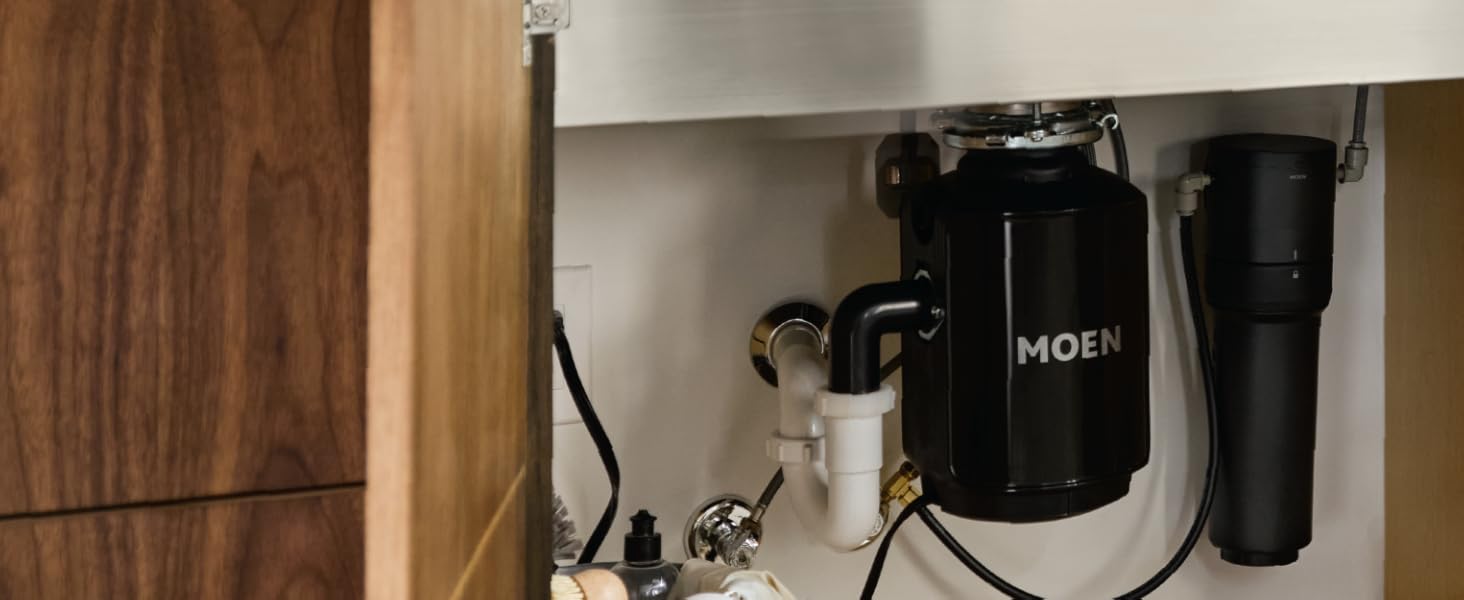
Image 3.3: The Moen Sip faucet is compatible with Moen Reverse Osmosis and Advanced Carbon filtration systems, which are installed under the sink.
- Tjek for lækager: Tænd langsomt for hovedvandforsyningen. Kontroller alle tilslutninger for lækager. Hvis der er lækager, skal du stramme tilslutningerne let, indtil de stopper.
- Skyl systemet: Allow water to run through the faucet for several minutes to flush out any debris from the new installation.
4. Betjeningsvejledning
The Moen Sip Beverage Faucet is designed for simple operation to provide filtered drinking water.
- Vandaktivering: The faucet features a single lever handle. Move the handle to activate the water flow.
- Vandstrømskontrol: The lever controls the on/off function of the water.
- Roterende tud: The high-arc spout can be rotated to provide greater convenience and control over water flow, helping to prevent splashing when filling various containers.

Image 4.1: The Moen Sip Drinking Water Faucet provides convenient access to cold, filtered drinking water directly at the sink.

Image 4.2: The high-arc design of the faucet allows for easy filling of tall glasses and pitchers.

Image 4.3: Enjoy clean and refreshing drinking water directly from your Moen Sip faucet.
5. Vedligeholdelse
5.1 Rengøring af vandhanen
To maintain the finish of your Moen faucet:
- Rengør med en blød, damp klud og mild sæbe.
- Skyl grundigt med varmt vand og tør med en blød klud.
- Undgå slibende rengøringsmidler, barske kemikalier eller skuresvampe, da disse kan beskadige kromfinishen.
5.2 Filterudskiftning (hvis relevant)
If you have connected your Moen Sip faucet to a Moen filtration system, refer to the filtration system's manual for specific filter replacement instructions and schedules. Regular filter replacement ensures optimal water quality.

Billede 5.1: Eks.ample of a filter cartridge used in compatible Moen filtration systems. Replace filters according to the filtration system's guidelines.
6. Fejlfinding
| Problem | Mulig årsag | Løsning |
|---|---|---|
| Ingen vandgennemstrømning eller lav vandgennemstrømning |
|
|
| Utæthed ved forbindelser |
|
|
| Vand smager eller lugter dårligt |
|
|
If you encounter issues not listed here, or if the problem persists, please contact Moen Customer Support.
7. Specifikationer
| Feature | Detalje |
|---|---|
| Mærke | Møn |
| Modelnavn | NIPPE TIL |
| Varenummer | F7600 |
| Farve | Chrome |
| Finish Type | Chrome |
| Materiale | Zink |
| Monteringstype | Dækmontering |
| Installationstype | Enkelt hul |
| Hulantal | 1 |
| Antal håndtag | 1 |
| Håndtag Type | Løftestang |
| Tuddesign | High-Arc Rotating Spout |
| Produktdimensioner | 16.7 x 1.88 x 10.25 tommer |
| Varens vægt | 1.8 pund |
| Anbefalede anvendelser | Køkken |
| Særlige funktioner | Rotating Spout, Filtered Water |
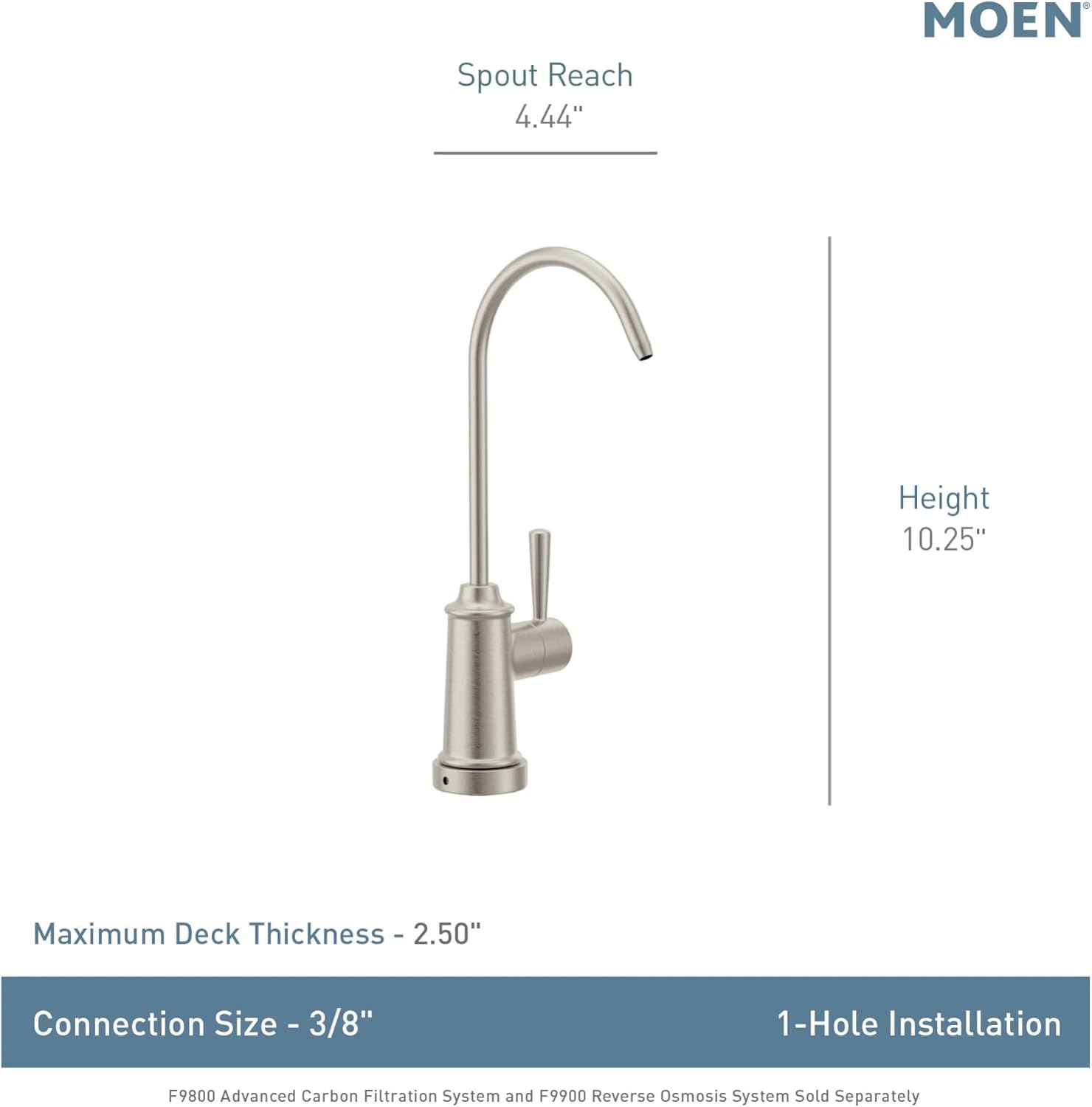
Image 7.1: Dimensional drawing of the Moen Sip faucet, indicating key measurements for installation planning.
8. Garanti og support
The Moen Sip Chrome Traditional Drinking Water Beverage Faucet (Model F7600) is backed by Moen's Limited Lifetime Warranty. This warranty covers defects in material and manufacturing workmanship under normal use.
For detailed warranty information, product registration, or technical support, please visit the official Moen website or contact Moen Customer Service:
- Moen Officiel Webwebsted: www.moen.com
- Kundeservice: Henvis til Møen website for current contact information (phone numbers, email, or chat support).
Please have your model number (F7600) and purchase date available when contacting support.