
1. Introduktion
The Pronomic DX-50 USB MKII is a professional 4-channel DJ mixer designed for a wide range of applications, including discos, parties, restaurants, and presentations. Its user-friendly design ensures that both experienced and less experienced users can fully utilize its features. This manual provides detailed instructions for setting up, operating, and maintaining your mixer.
Key features include a recording function, integrated Bluetooth interface, USB player with transport controls, and multiple input channels.
2. Vigtige sikkerhedsinstruktioner
- Læs instruktionerne: Læs alle sikkerheds- og betjeningsinstruktioner, før du bruger produktet.
- Gem instruktionerne: Gem sikkerheds- og betjeningsvejledningen til fremtidig reference.
- Vær opmærksom på advarsler: Overhold alle advarsler på produktet og i betjeningsvejledningen.
- Følg instruktionerne: Følg alle betjenings- og brugsanvisninger.
- Vand og fugt: Do not use this apparatus near water (e.g., bathtub, washbowl, kitchen sink, laundry tub, wet basement, or swimming pool).
- Ventilation: Bloker ikke ventilationsåbninger. Installer i overensstemmelse med producentens anvisninger.
- Varme: Må ikke installeres i nærheden af varmekilder såsom radiatorer, varmeapparater, komfurer eller andre apparater (inklusive ampløftere), der producerer varme.
- Strømkilder: Use only power sources specified by the manufacturer.
- Strømkabelbeskyttelse: Beskyt netledningen mod at blive trådt på eller klemt, især ved stik, stikkontakter og det sted, hvor de kommer ud af apparatet.
- Rensning: Rengør kun med en tør klud.
- Service: Forsøg ikke selv at servicere dette produkt, da åbning eller fjernelse af dæksler kan udsætte dig for farlig voltage eller andre farer. Overlad al service til kvalificeret servicepersonale.
3. Pakkens indhold
Please check that all items listed below are included in your package. If any items are missing or damaged, contact your dealer immediately.
- Pronomic DX-50 USB MKII DJ Mixer
- Power Adapter (AC 12V)
- USB Stick (32 GB, if included in your specific bundle)
- Brugervejledning (dette dokument)
4. Produktet er slutview
Familiarize yourself with the various controls and connections on your DX-50 USB MKII mixer.
4.1 Betjeningselementer på frontpanelet
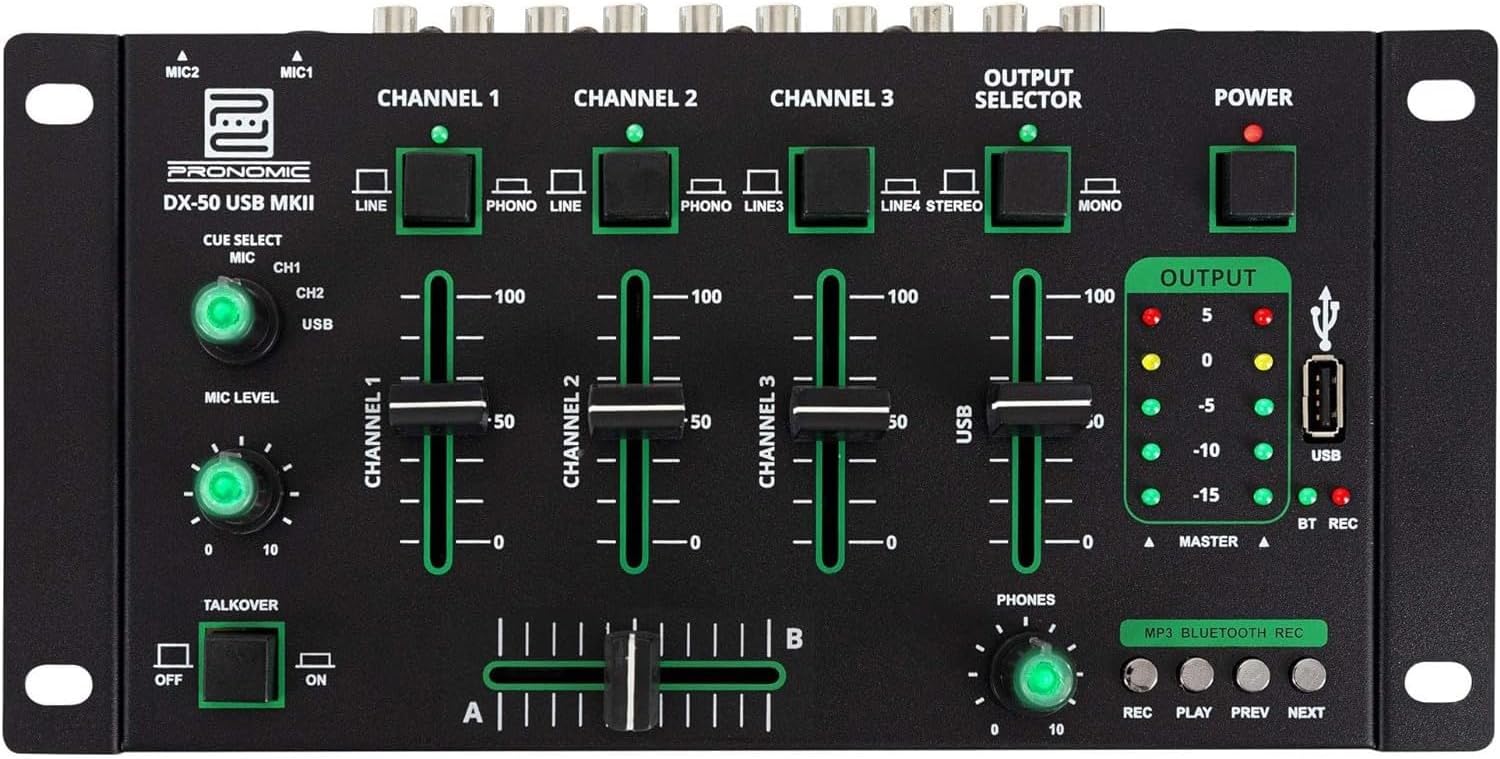
- MIC 1/2 Inputs: Tilslut mikrofoner.
- Channel 1-4 Input Selectors: Switch between LINE, PHONO, or USB/Bluetooth inputs for each channel.
- Kanalfadere: Adjust the volume level for each channel.
- CUE Select Buttons: Route specific channels to the headphone output for monitoring.
- Mikrofonniveauknap: Adjust the volume of the microphone inputs.
- Talkover-switch: Activates the talkover function, which automatically lowers music volume when speaking into the microphone.
- Udgangsvælger: Choose between Stereo or Mono master output.
- Afbryderen: Tænder/slukker mixeren.
- Udgangsniveaumålere: LED indicators showing the master output level.
- USB-port: Connect a USB drive for MP3 playback and recording.
- MP3/Bluetooth/REC Player Controls: Buttons for Play/Pause, Previous, Next, and Record functions for the integrated player.
- Phones Level Knob: Justerer lydstyrken på hovedtelefonudgangen.
- Crossfader (A/B): Blends between channels assigned to A and B.
4.2 Bagpaneltilslutninger

- AC 12V Power Input: Tilslut den medfølgende strømadapter her.
- TELEFONER Udgang: 6.3 mm stik til tilslutning af hovedtelefoner.
- MASTER OUT L/R (RCA): Connect to your main amplifier eller drevne højttalere.
- Channel 1 & 2 Inputs (RCA Line/Phono): Connect turntables (Phono) or other line-level devices (CD players, media players). Use the front panel selector to switch.
- Channel 3 & 4 Inputs (RCA Line): Connect line-level devices.
- MIC 1 & 2 Inputs (6.3mm Jack): Tilslut mikrofoner.
5. Opsætning
Follow these steps to set up your Pronomic DX-50 USB MKII mixer:
- Strømtilslutning: Ensure the mixer's power switch is in the OFF position. Connect the supplied AC 12V power adapter to the "AC 12V" input on the rear panel of the mixer. Plug the adapter into a suitable power outlet.
- Master Output Connection: Connect the "MASTER OUT L/R" RCA outputs on the rear panel to the inputs of your amplifier eller drevne højttalere.
- Tilslutning af inputenhed:
- Pladespillere: Connect turntables to the "CHANNEL 1" or "CHANNEL 2" RCA inputs. Set the corresponding input selector on the front panel to "PHONO".
- CD Players/Line Devices: Connect CD players, media players, or other line-level devices to "CHANNEL 1", "CHANNEL 2", "CHANNEL 3", or "CHANNEL 4" RCA inputs. Set the corresponding input selector on the front panel to "LINE".
- Mikrofoner: Connect microphones to the "MIC 1" or "MIC 2" 6.3mm jack inputs on the rear panel.
- Hovedtelefonforbindelse: Connect your headphones to the "PHONES" 6.3mm jack on the rear panel.
- USB Drive (Optional): If using a USB drive for playback or recording, insert it into the "USB" port on the front panel.
- Tænd: Once all connections are made, switch the mixer's power switch to the ON position. The power indicator LED will illuminate.
6. Betjeningsvejledning
6.1 Grundlæggende blanding
- Vælg input: For each channel, use the input selector switch (LINE/PHONO/USB/BT) to choose the desired audio source.
- Adjust Channel Volume: Use the vertical faders for each channel to adjust its individual volume level.
- Master output: Monitor the "OUTPUT" LED meters and adjust the master volume knob (if present, otherwise rely on channel faders and amplifier volume) to achieve a suitable overall output level without clipping.
- Crossfader: Use the crossfader to smoothly transition between channels assigned to A and B. Channels 1 and 2 are typically assigned to the crossfader.
6.2 Brug af mikrofon
- Connect your microphone to one of the MIC inputs on the rear panel.
- Adjust the "MIC LEVEL" knob on the front panel to control the microphone's volume.
- Talkover-funktion: Activate the "TALKOVER" switch to automatically reduce the volume of the music when you speak into the microphone. This is useful for announcements.
6.3 USB-afspilning og -optagelse
- USB-afspilning: Indsæt et USB-drev, der indeholder MP3 files into the "USB" port. Select "USB" as the input source for the dedicated USB channel. Use the "PLAY/PAUSE", "PREV", and "NEXT" buttons to control playback.
- USB-optagelse: Press the "REC" button to start recording the master output to the connected USB drive. Press "REC" again to stop recording. Ensure your USB drive has sufficient free space and is formatted correctly (FAT32 is commonly supported).
6.4 Bluetooth-forbindelse
- Aktiver Bluetooth: Select "BT" as the input source for the dedicated Bluetooth channel. The mixer will enter pairing mode.
- Par enhed: On your Bluetooth-enabled device (smartphone, tablet, etc.), search for available Bluetooth devices. Select "Pronomic DX-50 USB MKII" (or similar name) from the list to pair.
- Afspil lyd: Once paired, you can play audio from your device through the mixer. Control playback from your device or using the mixer's transport controls (if supported by your device).
6.5 Overvågning med hovedtelefoner
- Connect headphones to the "PHONES" output.
- Use the "CUE SELECT" buttons to choose which channels you want to monitor in your headphones without affecting the main output.
- Adjust the "PHONES" level knob to set your desired headphone volume.
7. Vedligeholdelse
- Rensning: Disconnect the power before cleaning. Use a soft, dry cloth to wipe the surface of the mixer. Do not use liquid cleaners, aerosols, or solvents.
- Opbevaring: Opbevar mixeren et køligt, tørt sted væk fra direkte sollys og ekstreme temperaturer.
- Fader and Knob Care: Avoid excessive force when operating faders and knobs. Periodically check for dust or debris accumulation around moving parts.
- Kabelstyring: Ensure cables are not kinked or strained, which can lead to damage.
8. Fejlfinding
| Problem | Mulig årsag | Løsning |
|---|---|---|
| Ingen strøm | Power adapter not connected; Power switch off; Faulty power outlet. | Check power adapter connection; Ensure power switch is ON; Try a different power outlet. |
| Ingen lyd fra hovedudgangen | Master volume too low; Amplifier/speakers off or disconnected; Incorrect input selection; Channel faders down. | Increase master volume; Check amplifier/speaker connections and power; Verify correct input selected for channels; Raise channel faders. |
| Ingen lyd fra hovedtelefoner | Headphone volume too low; Headphones not connected; No CUE selected. | Increase PHONES level; Connect headphones properly; Press CUE button for desired channel. |
| Bluetooth ikke parring | Mixer not in pairing mode; Device too far; Interference. | Ensure BT input is selected; Bring device closer; Restart mixer and device. |
| USB-afspilning virker ikke | USB-drev ikke isat korrekt; Forkert file format; USB-drev er ikke formateret korrekt. | Sæt USB-drevet i igen; Sørg for files are MP3; Format USB drive to FAT32. |
9. Specifikationer
| Model | Pronomic DX-50 USB MKII |
| Antal kanaler | 4 |
| Forbindelsesteknologi | Bluetooth, USB |
| Lydindgang | RCA (line/phono), 6.3mm microphone, Bluetooth, USB |
| Udgangsstiktype | RCA (Master Out), 6.3mm (Phones) |
| Strømkilde | Elkabel (AC 12V adapter) |
| Dimensions (without corner brackets and controls) | 222 x 129 x 28 mm (Bredde x Dybde x Højde) |
| Total Dimensions (with corner brackets and controls) | 267 x 136 x 51 mm (Bredde x Dybde x Højde) |
| Vægt | 790 g |
10. Garanti og support
For garantioplysninger og teknisk support henvises til den dokumentation, der fulgte med dit køb, eller kontakt din forhandler. Gem dit købsbevis i tilfælde af garantikrav.
For further assistance, you may also visit the official Pronomic webwebsted eller kontakt deres kundeserviceafdeling.