
StuntCams SC-4KBLT
Brugermanual
StuntCams 4K High Definition Waterproof Bullet Camera
Model: SC-4KBLT
Indledning
The StuntCams SC-4KBLT is a true 4K high-definition waterproof bullet camera designed for a wide range of applications. It features digital video recording, photo-shooting capabilities, and high-speed USB data transmission. This versatile camera is suitable for vehicle data recording, mountain climbing, skiing, cycling, parachuting, diving, fishing, hunting, and many other activities. It also includes WiFi connectivity, H.265 video compression technology, and a 120-degree wide-angle lens for comprehensive capture.
Hvad er inkluderet
Kontroller venligst, at alle nedenstående varer er til stede i din pakke:
- 1 x 4K waterproof bullet camera
- 1 x Helmet Mount with Velcro Loops
- 1 x styrmontering
- 1 x Tripod Adapter Mount
- 1 x Nulstil nøgle
- 1 x USB ladekabel
- 1 x Brugermanual (dette dokument)

Image: All components included with the StuntCams SC-4KBLT camera, including the camera unit, various mounts, USB cable, and reset key.
Opsætning
-
1. Charging the Camera:
Before first use, fully charge the camera. Connect the provided USB Charging Cable to the camera's USB port and the other end to a USB power adapter (not included) or a computer's USB port. The charging indicator light will show the charging status.
-
2. Inserting a Micro TF Card:
The camera supports high-capacity Micro TF cards (not included). Locate the Micro TF card slot, typically under a protective cover. Gently insert the card with the contacts facing the correct direction until it clicks into place. Ensure the camera is powered off before inserting or removing the card.
-
3. Montering af kameraet:
Utilize the included Helmet Mount, Handlebar Mount, or Tripod Adapter Mount based on your intended use. Securely attach the camera to the chosen mount. Ensure the camera is firmly fixed to prevent accidental detachment during activity.
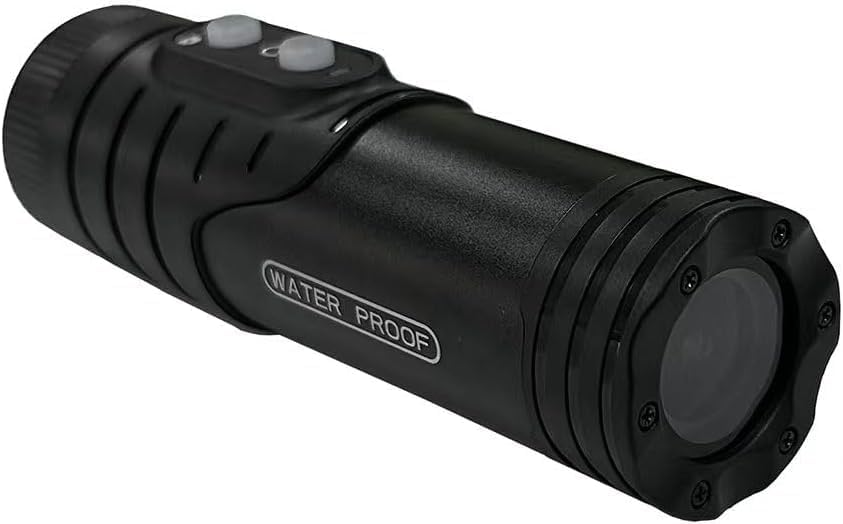
Billede: Forside view of the StuntCams SC-4KBLT camera, showing the lens and waterproof design.

Billede: Top view of the StuntCams SC-4KBLT camera, highlighting the power and mode buttons.
Betjeningsvejledning
-
1. Tænd/sluk:
Press and hold the Power button (usually marked with a power symbol) for a few seconds to turn the camera on. Repeat the action to turn it off.
-
2. Videooptagelse:
Once powered on, the camera typically defaults to video recording mode. Press the Record/Shutter button (often marked with a camera or record icon) to start recording. Press it again to stop recording. The camera supports video recording while charging.
-
3. Photo Shooting:
If your camera has a dedicated mode button, press it to switch to photo mode. Then, press the Record/Shutter button to capture a still image.
-
4. WiFi Connectivity and Live View:
The camera features WiFi connectivity. To use this feature, enable WiFi on the camera (refer to specific button presses in the quick start guide if available). Then, download the dedicated StuntCams app on your smartphone or tablet. Connect your device to the camera's WiFi network. This allows for live view, fjernbetjening og file overførsel.
Opretholdelse
-
Vandtætning:
The camera is IP66 waterproof. Ensure all ports and covers are securely closed before exposing the camera to water or moisture. Do not submerge the camera beyond its rated depth or for extended periods unless specifically designed for such use.
-
Rensning:
Brug en blød, tør klud til at rengøre kamerahuset. Brug en specialklud og -opløsning til objektivet for at undgå ridser. Brug ikke skrappe kemikalier eller slibende materialer.
-
Opbevaring:
When not in use, store the camera in a cool, dry place away from direct sunlight and extreme temperatures. Remove the Micro TF card if storing for a long period.
Fejlfinding
- Camera is unresponsive or frozen:
-
Use the provided Reset Key. Locate the small reset pinhole on the camera body. Insert the reset key into the pinhole and gently press until you feel a click. This will restart the camera without deleting data.

Billede: Side view of the StuntCams SC-4KBLT camera, showing the 'WATER PROOF' label and general form factor.
- Kan ikke oprette forbindelse til WiFi:
-
Ensure WiFi is enabled on the camera and your mobile device. Check that you have downloaded the correct StuntCams application. Try restarting both the camera and your mobile device. Ensure you are within the camera's WiFi range.
- Videokvaliteten er dårlig:
-
Ensure the lens is clean and free from smudges or dirt. Check that you are recording in 4K resolution settings if available. Ensure adequate lighting conditions for optimal video quality.
Specifikationer
| Feature | Detalje |
|---|---|
| Mærkenavn | StuntCams |
| Modelnavn | SC-4KBLT |
| Produktdimensioner | 3 x 1 x 1 tommer |
| Oprindelsesland | Kina |
| Farve | Sort |
| Forbindelsesteknologi | USB, WiFi |
| Videooptagelsesopløsning | 4K |
| Videooptagelsesformat | MP4 |
| Fotosensorteknologi | CMOS |
| Flash-hukommelsestype | Micro SD (supports high capacity) |
| Linsevinkel | 120 graders vidvinkel |
| Vandtæt vurdering | IP66 |
Garanti og support
For information regarding warranty coverage, technical support, or service inquiries, please refer to the official StuntCams webwebstedet eller kontakt deres kundeservice direkte. Gem din købskvittering som købsbevis i tilfælde af garantikrav.
Online ressourcer og ofte stillede spørgsmål kan også være tilgængelige på producentens supportsider.
Ask a question about this manual
Ask about setup, troubleshooting, compatibility, parts, safety, or missing instructions. Manuals+ will review the question and use this page’s manual context to help answer it.