
Della 9000 BTU - 115V - 24 SEER2 (Model: 048-TP-9K1V-23S-I+O)
DELLA Hyper Heat 9,000 BTU Mini Split Instruction Manual
Mærke: Della | Model: 9000 BTU - 115V - 24 SEER2 (048-TP-9K1V-23S-I+O)
1. Vigtige sikkerhedsoplysninger
Læs venligst alle instruktioner omhyggeligt inden installation og betjening. Manglende overholdelse af disse instruktioner kan resultere i materielle skader, personskade eller død.
- This system mandates professional installation. It is not a DIY mini split AC.
- Line set vacuuming is required during installation.
- No refrigerant adjustment is needed if the tube is under 25 ft; over 25 ft requires adjustment according to the manual.
- Ensure proper electrical connections. Maximum fuse size is 20A.
- Dette produkt kan indeholde kemikalier, der af staten Californien er kendt for at forårsage kræft og fosterskader eller andre reproduktionsskader (advarsel i henhold til Proposition 65).
2. Produktet er slutview & Komponenter
The DELLA Hyper Heat Mini Split system provides efficient cooling and heating for spaces up to 400 sq. ft. It features a durable and stylish indoor unit and a robust outdoor unit, designed for optimal performance and energy savings.

Figure 2.1: Main Components of the DELLA Mini Split System
Inkluderede komponenter:
| Varenr. | Komponent |
|---|---|
| 1 | Indendørsenhed |
| 2 | Udendørsenhed |
| 3 | Refrigerant Pipe (16.4ft pre-flared and insulated copper line set) |
| 4 | Drain Lines (6.56ft drainage extension) |
| 5 | Fjernbetjening |
| 6 | Gummi fødder |
| 7 | Isoleringsskum |
| 8 | Monteringsplade |
| 9 | 2 AAA batterier |
| 10 | Dræn albue |
| 11 | Vægærme |
| 12 | Plasticine-spartelmasse |
| 13 | Skruer |
| 14 | Ankre |
| 15 | Væghætte |
| 16 | Plastfolie |
| 17 | Kommunikationskabel |
| 18 | Beslagskabelon |
3. Opsætning og installation
Installation of the DELLA Mini Split AC unit requires specialized knowledge and tools. It is strongly recommended that installation be performed by a certified HVAC professional to ensure proper function, safety, and warranty validity.
Vigtige overvejelser ved installation:
- Valg af websted: Choose a location for both indoor and outdoor units that allows for proper airflow, drainage, and accessibility for maintenance.
- Montering: Securely mount the indoor unit to a wall using the provided mounting plate and the outdoor unit on a stable surface or wall bracket.
- Linjesætforbindelse: Connect the pre-flared and insulated copper line set between the indoor and outdoor units. Ensure all connections are tight to prevent refrigerant leaks.
- Støvsugning: A vacuum pump must be used to evacuate the air and moisture from the refrigerant lines before releasing refrigerant. This is a critical step for system efficiency and longevity.
- Elektriske ledninger: Connect the power supply and communication cable according to local electrical codes and the wiring diagram in the full user manual.
- Dræning: Ensure the drainage hose from the indoor unit is properly sloped to allow for continuous condensate removal.
For detailed step-by-step installation instructions, please refer to the comprehensive User Manual available for download from the product page or the manufacturer's webwebsted.
4. Betjeningsvejledning
The DELLA Mini Split offers multiple ways to control your comfort, including a remote control, a mobile app, and voice commands.
Betjening af fjernbetjening:

Figur 4.1: Fjernbetjeningens layout og funktioner
- Til/fra: Tænd eller sluk for enheden.
- Mode: Cycle through 6 modes: Cooling, Heating, Dry, Auto, Dehumidifying, and Fan.
- Temperatur op/ned: Juster den ønskede temperatur.
- Blæserhastighed: Select from 7 wind speeds (Quiet, Low, Mid Low, Mid, Mid High, High, Turbo).
- Svinge: Control vertical and horizontal airflow direction (4D airflow).
- ØKO -tilstand: Aktiverer energibesparende drift.
- Sove mode: Justerer temperaturen automatisk for en behagelig søvn.
- Timer: Set a schedule for the unit to turn on or off automatically.
- Jeg føler-tilstand: Registrerer temperaturen på fjernbetjeningens placering for præcis komfort.
Della+ App & WiFi Connectivity:
Control your mini split from anywhere using the free Della+ app on your smartphone. The unit supports WiFi connectivity for seamless remote management.

Figure 4.2: Della+ App Interface for Comprehensive Control
- Fjernbetjening: Adjust settings, change modes, and set schedules from your phone.
- Smart Geo-placering: The app can automatically turn your AC unit on or off based on your location, providing hands-free control while driving.
- Schedules & Timer: Create custom schedules for daily or weekly operation to optimize energy usage.
Stemmekontrolkompatibilitet:
The DELLA Mini Split seamlessly integrates with Amazon Alexa and Google Assistant, allowing for convenient voice commands.
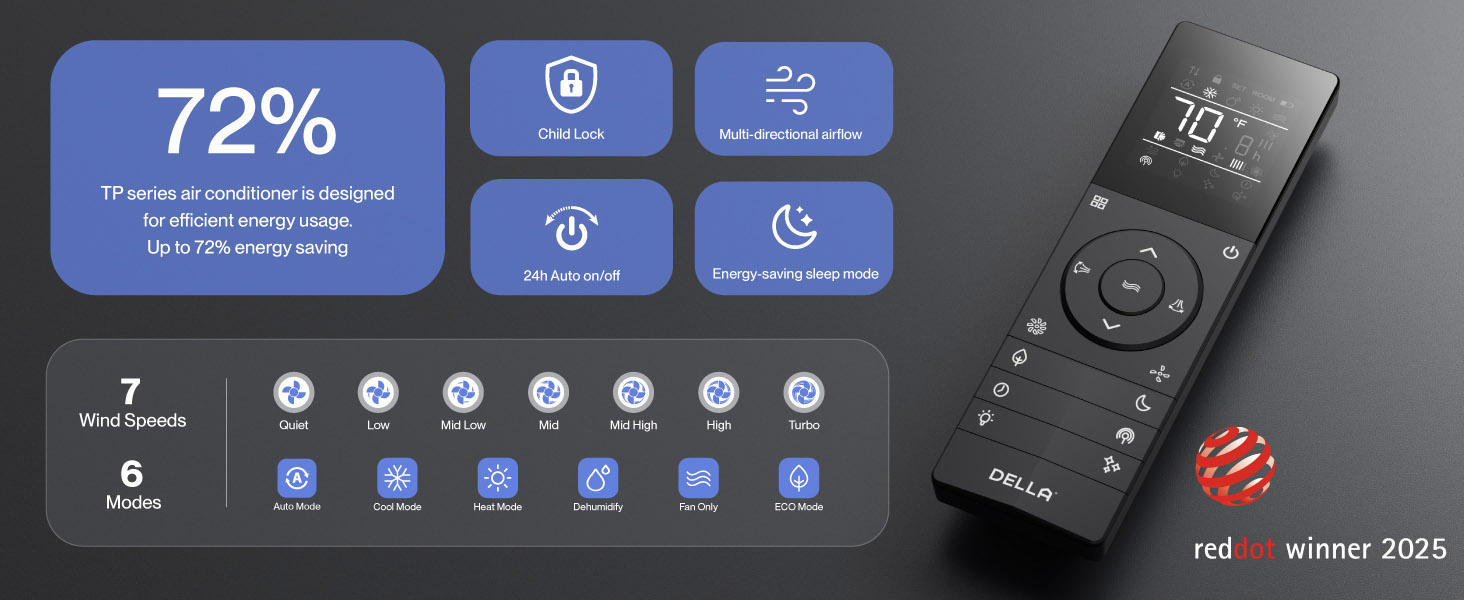
Figure 4.3: Voice Control Integration with Smart Home Devices
Simply use voice commands like "Alexa, turn on the air conditioner" to control your unit.
5. Vedligeholdelse
Regular maintenance ensures optimal performance and longevity of your DELLA Mini Split system.
- Filterrensning: Regularly clean the air filters in the indoor unit to maintain air quality and efficiency. Refer to the full manual for frequency and procedure.
- PureClean-teknologi: The unit features PureClean tech that helps stop dust buildup and defrosts your indoor unit, contributing to cleaner air and advanced sterilization.
- Gold Plated FIN Technology: The gold plated FIN technology in the outdoor unit prevents freezing and rust corrosion, enhancing durability and boosting heat efficiency, even in extreme temperatures down to -13°F (-25°C).

Figure 5.1: PureClean Technology for Cleaner Air

Figure 5.2: Gold Plated FIN Technology for Enhanced Durability
6. Fejlfinding
If you encounter issues with your DELLA Mini Split, refer to the following common troubleshooting tips. For more detailed solutions, consult the full user manual.
- Enheden tænder ikke: Kontroller strømforsyningen, afbryderen, og sørg for, at fjernbetjeningens batterier ikke er afladet.
- Utilstrækkelig køling/opvarmning: Verify correct mode selection, temperature setting, and ensure air filters are clean. Check for obstructions around indoor and outdoor units.
- Usædvanlige lyde: Some operational noises are normal (e.g., refrigerant flow). If noises are loud or unusual, consult the manual or contact support.
- Problemer med Wi-Fi-forbindelse: If the unit occasionally loses connection with Wi-Fi, try resetting the unit by cycling power at the breaker. Ensure your Wi-Fi network is stable.
- Fejlkoder: If an error code appears on the display, note the code and refer to the troubleshooting section in the comprehensive user manual for specific instructions.
If problems persist after attempting these solutions, please contact DELLA customer support.
7. Specifikationer
Key technical specifications for the DELLA Hyper Heat 9,000 BTU Mini Split.

Figur 7.1: Produktmål og nøglespecifikationer
| Specifikation | Værdi |
|---|---|
| Modelnummer | 048-TP-9K1V-23S-I+O |
| Kølekapacitet | 9000 BTU/t (0.75 tons) |
| Varmekapacitet | 10000 BTU/t |
| Strømforsyning | 115V~/60Hz/1PH |
| Max indgangseffekt | 730 watt |
| Luftmængde | 554 m³/t |
| Maks. Sikring størrelse | 20A |
| SEER2-vurdering | 24 |
| HSPF2-vurdering | 10 |
| Driftstemperatur (opvarmning) | Functional up to -13°F (-25°C) |
| Støjniveau (indendørsenhed) | Så lavt som 30 dB(A) |
| Anbefalet rumstørrelse | Op til 400 sq. ft. |
| Certificeringer | Energy Star, ETL listed, AHRI certified |

Figure 7.2: Energy Efficiency Comparison (24 SEER2)
8. Garanti og support
DELLA is committed to providing exceptional product quality and customer service.
Livstidsgaranti:
The DELLA Hyper Heat Mini Split is backed by a lifetime warranty, offering unmatched support and peace of mind. This warranty covers manufacturing defects and ensures long-term reliability without additional costs.

Figure 8.1: Lifetime Coverage and Support
Kundesupport:
For any inquiries, technical assistance, or warranty claims, please contact DELLA customer support:
- Telefonsupport: Tilgængelig mandag - fredag, kl. 6 - 4 PST.
- Live chat: Tilgængelig døgnet rundt for øjeblikkelig assistance.

Figure 8.2: Della Customer Support Options
You can also find the full User Manual (PDF) and User Guide (PDF) for this product at the following links:
Relaterede dokumenter - 9000 BTU - 115V - 24 SEER2 (Model: 048-TP-9K1V-23S-I+O)
 |
DELLA Optima (TP) serie klimaanlæg: Installations- og betjeningsmanual Omfattende vejledning til installation og betjening af DELLA Optima (TP)-serien af mini-split klimaanlæg, der dækker sikkerhed, installation, betjening, vedligeholdelse og fejlfinding. |
 |
Installations- og betjeningsmanual til klimaanlægget i Della Optima (TP)-serien Omfattende vejledning til installation og betjening af klimaanlægget i Della Optima (TP)-serien, der dækker sikkerhedsforanstaltninger, installationstrin og driftsfunktioner for optimal ydeevne. |
 |
DELLA Optima (TP) serie Mini-Split klimaanlæg: Installations- og betjeningsmanual Officiel brugsanvisning til DELLA Optima (TP)-serien af mini-split klimaanlæg. Dækker installation, sikkerhed, betjening, vedligeholdelse og fejlfinding for modeller som 048-TP-9K1V-24S. |
 |
Della Optima (TP) Series w/CloudAir Installation and Operation Manual Comprehensive installation and operation guide for the Della Optima (TP) Series mini-split air conditioner with CloudAir technology. Includes safety instructions, specifications, and troubleshooting. |
 |
Della TLP Series Multi-Zone Inverter Installation Manual Comprehensive installation and instruction manual for the Della TLP Series Multi-Zone Inverter air conditioning system, including safety guidelines, technical specifications, and setup procedures for various indoor unit models. |
 |
DELLA Multi-Zone Inverter Installation Manual & Guide Comprehensive installation manual and guide for the DELLA Multi-Zone Inverter air conditioning system, covering safety, parts, specifications, and step-by-step installation procedures. |
Ask a question about this manual
Ask about setup, troubleshooting, compatibility, parts, safety, or missing instructions. Manuals+ will review the question and use this page’s manual context to help answer it.