
ANMEATE FC-IR202
ANMEATE No-Touch Forehead Thermometer User Manual
Brand: ANMEATE | Model: FC-IR202
Indledning
The ANMEATE No-Touch Forehead Thermometer is designed for swift, accurate, and reliable temperature measurements for individuals of all ages, including adults, kids, and babies. Its non-contact design ensures hygienic use, making it ideal for monitoring body temperature without physical contact. This manual provides comprehensive instructions for setup, operation, maintenance, and troubleshooting to ensure optimal performance and longevity of your device.
Key features include 1-second rapid readings, rigorous clinical testing for accuracy, and a user-friendly design. The device also incorporates a large display with 3 backlight indicators (Green, Yellow, Red) to visually communicate temperature levels, a one-touch mute mode for quiet operation, and a memory recall function to store up to 35 previous readings. A fever warning alarm is also integrated for immediate alerts.
Nøglefunktioner
- Swift 1-Second Readings: Obtain accurate temperature readings rapidly.
- Reliable and Accurate Measurements: Clinically tested for precision with a tiny error margin.
- 3 Backlight Indicators: Green (normal), Yellow (slightly elevated), Red (fever/abnormal) for easy interpretation.
- 35 Sets of Memory Storage: Track temperature trends over time.
- One-Touch Mute Mode: For quiet operation, especially useful for sleeping individuals.
- Fahrenheit/Celsius kan skiftes: Skift nemt mellem temperaturenheder.
- Fever Warning Alarm: Audible alert for abnormal temperatures.
- Brugervenligt design: Ergonomic and suitable for all ages (adults, kids, and babies).
- Komplet pakke: Includes thermometer, 2 AAA batteries, and user manual.
Opsætning
Installation af batteri
Your ANMEATE thermometer comes with 2 AAA batteries included. To install or replace batteries:
- Find batteridækslet på bagsiden af termometeret.
- Skub dækslet nedad for at åbne rummet.
- Isæt de 2 AAA-batterier, og sørg for at polerne (+ og -) vender korrekt som angivet inde i batterirummet.
- Skub batteridækslet tilbage på plads, indtil det klikker sikkert.

Image: Battery compartment with AAA batteries.
Video: Demonstrates how to install batteries and use the thermometer.
Betjeningsvejledning
Taking Temperature (Forehead Mode)
For at måle kropstemperatur:
- Ensure the thermometer is in Forehead Mode (indicated by a human head icon on the display). If not, refer to "Switching Temperature Modes" below.
- Hold the thermometer 0.3-1.5 inches (1-3 cm) away from the center of the forehead.
- Press the measurement button (large button with thermometer icon).
- The temperature reading will appear on the display within 1 second, accompanied by a corresponding backlight color.

Image: Non-contact forehead temperature measurement.
Video: Demonstrates how to use the thermometer for forehead temperature readings.
Taking Temperature (Object/Room Mode)
To measure the temperature of objects or a room:
- Ensure the thermometer is in Object/Room Mode (indicated by a house icon on the display). If not, refer to "Switching Temperature Modes" below.
- Point the thermometer at the object or area you wish to measure.
- Tryk på måleknappen.
- The temperature reading will be displayed.

Image: Multiple uses including object and room temperature measurement.
Video: Demonstrates switching between forehead and object/room temperature modes.
Switching Temperature Modes (Forehead/Object)
To switch between Forehead Mode and Object/Room Mode, ensure the device is OFF. Press and hold the 'Mem' button for approximately 3 seconds until the mode icon changes on the display (human head for forehead, house for object/room).
Switching Temperature Units (Fahrenheit/Celsius)
To switch between Fahrenheit (℉) and Celsius (℃) units, ensure the device is ON. Press and hold the 'Mute' button (speaker icon) for approximately 3 seconds until the unit changes on the display.
Video: Demonstrates how to switch between Fahrenheit and Celsius units.
Mute-tilstand
The thermometer features a one-touch mute mode for silent operation. This is particularly useful when taking temperatures of sleeping infants or children to avoid disturbance. Press the 'Mute' button (speaker icon) briefly to toggle the sound on or off.

Image: Silent mode for undisturbed temperature checks.
Video: Highlights the mute mode and memory recall features.
Hukommelse Genkald
The thermometer can store up to 35 sets of previous temperature readings. To access memory recall, press the 'Mem' button briefly. Each press will cycle through the stored readings. This feature is useful for tracking temperature changes over time.
Backlight Indicators
The display features a color-coded backlight to indicate temperature status:
- Grøn: Normal temperature range.
- Gul: Slightly elevated temperature, indicating caution.
- Rød: High temperature, indicating a fever or abnormal reading, often accompanied by an alarm.
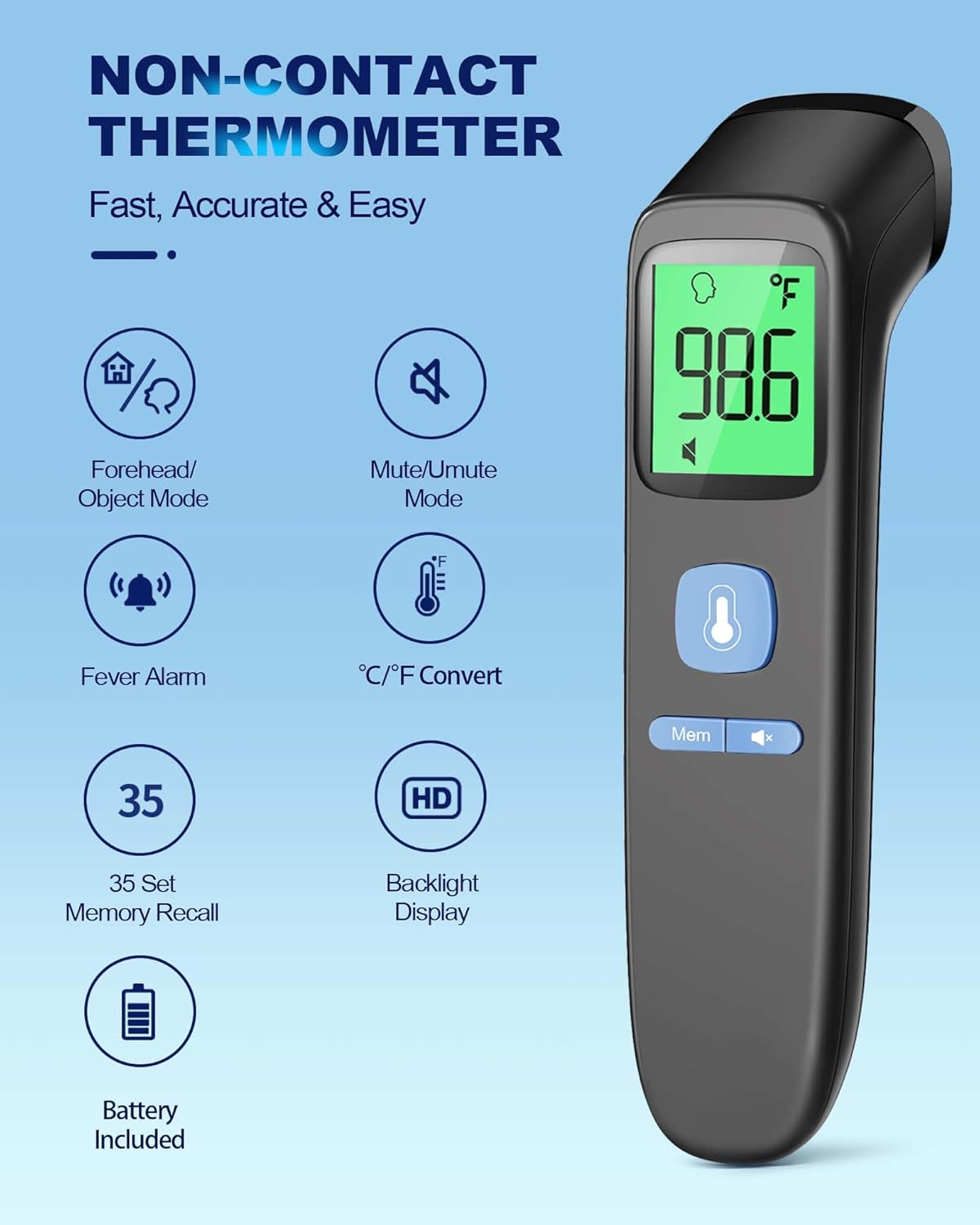
Image: Visual representation of backlight indicators.
Opretholdelse
Rensning
To ensure hygienic use and accurate readings, clean the thermometer regularly. Wipe the device with a soft, dry cloth. For disinfection, use an alcohol swab (70% isopropyl alcohol) to gently wipe the sensor and the body of the thermometer. Do not immerse the thermometer in water or any cleaning solutions.
Opbevaring
Store the thermometer in a cool, dry place away from direct sunlight, extreme temperatures, and humidity. Keep it out of reach of children. The included pouch can be used for convenient and protective storage.
Video: Demonstrates the thermometer's features, including its compact size for storage.
Fejlfinding
| Problem | Mulig årsag | Løsning |
|---|---|---|
| "Lo" eller "Hi" vises | Temperaturen er uden for det målbare område. | Ensure proper distance from the forehead (0.3-1.5 inches). Ensure the environment temperature is within operating limits. |
| Unøjagtige aflæsninger | Improper measurement distance, dirty sensor, or unstable environment. | Verify correct distance. Clean the sensor. Avoid measuring in drafts or extreme temperature changes. Allow the thermometer to acclimate to room temperature for 30 minutes before use if moved from a different environment. |
| Display tænder ikke | Døde eller forkert installerede batterier. | Kontroller batteripolariteten. Udskift batterierne om nødvendigt. |
| No sound in mute mode | Mute mode is activated. | Press the 'Mute' button to toggle sound on. |
Specifikationer
| Feature | Detalje |
|---|---|
| Produktdimensioner | 6.43 x 1.54 x 1.56 tommer; 3 ounce |
| Varemodelnummer | FC-IR202 |
| Batterier | 2 AAA-batterier påkrævet (medfølger) |
| Fabrikant | ANMEAT |
| Speciel funktion | Non-Contact, Low Battery Indicator, Ultra Clear Screen With Backlit, Fast Reading System, High Accuracy |
| Farve | Sort |
| Aldersinterval (beskrivelse) | Adult, Kid & Baby |
| Inkluderede komponenter | 1*Thermometer, 2*AAA Batteries, 1*User Manual, 1*Quick User Guide |
| Ydermateriale | Plast |
| Specifikation Met | FDA, CE, ISO 13485 |
| Display Type | Digital |
| Produktplejevejledning | Tør Clean |
| Antal enheder | 1.0 tæller |
Garanti og support
Your ANMEATE No-Touch Forehead Thermometer comes with lifetime support. For any questions, concerns, or technical assistance, please refer to the contact information provided in your Quick User Guide or visit the official ANMEATE webwebsted.