
1. Introduktion
The ZEBRONICS Riser Party DJ Speaker is designed to deliver a powerful audio experience with versatile connectivity and entertainment features. This manual provides detailed instructions for setting up, operating, and maintaining your speaker to ensure optimal performance.
2. Pakkens indhold
Markér venligst feltet for følgende elementer:
- 1 x ZEBRONICS Riser Party DJ Speaker
- 1 x fjernbetjening
- 2 x trådløse UHF -mikrofoner
- 1 x strømkabel

Image: ZEBRONICS Riser Party DJ Speaker with included accessories.
3. Produktet er slutview
3.1 Betjeningselementer på øverste panel
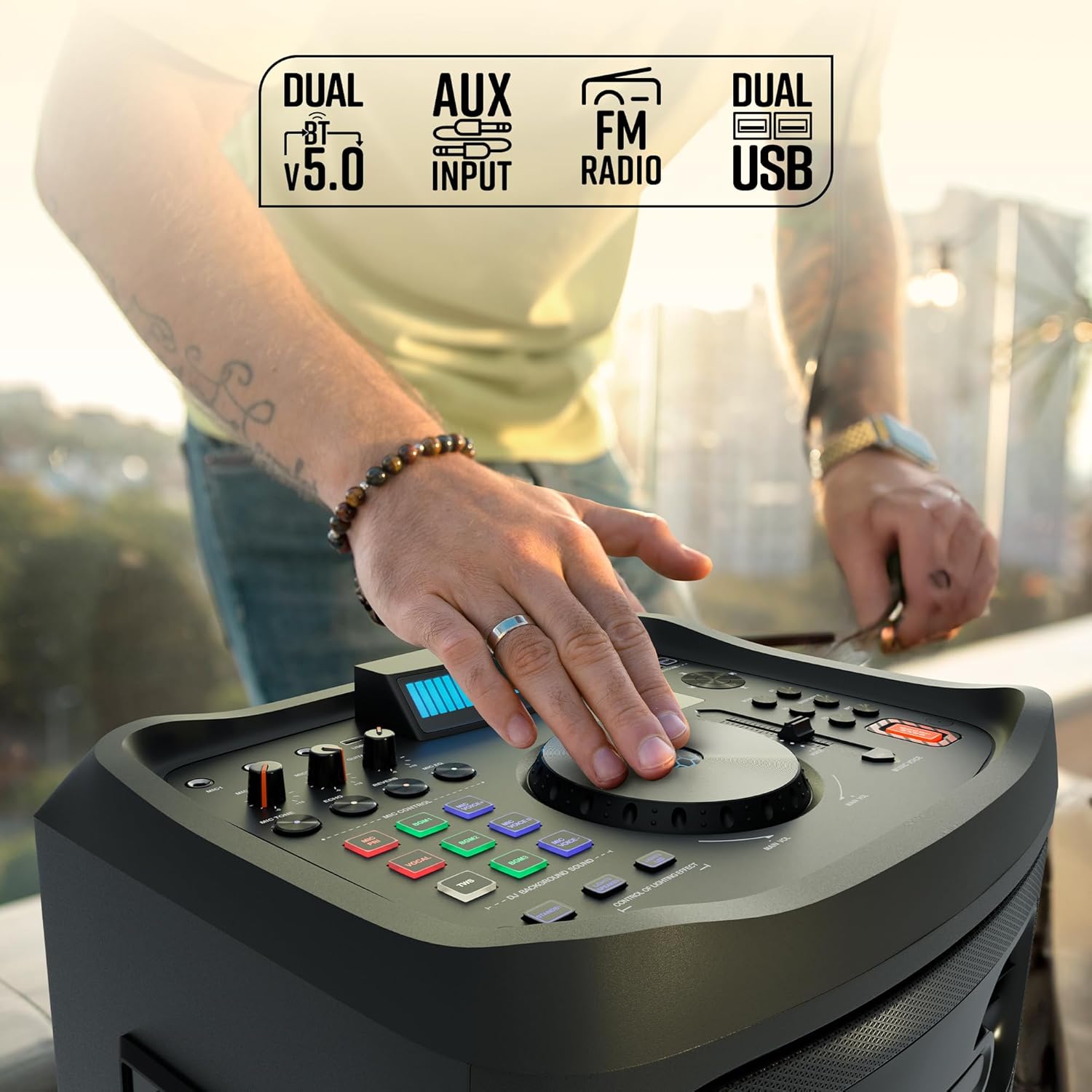
Billede: Detaljeret view af højttalerens øverste kontrolpanel.
The top panel features various controls for audio adjustment, input selection, and special functions:
- Hovedvolumenknap: Justerer den samlede højttalerlydstyrke.
- Microphone Volume Knobs (MIC1, MIC2): Controls the volume for each connected microphone.
- Guitar Volume Knob: Adjusts the volume for the connected guitar.
- Echo/Reverb/Mic Tone Knobs: Fine-tune microphone effects.
- Mode knap: Cycles through input sources (Bluetooth, USB, AUX, FM, HDMI ARC).
- Bas/diskant-kontroller: Adjusts low and high frequencies.
- EQ knap: Vælger forudindstillede equalizer-tilstande.
- Mediekontrolknapper: Play/Pause, Skip Track, Repeat.
- DJ BGM Effects: Buttons for activating various DJ background sound effects.
- LED display: Shows current mode, track information, and other settings.
- Lysstyring: Buttons to manage the speaker's LED lighting effects.
- Basforstærkningsknap: Forbedrer lavfrekvent output.
- Music Pitch Control: Adjusts the pitch of the music playback.
- Mic Pitch Control: Adjusts the pitch of the microphone input.
3.2 Bagpaneltilslutninger

Image: Rear panel connections of the speaker.
The rear panel provides essential connection ports:
- Strømindgang: Connects the power cable to an electrical outlet.
- USB-porte (x2): Til afspilning og opladning af USB-drev.
- AUX-indgang: 3.5 mm jackstik til tilslutning af eksterne lydenheder.
- HDMI (ARC)-port: For connecting to compatible TVs or audio systems.
- Guitar input: 6.3 mm jackstik til tilslutning af en guitar.
- MIC Inputs (x2): 6.3mm jacks for wired microphones (in addition to wireless mics).
4. Opsætning
4.1 Strømtilslutning
- Connect the provided power cable to the Power Input port on the rear of the speaker.
- Sæt den anden ende af strømkablet i en almindelig stikkontakt.
- Ensure the power switch on the speaker is in the 'OFF' position before connecting to power.
4.2 Indledende placering
Place the speaker on a stable, flat surface. For optimal sound dispersion, position it in an open area, away from walls or corners that might obstruct audio. The speaker is designed for floor standing use.
5. Betjeningsvejledning
5.1 Tænd/sluk
To power on the speaker, flip the power switch located on the rear panel to the 'ON' position. The LED display will illuminate. To power off, flip the switch back to 'OFF'.
5.2 Bluetooth-forbindelse
- Turn on the speaker. The default mode is usually Bluetooth. If not, press the 'Mode' button until 'BT' appears on the LED display.
- Aktiver Bluetooth på din mobilenhed, og søg efter tilgængelige enheder.
- Select 'ZEBRONICS Riser' from the list of devices.
- Once paired, the speaker will indicate a successful connection, and you can play audio from your device.
5.3 USB-afspilning
- Indsæt et USB-flashdrev med MP3-lyd files ind i en af USB-portene.
- Press the 'Mode' button until 'USB' appears on the LED display.
- Højttaleren vil automatisk begynde at afspille lyd files from the USB drive. Use the media control buttons to navigate tracks.
5.4 AUX-indgang
- Tilslut en ekstern lydenhed (f.eks. smartphone, MP3-afspiller) til AUX-indgangsporten med et 3.5 mm lydkabel.
- Press the 'Mode' button until 'AUX' appears on the LED display.
- Afspil lyd fra din tilsluttede enhed.
5.5 FM radio
- Press the 'Mode' button until 'FM' appears on the LED display.
- Use the media control buttons to scan for and select FM radio stations.
5.6 HDMI ARC-forbindelse
- Connect an HDMI cable from the HDMI ARC port on the speaker to the HDMI ARC port on your television.
- Press the 'Mode' button until 'HDMI ARC' appears on the LED display.
- Ensure your TV's audio output settings are configured for HDMI ARC.
5.7 Guitarindgang
- Connect your guitar to the 'Guitar Input' 6.3mm jack on the rear panel.
- Adjust the 'Guitar Vol' knob on the top panel to control the guitar's volume.
5.8 Microphone Input and Karaoke

Billede: Overview of microphone and karaoke features.
- Trådløse mikrofoner: Insert batteries into the provided UHF wireless microphones. Turn them on. They will automatically connect to the speaker.
- Kablede mikrofoner: Connect wired microphones to the 'MIC1' or 'MIC2' 6.3mm jacks.
- Adjust the 'MIC1 Vol' and 'MIC2 Vol' knobs to control microphone volume.
- Use the 'Echo', 'Reverb', and 'Mic Tone' knobs to add effects to your vocals.
- The 'Instant Karaoke Maker' function allows you to sing along to music.
- Utilize the 'Mic Pitch Control' for vocal adjustments.
5.9 TWS (ægte trådløs stereo) funktion

Image: Two speakers demonstrating the TWS function for stereo sound.
To connect two Zeb-Riser speakers for a true wireless stereo experience:
- Sørg for, at begge højttalere er tændt og i Bluetooth-tilstand, men endnu ikke er parret med nogen enhed.
- On one of the speakers (this will be the primary speaker), press and hold the 'TWS' button.
- The primary speaker will search for the secondary speaker and connect automatically.
- Once connected, the LED display will indicate TWS mode. You can now pair your mobile device to the primary speaker via Bluetooth, and audio will play in stereo through both units.
5.10 DJ-effekter
The speaker includes 3 DJ BGM (Background Music) Effects. Press the corresponding buttons on the top panel to activate these effects during playback.
5.11 LED Light Controls

Image: LED display and light control section.
The speaker features dynamic LED lights. Use the 'Lights Speaker' and 'Lights LED' controls on the top panel to customize or turn off the lighting effects.
5.12 Lydjusteringer
Use the 'Bass/Treble' knobs to adjust the low and high frequencies of the audio output. The 'EQ' button allows you to cycle through various preset equalizer modes to suit different music genres.
6. Vedligeholdelse
For at sikre din højttalers levetid og optimale ydeevne:
- Rengør højttalerens yderside med en blød, tør klud. Undgå at bruge slibende rengøringsmidler eller opløsningsmidler.
- Keep the speaker away from direct sunlight, excessive heat, dust, and moisture.
- Do not block the ventilation openings on the speaker.
- Opbevar højttaleren et køligt og tørt sted, når den ikke er i brug i længere perioder.
7. Fejlfinding
| Problem | Mulig årsag | Løsning |
|---|---|---|
| Ingen strøm | Strømkabel ikke tilsluttet; Strømafbryder slukket; Strømstik defekt. | Sørg for, at strømkablet er korrekt tilsluttet; Tænd for strømafbryderen; Test stikkontakten med en anden enhed. |
| Ingen lyd | Volume too low; Incorrect input mode; Device not playing audio; Cables loose. | Increase volume; Select correct input mode; Check audio playback on source device; Secure all audio cables. |
| Bluetooth forbinder ikke | Højttaler ikke i parringstilstand; Enhedens Bluetooth er slået fra; Højttaleren er allerede forbundet til en anden enhed. | Ensure speaker is in BT mode; Turn device Bluetooth on/off; Disconnect from other devices and try again. |
| Mikrofon virker ikke | Mic volume low; Batteries dead (wireless mic); Mic not connected (wired mic); Faulty mic. | Increase mic volume; Replace batteries; Ensure wired mic is fully inserted; Test with another mic if possible. |
| Lydforvrængning | Volume too high; Source audio quality poor; Speaker placed too close to interference. | Reduce volume; Use high-quality audio source; Relocate speaker away from electronic devices. |
8. Specifikationer
| Feature | Detalje |
|---|---|
| Modelnavn | Zeb-Riser |
| Udgangseffekt (RMS) | 210W |
| Driver størrelse | 25.4cm (Full-range), 7.62cm (Tweeter) |
| Forbindelse | Dual BT v5.0, USB x 2, FM, AUX, HDMI (ARC) |
| Indgange | Guitar Input, Dual 6.3mm MIC Input |
| Mikrofoner | Dual Wireless UHF Mic |
| Særlige funktioner | Instant Karaoke Maker, TWS Function, 3x DJ BGM Effects, Colorful LED lights, Dynamic Visualizer, 3D EQ, 12x Music Pitch Control, 24x Mic Pitch Control, Bass Boost |
| Monteringstype | Floor Standing |
| Strømkilde | Elektrisk med ledning |
| Varens vægt | 12.5 kg |
| Produktmål (LxBxH) | 38.3 x 46 x 73 cm |
9. Garanti og support
This product comes with a standard manufacturer's warranty. For detailed warranty information, service, or technical support, please refer to the warranty card included in your package or visit the official ZEBRONICS webwebsted. Gem din købskvittering for garantikrav.