
1. Introduktion
This manual provides essential information for the safe and efficient operation of your Metz MUD8500Z 43-inch 4K UHD Google Smart TV. Please read these instructions thoroughly before using the television and retain them for future reference. This television features a 43-inch Direct LED display with UHD 4K HDR resolution, integrated Google TV operating system, and a built-in soundbar with Wonder Audio technology.
2. Hvad er der i æsken
Pak forsigtigt dit fjernsyn ud, og kontroller, at alle følgende dele er inkluderet:
- Metz MUD8500Z 43-inch Smart TV
- Strømadapter
- Fjernbetjening
- Brugervejledning (dette dokument)
- Komponenter til tv-bord (hvis relevant)
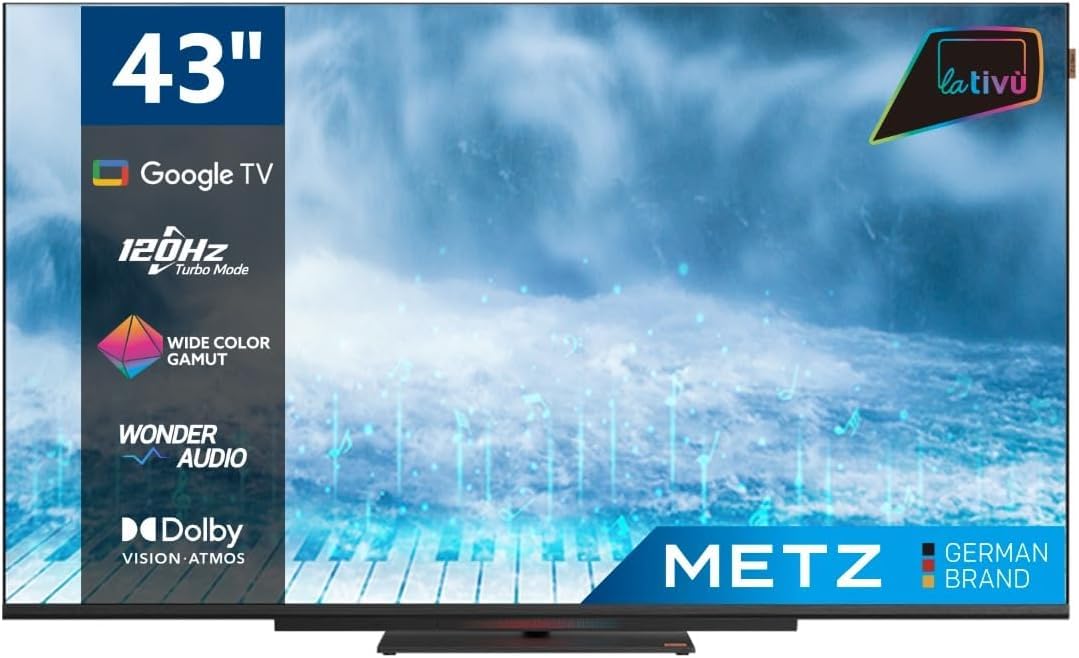
Billede: Forside view of the Metz MUD8500Z 43-inch Smart TV.
3. Opsætning
3.1. Udpakning og placering
Tag TV'et ud af emballagen. Placer TV'et på en stabil, plan overflade, eller monter det på en væg med et kompatibelt VESA-beslag (sælges separat). Sørg for tilstrækkelig ventilation omkring TV'et.

Image: Diagram showing the dimensions of the Metz MUD8500Z TV (96.6cm width, 57cm height, 11cm depth).
3.2. Tilslutning af strøm
Connect the power adapter to the TV's power input, then plug the adapter into a wall outlet. The TV will enter standby mode.
3.3. Første opsætning (Google TV)
Når du tænder det første gang, vil TV'et guide dig gennem den indledende opsætningsproces. Dette omfatter:
- Sprogvalg: Vælg dit foretrukne sprog.
- Netværks forbindelse: Connect the TV to your home Wi-Fi network or via an Ethernet cable.
- Login til Google-konto: Log ind med din Google-konto for at få adgang til Google TV-funktioner, apps og personlige anbefalinger.
- Kanalscanning: Søg efter tilgængelige tv-kanaler (antenne/kabel).
4. Betjeningsvejledning
4.1. Grundlæggende tv-funktioner
- Tænd/sluk: Tryk på tænd/sluk-knappen på fjernbetjeningen eller tv'et.
- Lydstyrkekontrol: Brug knapperne for lydstyrke op/ned på fjernbetjeningen.
- Kanalvalg: Brug knapperne Kanal op/ned eller det numeriske tastatur.
- Inputkilde: Press the 'Input' button to select HDMI, AV, or other connected devices.
4.2. Google TV Navigation
The Google TV interface provides access to streaming services, apps, and live TV. Use the directional pad and 'OK' button on your remote to navigate menus and select items.

Image: Remote control for the Metz Smart TV, highlighting dedicated buttons for popular streaming services and Google Assistant.
4.3. Google Assistant
Your TV has an integrated Google Assistant. Press the Google Assistant button on your remote or use the built-in microphone for voice commands to search for content, control smart home devices, and more.
4.4. App Access
Access a wide range of applications from the Google Play Store directly on your TV. Navigate to the 'Apps' section on the Google TV home screen to browse, download, and manage your applications.

Image: Screenshot of the Google TV interface displaying various streaming applications.
5. Funktioner
5.1. UHD 4K Resolution and HDR
Experience stunning visuals with a resolution of 3840x2160 pixels, providing exceptional clarity and detail. The 4K HDR (High Dynamic Range) support enhances contrast and color accuracy for a more lifelike picture.
5.2. Wide Color Gamut
The Wide Color Gamut technology allows the TV to display a broader spectrum of colors, resulting in more vibrant and realistic images.

Image: A visual comparison demonstrating the enhanced color range with Wide Color Gamut versus normal display.
5.3. Wonder Audio Soundbar
The integrated soundbar with Wonder Audio technology delivers an immersive and clear audio experience. This advanced sound processing algorithm improves treble and bass, offering a more realistic virtual surround sound.

Image: Diagram illustrating the internal structure of the Surging Soundbar, showing increased diaphragm area and net sound cavity volume.
5.4. Google TV Operating System
Powered by Google TV, this television provides a personalized experience with easy access to your favorite movies, shows, live TV, and apps from across your subscriptions. It also offers smart recommendations based on your viewing vaner.
5.5. 120Hz Turbo Mode
The 120Hz Turbo Mode enhances motion clarity, making fast-paced scenes and gaming content appear smoother and more fluid.

Image: Visual representation of the 120Hz Turbo Mode, illustrating enhanced smoothness for dynamic content.
5.6. Dolby Vision and Dolby Atmos
Enjoy cinematic picture quality with Dolby Vision, offering incredible brightness, contrast, and color. Dolby Atmos provides immersive, multi-dimensional audio that flows around you.
6. Forbindelser
Your Metz MUD8500Z TV offers various ports for connecting external devices:
- HDMI (x3): Tilslut Blu-ray-afspillere, spillekonsoller, set-top-bokse osv.
- USB 2.0 (x2): Tilslut USB-lagerenheder til medieafspilning.
- LAN (Ethernet): Til kablet internetforbindelse.
- AV IN: Tilslut ældre enheder med kompositvideo- og stereolydudgange.
- RF Input (Antenna/Satellite): Tilslut din jordbaserede eller satellitantenne.
- Optisk udgang: For digital audio output to a sound system or soundbar.
- CI slot: For Common Interface-moduler (f.eks. til betalings-tv-tjenester).

Billede: Detaljeret view of the rear panel connections, including CI, AV IN, RF Input, USB 2.0, HDMI, Optical Out, and LAN ports.
7. Specifikationer
| Parameter | Værdi |
|---|---|
| Modelnummer | MUD8500Z (S9147779) |
| Skærmstørrelse | 43 tommer (108 cm) |
| Displayteknologi | LED |
| Opløsning | 4K UHD (3840x2160) |
| Opdateringshastighed | 60 Hz (with 120Hz Turbo Mode) |
| Aspektforhold | 16:9 |
| Forbindelse | Ethernet, HDMI (x3), USB (x2), Wi-Fi |
| Særlige funktioner | Flat Screen, Google TV, Google Assistant, Wonder Audio Soundbar, HDR, Wide Color Gamut |
| Produktdimensioner (BxDxH) | 96.6 x 10.9 x 56.9 cm |
| Vægt | 8.2 kg |
| Energieffektivitetsklasse (SDR) | F |
| Strømforbrug (SDR) | 50.0 W |
| Energieffektivitetsklasse (HDR) | G |
| Strømforbrug (HDR) | 90.0 W |
| Stand-by magt | 0.4 W |
For detailed energy information, please refer to the official EU energy label: https://eprel.ec.europa.eu/qr/1530402
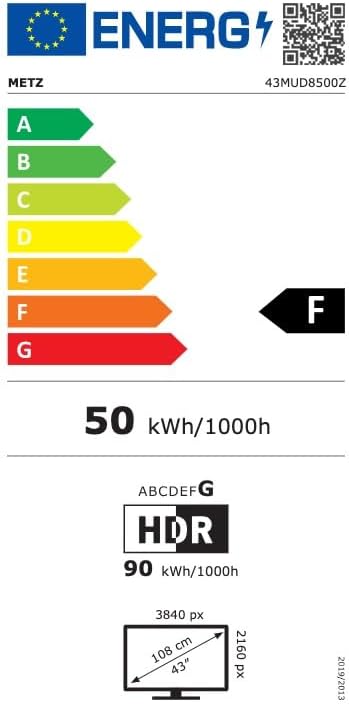
Image: EU Energy Label for the Metz MUD8500Z television, showing energy efficiency class F.
8. Fejlfinding
If you encounter issues with your TV, consult the following common problems and solutions:
- Ingen strøm:
- Ensure the power cable is securely connected to both the TV and the wall outlet.
- Check if the wall outlet is functioning by plugging in another device.
- Press the power button on the remote or TV. - Intet billede/lyd:
- Verify the correct input source is selected (e.g., HDMI 1, AV).
- Check all cable connections between the TV and external devices.
- For no sound, ensure volume is not muted or too low. - Fjernbetjeningen virker ikke:
- Udskift batterierne i fjernbetjeningen.
- Ensure there are no obstructions between the remote and the TV's IR sensor.
- Point the remote directly at the TV. - Problemer med netværksforbindelse:
- Genstart din Wi-Fi-router.
- Check Wi-Fi password and ensure it is entered correctly.
- Try connecting via an Ethernet cable if Wi-Fi issues persist. - Problemer med billedkvaliteten (f.eks. sløret, forvrænget):
- Check the resolution settings of the input source.
- Ensure the signal source (antenna, cable box, streaming) is stable.
- Adjust picture settings in the TV menu (brightness, contrast, sharpness).
Hvis problemet fortsætter efter at have prøvet disse løsninger, bedes du kontakte kundesupport.
9. Vedligeholdelse
9.1. Rengøring af skærmen
Tør forsigtigt skærmen af med en blød, fnugfri klud. Tør forsigtigt genstridige mærker afampRengør kluden med vand eller en specialiseret skærmrens. Brug ikke skrappe kemikalier eller slibende materialer.
9.2. Rengøring af kabinettet
Wipe the TV cabinet with a soft, dry cloth. Avoid using liquid cleaners directly on the TV.
9.3. Ventilation
Ensure that the ventilation openings on the back of the TV are not blocked. Proper airflow prevents overheating and prolongs the life of the TV.
10. Garanti og support
The Metz MUD8500Z television comes with a standard manufacturer's warranty. According to specifications, the minimum general warranty duration provided by the supplier is 2 years.
For warranty claims, technical assistance, or further support, please refer to the contact information provided with your purchase documentation or visit the official METZ CONNECT webwebsted.