
Indledning
This manual provides essential information for the installation, operation, maintenance, and troubleshooting of the Cisco Catalyst C9300L-24P-4X-E Network Essentials Switch. This device is designed for enterprise-grade access, offering 24 Gigabit PoE+ ports and four 10 Gbps SFP+ uplinks for robust network connectivity.
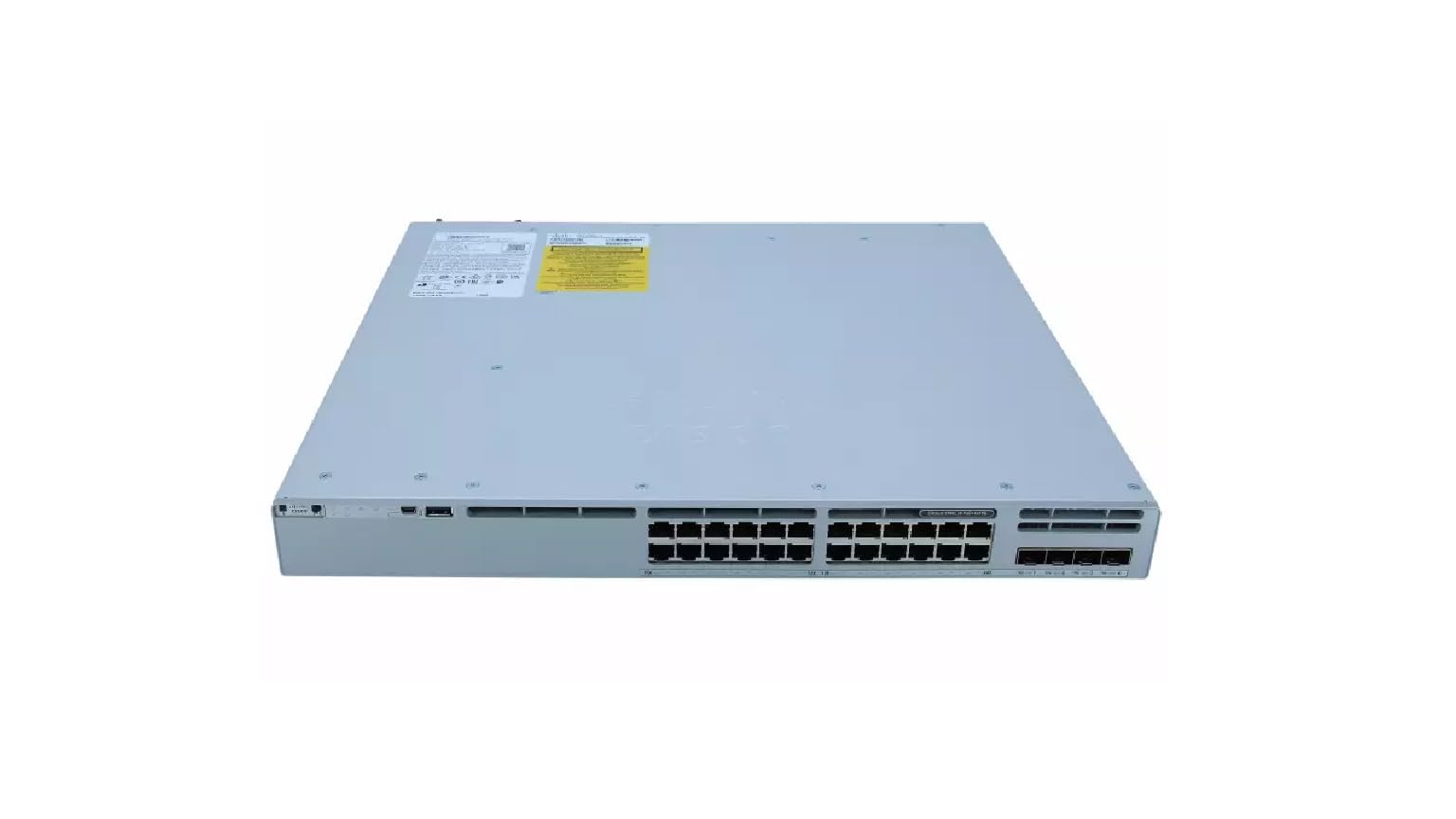
This image displays the rear panel of the Cisco Catalyst C9300L-24P-4X-E switch, highlighting the various ports, cooling fans, and the power supply unit.
Sikkerhedsoplysninger
Overhold følgende sikkerhedsforanstaltninger for at forhindre personskade og beskadigelse af udstyret:
- Sørg for korrekt jordforbindelse, før du tilslutter strømmen.
- Brug ikke kontakten i våde eller meget fugtige omgivelser.
- Brug kun godkendte netledninger og tilbehør.
- Sørg for tilstrækkelig ventilation for at forhindre overophedning.
- Afbryd strømmen, før du udfører vedligeholdelses- eller installationsprocedurer.
Pakkens indhold
Bekræft, at din pakke indeholder følgende varer:
- Cisco Catalyst C9300L-24P-4X-E Switch
- Strømledning
- Rackmonteringssæt (hvis relevant)
- Konsolkabel (RJ-45 til DB-9)
- Dokumentation (hurtigstartguide, sikkerhedsoplysninger)
Fysisk beskrivelse
The Cisco Catalyst C9300L-24P-4X-E switch features a robust design for network deployments. The rear panel includes:
- 24 Gigabit Ethernet PoE+ Ports: For connecting network devices and providing power over Ethernet.
- 4x 10Gbps SFP+ Uplink Ports: For high-speed connections to the distribution or core layer.
- Konsolport: For command-line interface access.
- USB-porte: For file management and system configuration.
- Modular Power Supply Bay: For installing power supply units.
- Køleventilatorer: Til termisk styring.
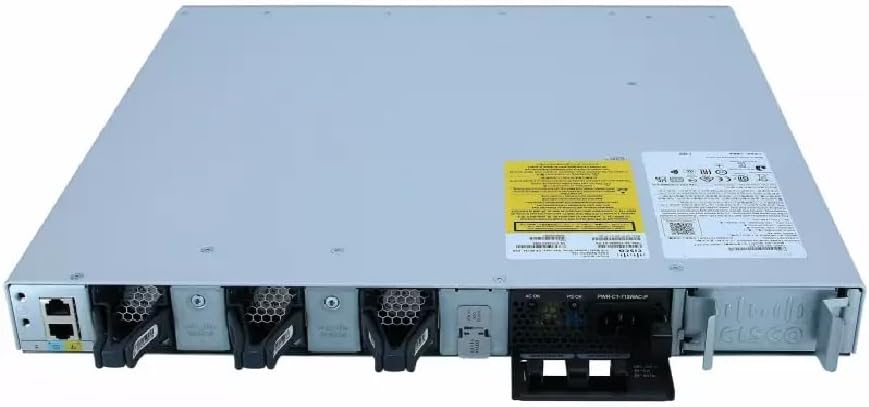
En detaljeret view of the rear panel of the Cisco Catalyst C9300L-24P-4X-E switch, illustrating the 24 Gigabit PoE+ ports, four 10Gbps SFP+ uplink ports, and the modular power supply bay.
Opsætning
1. Udpakning og inspektion
Carefully remove the switch from its packaging. Inspect the device for any signs of physical damage. If damage is found, contact your supplier immediately.
2. Montering af kontakten
The switch can be mounted in a standard 19-inch equipment rack or placed on a desktop.
- Rackmontering: Attach the provided rack-mount brackets to the sides of the switch using the screws. Secure the switch into the rack using appropriate rack screws.
- Desktop installation: Ensure the surface is flat, stable, and allows for adequate ventilation around the switch. Attach the rubber feet (if provided) to the bottom of the switch.
3. Tilslutning af strøm
Insert the power cord into the AC power connector on the rear of the switch. Connect the other end of the power cord to a grounded electrical outlet. Ensure the power supply is properly seated in its bay.
4. Netværksforbindelser
- PoE+ porte: Connect Ethernet cables from your network devices (e.g., IP phones, access points, surveillance cameras) to the 24 Gigabit PoE+ ports. These ports will provide both data connectivity and power.
- SFP+ Uplink-porte: Insert compatible SFP+ transceivers into the four 10Gbps SFP+ uplink ports. Connect fiber optic cables from these transceivers to your distribution or core network devices.
- Konsolport: For initial configuration or troubleshooting, connect a console cable from your management workstation to the console port on the switch.
Betjening af kontakten
1. Første opstart
After connecting power, the switch will automatically power on. Observe the system LED indicators for boot status. The system LED should turn green once the boot process is complete.
2. Grundlæggende konfiguration
The Cisco Catalyst C9300L-24P-4X-E runs on Cisco IOS XE. Initial configuration can be performed via the console port using a command-line interface (CLI) or through a web-based graphical user interface (GUI) if enabled. Refer to Cisco's official documentation for detailed configuration guides.
3. LED-indikatorer
The switch features various LED indicators to provide status information:
- System LED: Indicates overall system status (e.g., green for normal operation, amber for warning).
- PoE LED: Angiver status for Power over Ethernet for portene.
- Portstatus LED'er: Indicate link status and activity for each network port.
Opretholdelse
Regelmæssig vedligeholdelse sikrer optimal ydeevne og levetid for din switch:
- Rensning: Rengør jævnligt ydersiden af kontakten med en blød, tør klud. Sørg for, at ventilationsåbningerne er fri for støv og snavs. Brug ikke flydende rengøringsmidler direkte på enheden.
- Firmwareopdateringer: Keep the switch firmware updated to the latest version provided by Cisco. This ensures access to new features, security patches, and performance improvements.
- Miljøkontrol: Maintain the operating environment within specified temperature and humidity ranges to prevent hardware failure.
- Kabelstyring: Ensure all cables are neatly organized and properly secured to prevent accidental disconnections or damage.
Fejlfinding
Hvis du støder på problemer med din switch, kan du overveje følgende fejlfindingstrin:
- Ingen strøm: Verify the power cord is securely connected to both the switch and the power outlet. Check the power source and any circuit breakers. Ensure the power supply unit is correctly installed.
- Ingen netværksforbindelse: Check the link status LEDs on the affected ports. Ensure Ethernet cables are properly connected and undamaged. Verify connected devices are powered on and functioning correctly.
- PoE-enhed tænder ikke: Confirm the PoE+ port is enabled and the device is PoE compatible. Check the PoE budget and ensure it's not exceeded.
- Langsom ydeevne: Check for network congestion, duplex mismatches, or errors on ports. Ensure uplink bandwidth is sufficient.
- Accessing the Switch: If unable to access via network, try connecting directly to the console port for CLI access.
Specifikationer
| Feature | Detalje |
|---|---|
| Mærke | Cisco |
| Modelnummer | C9300L-24P-4X-E |
| Antal havne | 24 Gigabit PoE+ ports, 4x 10Gbps SFP+ uplinks |
| Interface | PoE, SFP+ |
| Dataoverførselshastighed | 1 Gigabits Per Second (Gigabit Ethernet), 10 Gigabits Per Second (Uplinks) |
| Voltage | 240 volt (AC) |
| Switch Type | Managed, Fixed, PoE+, Layer 2 |
| Etuimaterialetype | Plast |
| Kompatible enheder | Desktop, Laptop, Printer (and other network devices) |
Garantioplysninger
Dette produkt leveres med en 90 dages begrænset garanti. Please refer to the warranty documentation provided with your purchase for specific terms and conditions. For warranty claims, contact your reseller or the manufacturer's support channels.
Teknisk support
For further assistance, technical support, or advanced configuration guidance, please refer to the official Cisco documentation available on their website. You may also contact your authorized Cisco reseller or support provider for specialized assistance.
Cisco Support Webwebsted: https://www.cisco.com/c/en/us/support/index.html