Indledning
This manual provides detailed instructions for the installation, operation, maintenance, and troubleshooting of your RONGJI 9-inch IPS Touch Screen Car Stereo. Please read this manual thoroughly before installation and use to ensure proper function and to maximize your user experience. Keep this manual for future reference.
Produktegenskaber
- Operativsystem: Android 13.0 with 4-Core CPU, 2GB RAM, and 32GB ROM for smooth performance.
- Vise: 9-inch IPS Capacitive Touch Screen with 1280*720 resolution for clear visuals.
- Smartphone-integration: Built-in Wireless Car-Play and Android Auto for seamless phone connectivity. Supports both wireless and wired connections.
- Bluetooth: Integrated Bluetooth for hands-free calling, phonebook access, and audio streaming from your mobile device.
- Radio: FM&RDS tuner with stable radio frequency for listening to broadcasts.
- Forbindelse: Built-in 5G WiFi receiver for internet access and app downloads.
- Navigation: Integrated GPS module with external GPS antenna for online and offline map navigation.
- Ratbetjening (SWC): Supports original vehicle steering wheel controls for convenient operation.
- Bag View Kamerasupport: Compatible with aftermarket rear view cameras (camera not included).
- Multi-tasking: Split Screen Function allows simultaneous display of two applications.
Opsætning og installation
The RONGJI Car Stereo is designed for plug-and-play installation in compatible Mitsubishi ASX models from 2016 to 2022. While designed for ease of installation, professional installation is recommended if you are unfamiliar with car audio systems or vehicle wiring.
Kontrol af køretøjets kompatibilitet
Before installation, verify compatibility by comparing your vehicle's center console and the back of your factory radio socket with the product images. Ensure the unit matches your vehicle's dashboard configuration.
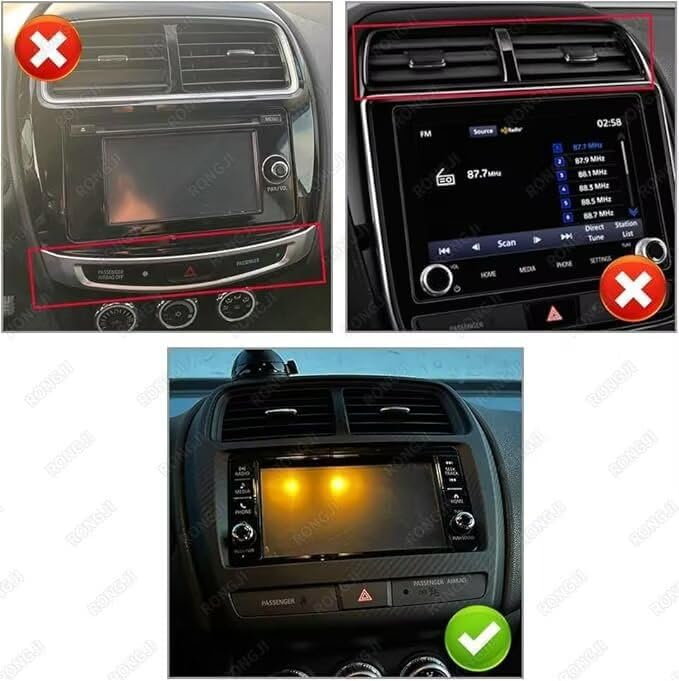
This image illustrates the correct and incorrect center console configurations for installing the RONGJI car stereo. The top two panels show incompatible setups, while the bottom panel displays a compatible dashboard with the green checkmark.
Installationstrin (generelle retningslinjer)
- Forberedelse: Frakobl køretøjets batteri for at undgå kortslutninger.
- Fjern fabriksenhed: Carefully remove the existing factory radio and trim panels using appropriate tools.
- Tilslut ledninger: Connect the provided wiring harness from the RONGJI stereo to the vehicle's factory wiring. Ensure all connections are secure. Connect the external GPS antenna and any other accessories (e.g., rear view kamera, ekstern mikrofon).
- Test funktionalitet: Before fully reassembling, reconnect the battery and power on the unit to test basic functions like power, audio, touch screen, and steering wheel controls.
- Sikker enhed: Mount the RONGJI stereo securely into the dashboard opening.
- Saml igen: Reinstall all trim panels and ensure a snug fit.
Betjeningsvejledning
Berøringsskærmgrænseflade
The unit features a responsive IPS capacitive touch screen. Navigate through menus, select applications, and control functions by tapping, swiping, and pinching gestures similar to a smartphone.
Car-Play and Android Auto
The stereo includes built-in Car-Play and Android Auto for integrating your smartphone. Connect wirelessly via Bluetooth or use your original phone cable for a wired connection. This allows access to navigation, music, calls, and other compatible apps directly from the head unit's screen.

This image displays the user interfaces for Car-Play (left) and Android Auto (right), illustrating how smartphones connect wirelessly or wired to the head unit.
GPS-navigation
Utilize the built-in GPS module and external antenna for precise navigation. The unit supports both online and offline maps. Download free maps for your region via WiFi for offline use. The system provides real-time traffic conditions and accurate positioning.

This image illustrates the GPS navigation interface with accurate positioning and the WiFi connectivity feature, allowing for online content and map downloads.
WiFi-forbindelse
Connect to a WiFi network or mobile hotspot to access online features, download applications, stream music, and browse the internet directly from the head unit.
Opdelt skærmfunktion
To use the split screen feature, open an application, then drag another compatible application from the app drawer to the side of the screen. This allows you to view and interact with two applications simultaneously, such as navigation and music.
Ratbetjening (SWC)
After proper installation and configuration, your vehicle's steering wheel controls can be used to manage audio playback, answer calls, and navigate menus, enhancing driving safety and convenience.

This image demonstrates the split screen feature, showing music and map applications simultaneously, and highlights the integration with steering wheel controls for safe operation.
FM RDS Radio and Bluetooth
Access the FM radio tuner to scan for stations automatically or manually. The RDS function provides station information. Use the built-in Bluetooth for hands-free calls and to stream audio from your paired smartphone. The unit supports phonebook synchronization and call records.

This image illustrates the FM RDS Radio interface with station tuning options and the Bluetooth function for hands-free calling and music streaming.
Opretholdelse
To ensure the longevity and optimal performance of your RONGJI Car Stereo, follow these maintenance guidelines:
- Rengøring af skærm: Brug en blød, fnugfri klud til forsigtigt at tørre berøringsskærmen af. Ved genstridige pletter, tør let afampRengør kluden med vand eller et skærmsikkert rengøringsmiddel. Undgå skrappe kemikalier eller slibende materialer.
- Temperaturkontrol: Undgå at udsætte enheden for ekstreme temperaturer, både varme og kolde, i længere perioder.
- Støv og affald: Periodically clean around the unit to prevent dust and debris from accumulating in vents or ports.
- Softwareopdateringer: Tjek regelmæssigt efter tilgængelige softwareopdateringer for at sikre optimal ydeevne og adgang til nye funktioner.
Fejlfinding
If you encounter issues with your RONGJI Car Stereo, refer to the following common problems and solutions:
- Ingen strøm:
- Kontrollér alle strømtilslutninger for at sikre, at de er tilsluttet korrekt.
- Kontroller, at bilens sikring til stereoanlægget er intakt.
- Sørg for, at køretøjets batteri er korrekt tilsluttet og opladet.
- Berøringsskærm reagerer ikke:
- Genstart enheden ved at slukke for køretøjets tænding og derefter genstarte den.
- Sørg for, at skærmen er ren og fri for snavs eller fugt.
- Intet GPS-signal:
- Ensure the external GPS antenna is properly connected and positioned with a clear view af himlen.
- Verify GPS settings within the unit's menu.
- Problemer med Bluetooth-forbindelse:
- Sørg for, at Bluetooth er aktiveret på både stereoanlægget og din mobilenhed.
- Slet tidligere parringer, og forsøg at parre enhederne igen.
- Flyt din mobile enhed tættere på stereoanlægget.
- Ratbetjening virker ikke:
- Verify that the SWC wiring is correctly connected during installation.
- Access the unit's settings to configure or recalibrate the steering wheel controls.
Hvis disse trin ikke løser problemet, bedes du kontakte kundesupport for yderligere assistance.
Specifikationer
| Mærke | RONGJI |
| Modelnavn | For Mitsubishi ASX 2016-2022 |
| Operativsystem | Android 13.0 |
| CPU | 4-kerne |
| VÆDDER | 2 GB |
| Hukommelseslagringskapacitet | 32 GB |
| Skærmstørrelse | 9 tommer |
| Display Type | IPS LCD |
| Opløsning | 1280 x 720 |
| Berøringsskærmtype | Kapacitiv |
| Forbindelsesteknologi | Bluetooth, WiFi |
| Supported Navigation System | GPS |
| Særlige funktioner | BT, Touchscreen, Wireless Android Auto, Wireless Car-play |
| Inkluderede komponenter | Plug-and-Play Kit |
Garantioplysninger
This RONGJI Car Stereo comes with a 1-års garanti fra købsdatoen. Denne garanti dækker fabrikationsfejl og funktionsfejl ved normal brug. Gem venligst din købsbevis i forbindelse med garantikrav. Garantien dækker ikke skader forårsaget af forkert installation, misbrug, ulykker eller uautoriserede ændringer.
Support og kontakt
For technical assistance, troubleshooting not covered in this manual, or warranty inquiries, please contact RONGJI customer support.

Our customer service team is ready to assist you.
E-mail: Rongji08@outlook.com
You can also visit the official RONGJI Store on Amazon for more product information and support resources.
RONGJI Store: Besøg butik