
ZEBRONICS Zeb-Transformer Pro
ZEBRONICS Transformer PRO Gaming trådløst tastatur og mus-kombination brugermanual
Model: Zeb-Transformer Pro
Indledning
Tak for købetasing the ZEBRONICS Transformer PRO Gaming Wireless Keyboard & Mouse Combo. This manual provides essential information for setting up, operating, and maintaining your new device. Please read it thoroughly before use to ensure optimal performance and longevity.
Produkt overview
The ZEBRONICS Transformer PRO is a high-performance wireless keyboard and mouse combo designed for gaming and productivity. It features a durable aluminum body, multi-color LED lighting, and a reliable 2.4GHz wireless connection.

Figure 1: ZEBRONICS Transformer PRO Gaming Wireless Keyboard and Mouse Combo.

Figure 2: The ZEB-Transformer Pro keyboard features a durable aluminum body and 104 keys.

Figure 3: The ZEB-Transformer Pro mouse with an ergonomic design and high precision optical sensor.
Nøglefunktioner:
- 2.4 GHz trådløs forbindelse: Ensures a stable and reliable connection for both keyboard and mouse.
- Aluminum Body Keyboard: Giver holdbarhed og en førsteklasses fornemmelse.
- 104-tasters layout: Full-sized keyboard with a dedicated Rupee key for efficient typing.
- Multi-Color LED Modes: Customizable lighting with 3 brightness levels.
- Indbygget genopladeligt batteri: For both keyboard and mouse, with power-saver mode.
- Ergonomic Mouse Design: Comfortable for extended usage with a matte finish.
- Højpræcisions optisk sensor: Mouse supports adjustable DPI settings (1600 / 2400 / 4000 DPI).
- Tilslut og brug: Nem opsætning uden behov for yderligere drivere.
Opsætningsvejledning
- Udpak kombinationen: Carefully remove the keyboard, mouse, and USB Nano Receiver from the packaging.
- Locate the USB Nano Receiver: The receiver is typically stored in a compartment on the mouse or keyboard for safe transport.
- Tilslut modtageren: Insert the USB Nano Receiver into an available USB port on your computer (Laptop or Personal Computer).
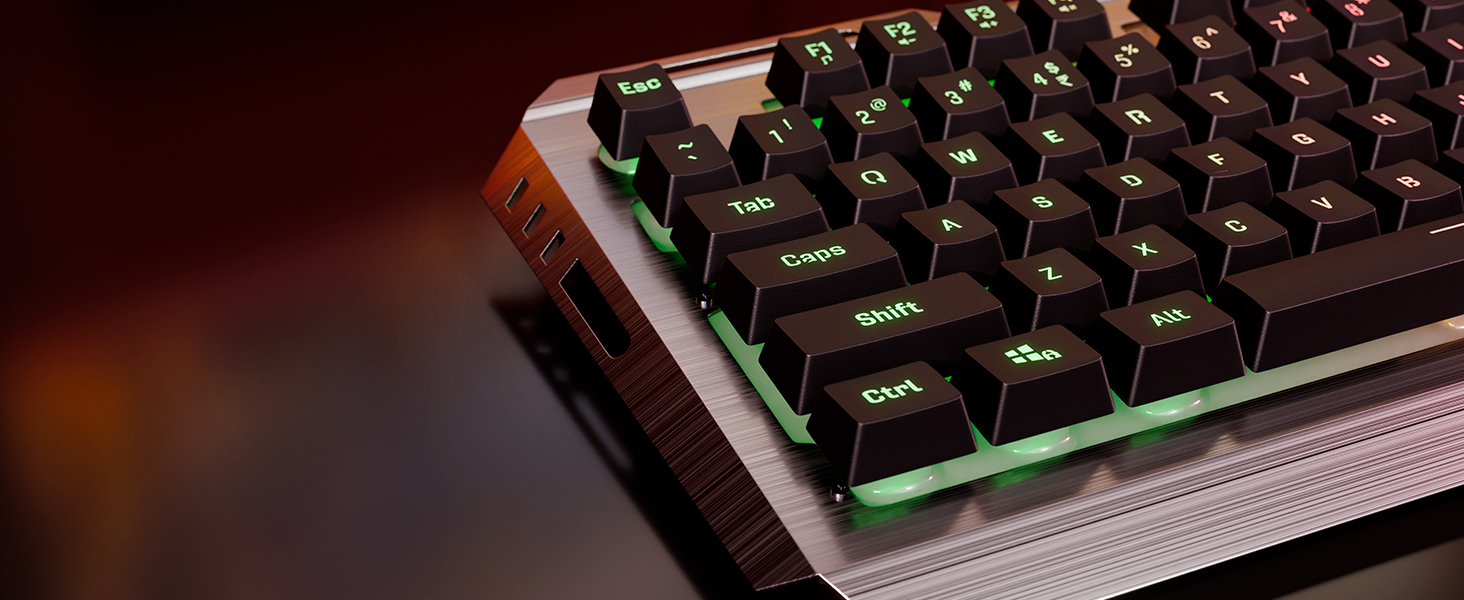
Figure 4: The compact USB Nano Receiver for wireless connectivity.
- Tænd enheder:
- For the keyboard, ensure the power switch (if present) is in the 'ON' position.
- For the mouse, locate the power switch on the underside and slide it to the 'ON' position.
- Automatisk forbindelse: The keyboard and mouse should automatically connect to your computer. No additional drivers are typically required for Windows operating systems.
- Indledende opladning: It is recommended to fully charge both the keyboard and mouse before first use. Use the provided Type-C cable to connect them to a USB power source.

Figure 5: Both the keyboard and mouse feature built-in rechargeable batteries for convenience.
Betjeningsvejledning
Tastaturfunktioner:
- LED-lysstyring:
- Tryk på Fn + Scroll Lock keys to cycle through different multi-color LED modes.
- Trykke Fn + Page Up/Page Down to adjust LED brightness levels (3 levels available).
- Trykke Fn + Hjem to turn LED lighting On/Off.

Figure 6: The keyboard offers multi-color LED modes and adjustable brightness levels.
- Windows-tastlås: Trykke Fn + Windows-tast to enable or disable the Windows key, preventing accidental presses during gaming.

Figure 7: Use Fn + Windows key to lock/unlock the Windows key.
- Multimedienøgler: Utilize the Fn key in combination with F1-F12 for various multimedia functions (e.g., volume control, media playback).
- 2-Step Stand: Adjust the keyboard's angle for comfortable typing using the integrated 2-step stand.
Musens funktioner:
- DPI-justering: Tryk på DPI knap located on the top of the mouse to cycle through DPI settings: 1600, 2400, and 4000 DPI. This allows you to adjust cursor sensitivity.

Figure 8: The mouse features a dedicated DPI button for on-the-fly sensitivity adjustments.
- Frem/Tilbage-knapper: Brug sideknapperne til hurtig navigation i web browsere eller file opdagelsesrejsende.
- Power-Saver Mode: The mouse automatically enters a power-saver mode after a period of inactivity to conserve battery. Move the mouse or click a button to wake it up.
Opretholdelse
- Rensning:
- Use a soft, dry cloth to wipe down the keyboard and mouse.
- Til genstridigt snavs, let dampRengør kluden med vand eller en mild rengøringsopløsning. Undgå for meget fugt.
- Use compressed air to remove dust and debris from between the keyboard keys.
- Batteripleje:
- Oplad enhederne regelmæssigt for at opretholde batteriets sundhed.
- Undgå at aflade batteriet helt ofte.
- If storing for a long period, charge the devices to about 50% before storage.
- Opbevaring: Opbevar kombinationen et køligt, tørt sted væk fra direkte sollys og ekstreme temperaturer.
Fejlfinding
| Problem | Mulig årsag | Løsning |
|---|---|---|
| Tastatur/mus reagerer ikke | Low battery; USB receiver disconnected; Device not powered on; Interference. | Charge devices; Reinsert USB receiver; Ensure power switch is ON; Move closer to receiver; Try a different USB port. |
| Lag eller intermitterende forbindelse | Distance from receiver; Interference from other wireless devices. | Reduce distance between devices and receiver; Move away from other 2.4GHz devices (e.g., Wi-Fi routers). |
| LED-lys virker ikke | LEDs turned off; Low battery. | Press Fn + Home to toggle LEDs; Charge keyboard. |
| Musemarkøren er uregelmæssig eller bevæger sig ikke jævnt | Snavset optisk sensor; Uegnet overflade; Lavt batteri. | Clean optical sensor; Use on a clean, non-reflective mouse pad; Charge mouse. |
Specifikationer
| Feature | Detalje |
|---|---|
| Mærke | ZEBRONIK |
| Modelnummer | Zeb-Transformer Pro |
| Forbindelse | 2.4GHz Wireless |
| Tastaturtaster | 104 nøgler |
| Keyboard Body Material | Aluminium |
| Mus DPI | 1600 / 2400 / 4000 DPI (Justerbar) |
| Batteri | Built-in Rechargeable Battery (for both keyboard and mouse) |
| Opladningsport | Type-C |
| Kompatible operativsystemer | All Windows versions |
| Kompatible enheder | Bærbar, personlig computer |
| Produktmål (tastatur) | Ca. 13.3 x 7.2 x 4.2 cm (L x B x H) |
| Varens vægt | 1 kg (total combo) |
Garanti og support
The ZEBRONICS Transformer PRO Gaming Wireless Keyboard & Mouse Combo comes with a 1 års garanti fra købsdatoen. Gem venligst din købsbevis i tilfælde af garantikrav.
For technical support, service, or warranty inquiries, please visit the official ZEBRONICS website or contact their customer service department. Refer to the product packaging or the ZEBRONICS webhjemmeside for de seneste kontaktoplysninger.
Note: Garantien dækker ikke skader forårsaget af misbrug, ulykker, uautoriserede ændringer eller normal slitage.
Ask a question about this manual
Ask about setup, troubleshooting, compatibility, parts, safety, or missing instructions. Manuals+ will review the question and use this page’s manual context to help answer it.