
TESSAN TS-WM102-2C
TESSAN Wall Outlet Extender with USB Charging Ports
Model: TS-WM102-2C
Indledning
The TESSAN Wall Outlet Extender (Model TS-WM102-2C) is designed to expand a single wall outlet into multiple power sources, providing convenience for charging various electronic devices. This unit features 4 AC outlets, 2 USB-C ports, and 1 USB-A port, along with built-in surge protection.
Please read this manual thoroughly before using the product to ensure safe and optimal operation.

Image: The TESSAN Wall Outlet Extender shown in different environments, such as a bedroom and bathroom, highlighting its versatile application.
Produktegenskaber
- 7-i-1 strømudvidelse: Converts one wall socket into 4 standard AC outlets, 2 USB-C ports, and 1 USB-A port.
- Udtag med stor afstand: Designed to accommodate larger power adapters without blocking adjacent outlets.
- USB-opladning:
- Dual USB-A ports: 2.4A maximum output.
- USB-C port: 3A maximum output.
- Automatically detects connected devices for optimal charging speed.
- Note: The USB-C port does not support devices requiring 14V to 22V charging voltage.
- Overspændingsbeskyttelse: Protects connected electronics from power surges and spikes.
- Kompakt design: Measures approximately 3.9 x 3.9 inches, suitable for various indoor environments.

Image: The TESSAN Wall Outlet Extender, illustrating its 7-in-1 functionality with widely spaced AC outlets and USB ports in use.
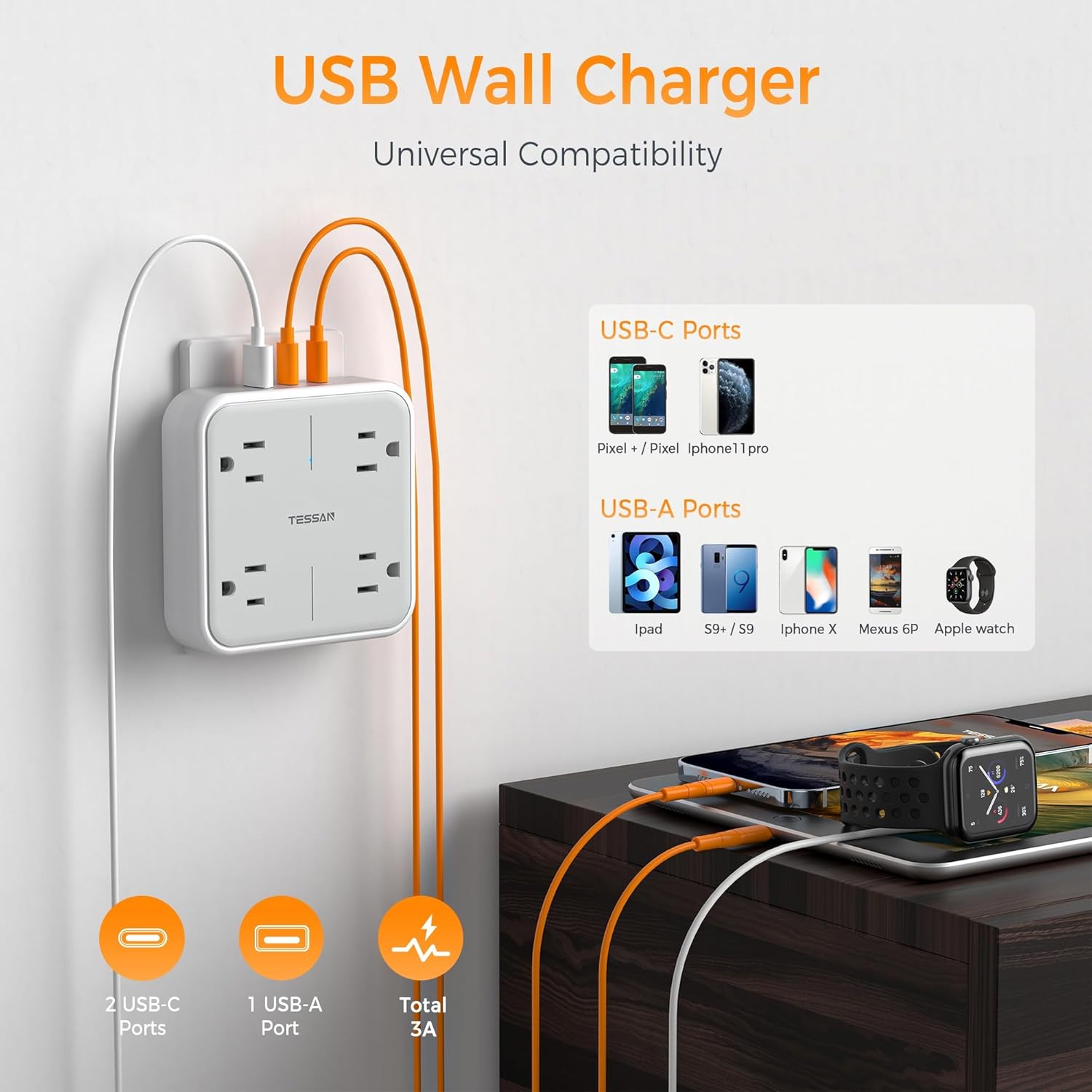
Image: USB Wall Charger functionality, highlighting compatibility with various devices for both USB-C and USB-A ports.
Opsætningsinstruktioner
- Unpack the Extender: Carefully remove the TESSAN Wall Outlet Extender from its packaging.
- Identify a Suitable Outlet: Locate a standard North American 3-prong (Type B) wall outlet. Ensure the outlet is in good condition and not damaged.
- Tilslut forlængeren: Insert the extender's plug firmly into the wall outlet. The stabilizing rod on the back of the extender helps secure it.
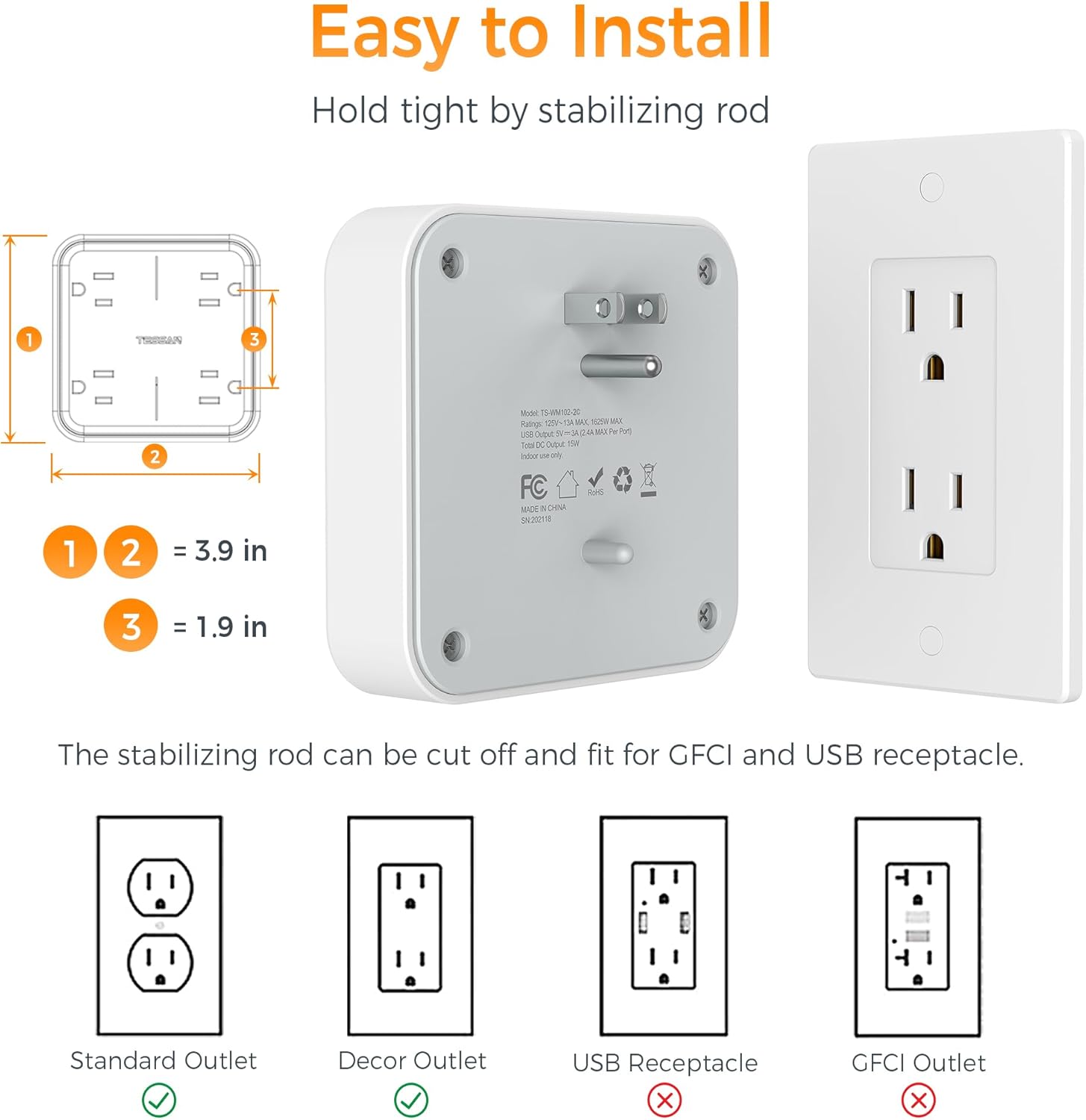
Image: Installation guide for the TESSAN Wall Outlet Extender, showing compatibility with standard and decor outlets, and the stabilizing rod.
- The stabilizing rod can be cut off if necessary for specific outlet types (e.g., decor outlets), but it is recommended to keep it for added stability.
- This extender is compatible with standard and decor outlets. It is ikke compatible with USB receptacles or GFCI outlets.
- Bekræft strøm: Once plugged in, the power indicator light (if present) on the extender should illuminate, indicating it is receiving power.
Betjeningsvejledning
- Tilslutning af AC-enheder: Plug your devices directly into any of the 4 AC outlets. The widely spaced design allows for multiple bulky adapters.
- Tilslutning af USB-enheder:
- For devices compatible with USB-C, use the 2 USB-C ports.
- For devices compatible with USB-A, use the 1 USB-A port.
- Ensure your device's charging cable is properly connected to both the device and the extender's USB port.
- Opladning af flere enheder: The extender can charge up to 7 devices simultaneously (4 AC, 2 USB-C, 1 USB-A).
- Strømforbrug: Do not exceed the maximum electrical rating of the extender (13 Amps, 125 Volts, 1875 Watts). Overloading can cause the surge protector to trip or damage the unit.
Sikkerhedsoplysninger og forholdsregler
To ensure safe operation and prevent damage to the product or connected devices, please observe the following:
- Overspændingsbeskyttelse: The unit includes built-in surge protection to safeguard against voltage pigge.
- Overbelastningsbeskyttelse: Do not exceed the specified electrical ratings (13A, 125V, 1875W).
- Kun indendørs brug: This product is designed for indoor use in dry locations. Do not use it outdoors or in wet environments.
- Undgå vand: Keep the extender away from water or other liquids.
- Ventilation: Ensure adequate ventilation around the extender. Do not cover it with cloths or other materials that could impede airflow.
- Børn og kæledyr: Opbevares utilgængeligt for børn og kæledyr.
- Demontering: Do not attempt to disassemble, repair, or modify the unit. Contact customer support if service is required.

Billede: Intern view highlighting multiple safety protections, including surge protection and fireproof materials.
Specifikationer
| Modelnummer | TS-WM102-2C |
| AC-stikkontakter | 4 |
| USB-C porte | 2 (3A Max per port) |
| USB-A porte | 1 (2.4A Max per port) |
| Samlet USB-porte | 3 |
| Voltage Bedømmelse | 125V |
| Maksimal strøm | 13 Amps |
| Power Rating | 1875 watt |
| Overspændingsbeskyttelse | Ja |
| Dimensioner | Cirka 3.9 x 3.9 tommer |
| Materiale | Plast |
| Stiktype | Type B - 3-benet (nordamerikansk) |
| Fabrikant | Zhuhai Tessan Power Technology Co., Ltd. |
Fejlfinding
- Ingen strøm til enheder:
- Ensure the extender is firmly plugged into a working wall outlet.
- Check if the wall outlet itself is functional by plugging in another device directly.
- Verify that the total power consumption of connected devices does not exceed 1875W (13A). The surge protector may have tripped. Unplug devices, reset the wall outlet (if applicable), and plug in fewer devices.
- USB-porte oplader ikke:
- Confirm that the USB cable is securely connected to both the device and the extender.
- Prøv et andet USB-kabel eller en anden enhed for at udelukke problemer med kablet eller enheden.
- Remember that the USB-C port does not support devices requiring 14V to 22V charging voltage.
- Unit Feels Hot or Causes Shocks:
- It is normal for the unit to feel slightly warm during operation. However, if it becomes excessively hot, or if you experience any electrical shocks, immediately unplug all devices and the extender from the wall outlet.
- This indicates a serious issue, potentially an overload or internal defect. Discontinue use immediately and contact customer support.
Opretholdelse
- Rensning: Disconnect the extender from the wall outlet before cleaning. Use a dry, soft cloth to wipe the surface. Do not use liquid cleaners or abrasive materials.
- Opbevaring: When not in use, store the extender in a cool, dry place away from direct sunlight and moisture.
- Inspektion: Periodically inspect the extender for any signs of damage, such as cracks in the casing or bent prongs. If damage is found, discontinue use and replace the unit.
Garanti og support
For warranty information or technical support, please contact TESSAN customer service. Refer to your purchase documentation for specific warranty terms.
Fabrikantens kontaktoplysninger:
Zhuhai Tessan Power Technology Co., Ltd.
Floor 13, Taiying Global Profit Center No. 663 Renmin West Road Xiangzhou District Zhuhai City
For further assistance, please visit the official TESSAN webwebstedet eller kontakt deres supportkanaler.
Ask a question about this manual
Ask about setup, troubleshooting, compatibility, parts, safety, or missing instructions. Manuals+ will review the question and use this page’s manual context to help answer it.