
1. Introduktion
The AOPUTTRIVER AP-9000B is a high-precision ammonia gas detector designed for continuous quantitative analysis of ammonia (NH3) concentration. It features an imported electrochemical principle ammonia gas sensor, offering fast response speed, high accuracy, good stability, and excellent repeatability. This device is equipped with a large LCD display, sound and light dual alarms, and is USB rechargeable, making it suitable for various industrial and agricultural applications.
2. Produktfunktioner
- High-precision Ammonia Detection: Measures ammonia concentration from 0 to 100 PPM with a resolution of 0.1 PPM and an accuracy of +/- 2%.
- Måling af omgivende temperatur: Monitors ambient temperature from -10°C to 50°C.
- Sound & Light Dual Alarms: Features customizable alarm thresholds. When the preset ammonia level is reached, a red light indicator and an audible beep sound simultaneously alert the user.
- USB genopladelig: Equipped with a built-in rechargeable lithium battery and includes a USB charging cable for continuous operation and reduced long-term costs.
- Datalogning: Stores up to 180 sets of historical data, recording ammonia concentration readings every minute for environmental condition monitoring.
- Farve LCD-skærm: Provides clear and easy-to-read information.

Figur 2.1: Overview of the AP-9000B Ammonia Gas Detector's key features.
3. Hvad er der i æsken
Når du åbner pakken, skal du kontrollere, at alle følgende varer er inkluderet:
- 1 x pakkeboks
- 1 x brugsanvisning
- 1 x ladekabel
- 1 x AOPUTTRIVER AP-9000B Ammonia Tester
- 1 x Opbevaringspose

Figure 3.1: Contents of the AP-9000B package.
4. Opsætning
4.1 Batteriinstallation
Before initial use, ensure the battery is correctly installed. If the battery is not pre-installed or needs replacement, follow these steps:
- Use a small screwdriver to unscrew the battery cover on the back of the device.
- Connect the battery to the interface inside the compartment.
- Tighten the battery cover securely.
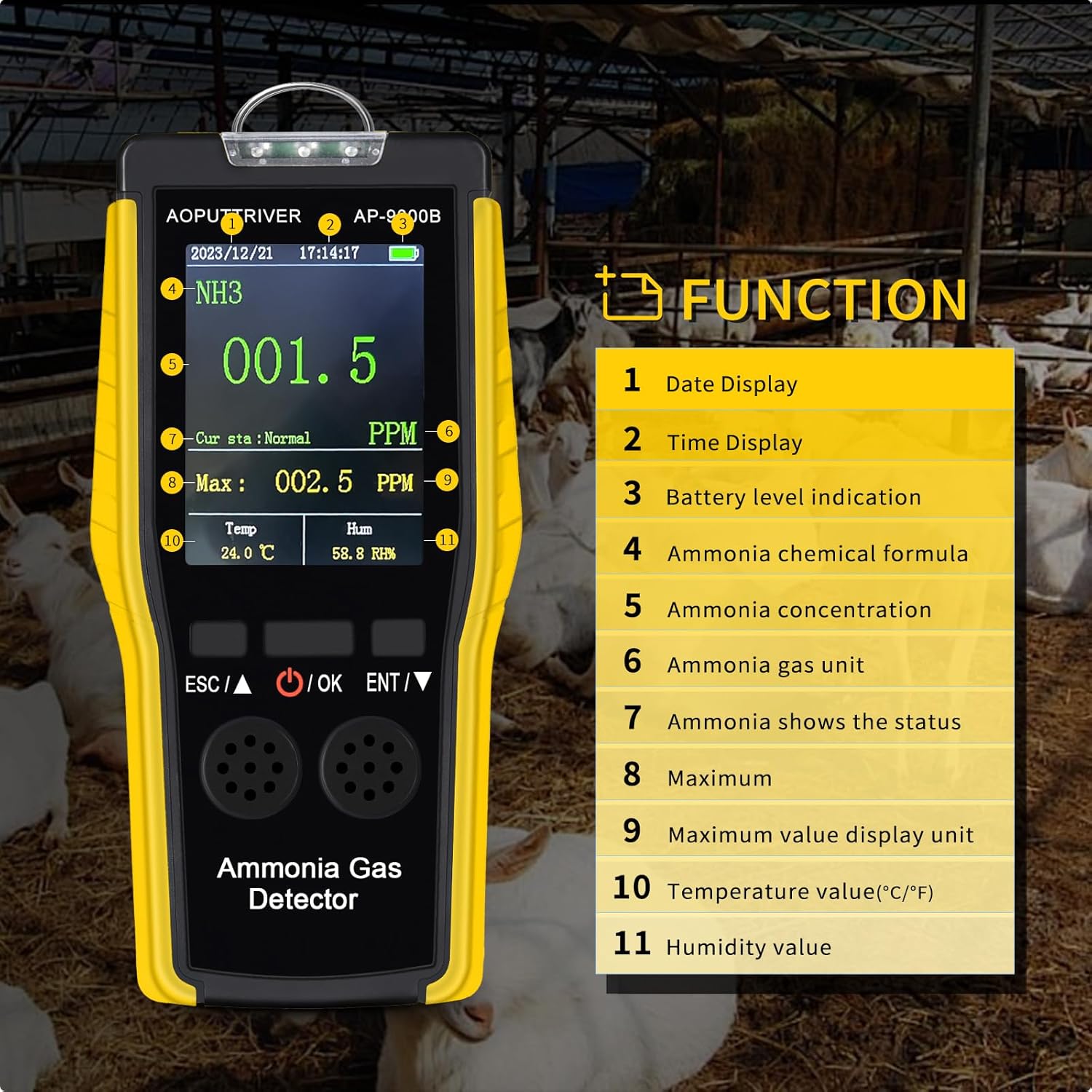
Figure 4.1: Battery installation steps.
4.2 Opladning af enheden
The AP-9000B is equipped with a rechargeable lithium battery. To charge the device:
- Find USB-opladningsporten på enheden.
- Connect the provided USB charging cable to the device and a suitable USB power source (e.g., computer, USB wall adapter).
- The battery indicator on the display will show the charging status. Charge until the battery icon indicates a full charge.
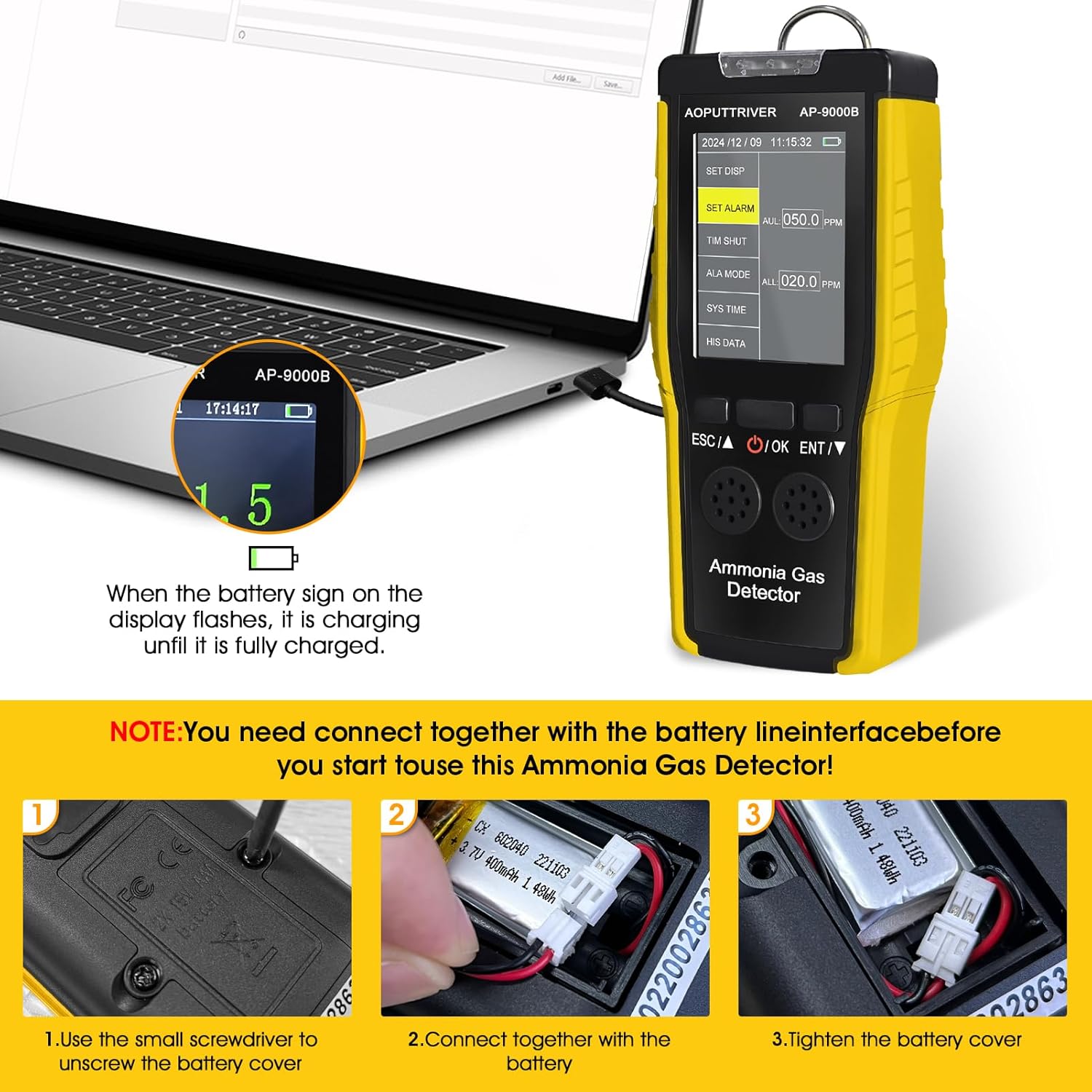
Figure 4.2: Charging the AP-9000B via USB.
5. Betjeningsvejledning
5.1 Tænd/sluk
- For at tænde: Tryk og hold på OK button until the device powers on and the display illuminates.
- For at slukke: Fra hovedskærmen skal du trykke på og holde OK button. The device will prompt for confirmation to power off. Press OK igen for at bekræfte.
5.2 Vis information
The color LCD display provides real-time information:
- Dato og tid: Shown at the top of the screen.
- Batteriniveau: Indicator at the top right.
- NH3 Concentration: Large digits display the current ammonia level in PPM.
- Nuværende status: Indicates 'Normal' or 'Alarm' status.
- Maksimal værdi: Displays the peak ammonia concentration detected.
- Temperatur: Current ambient temperature in °C or °F.
- Fugtighed: Current relative humidity (RH%).
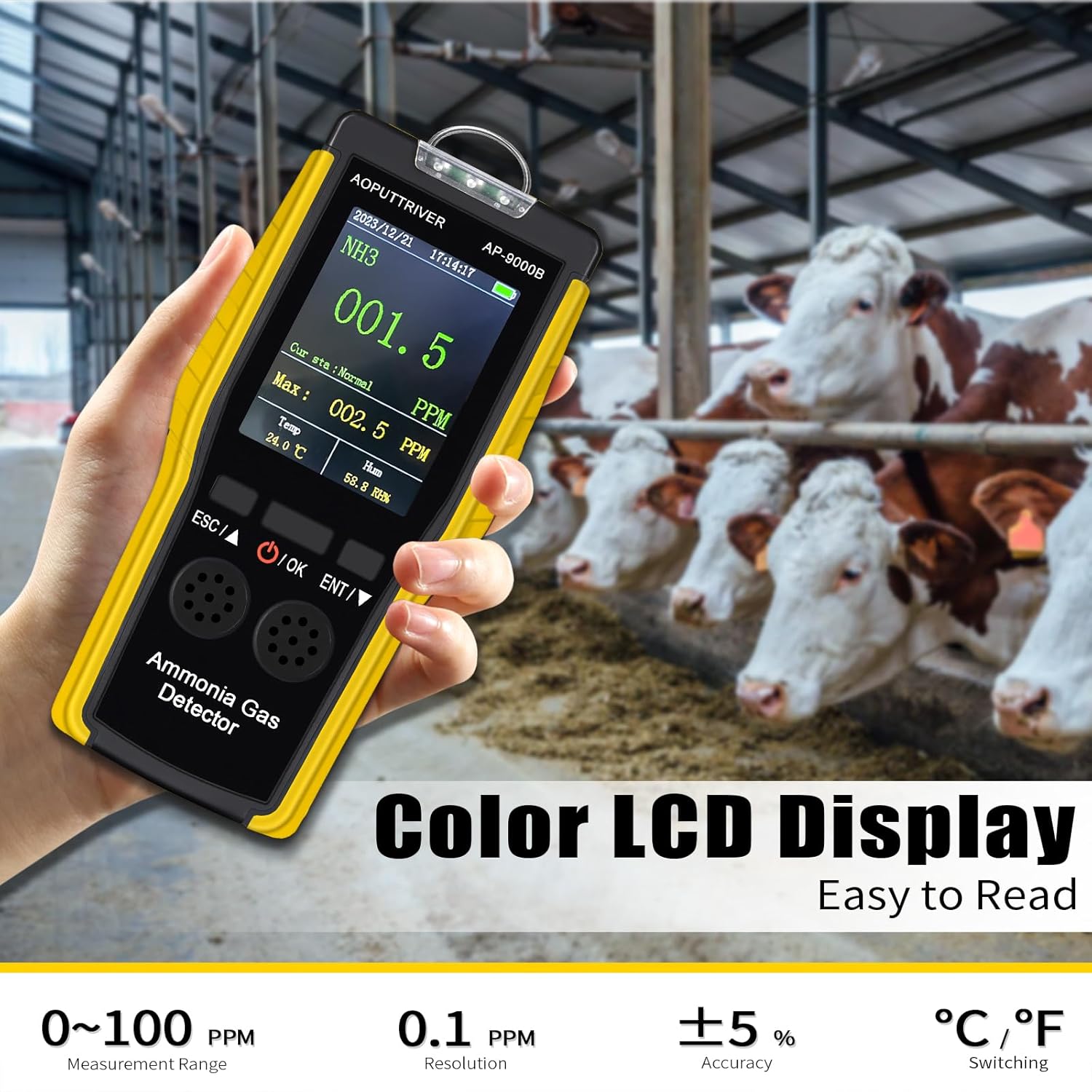
Figure 5.1: Main display interface of the AP-9000B.
5.3 Menunavigation og indstillinger
The device features a menu for various settings and data review:
- ENT/▼ Key: Long press to enter the setting function. Short press in the setting state to activate the downward function or navigate through options.
- ESC/▲ Key: Short press to activate the upward function or navigate through options.
- OK-tast: Press to confirm selections or enter sub-menus.
The settings interface includes options for:
- Display Settings (SET DISP)
- Alarm Settings (SET ALARM) - Adjust high and low alarm thresholds.
- Scheduled Shutdown (TIM SHUT)
- Alarm Mode (ALA MODE) - Select Light, Vibration, or Sound.
- System Time (SYS TIME)
- Historical Data (HIS DATA) - Review gemte aflæsninger.
Video 5.2: Demonstration of the AP-9000B's button functions and menu navigation for settings and data review.
6. Ansøgninger
The AOPUTTRIVER AP-9000B Ammonia Gas Detector is versatile and can be used in a wide range of environments where ammonia monitoring is critical. Its applications include:
- Metallurgi
- Kraftværker
- Farms (Poultry, Pig, Livestock)
- Miner
- Kemiske Anlæg
- Scientific Research Facilities
- Healthcare and Pharmaceutical Industries
- Environmental Protection Monitoring

Figure 6.1: Diverse applications of the AP-9000B Ammonia Gas Detector.
7. Safety Information: Hazards of Ammonia
Ammonia (NH3) is a hazardous gas. Understanding its concentration levels and associated risks is crucial for safety. The AP-9000B helps monitor these levels to prevent exposure to dangerous concentrations.
| Concentration (PPM) | Potentiel fare |
|---|---|
| 5 ppm | Sensory odor threshold; some individuals may detect it. |
| 20 ppm | Significant irritation in most people, generally not harmful with short exposure. |
| 20-30 ppm | Time-weighted safety thresholds for occupational exposure. |
| 100 ppm | Discomfort for most people, not harmful with limited exposure. |
| 250 ppm | Irritation of nose, throat, eyes, and other senses. |
| 400 ppm | Eye pain, tearing for 30 minutes. |
| 700 ppm | Limit of human tolerance; prolonged exposure should be avoided. |
| 2500 ppm | Intense coughing, irritation of nose, throat, etc.; may lead to death in 15 minutes. |
| 5000 ppm | Causes spasmodic dyspnea, asphyxiation, and rapid death. |

Figure 7.1: Ammonia concentration hazard levels.
8. Vedligeholdelse
To ensure the longevity and accuracy of your AOPUTTRIVER AP-9000B Ammonia Gas Detector, follow these maintenance guidelines:
- Regelmæssig rengøring: Wipe the device exterior with a soft, dry cloth. Do not use abrasive cleaners or solvents.
- Sensorpleje: Avoid exposing the sensor area to dust, dirt, or liquids, which can affect its performance.
- Batteristyring: Recharge the battery when the low battery indicator appears. Avoid fully discharging the battery frequently to prolong its lifespan. If replacing the battery, refer to Section 4.1.
- Opbevaring: Når enheden ikke er i brug i længere perioder, skal den opbevares køligt og tørt, væk fra direkte sollys og ekstreme temperaturer.
- Kalibrering: For professional applications requiring high accuracy, periodic calibration by qualified personnel may be necessary. Refer to the full technical manual for calibration procedures if applicable.
9. Fejlfinding
If you encounter issues with your AP-9000B, refer to the following common troubleshooting steps:
- Enheden tænder ikke: Ensure the battery is charged. Connect the device to a USB charger and try again. Check if the battery is correctly installed (refer to Section 4.1).
- Upræcise læsninger: Ensure the sensor area is clean and unobstructed. Avoid using the device in environments with extreme temperature or humidity fluctuations outside its operating range. Allow the device to stabilize in the environment for a few minutes before taking readings.
- Alarm virker ikke: Check the alarm settings in the menu (SET ALARM, ALA MODE) to ensure they are configured correctly and the volume/vibration is enabled.
- Visningsproblemer: If the display is dim or flickering, ensure the battery is charged. If the issue persists, contact customer support.
- Knapper reagerer ikke: Try restarting the device. If buttons remain unresponsive, contact customer support.
For persistent issues not covered here, please contact AOPUTTRIVER customer support.
10. Specifikationer
| Feature | Specifikation |
|---|---|
| Mærke | AOPUTTRRIVER |
| Modelnummer | AP-9000B |
| Ammonia Measuring Range | 0 ~ 100 PPM |
| Opløsning | 0.1 PPM |
| Nøjagtighed | +/- 2 % |
| Measurement Ambient Temperature Range | -10 ~ 50 °C |
| Driftsfugtighed | 0-95% RF |
| Alarmtype | Sound & Light Dual Alarm |
| Strømkilde | USB Rechargeable Lithium Battery |
| Datalagring | Up to 180 sets of data (1-minute interval) |
| Varens vægt | 3.2 ounce (ca. 90.7 gram) |
| Pakkedimensioner | 8 x 6 x 3 tommer |
11. Garanti og support
Specific warranty information and detailed customer support contacts are not available in the provided product data. Please refer to the warranty card included with your product or visit the official AOPUTTRIVER website for the most up-to-date warranty terms and customer service contact information.