
1. Introduktion
The BFOUR Wireless Meat Thermometer with 2 Probes is designed to provide precise temperature monitoring for various cooking applications, including grilling, smoking, and oven use. Its wireless capabilities and smart app integration offer convenience and control, helping you achieve perfectly cooked meals with ease.
2. Hvad er der i æsken
Your BFOUR Wireless Meat Thermometer package includes the following components:
- 1 x BFOUR Grill Thermometer (Booster)
- 2 x Stainless Steel Probes (one black, one white)
- 1 x Type-C ladekabel
- 1 x Brugermanual

3. Produktfunktioner
- LCD-skærmforstærker: Monitor real-time temperatures directly on the booster's large screen without needing to check the app constantly. The booster is visible, rechargeable, and remotely controllable, simplifying your cooking process.
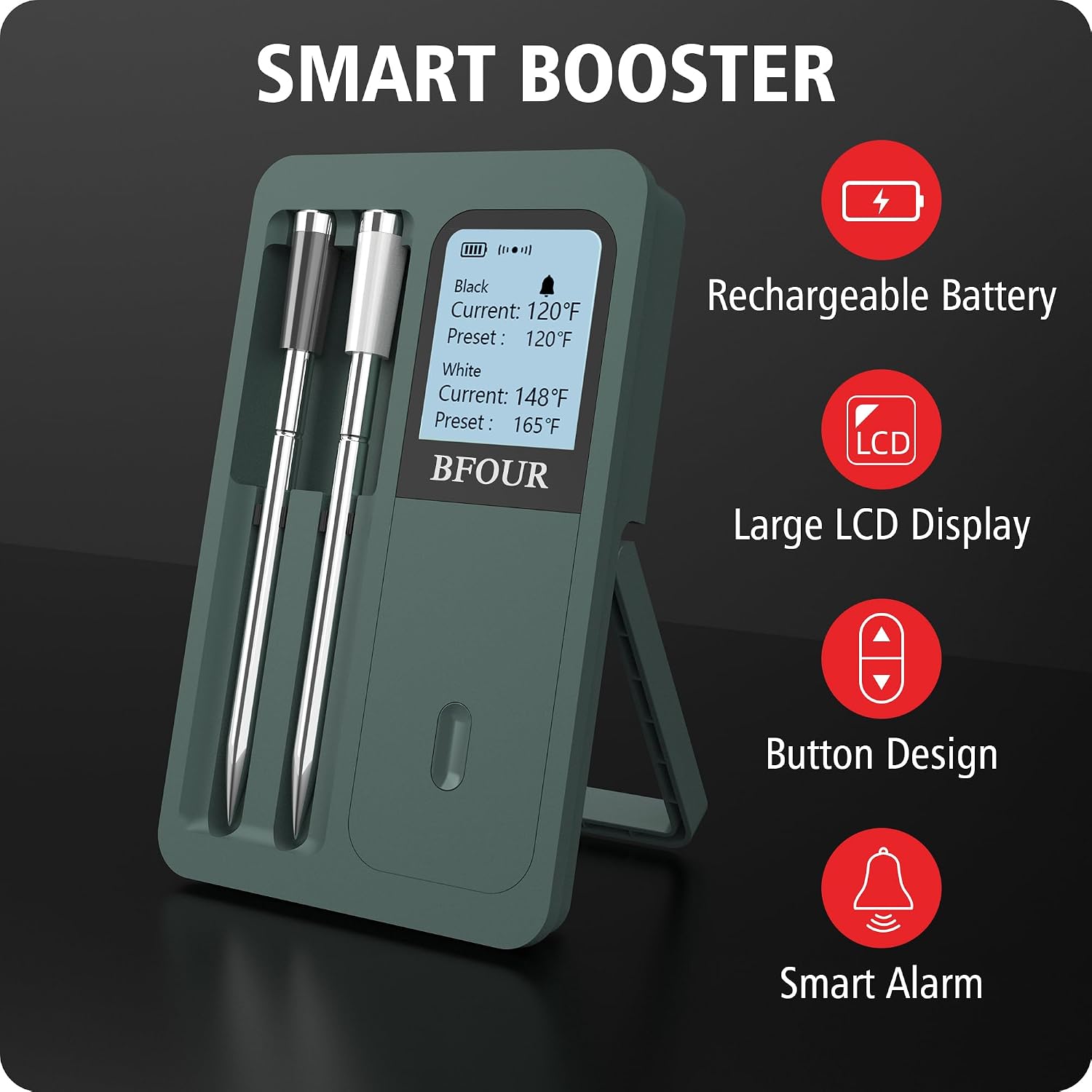
Figure 3.1: Smart Booster with LCD Display. - Highly Accurate Dual Meat Probes: Features two distinct black and white meat probes for easy identification. These probes monitor internal cooking temperatures up to 212°F (100°C) with an accuracy of ±1.8°F.

Figure 3.2: Accurate Probe Design. - 100% Truly Wireless: Eliminates tangled wires, offering wireless freedom up to 328 feet (100 meters). The stylish dark green design enhances kitchen aesthetics.

Figure 3.3: Twin Wire-Free Probes in Use. - Lang batterilevetid: The booster provides up to 40 hours of use. A quick 2-minute charge of the probe yields 60 hours of use, ideal for extended cooking sessions.

Figure 3.4: Rechargeable Battery Feature. - Waterproof & Easy-to-Clean: The wireless meat probes are suitable for various cooking environments including electric barbecues, smokers, ovens, grills, frying pans, or sous vide. The probes are dishwasher safe for easy cleaning.
- Intuitive Smart App: The user-friendly app includes 12 USDA presets and allows for customized settings. It offers various alarm features, such as target temperature alerts, pre-alarms, high/low temperature alarms, and downloadable temperature graphs.

Figure 3.5: Easy-to-Use App Interface. - Bredt temperaturområde: The ceramic handle of the probe can withstand temperatures from 32°F to 572°F (0°C to 300°C), while the internal temperature range for measurement is 32°F to 212°F (0°C to 100°C).

Figure 3.6: Probe Temperature Ranges.
4. Opsætning
Follow these steps for initial setup of your BFOUR Wireless Meat Thermometer:
- Oplad enheden: Ensure both the booster and the probes are fully charged before first use. Connect the booster to a power source using the provided Type-C cable. The probes charge when inserted into the booster.
- Download appen: Download the "BF Home" app from your smartphone's app store. You can find it on the Apple App Store or Google Play Butik.
- Par med app: Open the BF Home app and follow the on-screen instructions to pair your device. Ensure Bluetooth is enabled on your smartphone.
- Indsæt prober: Insert the probes into the center of the food you are cooking. Ensure the safety notch on the probe is completely covered by the meat to prevent damage and ensure accurate readings.
5. Betjeningsvejledning
Once set up, operating your BFOUR Wireless Meat Thermometer is straightforward:
- Overvågningstemperatur: You can monitor the current temperature of your food directly on the booster's LCD screen or through the BF Home app on your smartphone. The app provides real-time updates and a graphical representation of temperature changes over time.
- Setting Target Temperatures: Use the BF Home app to select from 12 USDA presets for various types of meat and doneness levels, or customize your own target temperatures.
- Alarmer: The app offers various alarm features, including target temperature alerts, pre-alarms, and high/low temperature alarms, to notify you when your food reaches the desired temperature or if there are significant temperature fluctuations.
- Brugstips:
- Avoid temperatures above 212°F (100°C) inside the probe to prevent damage.
- Insert the probe deep enough to cover the groove/safety notch.
- The probe does not measure ambient temperature.


6. Vedligeholdelse
Korrekt vedligeholdelse sikrer dit termometers levetid og nøjagtighed:
- Rensning: The probes are waterproof (IP67 rated) and can be cleaned in a dishwasher. For the booster unit, wipe clean with a damp cloth. Do not immerse the booster in water.
- Opladning: Recharge the booster and probes as needed. The booster lasts up to 40 hours, and probes provide 60 hours of use after a 2-minute charge. Ensure you use the provided Type-C cable for charging. Forsigtighed: Boosters cannot be charged with fast chargers.
- Opbevaring: Store the probes securely in the booster unit when not in use. Keep the device in a dry place.

7. Fejlfinding
If you encounter issues with your BFOUR Wireless Meat Thermometer, consider the following:
- Ingen temperaturaflæsning: Ensure probes are fully inserted past the safety notch into the meat. Check if the probes and booster are charged.
- Forbindelsesproblemer: Ensure Bluetooth is enabled on your phone and the app is open. Try restarting the app and the booster unit. Ensure the distance between the booster and probes is within the specified range (up to 328 feet/100 meters).
- Upræcise læsninger: Verify that the probe is inserted correctly into the thickest part of the meat, avoiding bones or gristle. Ensure the probe's internal temperature limit (212°F/100°C) is not exceeded.
8. Specifikationer
| Varemodelnummer | BF-40-G |
| Pakkedimensioner | 6.89 x 4.53 x 1.18 tommer; 7.83 ounce |
| Batterier | 1 Lithium Polymer batterier påkrævet (medfølger) |
| Dato først tilgængelig | 11. januar 2024 |
| Fabrikant | Bfour |
| Speciel funktion | Large Display, Alarm, App Companion, High Accuracy, Dual Probe |
| Farve | Mørkegrøn |
| Ydermateriale | Plast |
| Specifikation Met | FCC |
| Display Type | LCD |
| Forbindelsesteknologi | Bluetooth |
9. Garanti og support
BFOUR provides a worry-free 12-month warranty for your Wireless Meat Thermometer. For any product damage or issues, please do not hesitate to contact their friendly customer service. They are committed to promptly addressing and resolving any matters.
Producentoplysninger:
- Company: Shenzhen BFOUR Tech Co., Ltd
- Address: D5-23, Gangshen International Center, Xinniu Community, Longhua District, Shenzhen City, China
- Webwebsted: www.szbfour.com
- E-mail: salg@szbfour.com