
Montech AX120 PWM BLACK
Montech AX 120 ARGB Fan User Manual
Model: AX120 PWM BLACK | Brand: Montech
Produkt overview
The Montech AX 120 ARGB Fan is designed to enhance your PC's cooling performance and aesthetic appeal. Featuring a modern hexagonal RGB ring with 20 LEDs, this fan offers vibrant illumination. It incorporates advanced PWM controls for smart fan speed adjustments based on system temperature, ranging from 600 RPM to 1600 RPM. Engineered for quiet operation, it maintains noise levels under 27.9 dB(A) through optimized frames and blades. The fan is built with a high-end HDB bearing, ensuring a lifespan of 40,000 hours, and includes integrated anti-vibration pads to reduce resonance noise.

Figur 1: Forside view of the Montech AX 120 ARGB Fan, showcasing its hexagonal RGB lighting.
Hvad er der i æsken
Upon unboxing your Montech AX 120 ARGB Fan, you will find the following components:
- Montech AX 120 ARGB Fan (1 unit)
- Mounting Screws (typically included for installation)
Opsætning og installation
Proper installation ensures optimal performance and longevity of your Montech AX 120 ARGB Fan. Follow these steps carefully:
1. Forbered dit system
- Sørg for, at din computer er slukket, og at stikket er taget ud af stikkontakten.
- Åbn dit pc-kabinet for at få adgang til monteringsstederne for ventilatoren.
2. Montering af ventilatoren
Identify the desired mounting location within your PC case (e.g., front, rear, top, bottom). The fan can be configured for intake or exhaust airflow depending on its orientation.

Figur 2: Bagside view of the fan, indicating the power connector and product information.
- Position the fan against the mounting holes in your case.
- Secure the fan using the provided mounting screws. Ensure they are tightened firmly but do not overtighten to avoid damaging the fan frame. The fan features integrated anti-vibration pads at each corner to minimize noise from resonance.
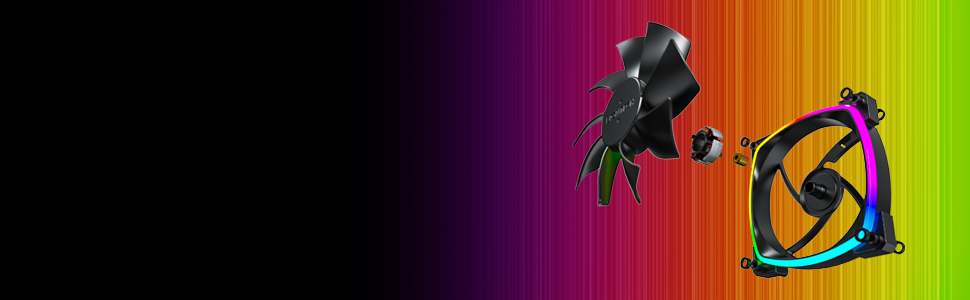
Figure 3: Detail of the integrated anti-vibration pads on the fan frame.
3. Tilslutning af ventilatoren
The Montech AX 120 ARGB Fan uses a 4-pin connector for both power and PWM control, and a separate ARGB connector for lighting.
- Connect the 4-pin fan cable to an available 4-pin fan header on your motherboard. This allows for PWM (Pulse Width Modulation) control of the fan speed.
- Connect the ARGB cable to a compatible 3-pin 5V ARGB header on your motherboard or an ARGB controller. Note: Tilslut ikke til en 12V RGB-header, da dette kan beskadige LED'erne.

Figur 4: Eksample of Montech AX 120 ARGB Fans installed in a PC system.
Betjeningsvejledning
Ventilatorhastighedskontrol (PWM)
The Montech AX 120 ARGB Fan supports PWM control, allowing your motherboard or fan controller to dynamically adjust the fan speed based on system temperature. This ensures efficient cooling when needed and quiet operation during lighter loads.
- Hastighedsområde: 600 RPM to 1600 RPM.
- Configure fan curves in your motherboard's BIOS/UEFI settings or through compatible software provided by your motherboard manufacturer.
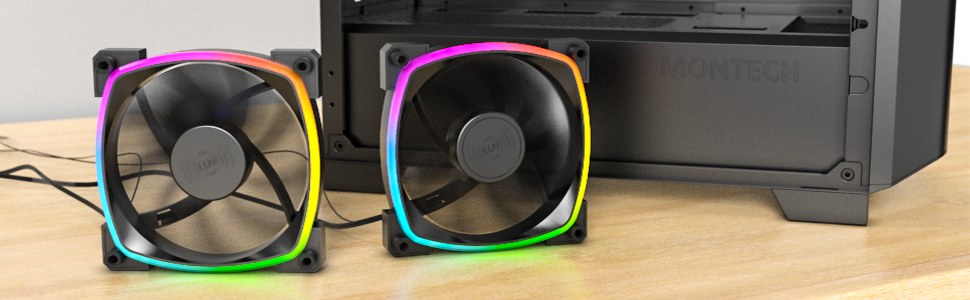
Figure 5: Visual representation of PWM fan speed adjustment.
ARGB-lysstyring
The fan's addressable RGB lighting can be controlled via your motherboard's ARGB software (e.g., ASUS Aura Sync, MSI Mystic Light Sync, GIGABYTE RGB Fusion, ASRock Polychrome Sync) or a dedicated ARGB controller. This allows for synchronization with other ARGB components and customization of lighting effects.
Silent Performance
The Montech AX 120 ARGB Fan is engineered for quiet operation, with noise levels typically under 27.9 dB(A) at maximum speed. This is achieved through optimized blade design and the inclusion of anti-vibration pads.

Figure 6: The fan's low noise output, measured at approximately 27.0 dB.
Opretholdelse
Regelmæssig vedligeholdelse er med til at sikre din ventilators levetid og optimale ydeevne.
- Rensning: Rengør ventilatorbladene og rammen med jævne mellemrum for at fjerne støvophobning. Brug trykluft eller en blød børste. Sørg for, at ventilatoren er slukket og frakoblet, før du rengør den.
- Bearing Lifespan: The fan features a Hydro Dynamic Bearing (HDB) with an estimated lifespan of 40,000 hours, providing long-term reliability without requiring lubrication.

Figur 7: Eksploderet view illustrating the fan's durable components, including the HDB bearing.
Fejlfinding
If you encounter issues with your Montech AX 120 ARGB Fan, refer to the following common problems and solutions:
| Problem | Mulig årsag | Løsning |
|---|---|---|
| Ventilatoren roterer ikke |
|
|
| ARGB-belysningen virker ikke |
|
|
| Overdreven støj eller vibrationer |
|
|
Specifikationer
| Feature | Detalje |
|---|---|
| Modelnummer | AX120 PWM BLACK |
| Dimensioner | 4.72 x 4.72 x 0.98 tommer (120 mm x 120 mm x 25 mm) |
| Vægt | 5.93 ounce |
| Blæserhastighed | 600 - 1600 o/min (PWM-styret) |
| Støjniveau | 27.9 dB(A) (maks.) |
| Luftstrøm | (Information not provided in source, typically measured in CFM) |
| Statisk tryk | (Information not provided in source, typically measured in mmH2O) |
| Leje Type | Hydro Dynamic Bearing (HDB) |
| Levetid | 40,000 timer |
| Strømstik | 4-Pin PWM |
| ARGB stik | 3-benet 5V ARGB |
| Voltage | 12 Volts (Fan), 5 Volts (ARGB) |
| Wattage | 4.2 watt |
| Materiale | Plast |
| Kompatible enheder | Gaming pc |
Garanti og support
For warranty information and technical support, please refer to the official Montech webwebstedet eller kontakt deres kundeservice direkte. Garantivilkår og -betingelser kan variere afhængigt af region og forhandler.
Montech Official Webwebsted: www.montechpc.com
Ask a question about this manual
Ask about setup, troubleshooting, compatibility, parts, safety, or missing instructions. Manuals+ will review the question and use this page’s manual context to help answer it.