
1. Introduktion
This manual provides detailed instructions for setting up, operating, and troubleshooting your HOSAYA 4G LTE SIM Card WiFi Router (Model: CPF908). This device is designed to provide reliable 4G LTE internet access, functioning as both a desktop and portable CPE (Customer Premises Equipment) router. It features a color LCD display, an RJ45 port, and supports up to 10 WiFi users.
2. Pakkens indhold
Kontroller venligst, at alle varer er til stede i din pakke:
- 4G LTE WiFi Router (CPE) x 1
- 12V Power Adaptor x 1
- Brugervejledning x 1
- Netværkskabel x 1
3. Produktet er slutview og funktioner
The HOSAYA CPF908 router is a versatile device offering high-speed 4G LTE internet connectivity. Key features include:
- High-Speed LTE Chipset: Supports TDD-LTE/FDD-LTE/UMTS networks.
- Farve LCD-skærm: A 1.44-inch display provides settings, parameters, SMS status, WiFi name, and password at a glance.
- Built-in External Antennas: Designed for wide signal coverage.
- Dual Power Inputs: Supports both 12V1A and 5V1A power input for flexible use indoors or with a power bank/car USB power.
- RJ45 WAN/LAN Port: One RJ45 port for wired connections.
- Multi-User Support: Connects up to 10 WiFi users simultaneously.
- Micro SIM-kortplads: Compatible with Nano SIM cards using an adapter.
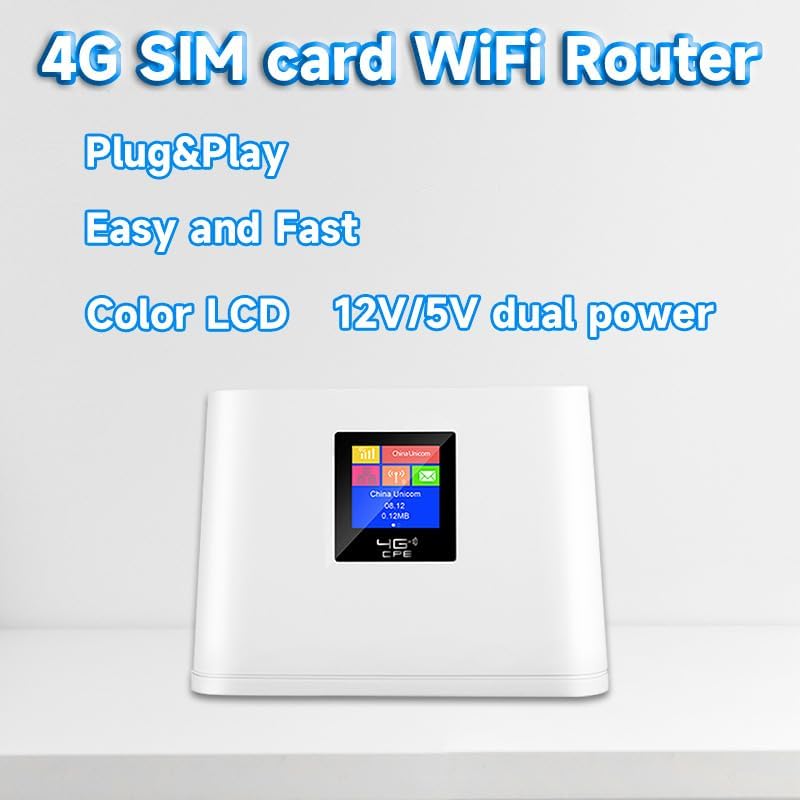
Figur 1: Forside view of the HOSAYA CPF908 Router with its color LCD display.

Figur 2: Detaljeret view of the 1.44-inch LCD display showing connection status, operator, Ethernet status, connected devices, SMS status, connection time, consumed data, WiFi name, and WiFi password.
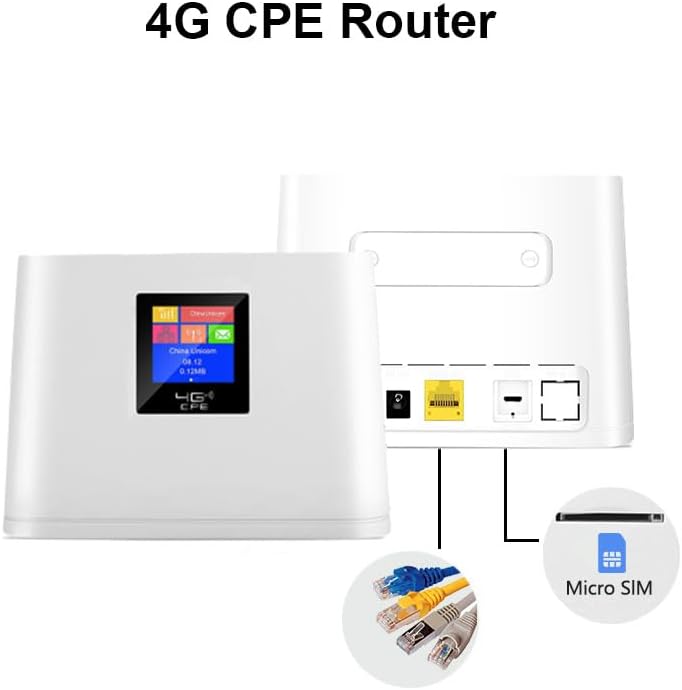
Figur 3: Bagside view of the HOSAYA CPF908 Router, highlighting the RJ45 WAN/LAN port, dual power inputs, and Micro SIM card slot.
4. Opsætning
4.1. SIM-kort installation
- Sørg for, at routeren er slukket.
- Find Micro SIM-kortåbningen på enheden.
- Insert your universal ordinary Micro SIM card into the slot. If using a Nano SIM, place it in a Micro SIM adapter first.
- Ensure the SIM card is correctly oriented and fully inserted until it clicks into place.
4.2. Strømtilslutning
- Connect the provided 12V power adaptor to the router's 12V power input port and then to a wall outlet.
- Alternatively, for portable use, connect a 5V1A power bank or car USB power source to the 5V power input port.
- The router will automatically power on and begin initialization.
4.3. Indledende konfiguration
The router will automatically recognize most SIM cards and APN settings. If it does not connect to the internet automatically:
- Connect a device (e.g., laptop, smartphone) to the router's WiFi network. The default WiFi name (SSID) and password (KEY) are displayed on the LCD screen.
- Åbn a web browser and enter the router's default IP address (usually 192.168.0.1 or 192.168.1.1) to access the web ledelsesgrænseflade.
- Log in using the default username and password (refer to the manual or device label).
- Navigate to the network settings and manually enter the APN information provided by your mobile network operator.
- Gem indstillingerne, og genstart routeren, hvis du bliver bedt om det.
Video 1: HOSAYA Production Showcase. This video provides a brief overview af produktets design og funktioner.
5. Betjeningsvejledning
5.1. Tilslutning af enheder
To connect your devices to the HOSAYA CPF908 router:
- Tænd for routeren.
- On your WiFi-enabled device (smartphone, tablet, laptop, gaming console, smart TV), search for available WiFi networks.
- Select the WiFi network name (SSID) displayed on the router's LCD screen.
- Enter the WiFi password (KEY) shown on the LCD screen.
- Din enhed skulle nu have forbindelse til internettet.

Figure 4: The router supports up to 10 simultaneous WiFi connections for various devices.
5.2. Forståelse af LCD-skærmen
The 1.44-inch color LCD display provides real-time status updates:
- Forbindelse Status: Indicates signal strength and network type (4G LTE).
- Telecom Operator: Shows the name of your mobile network provider.
- Ethernet Status: Indicates if a wired connection is active.
- Tilsluttede enheder: Displays the number of devices currently connected via WiFi.
- SMS-status: Notifies you of new messages.
- Connection Time: Shows the duration of the current internet session.
- Consumed 4G Data: Tracks data usage.
- WiFi Name (SSID) & Password (KEY): Essential for connecting new devices.
6. Fejlfinding
6.1. No Internet Access / Slow Speed
- Tjek SIM-kort: Ensure the Micro SIM card is correctly inserted and your plan is active and has data.
- APN-indstillinger: If internet access is unavailable, log into the web management interface and manually configure the APN settings according to your mobile network operator's specifications.
- Signalstyrke: Check the signal strength indicator on the LCD. If the signal is weak, try relocating the router to an area with better reception.
- SIM-kort kompatibilitet: This router supports universal ordinary SIM cards. Some locked or contract SIM cards may not work. Try a different operator's universal SIM card if issues persist.
- Genstart routeren: Sluk routeren, vent 30 sekunder, og tænd den derefter igen.
6.2. Unable to Connect to WiFi
- Verify WiFi Name/Password: Ensure you are entering the correct SSID and password as displayed on the router's LCD screen.
- Enhedskompatibilitet: Ensure your device supports 802.11n wireless communication standard.
- Routernærhed: Ensure your device is within the WiFi range of the router.
7. Specifikationer
| Feature | Specifikation |
|---|---|
| Modelnummer | CPF908 |
| Produktdimensioner | 7048 x 6.69 x 2.76 tommer |
| Varens vægt | 14.1 ounce |
| Forbindelsesteknologi | Ethernet, LTE, Wi-Fi |
| Standard for trådløs kommunikation | 802.11n |
| Frekvensbåndsklasse | Single-Band |
| Særlige funktioner | 12V 5V dual power inputs, Access Point Mode, color LCD display, portable and desktop |
| Supported 4G LTE Bands (American Version) | B2/B4/B5/B7/B12/B17/B28/B66 |
| Supported 3G Bands (American Version) | B2/B5 |
| Maks. WiFi-brugere | 10 |
8. Garanti og support
For warranty information and technical support, please refer to the documentation included in your product package or visit the official HOSAYA webwebsted. Gem din købskvittering for garantikrav.