
1. Introduktion
Thank you for choosing the Aptkdoe HD65 Wireless Earbuds. These earbuds are designed to provide a high-quality audio experience with features tailored for active lifestyles, including secure ear hooks, IPX7 waterproofing, and ENC noise-cancelling microphone technology. Please read this manual carefully to ensure proper use and optimal performance of your device.
2. Pakkens indhold
- Aptkdoe HD65 Wireless Earbuds (Left and Right)
- Opladningsetui
- USB-C ladekabel
- Flere størrelser af ørepropper
- Brugervejledning (dette dokument)
3. Produktet er slutview
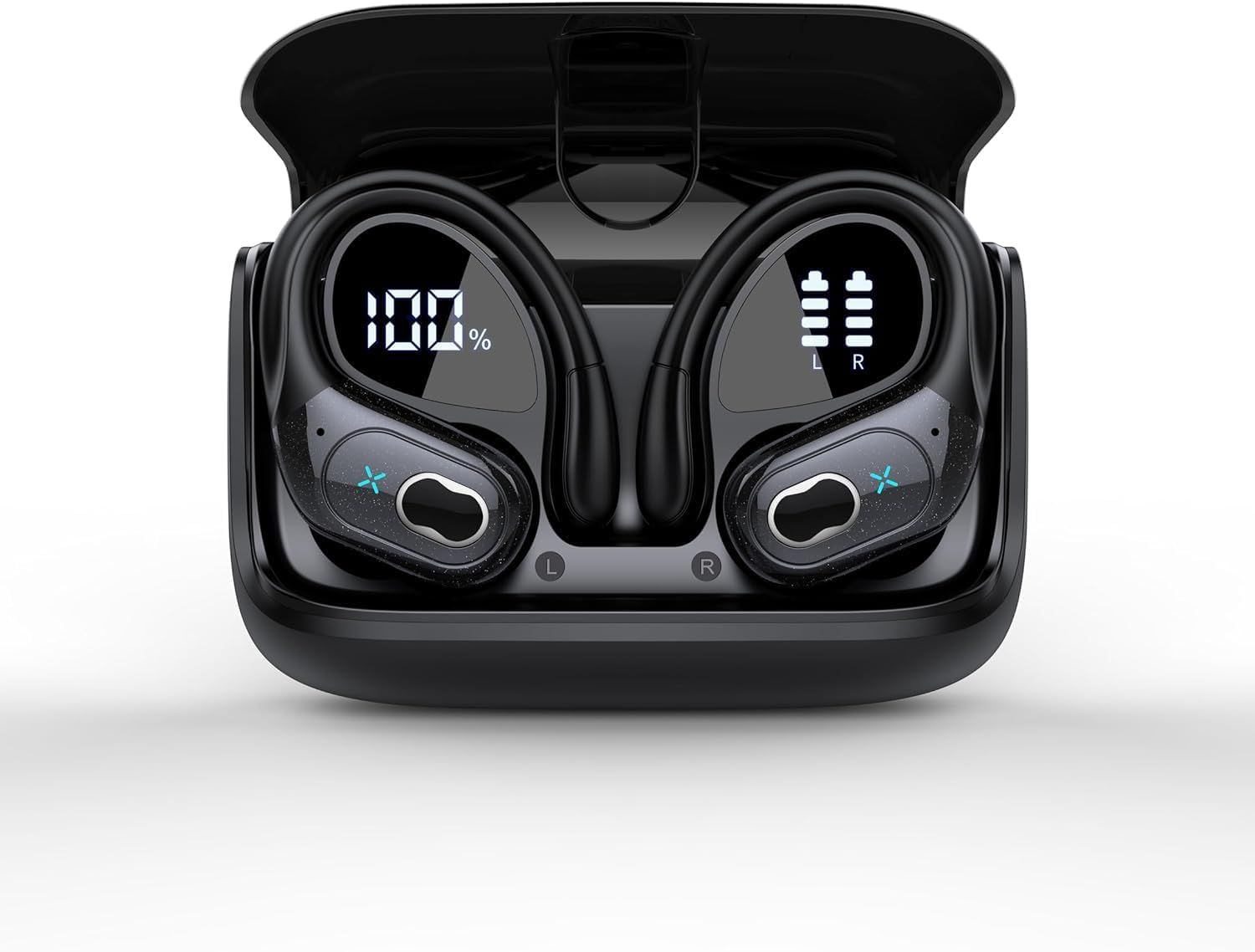
Billede 1: Aptkdoe HD65 Wireless Earbuds in their charging case. The case features a digital display showing the battery percentage of the case (100%) and individual battery levels for the left (L) and right (R) earbuds.
The Aptkdoe HD65 earbuds feature an over-ear hook design for secure fit during activities. The charging case includes a digital display to show the battery status of both the case and individual earbuds. Each earbud has touch controls for media playback and call management.
4. Opsætning og første brug
4.1 Opladning af øretelefoner og etuiet
- Placer begge ørepropper i opladningsetuiet. Sørg for, at de er korrekt isat.
- Connect the USB-C charging cable to the charging port on the case and to a compatible USB power source (e.g., wall adapter, computer USB port).
- Det digitale display på opladningsetuiet viser den aktuelle batteriprocent.tagetuiets og opladningsstatussen for hver øreprop.
- Allow the earbuds and case to fully charge before first use. A full charge provides up to 75 hours of total playtime with the charging case.
Note: It is recommended to fully charge the device before initial use to maximize battery life.
4.2 Parring med en Bluetooth-enhed
- Åbn opladningsetuiet. Ørepropperne går automatisk i parringstilstand, hvilket indikeres af en blinkende LED-lampe på ørepropperne.
- Aktiver Bluetooth på din enhed (f.eks. smartphone, tablet).
- Søg efter "HD65" in the list of available Bluetooth devices.
- Select "HD65" to connect. Once connected, the LED indicator on the earbuds will stop flashing.
- Ørepropperne genopretter automatisk forbindelse til den sidst parrede enhed, når de tages ud af etuiet, hvis Bluetooth er aktiveret på enheden.
Bemærk: Hvis parringen mislykkes, skal du sørge for, at øretelefonerne er opladet og inden for din enheds rækkevidde. Prøv at slå Bluetooth fra og til igen på din enhed.
4.3 Sådan tager du ørepropperne på
- Identificér venstre (V) og højre (H) ørepropper.
- Placer forsigtigt øreproppen i din øregang.
- Adjust the over-ear hook to fit securely around your ear. The flexible hook ensures stability, especially during physical activities.
- Experiment with the different sizes of ear tips provided to find the most comfortable and secure fit for optimal sound quality and noise isolation.
5. Betjeningsvejledning
5.1 Tryk på kontrolelementer
The Aptkdoe HD65 earbuds feature intuitive touch controls for easy management of audio and calls. Specific functions may vary slightly, but generally include:
- Enkelt tryk: Afspil/pause musik, besvar/afslut opkald.
- Dobbelttryk (venstre øretelefon): Forrige nummer.
- Dobbelttryk (højre øretelefon): Næste nummer.
- Tredobbelt tryk (venstre øreprop): Lydstyrke ned.
- Tredobbelt tryk (højre øreprop): Lydstyrke op.
- Langt tryk (2 sekunder): Reject call, Activate voice assistant.
5.2 Tænd/sluk
- Tænd: Åbn opladningsetuiet, eller tryk længe på berøringsområdet på begge ørepropper i 3 sekunder.
- Sluk: Placer ørepropperne tilbage i opladningsetuiet, og luk låget, eller tryk længe på berøringsområdet på begge ørepropper i 5 sekunder.
5.3 Støjreduktion (ENC)
The earbuds are equipped with Environmental Noise Cancelling (ENC) microphone technology. This feature enhances call clarity by reducing background noise during phone conversations, ensuring your voice is heard clearly by the other party.
5.4 Vandtæthed (IPX7)
With an IPX7 waterproof rating, your earbuds are protected against sweat and rain, making them suitable for workouts and outdoor activities. Note: The charging case is not waterproof. Do not submerge the earbuds or charging case in water. Ensure earbuds are dry before placing them back into the charging case to prevent damage.
6. Vedligeholdelse og pleje
- Rensning: Regularly clean the earbuds, ear tips, and charging contacts with a soft, dry, lint-free cloth. Avoid using harsh chemicals or abrasive materials.
- Opbevaring: Når ørepropperne ikke er i brug, skal de opbevares i deres opladningsetui for at beskytte dem og holde dem opladede. Opbevares køligt og tørt, væk fra ekstreme temperaturer.
- Batteripleje: For at forlænge batterilevetiden skal du undgå at aflade ørepropperne og opladningsetuiet helt ofte. Oplad dem regelmæssigt, selvom de ikke er i konstant brug.
- Vandeksponering: After exposure to sweat or water, ensure the earbuds are completely dry before placing them back into the charging case to prevent corrosion of charging contacts.
7. Fejlfinding
| Problem | Mulig løsning |
|---|---|
| Øretelefoner parrer ikke |
|
| Ingen lyd eller lav lydstyrke |
|
| Øretelefoner oplader ikke |
|
| Dårlig opkaldskvalitet |
|
8. Specifikationer
- Modelnavn: HD65
- Forbindelse teknologi: Bluetooth 5.3, Trådløs
- Trådløs kommunikationsteknologi: Bluetooth
- Bluetooth Range: 10 meter
- Batterilevetid: Op til 75 timer (med opladningsetui)
- Vandmodstandsniveau: IPX7 (kun øretelefoner)
- Støjkontrol: Active Noise Cancellation (ENC for microphone)
- Øreplacering: Over Ear
- Formfaktor: In Ear
- Kontroltype: Mediekontrol, fjernbetjening
- Kompatible enheder: Mobiltelefoner
- Fabrikant: Aptkdoe
- Varens vægt: 5.3 ounce
9. Garanti og support
For warranty information and customer support, please refer to the warranty card included in your product packaging or visit the official Aptkdoe website. You may also contact Aptkdoe customer service directly for assistance with product inquiries, technical support, or warranty claims.
Gem venligst din købsbevis af garantihensyn.