
1. Introduktion
This user manual provides detailed instructions for the setup, operation, and maintenance of your TAMPROAD Q55-2Mic Portable Party Speaker. Please read this manual thoroughly before using the product to ensure proper function and longevity.
Produkt overview
Den TAMPROAD Q55-2Mic is an 80W peak wireless Bluetooth speaker designed for both indoor and outdoor use. It features dual 4-inch full-range high-performance drivers, vibrant LED lights, and multiple connectivity options including Bluetooth 5.0, TF card, USB, AUX, and FM radio. It also supports True Wireless Stereo (TWS) pairing for an enhanced audio experience and comes with two wireless microphones for karaoke functions.

Image: The Q55-2Mic Portable Party Speaker, showcasing its vibrant LED lights, along with two wireless microphones and its remote control.
2. Pakkens indhold
Markér venligst feltet for følgende elementer:
- 1 x Q55 Portable Party Speaker
- 2 x Wireless Microphones (requires 2*AA batteries each, not included)
- 1 x Remote Control (requires 2*AAA batteries, not included)
- 1 x USB-opladerkabel
- 1 x 3.5 mm AUX-kabel
- 1 x brugermanual
3. Opsætning
3.1 Indledende opladning
Before first use, fully charge the speaker using the provided USB charger cable. The speaker features a 10000mAh battery, providing long-lasting playback. Charging typically takes 3-6 hours.

Image: Visual representation of the speaker's large capacity battery, indicating 3-6 hours charging time and 8-20 hours playing time.
3.2 Mikrofonopsætning
Insert 2 AA batteries into each wireless microphone (batteries not included). The microphones will automatically connect to the speaker when powered on.
3.3 Opsætning af fjernbetjening
Insert 2 AAA batteries into the remote control (batteries not included).
4. Betjeningsvejledning
4.1 Kontrolpanel overview
The speaker features an intuitive control panel on the top, along with a remote control for convenient operation. Refer to the diagram below for button functions.

Image: A comprehensive guide to the speaker's control panel, highlighting power switch, charging indicator, TF card slot, USB port, audio cable socket, wired microphone socket, LED screen, speaker volume, REC/DEL, EQ modes, LED light modes, navigation buttons, Echo, TWS mode, and microphone volume.
4.2 Forbindelsestilstande
The Q55-2Mic speaker offers multiple ways to play your audio:
- Bluetooth 5.0: For wireless connection to smartphones, tablets, and other Bluetooth-enabled devices. Provides stable and long-distance transmission.
- TF-kort/USB: Insert a Micro TF card or Flash USB drive into the respective slots to play stored music.
- AUX-indgang: Use the 3.5mm AUX cable to connect to devices like TVs, PCs, or MP3 players.
- FM-radio: The speaker includes an FM radio function.
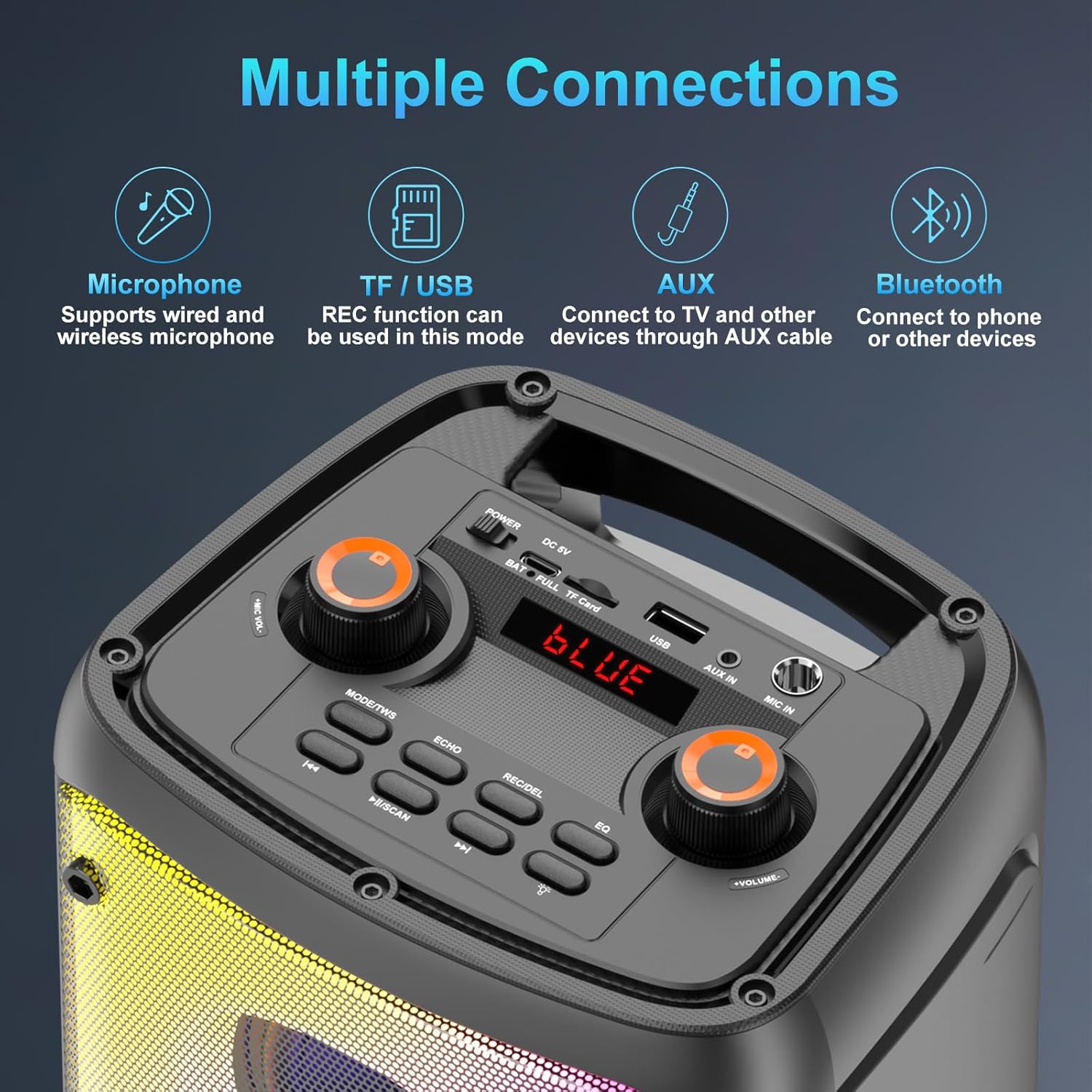
Image: An illustration detailing the various connectivity options available on the speaker, including wired/wireless microphone support, TF/USB with REC function, AUX in for TV/other devices, and Bluetooth for phone/other devices.
4.3 Bluetooth Pairing (TWS Function)
To pair two Q55 speakers for True Wireless Stereo (TWS) sound:
- Ensure both Q55 speakers are powered on.
- Tryk kort på TWS button on one of the speakers. It will attempt to pair with the other speaker.
- Once successfully paired, a prompt sound will confirm the connection.
- Enable Bluetooth on your mobile device and select "Q55" to connect. Audio will now play synchronously through both speakers, creating a 160W stereo surround experience.
- To disconnect TWS mode, short press the TWS knappen igen.

Image: Two Q55 speakers set up to demonstrate 160W Powerful TWS Stereo Sound, providing an immersive audio experience for users watching TV.
4.4 LED-lystilstande
The speaker features multiple dynamic LED light modes that synchronize with the music's rhythm, enhancing the party atmosphere. You can control these lights via the control panel or the remote control.

Billede: Talershowetasing its "Disco Light Show Driven By Beat" feature, with LED lights changing according to the music's rhythm, and examples of six different light modes.
4.5 Sound Effects (EQ)
Switch between Indoor and Outdoor sound modes with a single click using the EQ button on the control panel or remote. Outdoor mode provides loud and clear sound, while Indoor mode offers high-quality deep bass.

Image: An illustration demonstrating the one-click switch between "Indoor Mode: High quality deep bass" and "Outdoor Mode: Loud & clear" sound effects on the speaker.
4.6 Optagefunktion
When using USB or TF card mode, you can utilize the recording function to capture audio directly to your inserted storage device.
4.7 Brug af mikrofon
The two wireless microphones provide clear voice pickup. Adjust microphone volume and echo effects using the dedicated controls on the speaker's top panel or remote control.
Video: A demonstration of the Q55-2Mic Karaoke Machine with its two wireless microphones, showcasindens funktioner og lydmuligheder.
5. Vedligeholdelse
To ensure the longevity and optimal performance of your Q55-2Mic speaker:
- Rensning: Tør højttaleren af med en blød, tør klud. Brug ikke slibende rengøringsmidler eller opløsningsmidler.
- Opbevaring: Opbevar højttaleren et køligt, tørt sted væk fra direkte sollys og ekstreme temperaturer.
- Batteripleje: Fully charge the battery before long periods of storage. Recharge the battery at least once every three months to maintain its health.
- Vandeksponering: Denne højttaler er ikke vandtæt. Undgå udsættelse for vand eller høj luftfugtighed.
6. Fejlfinding
Hvis du støder på problemer med din højttaler, kan du se følgende almindelige problemer og løsninger:
| Problem | Mulig årsag | Løsning |
|---|---|---|
| Højttaleren tænder ikke. | Lavt batteri eller ingen opladning. | Connect the speaker to a power source using the USB charger cable and allow it to charge fully. |
| Ingen lyd fra højttaleren. | Lydstyrken er for lav, der er forkert indgangstilstand, eller lydkilden er afbrudt. | Increase speaker volume. Ensure the correct input mode (Bluetooth, AUX, USB, TF) is selected. Check audio cable connections. |
| Bluetooth-parring mislykkedes. | Højttaleren er ikke i parringstilstand, enheden er for langt væk, eller der er interferens. | Ensure speaker is in Bluetooth mode. Move device closer to speaker. Turn off other Bluetooth devices to reduce interference. Try re-pairing. |
| Mikrofon virker ikke. | Microphone batteries low/dead, microphone volume too low, or not properly connected. | Replace AA batteries in microphones. Increase microphone volume on the speaker. Ensure wireless microphones are powered on. |
| TWS pairing unsuccessful. | Forkert parringsprocedure eller højttalerne er for langt fra hinanden. | Follow the TWS pairing instructions carefully (Section 4.3). Ensure both speakers are within close proximity during pairing. |
7. Specifikationer
| Modelnummer | Q55-2Mic |
| Mærke | TAMPVEJ |
| Output Wattage | 80 watt (peak) |
| Forbindelsesteknologi | Bluetooth 5.0, USB, TF Card, AUX, Wireless |
| Strømkilde | Battery Powered (10000mAh Lithium Polymer battery included) |
| Produktmål (L x B x H) | 7.48 x 6.3 x 16 tommer |
| Varens vægt | 2.75 kilo (6.05 pund) |
| Materiale | Acrylonitril Butadien Styren (ABS) |
| Antal kanaler | 4 |
| Impedans | 4 Ohm |
| Anbefalede anvendelser | Indendørs/Udendørs |
| Farve | Sort |
| Oprindelsesland | Kina |
8. Garanti og support
For any questions or assistance with your TAMPROAD Q55-2Mic Portable Party Speaker, please contact our customer service. We are committed to providing the best customer service and will respond to your inquiries within 7-24 hours.
Se venligst din købsdokumentation for specifikke garantioplysninger.