
1. Introduktion
The Sygonix SY-5044422 Digital Timer Switch is designed for easy programming and operation, helping to manage power consumption for various appliances. This device features 20 ON/OFF programs, 3 random settings, and a countdown function, with switching intervals as short as 1 minute. Programs can be set for specific days, combinations of days, or daily. Its IP44 splash-proof rating allows for outdoor use, and an integrated battery retains settings during power outages. The timer supports a maximum switching capacity of 1800 W and includes enhanced touch protection.
2. Sikkerhedsinstruktioner
- Læs alle instruktioner omhyggeligt før brug.
- This device is rated IP44, making it splash-proof for outdoor use. However, do not immerse it in water or expose it to direct jets of water.
- Ensure the total load of connected appliances does not exceed 1800 W.
- Do not open the device housing. Repairs should only be performed by qualified personnel.
- Keep out of reach of children. The device features enhanced touch protection.
- Tag altid timeren ud af stikkontakten inden rengøring.
3. Pakkens indhold
- Sygonix SY-5044422 Digital Timer Switch
- Instruktionsmanual
- Garantioplysninger
4. Produktet er slutview
Familiarize yourself with the components and controls of your digital timer switch.
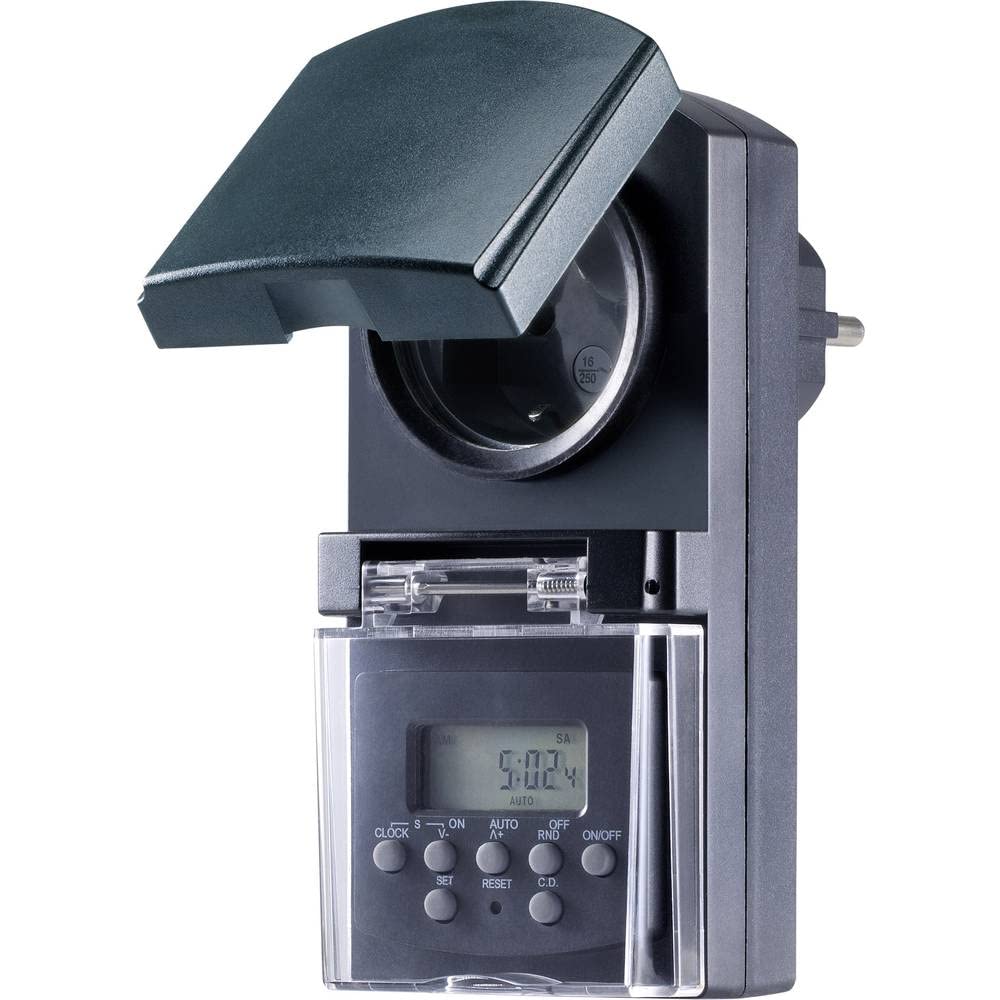
Figur 1: Front view of the Sygonix SY-5044422 Digital Timer Switch. This image displays the LCD screen, which shows the current time and day, along with various control buttons including CLOCK, ON/OFF, SET, RESET, AUTO/A+, OFF/RND, and C.D. (Countdown).

Figur 2: Front view of the timer with the protective cover opened, showing the integrated power socket. The display and control buttons are visible below the socket.
Kontrolknapper:
- UR: Bruges til at indstille det aktuelle klokkeslæt og den aktuelle dag.
- TIL/FRA: Manually switches the timer output ON or OFF.
- SÆT: Enters programming mode and confirms settings.
- NULSTIL: Rydder alle indstillinger og nulstiller timeren til fabriksindstillingerne.
- AUTO/A+: Cycles through automatic mode, program settings, and adjusts values.
- OFF/RND: Activates or deactivates the Random function.
- C.D. (Countdown): Activates or deactivates the Countdown function.
5. Opsætning
5.1 Indledende opladning
Before first use, plug the timer into a power outlet for approximately 30 minutes to charge the internal battery. This ensures the display is active and settings are retained during power outageller når stikket er frakoblet.
5.2 Indstilling af aktuel tid og dag
- Tryk og hold på UR knap.
- Mens du holder UR, tryk AUTO/A+ repeatedly to set the current day (MO, TU, WE, TH, FR, SA, SU).
- Mens du holder UR, tryk SÆT repeatedly to set the current hour.
- Mens du holder UR, tryk OFF/RND gentagne gange for at indstille det aktuelle minut.
- Slip UR knappen for at gemme indstillingerne.
5.3 Summer Time Adjustment
The timer supports a summer time function. To activate or deactivate:
- Tryk og hold på UR knappen og ON/OFF button simultaneously for 3 seconds. The display will show "SUMMER" or "WINTER" to indicate the mode.
6. Betjeningsvejledning
6.1 Programming ON/OFF Times (Weekly Program)
The timer allows for up to 20 ON/OFF programs. Each program can be set for specific days or combinations of days.
- Tryk på SÆT knappen én gang for at gå i programmeringstilstand. Displayet viser "1 ON".
- Trykke AUTO/A+ to select the desired day(s) for the program (e.g., MO, TU, WE, TH, FR, SA, SU, MO-FR, SA-SU, MO-SA, etc.).
- Trykke SÆT for at bekræfte valget af dag.
- Trykke AUTO/A+ for at indstille den ønskede ON-time.
- Trykke OFF/RND for at indstille det ønskede ON-minut.
- Trykke SÆT again. The display will now show "1 OFF".
- Gentag trin 2-5 for at indstille OFF-tiden for det samme program.
- Fortsæt med at trykke SÆT to cycle through all 20 ON/OFF programs. To exit program mode at any time, press the UR knap.
Note: After programming, ensure the timer is in AUTO mode for the programs to execute. Press ON/OFF repeatedly until "AUTO" is displayed.
6.2 Nedtællingsfunktion
The countdown function allows you to switch the connected appliance ON or OFF after a set duration.
- Tryk på CD button once. The display will show "CD ON" or "CD OFF".
- Trykke AUTO/A+ for at indstille den ønskede nedtællingstime.
- Trykke OFF/RND to set the desired countdown minute.
- Trykke CD again to start the countdown. The display will show the remaining time.
- For at annullere nedtællingen skal du trykke på CD endnu en gang.
6.3 Random Function (Presence Simulation)
The random function simulates presence by randomly switching the connected appliance ON and OFF within a set time window, deterring potential intruders.
- Sørg for, at timeren er aktiveret AUTO mode.
- Tryk på OFF/RND button. The display will show "RND" to indicate the random function is active.
- The timer will now randomly switch the output ON and OFF for short periods within the programmed ON/OFF times.
- To deactivate the random function, press OFF/RND again. "RND" will disappear from the display.
6.4 Manuel TIL/FRA-overstyring
You can manually override the programmed settings at any time.
- Tryk på ON/OFF button repeatedly to cycle through "ON", "OFF", and "AUTO" modes.
- "ON" means the output is continuously ON.
- "OFF" means the output is continuously OFF.
- "AUTO" means the timer will follow the programmed settings.
7. Vedligeholdelse
- Before cleaning, always unplug the timer from the power outlet.
- Tør enheden af med en blød, tør klud. Brug ikke slibende rengøringsmidler eller opløsningsmidler.
- Ensure no liquids enter the device.
8. Fejlfinding
| Problem | Mulig årsag | Løsning |
|---|---|---|
| Skærmen er tom eller svag. | Internt batteri er afladet. | Sæt timeren i en stikkontakt i mindst 30 minutter for at oplade batteriet. |
| Programmerne udføres ikke. | Timeren er ikke i AUTO-tilstand. | Tryk på ON/OFF button repeatedly until "AUTO" is displayed. |
| Incorrect time or day displayed. | Time/day was not set correctly or reset. | Refer to Section 5.2 "Setting Current Time and Day" to re-set. |
| All settings lost after power outage. | Internal battery not charged or faulty. | Ensure the timer is regularly plugged in to keep the internal battery charged. If the issue persists, contact support. |
9. Specifikationer
| Modelnummer: | SY-5044422 |
| Maks. omskiftningskapacitet: | 1800 W |
| Beskyttelsesklasse: | IP44 (stænksikker) |
| Skærmtype: | Digital |
| Programmer: | 20 ON/OFF programmer |
| Minimum Switching Interval: | 1 minut |
| Særlige funktioner: | Countdown function, Random function (presence simulation), Summer time, Integrated battery for settings retention, Enhanced touch protection. |
| Produktdimensioner: | 14 x 10 x 6 cm |
| Fabrikant: | Sygonix |
| Oprindelsesland: | Kina |
10. Garanti og support
This product comes with a minimum 2-year warranty from the date of purchase. In case of any issues or defects, please contact your retailer or Sygonix customer support for assistance. Keep your proof of purchase for warranty claims.