
1. Produktet er slutview
The WAHOO KICKR BIKE SHIFT INDOOR TRAINER offers an efficient and effective indoor cycling experience with an unmatched ride feel. Designed for seamless integration with your training regimen, it provides a realistic and immersive environment for all skill levels.

Image 1.1: A cyclist actively using the WAHOO KICKR BIKE SHIFT INDOOR TRAINER, demonstrating its compact and stable design during a training session.
Nøglefunktioner:
- True Fit: Guided by an intuitive set-up app, KICKR BIKE SHIFT's 5-point adjustment system lets you easily adjust frame, setback and reach dimensions to optimize overall bike fit for comfort and performance.
- Your Ride. Inside: KICKR BIKE SHIFT features virtual shifting and custom gearing that allows you to match the gear ratios of your outdoor bike, replicating the major groupsets from Shimano, SRAM and Campagnolo to create a personalized ride experience.
- Real-Time Response: KICKR BIKE SHIFT's innovative brake and belt drivetrain system delivers lightning fast resistance response to grade and power changes.
- Programmable Virtual Shifting: Customize the KICKR BIKE SHIFT controls to match shifters from the leading manufacturers - SRAM, Shimano, and Campagnolo.
- Programmable Gearing: Replicate your outdoor bike down to the exact gearing configuration by selecting the number of speeds and cassette tooth count.
2. Opsætningsvejledning
Proper setup of your KICKR BIKE SHIFT is crucial for optimal performance and a realistic riding experience. Follow these steps to assemble and prepare your trainer.
2.1 Udpakning og første samling
Carefully remove all components from the packaging. The main unit, handlebar assembly, seatpost and saddle assembly, AC power adapter, and Allen wrenches are included. Ensure all parts are present before proceeding.
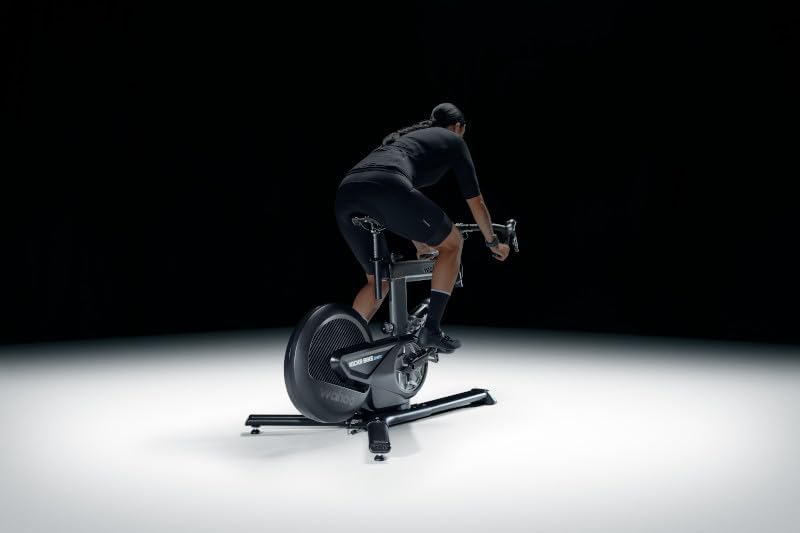
Image 2.1: The main unit of the WAHOO KICKR BIKE SHIFT INDOOR TRAINER, showcasing dens robuste ramme og svinghjul.
2.2 Fastgørelse af benene
The trainer comes with two legs that need to be attached to the main unit. Use the provided Allen wrenches and bolts to secure them firmly. Ensure the longer leg is positioned at the front for stability.
Video 2.2: A detailed guide on attaching the legs to a Wahoo KICKR CORE 2 trainer. While this video features a related product, the leg attachment process is similar and provides helpful visual instructions for securing the base of the trainer.
2.3 Installing Cassette (if applicable)
The KICKR BIKE SHIFT may come with a pre-installed cassette or require you to install one. If installing, ensure you have the correct cassette for your bike's gearing (e.g., 11-speed Shimano). Use a cassette tool to secure it properly. Spacers may be required for 9 or 10-speed cassettes.
Video 2.3: A user demonstrating the installation of a Shimano cassette onto a Wahoo KICKR CORE 2. This process is similar for the KICKR BIKE SHIFT, ensuring proper gearing for your indoor training.
2.4 Adjusting Bike Fit
Utilize the 5-point adjustment system to match your outdoor bike's geometry. This includes stack, reach, setback, saddle height, and frame height. An intuitive setup app can guide you through this process for optimal comfort and performance.

Image 2.4: Close-up of the WAHOO KICKR BIKE SHIFT handlebars, highlighting the integrated shifter controls and adjustment points.
3. Betjeningsvejledning
The KICKR BIKE SHIFT is designed for seamless integration with various cycling applications, offering a dynamic and responsive training experience.
3.1 Connecting to Training Apps
The trainer is compatible with popular cycling apps like Zwift, Rouvy, and TrainerRoad. Connect your KICKR BIKE SHIFT via Bluetooth or ANT+ to your preferred device (smartphone, tablet, computer, or Apple TV). Ensure your app is updated to the latest version for best performance.
Video 3.1: En omfattende review of the Wahoo KICKR trainer, highlighting its features and compatibility with various cycling apps. This video provides insights into the user experience and overall performance.
3.2 Virtual Shifting and Gearing
Customize your virtual shifting to mimic major groupsets (Shimano, SRAM, Campagnolo). The programmable gearing allows you to select the number of speeds and cassette tooth count, providing a realistic feel that matches your outdoor bike.

Image 3.2: A person riding the WAHOO KICKR BIKE SHIFT, demonstrating the immersive experience of indoor cycling with virtual shifting.
3.3 ERG Mode and Resistance Response
In ERG mode, the trainer automatically adjusts resistance to match your target wattage, allowing you to focus solely on your cadence. The innovative brake and belt drivetrain system ensures lightning-fast resistance response to changes in grade and power, enhancing the realism of your ride.
4. Vedligeholdelse
Regular maintenance ensures the longevity and optimal performance of your WAHOO KICKR BIKE SHIFT.
- Rensning: Tør træningsskoen regelmæssigt af med enamp cloth to remove sweat and dust. Avoid using abrasive cleaners.
- Kædevedligeholdelse: Keep your bike chain clean and lubricated to ensure smooth operation and minimize noise.
- Firmwareopdateringer: Periodically check for and install firmware updates via the Wahoo Fitness app to ensure your trainer has the latest features and performance enhancements.
- Bælteinspektion: Inspect the drive belt for any signs of wear or damage. Contact Wahoo Support if replacement is needed.
5. Fejlfinding
If you encounter issues with your KICKR BIKE SHIFT, refer to the following common troubleshooting tips:
- Forbindelsesproblemer: If the trainer fails to connect to your app, ensure Bluetooth/ANT+ is enabled on your device and the trainer is powered on. Try restarting both the trainer and your device. Check for any potential interference from other wireless devices.
- Unøjagtige effektmålinger: Perform a spin-down calibration using the Wahoo Fitness app. Ensure your trainer's firmware is up to date.
- Unusual Noises/Grinding: Inspect your bike's chain and cassette for cleanliness and proper alignment. Ensure the trainer's legs are securely fastened. If the noise persists, contact Wahoo Support.
- Modstand ændrer sig ikke: Verify that ERG mode is correctly configured in your training app. Check for any error indicators on the trainer's LED lights.
Video 5.1: En brugerreviewing the noise level of a Wahoo KICKR CORE 2 trainer. This video can help users identify if their trainer's noise levels are normal or indicative of a potential issue.
6. Specifikationer
| Feature | Specifikation |
|---|---|
| Mærke | Wahoo Fitness |
| Modelnavn | WAHOO KICKR BIKE SHIFT INDOOR TRAINER |
| Modelnummer | WFBIKE2 |
| Farve | Sort |
| Materiale | Alloy Steel, Aluminum, Plastic, Stainless Steel |
| Modstandsmekanisme | Magnetisk |
| Max Wattage | 1,800 watt |
| Max hældning | 16% simulated grade |
| Varens vægt | 35 kilo |
| Produktmål (L x B x H) | 76 cm L x 95 cm B x 121 cm H |
| Belastningskapacitet | 250 lbs |
| UPC | 850010131801 |
7. Garanti og support
Your WAHOO KICKR BIKE SHIFT INDOOR TRAINER is covered by a manufacturer's warranty and dedicated customer support.
7.1 Garantioplysninger
Produktet leveres med en 1 års fabriksgarantiGem venligst din købsbevis i tilfælde af garantikrav.
7.2 Kundesupport
For any questions, technical assistance, or warranty claims, please contact Wahoo Fitness Customer Support. Refer to the official Wahoo Fitness webwebsted for de mest opdaterede kontaktoplysninger og supportressourcer.