
1. Introduktion
This manual provides comprehensive instructions for the setup, operation, maintenance, and troubleshooting of your EDJO Ergonomic Wireless Keyboard. Designed for comfort and efficiency, this keyboard features a split layout, cushioned wrist rest, and versatile connectivity options to enhance your typing experience across multiple devices.
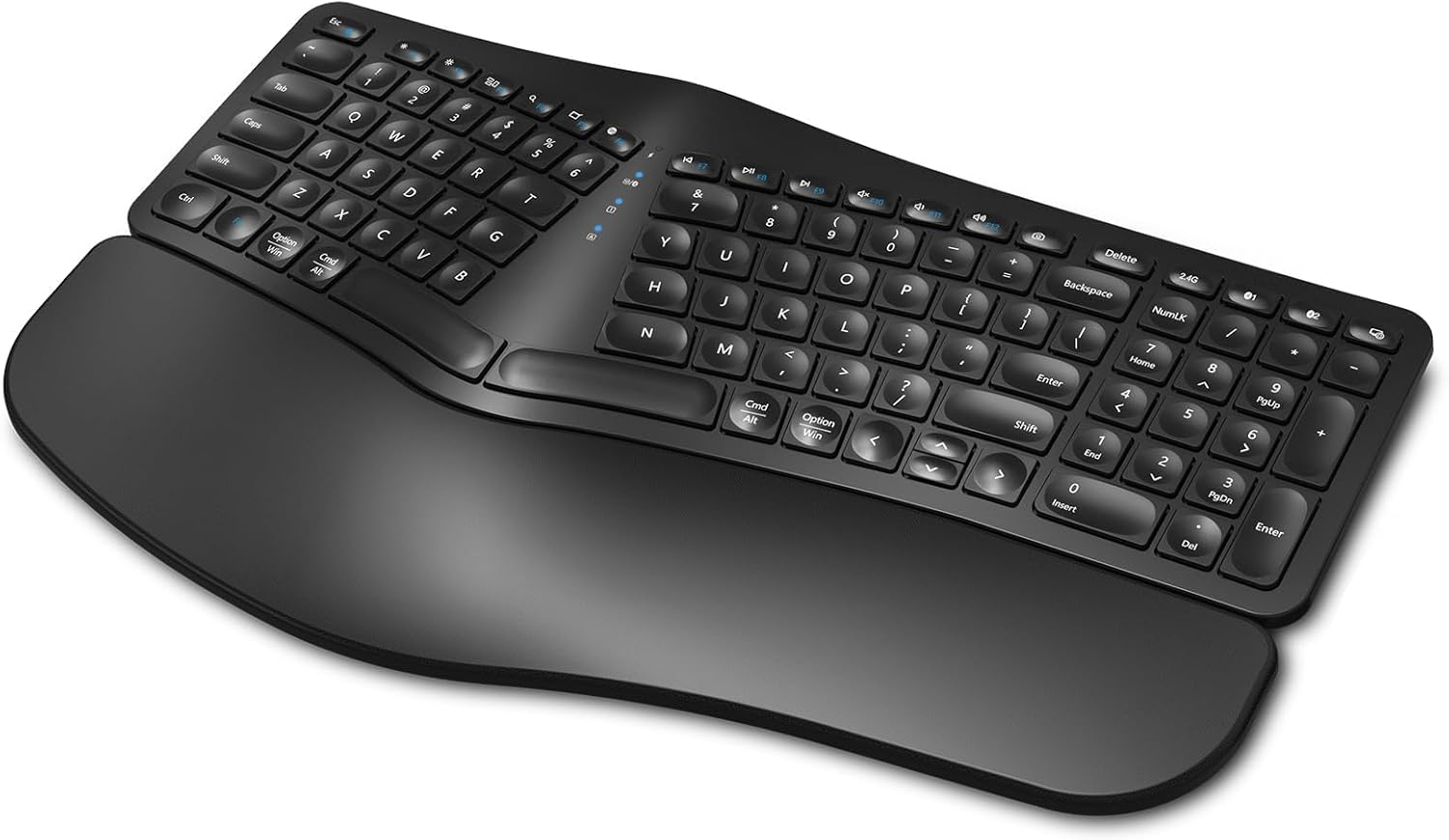
Figure 1: EDJO Ergonomic Wireless Keyboard
2. Pakkens indhold
Bekræft at alle varer er til stede i pakken:
- EDJO Ergonomic Wireless Keyboard
- USB-C ladekabel
- 2.4G USB Wireless Receiver (stored on the back of the keyboard)
- Brugervejledning (dette dokument)
3. Produktet er slutview
The EDJO Ergonomic Wireless Keyboard is engineered for user comfort and multi-device functionality. Key features include:
- Ergonomisk delt design: A curved layout and split key zones promote a natural hand and wrist posture, reducing strain during extended use.
- Polstret håndledsstøtte: An integrated soft pillow palm rest provides support, minimizing wrist flexion.
- Dobbelt trådløs forbindelse: Seamlessly switch between 2.4G wireless (via USB receiver) and two Bluetooth channels (BT1, BT2) for up to three devices.
- Genopladeligt batteri: Built-in 500mAh battery, rechargeable via USB-C, offering extended usage time.
- Stille skrivning: Scissor switches and drop-like keycaps ensure a silent and responsive typing experience.
- Multimedie-genvejstaster: 12 dedicated hotkeys for quick access to common functions.
- Adjustable Stands: Four foldable stands allow for customizable keyboard tilt.
Video 1: EDJO Ergonomic Wireless Keyboard Overview
4. Opsætning
4.1. Opladning af tastaturet
Before first use, it is recommended to fully charge the keyboard. Connect the provided USB-C charging cable to the charging port located on the top edge of the keyboard and to a USB power source. The charging indicator light will show the charging status.

Figur 2: USB-C-opladningsport og tænd/sluk-knap
4.2. 2.4G trådløs forbindelse
For a stable and fast connection to your computer:
- Locate the 2.4G USB wireless receiver stored in the compartment on the back of the keyboard.
- Sæt USB-modtageren i en ledig USB-port på din computer.
- Turn on the keyboard using the power switch on the top edge.
- Press the '2.4G' button on the keyboard. The corresponding indicator light will illuminate, confirming the connection.

Figure 3: USB Receiver Location and Adjustable Stands
4.3. Bluetooth Connection (BT1, BT2)
The keyboard supports two Bluetooth connections (BT1 and BT2) for multi-device pairing:
- Tænd for tastaturet ved hjælp af afbryderen.
- Tryk og hold enten 'BT1'- eller 'BT2'-knappen nede i 3-5 sekunder, indtil den tilsvarende indikatorlampe blinker hurtigt. Dette indikerer parringstilstand.
- Aktiver Bluetooth på din enhed (pc, bærbar computer, tablet, smartphone) og søg efter tilgængelige enheder.
- Select 'K960' (or similar name) from the list of found devices to pair.
- Once paired, the indicator light will stop flashing and remain steadily lit.
- Repeat steps 2-5 to pair a second Bluetooth device using the other 'BT' button.
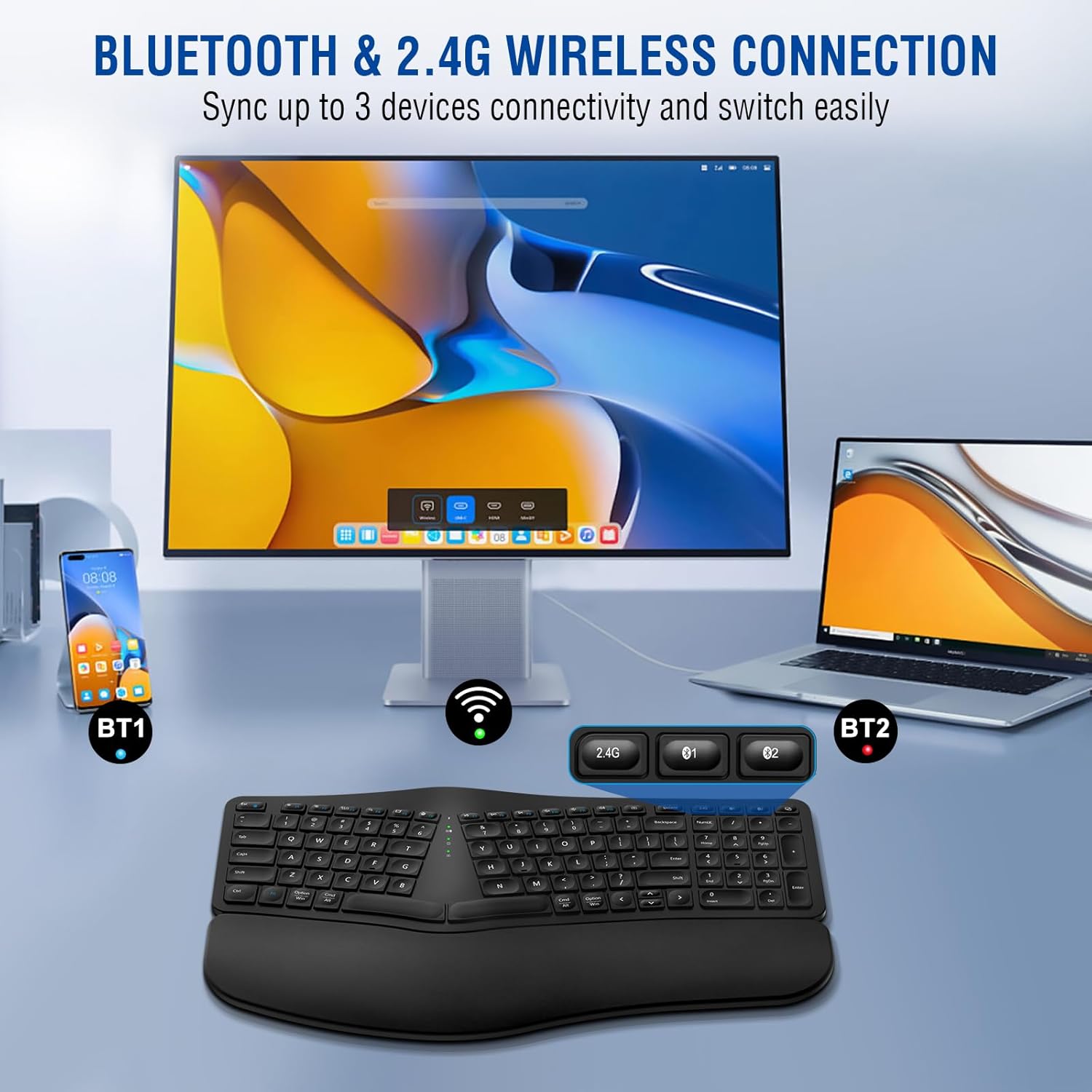
Figure 4: Multi-Device Connectivity via Bluetooth and 2.4G
5. Betjening
5.1. Tænd/sluk
To turn the keyboard on or off, use the dedicated power switch located on the top edge of the keyboard (refer to Figure 2).
5.2. Skift mellem enheder
To switch between connected devices (2.4G, BT1, BT2), simply press the corresponding button ('2.4G', 'BT1', or 'BT2') on the keyboard. The keyboard will connect to the selected device within a few seconds.
5.3. Multimediegenvejstaster
The keyboard features 12 multimedia hotkeys (F1-F12) that provide quick access to various functions. These functions may vary slightly depending on your operating system. Common functions include:
- Volume Control (Mute, Down, Up)
- Media Playback (Play/Pause, Previous, Next)
- Web Browser, Email, Search
- Skærmlås

Figure 5: Silent Key Design with Scissor Switches
5.4. Justering af tastaturvinkel
The keyboard is equipped with four foldable stands on its underside. You can deploy these stands to adjust the tilt of the keyboard to your preferred ergonomic angle, promoting a more comfortable typing posture (refer to Figure 3).
6. Vedligeholdelse
To ensure the longevity and optimal performance of your keyboard:
- Rensning: Brug en blød, tør klud til at rengøre tastaturoverfladen. Ved genstridigt snavs, brug en let tør klud.amp cloth with mild soap can be used, ensuring no liquid enters the keycaps or internal components.
- Opbevaring: Opbevar tastaturet et køligt, tørt sted væk fra direkte sollys og ekstreme temperaturer.
- Batteripleje: Avoid fully discharging the battery frequently. Charge the keyboard when the low battery indicator appears.
7. Fejlfinding
| Problem | Mulig årsag | Løsning |
|---|---|---|
| Tastaturet reagerer ikke | Low battery; Keyboard off; Incorrect connection mode; USB receiver not plugged in (2.4G) | Charge keyboard; Turn keyboard on; Select correct mode (2.4G, BT1, BT2); Plug in USB receiver |
| Bluetooth-parring mislykkedes | Keyboard not in pairing mode; Device Bluetooth off; Interference | Press and hold BT button until light flashes; Ensure device Bluetooth is on; Move closer to device, reduce interference |
| Taster skrives ikke korrekt | Connection issue; Software conflict | Reconnect keyboard; Restart device; Test on another device |
| Kort batterilevetid | Frequent use; Battery degradation | Ensure full charge; Keyboard enters sleep mode after 30 mins of inactivity to save power. Press any key to reactivate. |
8. Specifikationer
| Feature | Detalje |
|---|---|
| Model | B0CNT6GP41 |
| Forbindelse | 2.4G Wireless, Bluetooth (BT1, BT2) |
| Batterikapacitet | 500mAh litium-ion (inkluderet) |
| Opladningsport | USB-C |
| Driftsområde | Op til 10 meter (33 fod) |
| Tastaturlayout | Ergonomic Split Design, Full-sized with Numeric Keypad |
| Nøgletype | Scissor Switches, Drop-like Keycaps |
| Håndledsstøtte | Cushioned (Soft Synthetic Leather, High-density Foam, Memory Foam) |
| Kompatibilitet | Windows, Mac, Android, iOS (Laptop, PC, Smartphone, Tablet, Television) |
| Produktdimensioner | 17.24 x 10.51 x 1.81 tommer |
| Varens vægt | 2.86 pund |
| Inkluderede komponenter | USB kabel |

Figure 6: Cushioned Wrist Rest Construction

Figur 7: Bred enheds kompatibilitet
9. Garanti og support
The EDJO Ergonomic Wireless Keyboard comes with a 12 måneders garanti from the date of purchase. For any issues or inquiries, please contact EDJO customer support via Amazon email. We are committed to providing lifetime support for our products.
For further assistance, please refer to the contact information provided with your purchase or on the official EDJO product page.