
1. Introduktion
This manual provides detailed instructions for the installation, operation, and maintenance of your Mars Gaming MC-MAG ATX Gaming Case. The MC-MAG case is designed for advanced gaming setups, featuring a tempered glass side panel, dual magnetic dust filters, and efficient cooling capabilities. Please read this manual thoroughly before beginning installation to ensure proper setup and optimal performance.
Key features of the MC-MAG case include:
- Full tempered glass side panel for component visibility.
- Dual magnetic grilles on the front and top panels with removable dust filters.
- Three pre-installed 120mm Fixed RGB front fans.
- Support for liquid cooling systems up to 360mm.
- Dual-chamber design for optimized cooling and space management.
- Front panel connectivity: 2x USB 2.0, 1x USB 3.0, HD Audio, Microphone.
2. Pakkens indhold
Bekræft at alle komponenter er til stede i pakken:
- Mars Gaming MC-MAG ATX Gaming Case
- Accessory kit (screws, cable ties, standoffs)
- Brugervejledning (dette dokument)
3. Sag afsluttetview
Familiarize yourself with the main components and features of the MC-MAG case.
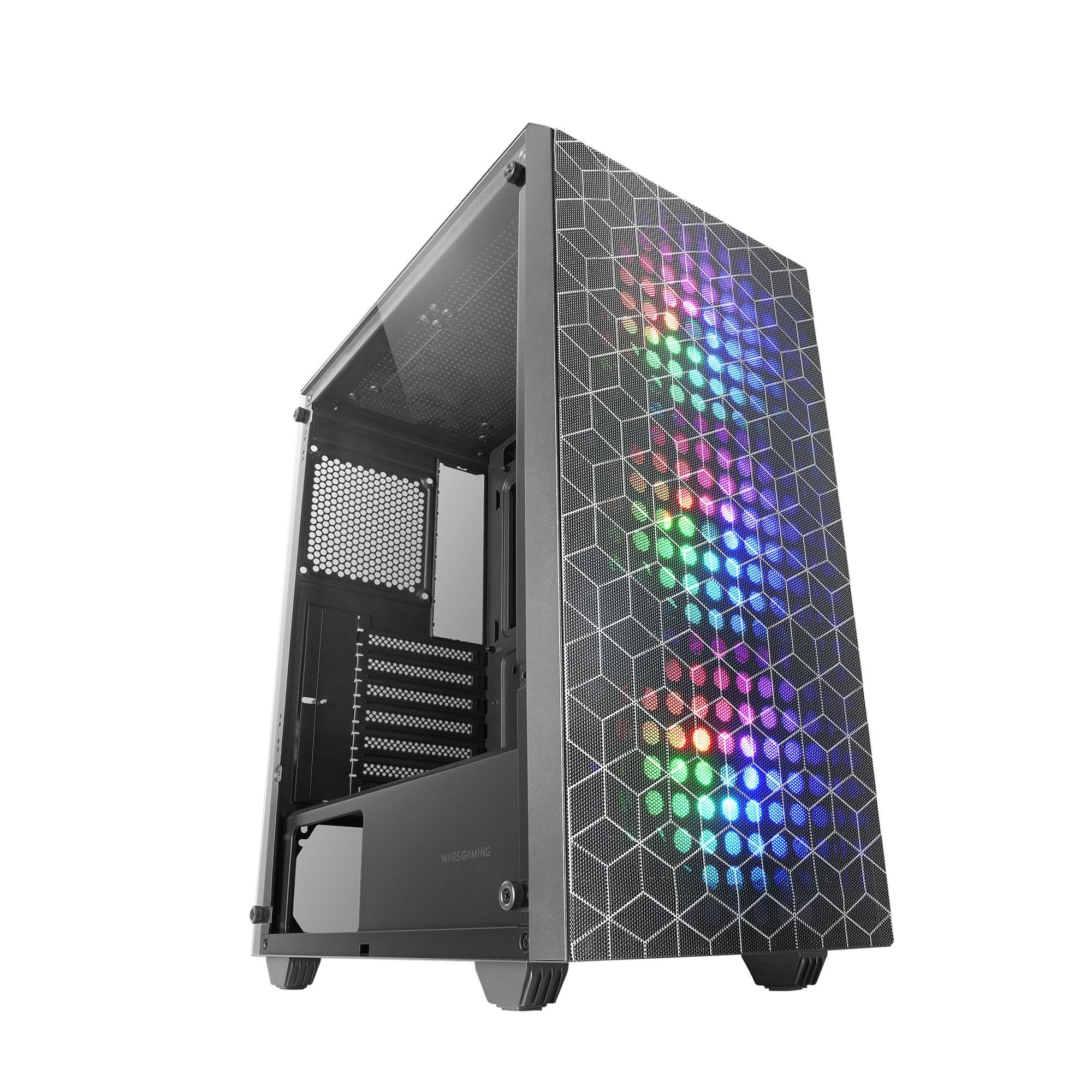
Figure 3.1: Mars Gaming MC-MAG ATX Gaming Case (Front-side view).

Figure 3.2: Tempered Glass Side Panel. This panel provides a clear view of internal components and is secured with thumbscrews.

Figure 3.3: Double Magnetic Front + Top Mesh. These removable grilles facilitate airflow and dust filtration.

Figure 3.4: Internal Layout Diagram. Illustrates fan and radiator mounting points, CPU cooler clearance (max 160mm), and VGA card length (max 350mm, 290mm with front radiator/fan).
4. Opsætning og installation
Follow these steps to install your PC components into the MC-MAG case.
4.1 Forberedelse af sagen
- Placer etuiet på en flad, stabil overflade.
- Remove the tempered glass side panel by unscrewing the thumbscrews at the rear of the case and carefully sliding the panel off. Set it aside on a soft, protected surface.
- Fjern bagpanelet for at få adgang til kabelhåndteringsområdet.
4.2 Installation af bundkort
- The MC-MAG case supports ATX, MicroATX, and Mini-ITX motherboards.
- Ensure the correct standoffs are installed for your motherboard size. Adjust if necessary.
- Installer I/O-skjoldet i den bageste åbning af kabinettet.
- Placer forsigtigt dit bundkort på afstandsstykkerne, og juster skruehullerne.
- Fastgør bundkortet med de medfølgende skruer.
4.3 Installation af strømforsyningsenhed (PSU).
- The PSU mounts in the bottom rear chamber of the case.
- Slide the PSU into its designated bay from the rear of the case.
- Fastgør strømforsyningen med skruer fra ydersiden af bagsiden af kabinettet.
4.4 Installation af lagerdrev
- The case supports up to 2x 3.5" HDDs and 4x 2.5" SSDs.
- 3.5" harddiske: Locate the drive cage in the PSU shroud area. Slide the HDD into the drive tray and secure it with screws.
- 2.5" SSD'er: Mount SSDs to the designated brackets on the rear of the motherboard tray or within the PSU shroud area. Secure with screws.
4.5 Graphics Card (VGA) Installation
- Fjern de nødvendige dæksler til udvidelsespladserne fra bagsiden af kabinettet.
- Indsæt dit grafikkort i PCIe-slottet på bundkortet.
- Secure the graphics card with the expansion slot screw.
- Note: Maximum VGA length is 350mm (290mm with front radiator/fan installed).
4.6 Cooling System Installation (Fans & Liquid Cooling)
The MC-MAG case comes with 3x 120mm Fixed RGB fans pre-installed in the front.
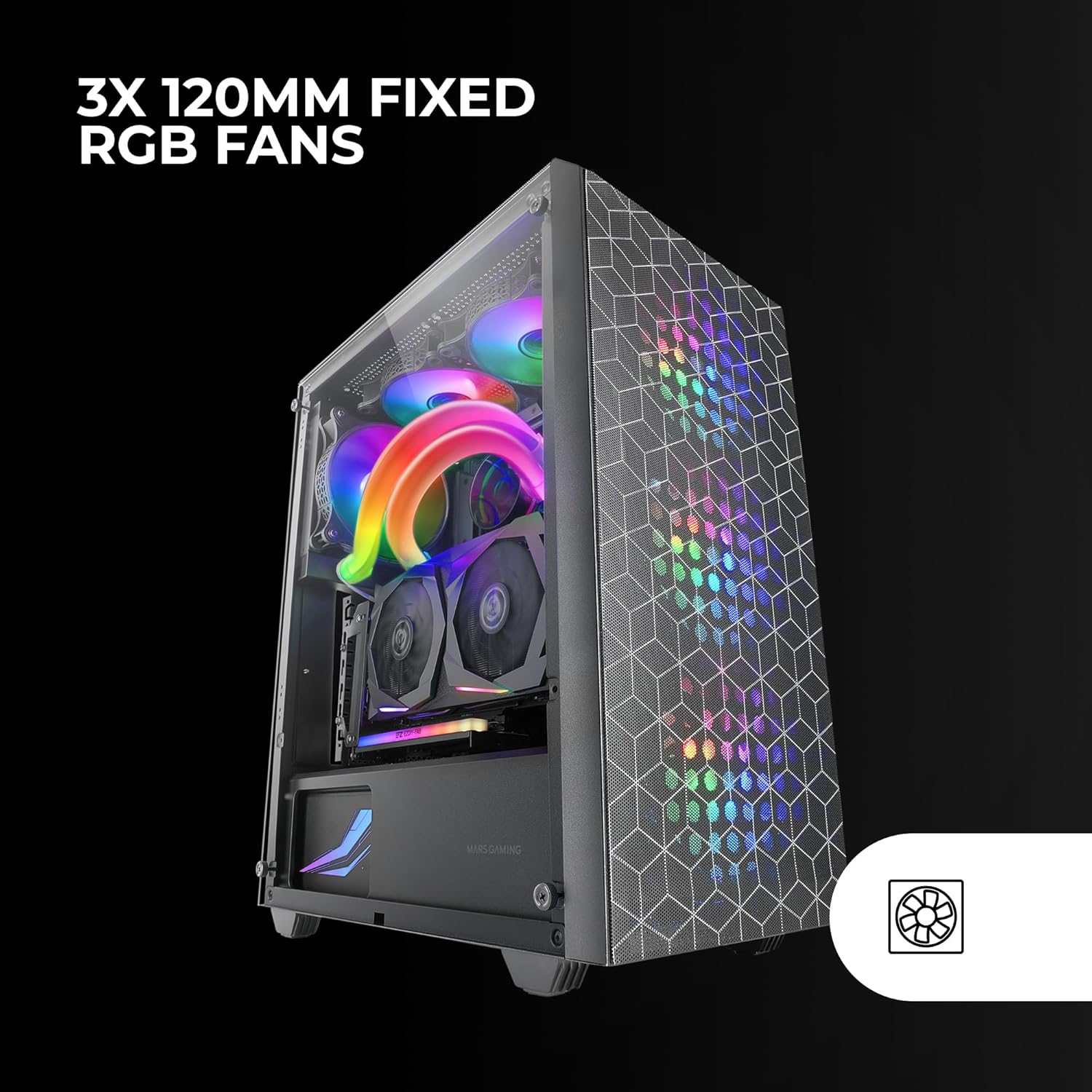
Figure 4.1: Pre-installed 3x 120mm Fixed RGB Fans.
- Yderligere blæsere: The case supports up to 6x 120mm fans or a combination of 4x 120mm and 2x 140mm fans. Refer to Figure 3.4 for fan mounting locations.
- Væskekøling: The case supports liquid cooling radiators up to 360mm.

Figure 4.2: Liquid Cooling Installation. The case supports radiators up to 360mm.
- Install radiators and fans according to their respective manufacturer's instructions.
4.7 Kabelstyring
Brug kabelføringsudskæringerne og fastgørelsespunkterne bag bundkortbakken til at organisere kablerne. Dette forbedrer luftgennemstrømningen og æstetikken.
4.8 Tilslutning af frontpanelets I/O
Connect the front panel cables (USB 2.0, USB 3.0, HD Audio, Microphone, Power Switch, Reset Switch, Power LED, HDD LED) to the corresponding headers on your motherboard. Refer to your motherboard manual for specific header locations.
4.9 Slutsamling
- Once all components are installed and cables are managed, reattach the rear side panel.
- Carefully reattach the tempered glass side panel and secure it with the thumbscrews.
5. Betjeningsvejledning
After successful installation, your MC-MAG case is ready for operation.
- Tænd: Press the power button located on the top panel of the case.
- USB-porte: Use the front USB 2.0 and USB 3.0 ports for connecting peripherals and external devices.
- Lydstik: Connect your headphones and microphone to the front panel HD Audio and Microphone jacks.
- RGB-blæsere: The pre-installed fans feature Fixed RGB lighting. Their lighting pattern is static and does not require software control from the case itself.
6. Vedligeholdelse
Regelmæssig vedligeholdelse er med til at sikre optimal ydeevne og levetid for dine pc-komponenter.
- Støvfiltre: The front and top panels feature magnetic dust filters. Regularly remove these filters and clean them with compressed air or by rinsing them with water (ensure they are completely dry before reattaching).
- Hærdet glaspanel: Clean the tempered glass side panel with a soft, lint-free cloth and a glass cleaner. Avoid abrasive materials that could scratch the glass.
- Indvendig rengøring: Periodically open the case and use compressed air to remove dust from internal components, especially fans and heatsinks.
7. Fejlfinding
Hvis du støder på problemer, skal du se følgende almindelige fejlfindingstrin.
- Ingen strøm:
- Ensure the PSU is switched on and properly connected to a power outlet.
- Kontroller, at alle strømkabler fra strømforsyningen er korrekt tilsluttet til bundkortet og komponenterne.
- Check the front panel power switch cable connection to the motherboard.
- Ventilatorer drejer ikke / RGB lyser ikke:
- Ensure fan power cables are securely connected to the motherboard or fan controller.
- For RGB, ensure the RGB cables are correctly connected (if applicable, for the fixed RGB fans, they should light up upon power).
- Frontpanel USB/lyd virker ikke:
- Verify that the USB and HD Audio cables from the front panel are correctly connected to the motherboard headers.
- Overophedning:
- Ensure all case fans are spinning correctly and oriented for optimal airflow (intake/exhaust).
- Clean dust filters and internal components to prevent dust buildup.
- Verify CPU cooler and GPU cooler are properly installed and functioning.
8. Specifikationer
| Feature | Detalje |
|---|---|
| Modelnavn | MCMAG |
| Sagstype | Mid Tower |
| Bundkort kompatibilitet | ATX, MicroATX, Mini-ITX |
| Materiale | Hærdet glas, stål, plast |
| Farve | Sort |
| Forudinstallerede ventilatorer | 3x 120mm Fixed RGB (Front) |
| Fan Support | Up to 6x 120mm or 4x 120mm + 2x 140mm |
| Væskekøling Support | Op til 360 mm radiator |
| Max CPU kølerhøjde | 160 mm |
| Max VGA-kortlængde | 350mm (290mm with front radiator/fan) |
| Drive Bays | 2x 3.5" harddiske, 4x 2.5" SSD |
| Udvidelsesslots | 7 |
| Front I / O-porte | 2x USB 2.0, 1x USB 3.0, HD Audio, Mic |
| Varens vægt | 3.96 kilo |
9. Garanti og support
Mars Gaming products are manufactured to high-quality standards. For information regarding warranty coverage, terms, and conditions, please refer to the warranty card included with your product or visit the official Mars Gaming webwebsted.
For technical support, troubleshooting assistance beyond this manual, or to inquire about replacement parts, please contact Mars Gaming customer support through their official channels.
Mars Gaming Official Webwebsted: www.marsgaming.eu