
HyperGear 15861
HyperGear Wireless Audio Essentials Duo brugermanual
Model: 15861 | Brand: HyperGear
1. Introduktion
Welcome to the user manual for your HyperGear Wireless Audio Essentials Duo. This innovative product combines the functionality of over-ear Bluetooth headphones with a portable HD stereo sound speaker, featuring vibrant LED lighting. Designed for versatility and superior audio quality, it allows you to enjoy your music privately or share it with others.
Hvad er inkluderet:
- Trådløse hovedtelefoner
- Micro USB Charging Cables
- 3.5mm Aux Cord with In-Line Microphone

Image: The HyperGear Wireless Audio Essentials Duo headphones in beige, showcasing their sleek design and integrated LED lighting on the earcups.

Billede: En overview of the Wireless Audio Essentials Duo, highlighting both the headphones and the portable speaker, emphasizing their HD sound, dynamic bass, and colorful LED lighting.
2. Opsætning
2.1 Opladning af enheden
Before first use, fully charge your HyperGear Wireless Audio Essentials Duo. Use the provided Micro USB Charging Cables to connect the headphones and speaker to a compatible USB power source.
- Hovedtelefoner: Op til 10 timers spilletid på fuld opladning.
- Højttaler: Op til 2 timers spilletid på fuld opladning.
- Hurtig genopladning: Cirka 1.5 timer for en fuld opladning.

Image: Visual representation of the battery life for both headphone and speaker modes, along with the rapid recharge time.
2.2 Bluetooth -parring
To connect your device wirelessly:
- Ensure the headphones/speaker are powered off.
- Tryk på tænd/sluk-knappen, og hold den nede, indtil LED-indikatoren blinker, hvilket angiver parringstilstand.
- On your device (smartphone, tablet, computer), enable Bluetooth and search for "HyperGear Audio Duo" (or similar name).
- Select the device to pair. Once connected, the LED indicator will show a solid light.
- The device will automatically reconnect to the last paired device when powered on, if within range (up to 33 feet).

Image: Diagram illustrating the wireless Bluetooth connectivity, showing the headphones, speaker, and a smartphone with a 33ft range and universal compatibility.
3. Betjeningsvejledning
3.1 Hovedtelefonkontrol
All physical buttons for controlling the headphones are conveniently located on the right ear cup.
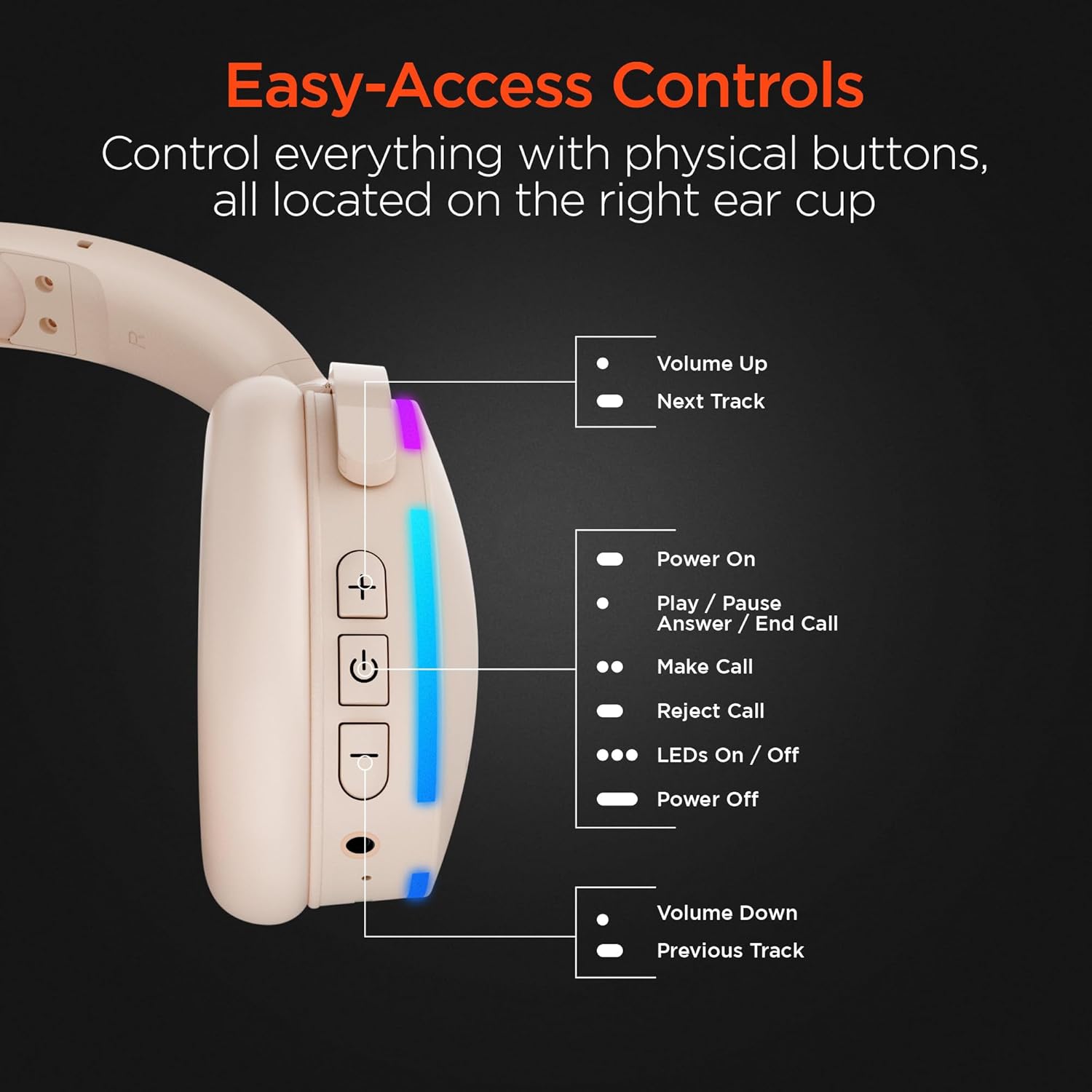
Billede: En detaljeret view of the right earcup, pointing out the functions of each button for easy access and control.
| Knap/handling | Fungere |
|---|---|
| + Knap | Volume Up / Next Track (Long Press) |
| Power knap | Power On / Play / Pause / Answer / End Call |
| LEDs On/Off Button | Toggle LED lights on/off |
| - Knap | Volume Down / Previous Track (Long Press) |
| Indbygget mikrofon | Til håndfri opkald og stemmekommandoer. |
3.2 Speaker Mode
The headphones can transform into a portable speaker for shared listening. Simply fold the earcups inwards to activate the speaker mode. The speaker features a full-range dynamic driver and 5W powerful audio, making it suitable for indoor and outdoor use. It also has a durable fabric carrying strap and is splashproof (IPX4).

Image: The ultra-compact and portable wireless speaker, shown with its durable fabric carrying strap, highlighting its 5W powerful audio, 52mm full-range dynamic driver, wireless control, and IPX4 splashproof rating.
3.3 Foretage og modtage opkald
Med den indbyggede mikrofon kan du nemt håndtere opkald:
- Besvar/afslut opkald: Tryk én gang på tænd/sluk-knappen.
- Afvis opkald: Tryk længe på tænd/sluk-knappen.
- Foretag opkald: Use your connected device to dial, and the audio will route through the headphones/speaker.
4. Vedligeholdelse
To ensure the longevity and optimal performance of your HyperGear Wireless Audio Essentials Duo, follow these maintenance guidelines:
- Rensning: Use a soft, dry cloth to clean the surfaces of the headphones and speaker. Do not use abrasive cleaners or solvents.
- Opbevaring: Opbevar enheden et køligt, tørt sted væk fra direkte sollys og ekstreme temperaturer.
- Vandeksponering: While the speaker is splashproof (IPX4), avoid submerging it in water. Keep both the headphones and speaker away from excessive moisture.
- Opladning: Always use the provided charging cables. Do not attempt to charge the device with damaged cables or chargers.
- Håndtering: Undgå at tabe enheden eller udsætte den for kraftige stød, da dette kan beskadige de indvendige komponenter.
5. Fejlfinding
If you encounter any issues with your HyperGear Wireless Audio Essentials Duo, please refer to the following common solutions:
| Problem | Mulig løsning |
|---|---|
| Enheden vil ikke tænde. | Sørg for, at enheden er fuldt opladet. Tilslut den til en strømkilde, og prøv igen. |
| Kan ikke parres via Bluetooth. |
|
| Ingen lyd eller lav lydstyrke. |
|
| Mikrofon virker ikke. |
|
| LED-lysene virker ikke. | Press the dedicated LED On/Off button on the right earcup. |
6. Specifikationer
| Feature | Detalje |
|---|---|
| Modelnavn | Wireless Audio Essentials Duo |
| Varemodelnummer | 15861 |
| Mærke | HyperGear |
| Farve | Beige |
| Materiale | Plast |
| Forbindelsesteknologi | Trådløs (Bluetooth) |
| Bluetooth version | 4.0 |
| Wireless Range | Op til 33 fod (10 meter) |
| Hovedtelefonstik | 3.5 mm Jack |
| Ørestykke form | Over Ear |
| Formfaktor | Over Ear |
| Støjkontrol | Lydisolering |
| Audio driver type | Dynamisk Driver |
| Frekvensområde | 20 Hz - 20,000 Hz |
| Kontroltype | Mediekontrol (berøring) |
| Spilletid for hovedtelefoner | Op til 10 timer |
| Højttalerens spilletid | Op til 2 timer |
| Genopladningstid | Ca. 1.5 timer |
| Højttalerens strømudgang | 5W |
| Størrelse på højttalerdriver | 52 mm |
| Speaker Water Resistance | IPX4 Stænksikker |
| Inkluderede komponenter | Wireless Headphones, Micro USB Charging Cables, 3.5mm Aux Cord with In-Line Microphone |
| Kompatible enheder | Bærbare computere, stationære computere, spillekonsoller, tablets, telefoner, smarthøjttalere, fjernsyn, mobiltelefoner |
| Aldersinterval | Teen to Adult |
| UPC | 633755158629 |
7. Garanti og support
For warranty information, technical support, or any inquiries regarding your HyperGear Wireless Audio Essentials Duo, please visit the official HyperGear website or contact their customer service. Details regarding product registration and warranty claims can typically be found on the manufacturer's support page.
You can also refer to the product's detail page on Amazon for additional information and potential protection plan options.
Officiel produktvideo:
Video: An official product video titled "HyperGear Wireless Audio Essentials Duo" from Amazon Videos, showcasing the key features and design of the headphones and speaker. This video provides a visual overview of the product's capabilities and versatility.
Ask a question about this manual
Ask about setup, troubleshooting, compatibility, parts, safety, or missing instructions. Manuals+ will review the question and use this page’s manual context to help answer it.