
MOUNTUP MU0062
MOUNTUP Ultra Slim Full Motion TV Wall Mount Instruction Manual
Comprehensive guide for the MOUNTUP MU0062 Ultra Slim Full Motion TV Wall Mount, designed for 26-60" LED OLED QLED TVs. This manual provides detailed instructions for installation, operation, and maintenance to ensure optimal performance and safety.
Indledning
The MOUNTUP MU0062 Ultra Slim Full Motion TV Wall Mount offers a sleek, space-saving solution for mounting your television. Its design allows the TV to sit only 1.3 inches from the wall when fully retracted, blending seamlessly into your living space. This mount is engineered for durability and flexibility, providing a wide range of motion for optimal viewing vinkler.
- Ultra Slim & Discreet Design: Retracts to just 1.3 inches from the wall.
- Full Motion Capability: Features 10° tilt, 45° left/right swivel, and 3° leveling adjustment.
- Universal kompatibilitet: Supports most 26"-60" flat TVs up to 88lbs, with VESA patterns from 75x75mm to 400x400mm.
- Robust og sikker: Constructed from heavy-duty alloy steel with a strong six-arm design for enhanced stability.
- Nem montering: Includes an installation manual, bubble level, and necessary hardware for quick setup.

Image: The MOUNTUP MU0062 Ultra Slim Full Motion TV Wall Mount, showcasing dens robuste design og leddelte arme.
Opsætning og installation
Before beginning installation, ensure you have all components and tools as listed in the included packing list. It is highly recommended to review the full installation manual for detailed steps and safety precautions. This mount is suitable for wood studs (12-16 inches spacing), concrete walls, and brick walls. Det er IKKE kun til gipsvægge.
Kompatibilitet mellem vægtyper

Image: Diagram illustrating compatible wall types: wood stud (max 16" spacing), concrete wall (requires anchor), and brick wall (requires anchor). Drywall alone is not supported.
For concrete or brick wall installations, concrete anchors are required and can be requested from the manufacturer. Always use a stud finder to locate wood studs accurately.
Quick 3-Step Assembly Overview
- Fastgør TV-beslag: Secure the mounting brackets to the back of your TV using the appropriate screws and spacers from the kit. Ensure the VESA pattern matches the mount's compatibility (75x75mm to 400x400mm).
- Monter vægplade: Position the wall plate on your chosen wall location, ensuring it is level. Mark and drill pilot holes into the wood stud(s) or concrete/brick, then secure the wall plate using the provided lag bolts.
- Hang and Secure TV: Carefully lift the TV and hook the attached brackets onto the wall plate. Secure the TV to the mount using the safety screws or locking mechanisms to prevent accidental dislodgement.

Image: Visual representation of the three main steps for installing the TV mount: attaching brackets to TV, mounting the wall plate, and hanging/securing the TV.
For a complete guide, please refer to the official Installationsmanual (PDF).
Betjening og justeringer
The MOUNTUP MU0062 mount provides full motion capabilities to optimize your viewing experience from various positions in the room.
Extension and Tilt
The mount allows your TV to extend up to 14 inches from the wall, providing flexibility for viewing. It also features a 10° downward tilting angle, which helps reduce glare and improve viewkomfort.

Image: A TV mounted on the wall, extended forward and tilted downwards, demonstrating the mount's extension and tilt capabilities.
Justering af drejning
You can swivel your TV up to 45° to the left or right, depending on your TV size and wall proximity. This feature is ideal for viewing from different seating areas.

Image: A TV mounted on a wall, swiveled to the side, illustrating the mount's swivel range. The maximum swivel angle depends on the TV size.
Justering af nivellering
After installation, the mount allows for a ±3° leveling adjustment to ensure your TV is perfectly horizontal.

Image: A diagram showing a TV mount with arrows indicating a ±3° leveling adjustment capability after installation.
Opretholdelse
To ensure the longevity and safe operation of your MOUNTUP TV wall mount, follow these simple maintenance guidelines:
- Regelmæssig inspektion: Periodically check all screws and connections to ensure they remain tight and secure. Over time, vibrations or frequent adjustments can loosen fasteners.
- Rensning: Tør holderen af med en blød, tør klud for at fjerne støv. Ved genstridige mærker, tør den let med enamp cloth can be used, followed by drying. Avoid abrasive cleaners or solvents that could damage the finish.
- Smøring: The articulating joints are designed for smooth movement. If you notice any stiffness or squeaking, a small amount of silicone-based lubricant can be applied to the moving parts.
- Overholdelse af vægtgrænse: Never exceed the maximum weight capacity of 88lbs (40kg) for the mount. Overloading can lead to structural failure and damage to your TV or property.
Fejlfinding
If you encounter any issues with your MOUNTUP TV wall mount, consider the following common solutions:
- TV'et er ikke i vater: Use the built-in leveling adjustment feature (±3°) to fine-tune the TV's horizontal position. Ensure the wall plate itself was installed level.
- Mount Feels Flimsy/Wobbly:
- Verify all wall plate lag bolts are securely fastened into solid wood studs or appropriate concrete/brick anchors.
- Ensure the TV brackets are properly seated and locked onto the wall plate.
- Confirm your TV's weight and size are within the mount's specified limits (up to 88lbs, 26"-60").
- Check that all articulating arm bolts are tightened.
- Difficulty Adjusting Movement (Tilt/Swivel/Extension):
- Check for any obstructions behind the TV or mount.
- Sørg for, at ingen kabler sidder fast eller forhindrer bevægelse.
- Apply a small amount of silicone lubricant to the joints if they feel stiff.
- TV Not Sitting Flush to Wall (when retracted):
- Ensure all cables are neatly managed and not creating bulk behind the TV.
- Verify that the TV's VESA mounting holes are not recessed in a way that prevents full retraction without additional spacers (which should be used if needed).
If problems persist, please contact MOUNTUP customer support for assistance.
Produktspecifikationer
| Feature | Detalje |
|---|---|
| Mærke | MONTERING |
| Modelnummer | MU0062 |
| Kompatible tv-størrelser | 26" - 60" |
| Vægt kapacitet | Op til 88 lbs (40 kg) |
| VESA-kompatibilitet | 75x75mm til 400x400mm |
| Distance from Wall (Retracted) | 1.3 tommer |
| Maksimal forlængelse fra væg | 14 tommer |
| Tilt vinkel | +5° / -10° |
| Drejevinkel | ±45° (Max, depends on TV size) |
| Justering af nivellering | ±3° |
| Materiale | Heavy-duty Alloy Steel |
| Farve | Sort |
| Varens vægt | 11.38 pund |
| Produktdimensioner | 17.1 x 16 x 1.3 tommer |
VESA-mønsterkompatibilitet
The VESA (Video Electronics Standards Association) pattern refers to the spacing of the four mounting holes on the back of your TV. This mount supports a wide range of VESA patterns, ensuring compatibility with many TV models.
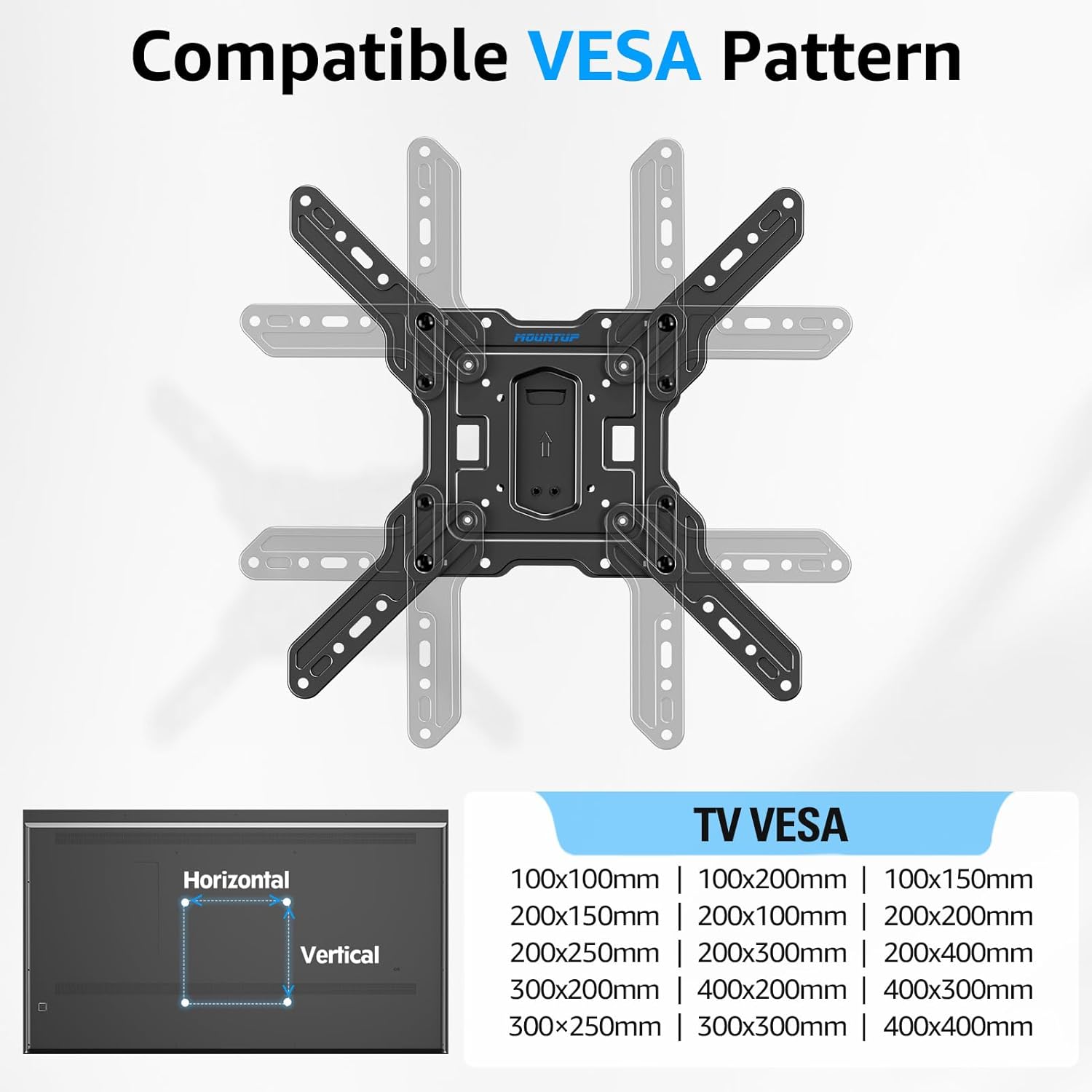
Image: A diagram showing various compatible VESA mounting patterns (e.g., 100x100mm, 200x200mm, 400x400mm) supported by the TV mount.
Garantioplysninger
MOUNTUP products are designed for durability and reliability. For specific warranty terms and conditions applicable to your MU0062 Ultra Slim Full Motion TV Wall Mount, please refer to the warranty card included with your product or visit the official MOUNTUP website. Typically, manufacturer warranties cover defects in materials and workmanship under normal use.
Kundesupport
For further assistance, technical support, or inquiries regarding your MOUNTUP TV wall mount, please contact MOUNTUP customer service. You can find more information and contact details by visiting the official MOUNTUP store:
Relaterede dokumenter - MU0062
 |
Installationsvejledning til MOUNTUP YZ2352 US1.0 TV-vægbeslag Detaljerede installationsvejledninger til MOUNTUP YZ2352 US1.0 TV-vægbeslag. Denne vejledning dækker montering på træstolper og betonvægge, VESA-kompatibilitet og sikkerhedsforanstaltninger for en sikker og optimal viewerfaring. Understøtter tv'er på op til 88 kg med VESA-mønstre op til 400x400 mm. |
 |
MOUNTUP MU0014 Installationsvejledning til TV-vægmontering Detaljerede installationsvejledninger til MOUNTUP MU0014 TV-vægbeslaget, der dækker sikkerhed, hardware, VESA-kompatibilitet, vægmontering (træstolper og beton) og justeringer til fuld bevægelsesvipping og nivellering. |
 |
MOUNTUP MU0009 Full Motion TV Vægmontering Installationsvejledning Comprehensive installation instructions for the MOUNTUP MU0009 Full Motion TV Wall Mount, designed for 26-60 inch TVs. This guide provides step-by-step directions for securely mounting your television to various wall types, including wood studs and solid concrete. |
 |
Installationsvejledning til MOUNTUP QTH-2B-US1 TV-vægbeslag Omfattende installationsvejledning til MOUNTUP QTH-2B-US1 TV-vægbeslaget, der dækker fastgørelse af VESA-plade, vægmontering (træstolper og beton), ophængning af TV og justeringsprocedurer. Indeholder sikkerhedsforanstaltninger og hardwareoplysninger på flere sprog. |
 |
MOUNTUP Ceiling TV Mount Installation Manual (Model MU0039) Installation guide for the MOUNTUP MU0039 ceiling TV mount. Includes safety precautions, parts list, step-by-step assembly instructions, and product dimensions for 24-65 inch TVs. |
 |
Installationsvejledning til MOUNTUP MU0036 universel TV-stander Detaljeret installationsvejledning til MOUNTUP MU0036 Universal TV-stativ. Det er designet til fladskærms-tv'er fra 37 til 55 tommer, understøtter en maksimal vægt på 40 kg og VESA-mønstre op til 400x400 mm. Lær, hvordan du sikkert samler og monterer dit TV med dette højdejusterbare stativ med en hærdet glasbase og drejefunktion. |
Ask a question about this manual
Ask about setup, troubleshooting, compatibility, parts, safety, or missing instructions. Manuals+ will review the question and use this page’s manual context to help answer it.