
Indledning
Thank you for choosing the HyperGear Bunny Tracks Kids Bluetooth Wireless Headphones. These headphones are designed to provide a fun and immersive audio experience for children, featuring wireless Bluetooth connectivity, LED rabbit ears, and multiple playback options. This manual provides essential information for setting up, operating, and maintaining your headphones to ensure optimal performance and longevity.

The image displays the HyperGear Bunny Tracks Kids Bluetooth Wireless Headphones in white, featuring LED rabbit ears. The product packaging is also visible, highlighting key features like Bluetooth connectivity, kid-friendly sizing, comfortable fit, and mic/volume control.
Produkt overview
Nøglefunktioner
- Trådløs Bluetooth-forbindelse: Problemfri lydstreaming fra kompatible enheder.
- LED Rabbit Ears: Fun, illuminated design element.
- Sammenfoldeligt design: Enhances portability and storage.
- Indbygget mikrofon: Til håndfri opkald og onlinekommunikation.
- Multi-tilstandsafspilning: Supports Bluetooth, 3.5mm Aux, microSD card, and FM radio.
- Komfortabel pasform: Adjustable headband and soft over-ear cushions.
- 10-timers spilletid: Længere lyttetid på en enkelt opladning.
Kontrol og porte
The headphones feature intuitive controls and versatile input options for various audio sources.

Dette billede giver en detaljeret view of the control buttons located on the headphone ear cup. Labels indicate functions for power on/off, next track/volume up, play/pause/answer call, previous track/volume down, and mode switch.
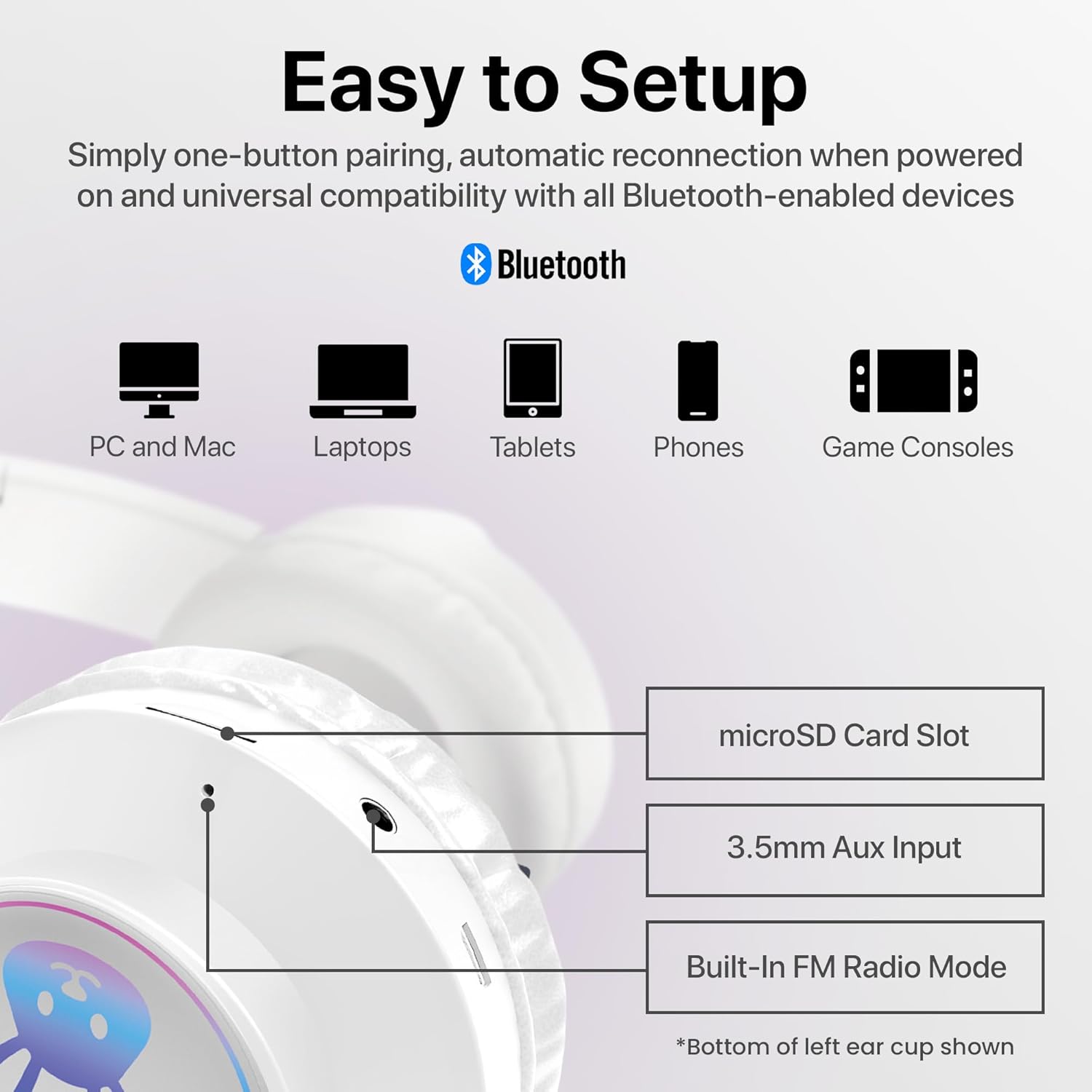
The image shows the various input ports on the bottom of the left ear cup, including a microSD card slot for direct audio playback, a 3.5mm Aux input for wired connections, and an indication of the built-in FM radio mode.
Opsætningsinstruktioner
1. Opladning af hovedtelefonerne
- Connect the included charging cable to the charging port on the headphones.
- Plug the other end of the charging cable into a USB power source (e.g., computer USB port, USB wall adapter).
- The LED indicator will illuminate during charging and turn off or change color when fully charged. A full charge takes approximately 2 hours.
2. Tænd/sluk
- For at tænde: Press and hold the Power button (usually combined with Play/Pause) until the LED indicator lights up and you hear an audible prompt.
- For at slukke: Tryk på tænd/sluk-knappen, og hold den nede, indtil LED-indikatoren slukker, og du hører en lydmeddelelse.
3. Bluetooth-parring
- Sørg for, at hovedtelefonerne er fuldt opladede og slukkede.
- Tryk på tænd/sluk-knappen og hold den nede i cirka 3-5 sekunder, indtil LED-indikatoren blinker blåt og rødt, hvilket angiver parringstilstand.
- Aktiver Bluetooth på din enhed (smartphone, tablet, computer) og søg efter tilgængelige enheder.
- Select "HyperGear Bunny Tracks" from the list of found devices.
- Once paired, the LED indicator will typically show a solid blue light or flash blue slowly, and you will hear a confirmation tone.
4. Wired Connection (Aux Mode)
Sådan bruger du hovedtelefonerne i kablet tilstand:
- Connect one end of a 3.5mm audio cable (not always included, check packaging) to the Aux input port on the headphones.
- Tilslut den anden ende til lydudgangsstikket på din enhed.
- The headphones will automatically switch to Aux mode. Bluetooth functionality will be disabled in this mode.
5. microSD Card Playback
To play audio directly from a microSD card:
- Indsæt et microSD-kort med MP3-lyd files into the microSD card slot on the headphones.
- The headphones will automatically switch to microSD mode and begin playing audio.
6. FM-radiotilstand
Sådan bruger du den indbyggede FM-radio:
- Tænd for hovedtelefonerne.
- Press the 'M/EQ' button (Mode/Equalizer) to switch to FM radio mode.
- Use the Volume Up/Down buttons to scan for stations. A short press may change frequency, while a long press might auto-scan. Refer to the control image for specific button functions.

This image depicts a young girl wearing the headphones while interacting with a laptop, suggesting use for online learning or entertainment.
Betjeningsvejledning
Basic Controls (Bluetooth/microSD Mode)
| Knap/handling | Fungere |
|---|---|
| Tænd/sluk-knap (kort tryk) | Play/Pause music; Answer/End phone calls. |
| Tænd/sluk-knap (langt tryk) | Tænd / sluk. |
| '+' Button (Short Press) | Næste spor. |
| '+' Button (Long Press) | Lydstyrke op. |
| '-' Button (Short Press) | Forrige spor. |
| '-' Button (Long Press) | Lydstyrke ned. |
| 'M/EQ' Button (Short Press) | Switch Audio Mode (Bluetooth, FM, microSD, Aux). |
| 'M/EQ' Button (Long Press) | Activate Equalizer (if available, check product specifications for details). |
Håndtering af telefonopkald
- Besvar opkald: Tryk kort på tænd/sluk-knappen, når du modtager et opkald.
- Afslut opkald: Tryk kort på tænd/sluk-knappen under et opkald.
- Afvis opkald: Tryk længe på tænd/sluk-knappen, når du modtager et opkald.
LED Rabbit Ears
The LED rabbit ears illuminate automatically when the headphones are powered on, adding a visual element to the listening experience. There are no specific controls for the LED lights; they operate in conjunction with the headphone's power state.

A boy is shown wearing the headphones and holding a game controller, illustrating the headphones' suitability for gaming.
Opretholdelse
Rensning
- Tør hovedtelefonerne af med en blød, tør og fnugfri klud.
- Brug ikke slibende rengøringsmidler, opløsningsmidler eller stærke kemikalier.
- Undgå at fugt kommer ind i åbninger.
Opbevaring
- Opbevar hovedtelefonerne et køligt, tørt sted væk fra direkte sollys og ekstreme temperaturer.
- Utilize the foldable design for compact storage and to protect the ear cups.
Batteripleje
- Oplad hovedtelefonerne regelmæssigt, selvom de ikke bruges ofte, for at opretholde batteriets sundhedstilstand.
- Undgå at aflade batteriet helt i længere perioder.
Fejlfinding
| Problem | Mulig løsning |
|---|---|
| Hovedtelefonerne tændes ikke. | Sørg for, at hovedtelefonerne er fuldt opladet. Tilslut dem til en strømkilde, og prøv igen. |
| Ingen lyd fra hovedtelefoner. | Check volume levels on both the headphones and the connected device. Ensure headphones are correctly paired via Bluetooth or properly connected via Aux cable. Verify the correct audio mode is selected. |
| Kan ikke parres via Bluetooth. | Sørg for, at hovedtelefonerne er i parringstilstand (blinkende blå/rød LED). Slå Bluetooth fra og til på din enhed. Flyt hovedtelefonerne tættere på enheden. Ryd tidligere Bluetooth-forbindelser på din enhed. |
| Dårlig lydkvalitet. | Ensure the headphones are within Bluetooth range (10 meters). Check for interference from other wireless devices. Try a different audio source or file. |
| LED rabbit ears not lighting up. | Ensure the headphones are powered on. If the issue persists, contact customer support. |
Specifikationer
| Feature | Detalje |
|---|---|
| Modelnavn | Bunny Tracks Headphones |
| Varemodelnummer | 15866 |
| Forbindelsesteknologi | Trådløs (Bluetooth) |
| Trådløs kommunikationsteknologi | Bluetooth 4.0 |
| Bluetooth rækkevidde | 10 meter |
| Ørestykke form | Over-Ear |
| Audio driver type | Dynamic Driver (40mm, inferred from image) |
| Frekvensområde | 20 Hz - 20,000 Hz |
| Batterilevetid | Op til 10 timer |
| Opladningstid | Approximately 2 Hours (inferred from A+ content) |
| Kontroltype | Mediekontrol, berøring |
| Særlige funktioner | Adjustable Comfy Fit, Ultra-Soft Plush Memory Foam Ear Cushions, LED Light-Up Rabbit Ears, Easy One-Button Setup, Foldable & Portable, Microphone Included |
| Materiale | Plast |
| Varens vægt | 7.2 ounces (0.45 pund) |
| Produktdimensioner | 7.1 x 2.9 x 10.6 tommer |
| UPC | 633755158667 |

En intern view of the headphone ear cup, illustrating the 40mm dynamic driver responsible for audio output, designed for clear sound and bass.
Garanti og support
For warranty information or technical support, please refer to the official HyperGear website or contact HyperGear customer service directly. Keep your purchase receipt as proof of purchase for any warranty claims.
Fabrikant: HYPERGEAR