
Indledning
Tak for købetasing the Volkano Griffin Series Dual Party Speaker. This manual provides essential information for the safe and optimal use of your speaker. Please read these instructions thoroughly before operating the device and retain them for future reference.
Sikkerhedsinstruktioner
- Udsæt ikke højttaleren for vand, fugt eller ekstreme temperaturer.
- Undgå at placere højttaleren i nærheden af varmekilder eller i direkte sollys.
- Forsøg ikke selv at skille enheden ad eller reparere den. Overlad al service til kvalificeret personale.
- Sørg for tilstrækkelig ventilation omkring højttaleren for at forhindre overophedning.
- Hold højttaleren væk fra børn og kæledyr.
- Brug kun den medfølgende strømadapter og tilbehør.
Pakkens indhold
Bekræft at alle varer er til stede i pakken:
- Volkano Griffin Series Dual Party Speaker
- Strømadapter
- Instruktionsmanual
- Hjælpekabel (3.5 mm)
- Fjernbetjening (hvis inkluderet)
- Wired Microphone (if included)

Image: The Volkano Griffin Series Dual Party Speaker shown with its instruction manual and auxiliary cable, illustrating the typical package contents.
Højttaleren overview
Kontrolpaneler på øverste panel
Billede: En detaljeret view of the speaker's top control panel, featuring various buttons, knobs, and sliders for audio adjustments and mode selection.
- Power knap: Tænder/slukker højttaleren.
- Mode knap: Skifter mellem Bluetooth, FM-radio, USB, SD og AUX-tilstande.
- Lydstyrkekontrol: Justerer masterlydstyrken.
- Bas/diskant-kontroller: Justerer bas- og diskantniveauer.
- Microphone Volume/Echo: Controls microphone input volume and echo effect.
- USB-port: Til afspilning fra USB-flashdrev.
- SD-kortplads: Til afspilning af SD-kort.
- Afspil/pause knap: Styrer medieafspilning.
- Knapper til forrige/næste spor: Navigerer gennem spor.
- LED Light Mode Button: Changes or turns off the LED lighting effects.
Bagpaneltilslutninger

Image: The back panel of the speaker, displaying the power input, auxiliary input, and other connection ports.
- DC strømindgang: Tilslut strømadapteren her.
- AUX-indgang: Tilslut eksterne lydenheder med et 3.5 mm hjælpekabel.
- Mikrofonindgang (6.35 mm): Tilslut en kablet mikrofon.
Opsætning
Tænd for højttaleren
- Connect the provided power adapter to the DC Power Input port on the rear of the speaker.
- Sæt strømadapteren i en almindelig stikkontakt.
- Tryk og hold på Power knap on the top panel for a few seconds until the speaker powers on and the LED lights illuminate.
Indledende Bluetooth-parring
- Sørg for, at højttaleren er tændt.
- Tryk på Mode knap until "Bluetooth" mode is announced or displayed. The speaker will enter pairing mode, indicated by a flashing Bluetooth indicator light.
- Aktiver Bluetooth på din mobilenhed (smartphone, tablet osv.) og søg efter tilgængelige enheder.
- Select "Volkano Griffin" (or similar name) from the list of found devices.
- Once paired, the speaker will confirm with an audible prompt, and the Bluetooth indicator light will become solid.
- Du kan nu afspille lyd fra din enhed via højttaleren.
Betjeningsvejledning
Changing Playback Modes
Tryk på Mode knap repeatedly to cycle through available input sources: Bluetooth, FM Radio, USB, SD Card, and AUX Input.
Adjusting Volume and Audio
- Hovedvolumen: Rotate the main Lydstyrkekontrol knappen til at øge eller mindske det samlede lydniveau.
- Bas/diskant: Brug den dedikerede Bas og Diskant knobs to fine-tune the audio equalization.
USB/SD-kortafspilning
- Indsæt et USB-flashdrev eller SD-kort (med MP3-lyd) files) into the respective port/slot on the top panel.
- The speaker will automatically switch to USB or SD mode and begin playing the first compatible track. If not, press the Mode knap for at vælge den korrekte kilde.
- Brug Afspil/pause, Forrige spor, og Næste spor knapper til at styre afspilning.
Betjening af FM-radio
- Tryk på Mode knap to select FM Radio mode.
- Tryk og hold på Afspil/pause knap to initiate an automatic scan for available FM stations. The speaker will save all found stations.
- Brug Forrige spor og Næste spor knapper til at navigere mellem gemte stationer.
AUX-indgang
- Connect one end of the 3.5mm auxiliary cable to the AUX Input port on the rear of the speaker.
- Tilslut den anden ende til hovedtelefonstikket eller lydudgangen på din eksterne enhed.
- Tryk på Mode knap for at vælge AUX-tilstand.
- Styr afspilning og lydstyrke fra din eksterne enhed.
Mikrofonbrug
- Plug a wired microphone into the 6.35mm Microphone Input port on the rear panel.
- Juster mikrofonens lydstyrke ved hjælp af den dedikerede Lydstyrke for mikrofon knob on the top panel.
- Brug Ekko knappen for at tilføje en ekkoeffekt til din stemme.
LED lyseffekter

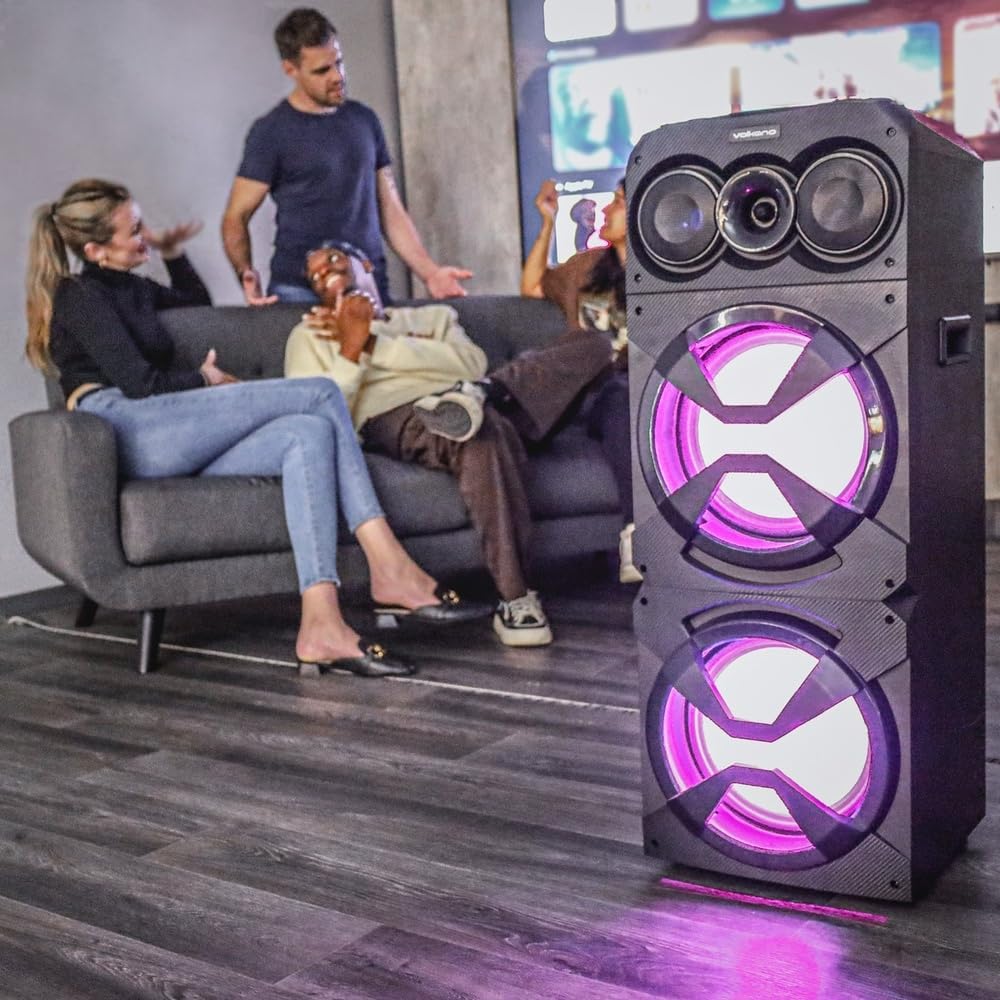
Image: The Volkano Griffin Series Dual Party Speaker in a social setting, showcasing its dynamic LED lighting effects in purple.

Image: The front of the speaker with its woofers illuminated by vibrant red LED lights, demonstrating another lighting option.
Tryk på LED-lystilstandsknap to cycle through different lighting patterns or to turn the lights off.
Opretholdelse
- Rensning: Brug en blød, tør klud til at tørre højttalerens yderside af. Brug ikke slibende rengøringsmidler, voks eller opløsningsmidler.
- Opbevaring: Når højttaleren ikke er i brug i længere perioder, skal den opbevares køligt og tørt, væk fra direkte sollys og ekstreme temperaturer.
- Ventilation: Sørg for, at højttalerens ventilationsåbninger ikke er blokerede for at forhindre overophedning.
Fejlfinding
| Problem | Mulig årsag | Løsning |
|---|---|---|
| Højttaleren tænder ikke. | Ingen strømforbindelse eller defekt strømadapter. | Ensure the power adapter is securely connected to both the speaker and a working power outlet. Try a different outlet. |
| Ingen lyd fra højttaleren. | Volume too low, incorrect input mode, or device not connected properly. | Increase the master volume. Press the Mode Button to select the correct input source. Re-pair Bluetooth or re-connect AUX cable. Check volume on the connected device. |
| Bluetooth-enheden kan ikke parres. | Højttaleren er ikke i parringstilstand, enheden er for langt væk, eller der er interferens. | Ensure the speaker is in Bluetooth pairing mode (flashing indicator). Move your device closer to the speaker. Turn off other Bluetooth devices to reduce interference. Try restarting both the speaker and your device. |
| USB/SD-kort afspiller ikke. | Ukorrekt file format, card/drive not inserted correctly, or corrupted media. | Sørg for lyd files are in a compatible format (e.g., MP3). Re-insert the USB drive or SD card. Try a different USB drive or SD card. |
Specifikationer
| Modelnavn: | Griffin Series Dual Party Speaker |
| Mærke: | Volkano |
| Højttalerstørrelse: | Dobbelt 12-tommer bashøjttaler |
| Forbindelse: | Bluetooth, USB, SD Card, AUX Input, FM Radio, Microphone Input |
| Strømudgang: | (Typical for similar speakers, e.g., 80W RMS) |
| Frekvensrespons: | (Typical for similar speakers, e.g., 40Hz - 20kHz) |
| Strømforsyning: | AC 100-240V, 50/60Hz |
| Dimensioner: | (Approximate, based on dual 12-inch design) |
| Vægt: | (Omtrentlig) |
Note: Specifications are subject to change without prior notice. Values marked with (Typical...) are estimates for general guidance.
Garantioplysninger
Volkano products are backed by a 1 års begrænset dækning from the date of purchase, reflecting our commitment to quality and dependable performance.
You may be eligible for an additional 12 måneders forlængelse, for a total of 24 months coverage, by registering your product. Please visit the official Volkano webhjemmeside for registreringsoplysninger og vilkår og betingelser.
This warranty covers manufacturing defects and workmanship under normal use. It does not cover damage caused by misuse, accidents, unauthorized modifications, or normal wear and tear.
Kundesupport
Your satisfaction is important to us. If you have any questions, require assistance with your Volkano Griffin Series Dual Party Speaker, or need to claim warranty service, please contact us:
- Online: Message us via the official Volkano Page on Amazon or visit the Volkano webwebsted.
- Webwebsted: Visit the Volkano Store on Amazon
Please have your product model name (Griffin Series Dual Party Speaker) and purchase details ready when contacting support.