
GOOJODOQ M06 Bluetooth Keyboard and Mouse
Brugermanual
Indledning
Thank you for choosing the GOOJODOQ M06 Bluetooth Keyboard and Mouse. This 3-in-1 device is designed to enhance your productivity across multiple platforms. This manual provides detailed instructions on how to set up, operate, and maintain your new device. Please read this manual carefully before use and keep it for future reference.
Pakkens indhold
- 1 x Bluetooth-tastatur
- 1 x Bluetooth mus
- 1 x opladningskabel (USB type-C)
- 1 x brugermanual
Produkt overview
The GOOJODOQ M06 is a versatile input solution featuring a 10-inch keyboard and a compact mouse, both utilizing Bluetooth connectivity. The keyboard supports simultaneous connection to up to three devices and is compatible with Android, iOS, and Windows operating systems. It features silent scissor-switch keys for a comfortable typing experience.
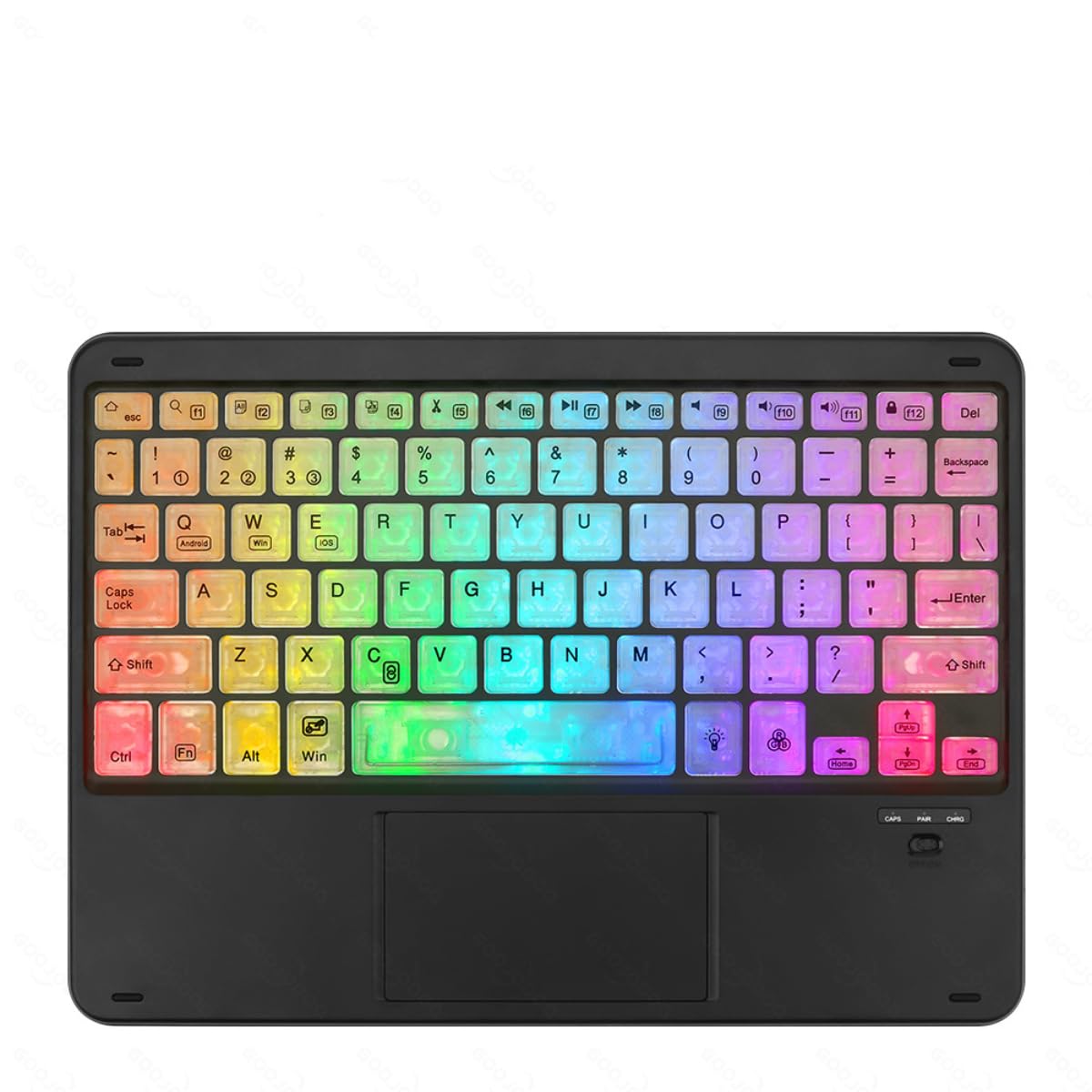
Image showing the GOOJODOQ M06 Bluetooth Keyboard and the accompanying mouse, both in black.
Setup: Bluetooth Connection
Follow these steps to connect your GOOJODOQ M06 Keyboard and Mouse via Bluetooth:
- Tænd: Turn on the power switch located on the keyboard and mouse. The Bluetooth indicator light on the keyboard will illuminate.
- Gå ind i parringstilstand:
- For the first device, press FN + 1. The Bluetooth light will blink, indicating it's ready for pairing.
- For the second device, press FN + 2.
- For the third device, press FN + 3.
- Connect on Your Device: On your device (e.g., tablet, smartphone, computer), go to Bluetooth settings and search for available devices. Select "Bluetooth Keyboard" from the list to connect.
- Vælg operativsystem: After successful connection, press the corresponding key combination to select your device's operating system:
- For Android devices, press FN + Q.
- For Windows devices, press FN + W..
- For iOS devices, press FN + E.
- Automatisk genforbindelse: Once successfully paired, the keyboard will automatically reconnect to the last used device when powered on.
Betjeningsvejledning
Skift mellem tilsluttede enheder
If you have paired the keyboard with multiple devices, you can easily switch between them by pressing the corresponding FN key combination:
- Trykke FN + 1 to switch to the first paired device.
- Trykke FN + 2 to switch to the second paired device.
- Trykke FN + 3 to switch to the third paired device.
Ensure the target device's Bluetooth is enabled and within range for a successful switch.
Generel brug
The keyboard features a standard QWERTY layout. The mouse operates like a conventional Bluetooth mouse. Ensure both devices are charged for optimal performance.
Opretholdelse
- Rensning: Use a soft, dry cloth to clean the surface of the keyboard and mouse. For stubborn dirt, a slightly damp en klud med mild sæbe kan bruges, så det sikres, at der ikke kommer væske ind i enheden.
- Opbevaring: Opbevar enheden et køligt, tørt sted væk fra direkte sollys og ekstreme temperaturer.
- Opladning: Charge the devices using the provided USB Type-C cable. Avoid using damaged cables or chargers.
- Undgå væsker: Do not expose the keyboard or mouse to water or other liquids.
Fejlfinding
- Enhed opretter ikke forbindelse:
- Sørg for, at både tastaturet og musen er tændt og fuldt opladet.
- Sørg for, at Bluetooth er aktiveret på din værtsenhed.
- Try re-entering pairing mode (FN + 1/2/3) and re-pairing with your device.
- Ensure the correct operating system mode is selected (FN + Q/W/E).
- Move the devices closer to each other to ensure they are within Bluetooth range.
- Taster reagerer ikke:
- Check if the keyboard is connected to the correct device (FN + 1/2/3).
- Genoplad tastaturet.
- Genstart din værtsenhed.
- Musen reagerer ikke:
- Genoplad musen.
- Sørg for, at musen er tændt.
- Re-pair the mouse with your device if necessary.
Specifikationer
- Model: M06
- Materiale: ABS + metal
- Farve: Sort
- Størrelse: 10 inches (Keyboard)
- Opladningsport: USB Type-C
- Forbindelse: Bluetooth (supports 3 devices simultaneously)
- Kompatibilitet: Android, iOS, Windows
- Tastaturfunktioner: Scissor-switch keys, Silent operation
Garanti og support
GOOJODOQ products are designed for reliability and performance. For warranty information, please refer to the warranty card included with your purchase or visit the official GOOJODOQ website. For technical support or further assistance, please contact GOOJODOQ customer service through the contact information provided on our webwebsted eller din købsplatform.