
1. Introduktion
The Rakstore XY-AP50H is a compact and versatile TPA3116D2 stereo digital amplifier board featuring Bluetooth 5.0 connectivity. It delivers 50W+50W output, making it suitable for various audio applications including home theater systems. This manual provides detailed instructions for setup, operation, and maintenance to ensure optimal performance and longevity of your device.
2. Sikkerhedsoplysninger
- Sørg for, at strømforsyningen voltage is within the specified range of DC 5-27V. Using an incorrect voltage kan beskadige enheden.
- Always connect speakers and power supply before powering on the amplivligere.
- Undgå at kortslutte højttalerudgangene eller strømindgangsterminalerne.
- Udsæt ikke enheden for fugt, vand eller ekstreme temperaturer.
- Hold enheden væk fra børn.
- Afbryd strømmen, før du udfører vedligeholdelse eller foretager tilslutninger.
3. Produktfunktioner
- Høj effekt: 50W + 50W stereoudgang.
- Bluetooth 5.0-forbindelse: Stable wireless audio transmission up to 15 meters (unobstructed).
- Wide Voltage Område: Operates on DC 5-27V / 2A or above.
- Flere lydindgange: Supports Bluetooth, AUX, and USB Sound Card functions.
- Beskyttelsesmekanismer: Includes power supply reverse connection protection, short circuit protection, and self-recovery overheating protection.
- Højttalerkompatibilitet: Adaptable for 10W-200W, 4Ω/8Ω speakers.
4. Produktet er slutview og komponenter
Familiarize yourself with the various components and connection points of the XY-AP50H amplivligere bræt.
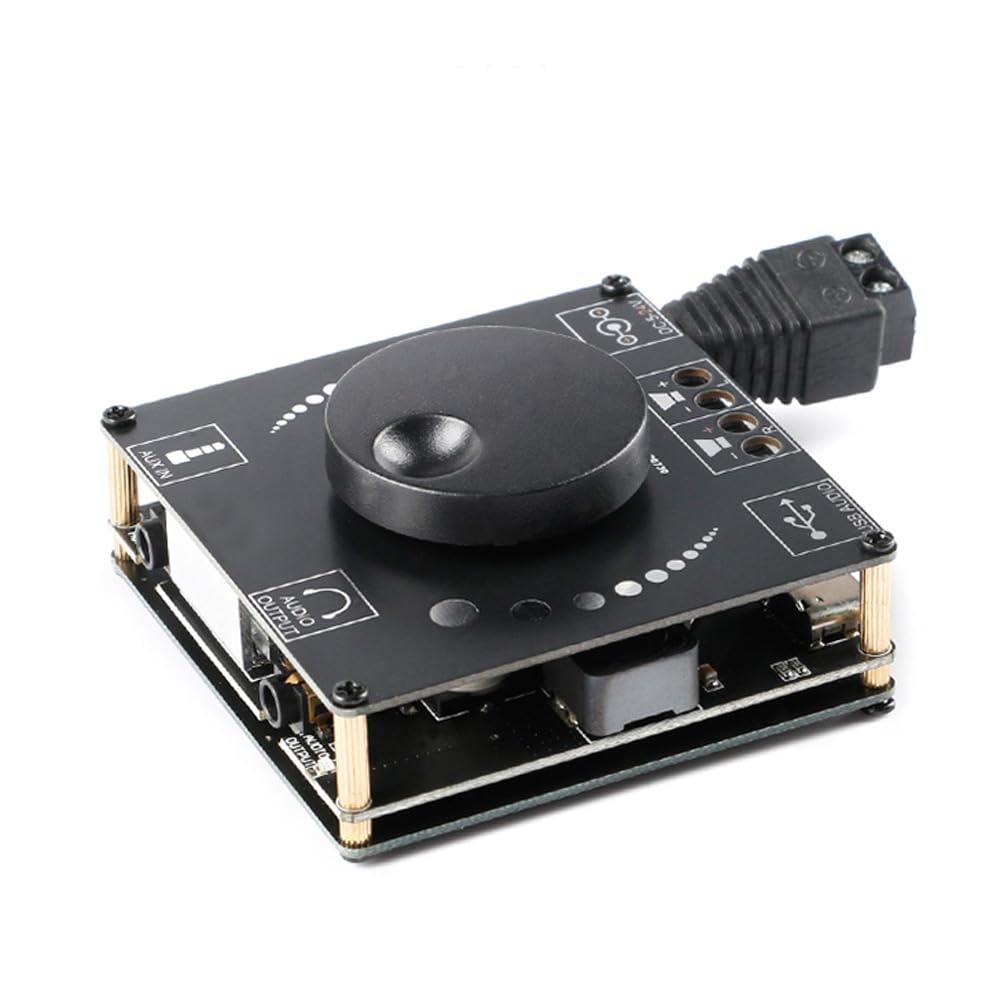
Billede 4.1: Top view of the XY-AP50H amplifier board, showing the main components including the volume knob, power input, speaker terminals, AUX input, and USB port.

Billede 4.2: Bund view of the XY-AP50H amplifier board, indicating the USB Audio input, speaker outputs (SPKR, SPKL), and DC 5-24V power input.

Billede 4.3: Dimensions of the XY-AP50H amplifier board, measuring approximately 60mm by 60mm.
5. Opsætningsvejledning
5.1 Strømtilslutning
- Sørg for amplifier is powered off and disconnected from any power source.
- Connect a DC 5-27V / 2A or above power adapter to the DC power input jack on the board. Observe polarity if using bare wires.
5.2 Højttalertilslutning
- Identify the left (SPKL) and right (SPKR) speaker output terminals on the board.
- Connect your passive speakers (10W-200W, 4Ω/8Ω) to the corresponding terminals. Ensure correct polarity (+ to + and - to -) for each speaker.
5.3 Lydindgangsmuligheder
The XY-AP50H supports three audio input methods: Bluetooth, AUX, and USB Sound Card.
5.3.1 Bluetooth-forbindelse
- Tænd for amplivligere bræt.
- Aktiver Bluetooth på din lydkildeenhed (f.eks. smartphone, tablet) og søg efter tilgængelige enheder.
- Select "XY-AP50H" from the list to pair. A confirmation sound will indicate successful pairing.
5.3.2 AUX-indgangsforbindelse
- Connect a 3.5mm audio cable from your audio source device's headphone jack to the AUX input port on the amplivligere bræt.
- De amplifier will automatically switch to AUX input mode when a cable is detected.
5.3.3 USB-lydkortfunktion

Billede 5.1: Illustration of connecting the XY-AP50H to a computer via a data cable to utilize its USB sound card function, providing improved audio output quality.
- Tilslut amplifier board to your computer using a USB data cable (Type-C to USB-A or Type-C to Type-C, depending on your computer's ports).
- Most computers will automatically recognize the amplifier as an external sound card.
- If prompted, select the XY-AP50H as the audio output device in your computer's sound settings.
- Open your computer's audio playback software to play music. The amplifier will output the audio.
6. Betjeningsvejledning
6.1 Tænd/sluk
Connect or disconnect the DC power supply to power on or off the amplivligere bræt.
6.2 Lydstyrkekontrol
Rotate the potentiometer knob on the board clockwise to increase volume and counter-clockwise to decrease volume.
6.3 Skift af inputtilstand
De amplifier automatically prioritizes inputs. Bluetooth is typically the default. Connecting an AUX cable will switch to AUX. Connecting via USB to a computer will activate the USB sound card mode.
7. Specifikationer
| Feature | Specifikation |
|---|---|
| Model | XY-AP50H |
| Amplifier Chip | TPA3116D2 |
| Bluetooth version | BLE 5.0 |
| Udgangseffekt | 50W + 50W (Stereo) |
| Forsyning Voltage | DC 5-27V / 2A above |
| Transmissionsafstand | 15 meter (uhindret) |
| Antal kanaler | Venstre og højre dobbeltkanal (stereo) |
| Tilpassede højttalere | 10W-200W, 4Ω/8Ω |
| Beskyttelsesmekanismer | Power supply reverse connection protection, short circuit protection, self-recovery overheating protection |
8. Fejlfinding
- Ingen lyd:
- Check power supply connection and ensure it meets DC 5-27V / 2A or above.
- Kontroller, at højttalertilslutningerne er sikre og korrekt polariserede.
- Ensure the correct audio input mode is selected (Bluetooth paired, AUX cable connected, or USB sound card active).
- Juster lydstyrkeknappen på amplifier og din lydkildeenhed.
- Forvrænget lyd:
- Reduce the volume from both the amplifteren og lydkilden.
- Check speaker impedance and power rating to ensure compatibility.
- Ensure power supply is stable and sufficient (at least 2A).
- Bluetooth afbrydelse:
- Ensure the audio source device is within 15 meters of the amplifier and there are no major obstructions.
- Prøv at ophæve parringen og parre enheden igen.
- Sørg for, at ingen andre enheder forstyrrer Bluetooth-signalet.
- Overophedning:
- Sørg for tilstrækkelig ventilation omkring amplivligere bræt.
- Reduce output volume or check speaker impedance. The board has self-recovery overheating protection, which may temporarily shut down output.
9. Vedligeholdelse
- Behold ampFjernbetjeningsplade ren og fri for støv. Brug en blød, tør klud til rengøring.
- Avoid placing the board in environments with high humidity or extreme temperatures.
- Forsøg ikke at adskille eller ændre boardet, da dette kan ugyldiggøre enhver potentiel garanti og forårsage skade.
10. Garanti og support
For warranty information and technical support, please refer to the seller's policies or contact Rakstore customer service directly. Keep your purchase receipt as proof of purchase.