1. Introduktion
Thank you for choosing the Hiwill HW210 Soundbar with Subwoofer. This 2.1 channel surround sound system is designed to enhance your audio experience for televisions, PCs, gaming consoles, and other compatible devices. This manual provides detailed instructions for setup, operation, and maintenance to ensure optimal performance and longevity of your product. Please read this manual thoroughly before use and retain it for future reference.

Image 1.1: The Hiwill HW210 Soundbar and Subwoofer system, shown with a television for illustrative purposes.
2. Sikkerhedsoplysninger
For at mindske risikoen for elektrisk stød, brand eller skade på enheden, bedes du overholde følgende sikkerhedsforanstaltninger:
- Udsæt ikke dette apparat for regn eller fugt.
- Placer ikke genstande fyldt med væske, såsom vaser, oven på apparatet.
- Sørg for tilstrækkelig ventilation. Bloker ikke ventilationsåbninger.
- Må ikke installeres i nærheden af varmekilder såsom radiatorer, varmeapparater, komfurer eller andre apparater (inklusive ampløftere), der producerer varme.
- Beskyt netledningen mod at blive gået på eller klemt, især ved stik, stikkontakter og det punkt, hvor de kommer ud af apparatet.
- Brug kun tilbehør/tilbehør specificeret af producenten.
- Træk stikket ud af dette apparat under tordenvejr, eller når det ikke skal bruges i længere perioder.
- Overlad al service til kvalificeret servicepersonale. Service er påkrævet, når apparatet er blevet beskadiget på nogen måde, såsom strømforsyningsledning eller stik er beskadiget, væske er blevet spildt, eller genstande er faldet ind i apparatet, apparatet har været udsat for regn eller fugt, ikke fungerer normalt , eller er blevet droppet.
3. Pakkens indhold
Kontroller venligst, at alle varer er til stede og i god stand:
- Hiwill Soundbar
- Kablet subwoofer
- Fjernbetjening
- Strømadapter
- Optical Cable (may vary by region)
- AUX Cable (may vary by region)
- Vægmonteringssæt (skruer, ankre)
- Brugervejledning (dette dokument)
4. Produktet er slutview
4.1 Soundbar-funktioner
- Ultra-slim design (3.8 cm height)
- Integrated orbital aluminum diaphragm speakers
- Built-in HiFi and DSP technology for immersive 3D surround sound
- Maximum output power: 120 Watts
- Lydtryksniveau: 106 dB
- Bluetooth 5.3 for wireless streaming
- Multiple input options: HDMI ARC, Optical, AUX, USB
- 3 adjustable EQ modes: Game, Movie, Music
- Adjustable bass and treble levels
4.2 Subwooferens funktioner
- 9-liter capacity for deep, resonant bass
- Wired connection to the soundbar for stable audio transmission
4.3 Kontroller og indikatorer
The soundbar features an integrated display and control buttons, typically located on the top or front panel. The remote control provides full functionality.
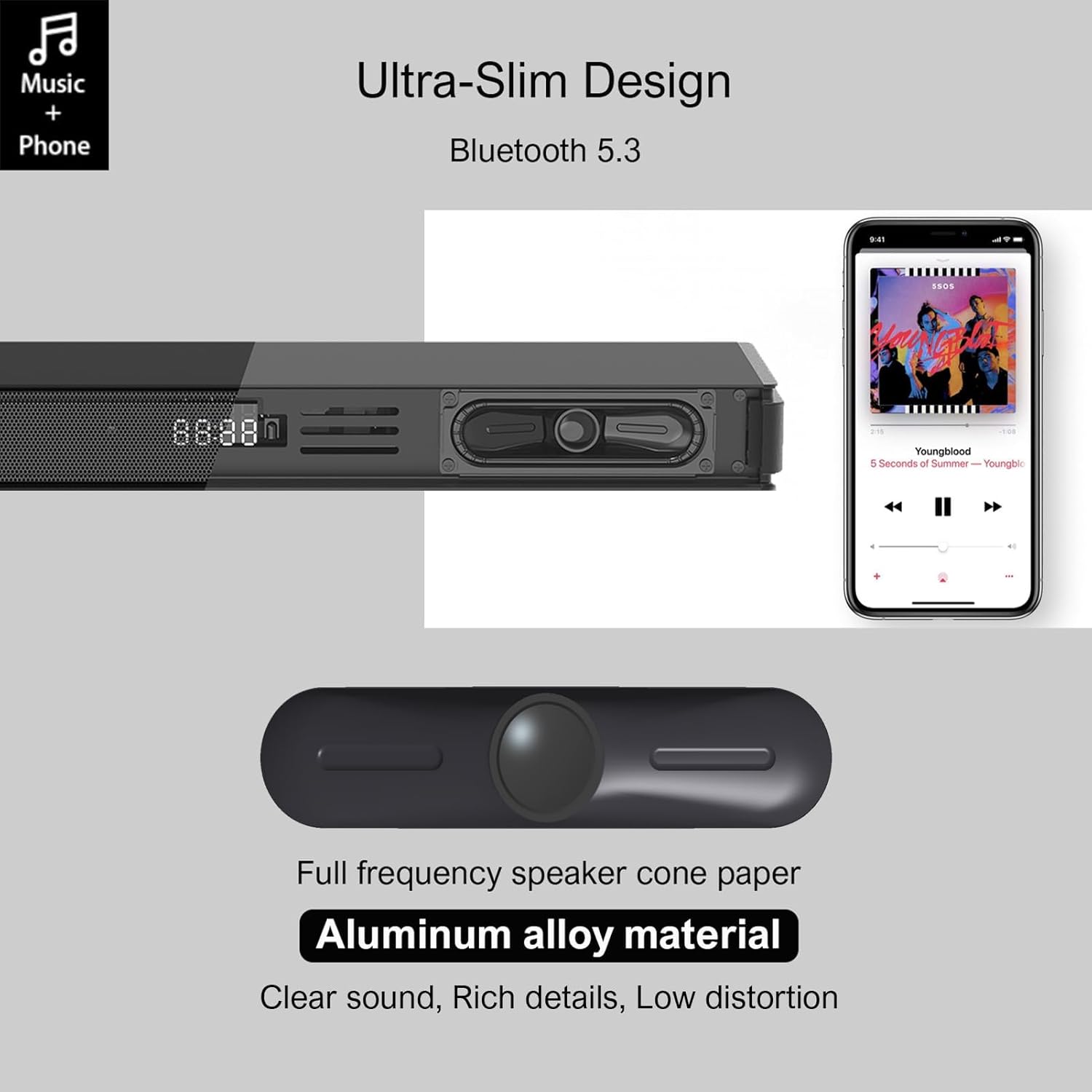
Image 4.1: Detail of the soundbar's ultra-slim design, showing the front display and integrated speakers.
4.4 Bagpaneltilslutninger
The rear panel of the soundbar provides various ports for connecting to your audio sources and power.

Billede 4.2: Bagside view of the soundbar showing input ports: AUX, HDMI ARC, USB, Optical, Subwoofer Out, and DC In.
- AUX (3.5 mm): Til tilslutning af enheder med en 3.5 mm lydudgang.
- ARC (HDMI): For connecting to a TV's HDMI ARC port. Supports CEC for unified control.
- USB: Til afspilning af lyd files fra et USB-drev.
- OPTISK: For connecting to a TV or other device with an optical audio output.
- SUB UD: Til tilslutning af den kablede subwoofer.
- DC IN: Til tilslutning af strømadapteren.
5. Opsætning
5.1 Placeringsmuligheder
The Hiwill HW210 soundbar offers flexible placement options to suit your home entertainment setup.

Image 5.1: Illustrates placing the soundbar on a tabletop in front of the TV or mounting it on the wall below the TV.
- Bordpladeplacering: Place the soundbar on a stable, flat surface directly in front of your TV. Ensure it does not obstruct the TV's remote sensor.
- Vægmontering: The soundbar can be mounted on the wall below your TV. Use the provided wall mounting kit and follow these steps:
- Mark the desired mounting positions on the wall, ensuring the soundbar is centered with your TV.
- Bor pilothuller på de markerede positioner.
- Insert wall anchors (if necessary for your wall type).
- Secure the mounting brackets (if separate) or the soundbar directly using screws.
- Subwoofer placering: Place the subwoofer on the floor near the soundbar. Experiment with placement to find the best bass response for your room.
5.2 Tilslutning til strøm
- Connect the power adapter to the DC IN port on the soundbar's rear panel.
- Sæt den anden ende af strømadapteren i en stikkontakt.
- Connect the wired subwoofer cable to the SUB OUT port on the soundbar.
5.3 Tilslutning til lydkilder
Choose one of the following connection methods based on your device:
- HDMI ARC (anbefales til tv'er):
- Connect one end of an HDMI cable (not included) to the ARC port on the soundbar.
- Connect the other end to the HDMI ARC port on your TV.
- Ensure HDMI CEC is enabled in your TV's settings for unified control.
- Optisk:
- Connect the optical cable (included) to the OPTICAL port on the soundbar.
- Connect the other end to the optical audio output port on your TV or other device.
- Ensure your TV's audio output is set to "PCM" if you experience no sound.
- AUX (3.5 mm):
- Connect the 3.5mm AUX cable (included) to the AUX port on the soundbar.
- Connect the other end to the headphone jack or AUX output of your device.
- USB:
- Indsæt et USB-flashdrev med lyd files i USB-porten på soundbaren.
6. Betjeningsvejledning
6.1 Tænd/sluk
- Tryk på Magt knappen på soundbaren eller fjernbetjeningen for at tænde eller slukke enheden.
6.2 Valg af indgangskilde
- Tryk på Input button on the remote control or the soundbar to cycle through available input sources (ARC, OPT, AUX, USB, BT). The selected input will be displayed on the soundbar's screen.
6.3 Bluetooth -parring
- Turn on the soundbar and select the "BT" input source. The soundbar will enter pairing mode, indicated by a flashing "BT" on the display.
- Aktiver Bluetooth på din mobilenhed, og søg efter tilgængelige enheder.
- Select "Hiwill HW210" (or similar name) from the list of devices.
- Once paired, the soundbar will emit a confirmation tone, and "BT" will stop flashing.
- To disconnect, turn off Bluetooth on your device or select a different input source on the soundbar.
6.4 Lydstyrkekontrol
- Brug Lydstyrke op (+) og Skrue ned (-) knapperne på soundbaren eller fjernbetjeningen til at justere mastervolumen.
- Tryk på Stum knappen på fjernbetjeningen for at slå lyden til eller fra.
6.5 EQ Modes and Tone Adjustment
The soundbar features three preset equalizer modes and adjustable bass/treble settings.

Image 6.1: Visual representation of the three equalizer modes: Game, Movie, and Music, optimized for different audio content.
- Tryk på EQ button on the remote control to cycle through the preset modes: Spil, Film, og Musik.
- Brug bas +/- buttons on the remote control to adjust the bass level.
- Brug Diskant +/- buttons on the remote control to adjust the treble level.
7. Vedligeholdelse
- Rensning: Brug en blød, tør klud til at rengøre overfladen på soundbaren og subwooferen. Brug ikke flydende rengøringsmidler eller slibende materialer.
- Opbevaring: Hvis enheden opbevares i længere tid, skal den tages ud af stikkontakten og opbevares et køligt og tørt sted.
- Undgå forhindringer: Ensure that the speaker grilles and ventilation openings are not blocked by dust or other objects.
8. Fejlfinding
| Problem | Mulig årsag | Løsning |
|---|---|---|
| Ingen strøm | Netledning ikke tilsluttet; Strømudtag ikke aktivt | Sørg for, at netledningen er korrekt tilsluttet; prøv en anden stikkontakt. |
| Ingen lyd | Forkert indgangskilde valgt; Lydstyrken er for lav; Kabler er ikke tilsluttet korrekt; TV'ets lydudgangsindstillinger er forkerte. | Select the correct input source; Increase volume; Check all audio cables are securely connected; For Optical/ARC, ensure TV audio output is set to PCM. |
| Bluetooth-parring mislykkes | Soundbaren er ikke i parringstilstand; Enheden er for langt væk; Interferens. | Ensure soundbar is in BT mode and flashing; Move device closer; Turn off other Bluetooth devices. |
| Fjernbetjening virker ikke | Batterierne er opbrugt; Blokering mellem fjernbetjening og soundbar. | Replace remote control batteries; Ensure clear line of sight to the soundbar's sensor. |
| Dårlig lydkvalitet | Incorrect EQ mode; Source audio quality; Cable issues. | Adjust EQ modes and bass/treble settings; Try a different audio source; Check/replace audio cables. |
9. Specifikationer
| Modelnavn | Hiwill HW210 Soundbar |
| Højttaler type | Soundbar med kabelbaseret subwoofer |
| Surround Sound konfiguration | 2.1 kanal |
| Maksimal højttalerudgangseffekt | 120 watt |
| Forbindelsesteknologi | Bluetooth 5.3, HDMI ARC, AUX (3.5mm), USB, Optical |
| Lydudgangstilstand | Omgive |
| Særlige funktioner | High-resolution audio support, 3 EQ modes, Adjustable Bass/Treble, Wall-mountable |
| Anbefalede anvendelser | TV, Gaming Consoles, Computers, Smartphones, Tablets, Music Players, DVD Players, Home Theater |
10. Garanti og support
Hiwill products are designed and manufactured to the highest quality standards. For detailed warranty information, please refer to the warranty card included in your package or visit the official Hiwill website. If you encounter any issues or require technical assistance, please contact Hiwill customer support through the contact information provided on the product packaging or webwebsted.
Please have your model number (HW210) and purchase date ready when contacting support.