
1. Introduktion
This manual provides essential instructions for the safe and efficient operation, setup, and maintenance of your ALLPOWERS R1500 LITE Portable Power Station and SP037 Solar Panel. Please read this manual thoroughly before using the product to ensure optimal performance and longevity.
The ALLPOWERS R1500 LITE is a versatile portable power station designed to provide reliable power for various applications, from outdoor camping and RV use to home backup during power outages. It features a 1056Wh capacity and 1600W AC output (3200W surge), capable of charging up to 9 devices simultaneously. The included SP037 400W solar panel allows for efficient solar recharging.

Figur 1: En overview of the ALLPOWERS R1500 LITE portable power station alongside the SP037 foldable solar panel.
2. Sikkerhedsoplysninger
Følg altid følgende sikkerhedsretningslinjer for at forhindre personskade eller beskadigelse af produktet:
- Enheden må ikke skilles ad, repareres eller modificeres.
- Keep the product away from fire, heat sources, and direct sunlight.
- Avoid exposure to water or other liquids. Do not operate in rain or wet conditions.
- Sørg for tilstrækkelig ventilation under brug og opladning. Dæk ikke enheden til.
- Brug kun originale eller certificerede opladningskabler og tilbehør.
- Opbevares utilgængeligt for børn og kæledyr.
- I tilfælde af brand, brug en tørpulverslukker. Brug ikke vand.
3. Pakkens indhold
Bekræft at alle varer er til stede i din pakke:
- ALLPOWERS R1500 LITE bærbar kraftstation
- ALLPOWERS SP037 400W Solar Panel
- AC-opladerkabel
- Solar ladekabel
- Brugervejledning (dette dokument)
4. Opsætning
4.1 Første opladning af kraftværket
Before first use, fully charge the R1500 LITE using the AC charging cable.
- Connect the AC charging cable to the AC input port on the R1500 LITE.
- Sæt den anden ende af AC-opladningskablet i en almindelig stikkontakt.
- Displayet viser opladningsstatus. Oplad indtil batteriindikatoren viser 100%.
4.2 Connecting the SP037 Solar Panel
To charge the R1500 LITE using solar power:
- Unfold the SP037 solar panel and place it in direct sunlight. Adjust the kickstands for optimal angle towards the sun.
- Connect the solar charging cable to the output port of the SP037 solar panel.
- Connect the other end of the solar charging cable to the DC input port on the R1500 LITE.
- The display will show solar input wattage og ladestatus.

Figure 2: Key features of the SP037 solar panel, including its IP67 water resistance, included cables with a storage bag, and adjustable kickstands for optimal sun exposure.
5. Betjening
5.1 Tænd/sluk
Press and hold the main power button for a few seconds to turn the R1500 LITE on or off. The LCD screen will illuminate upon activation.
5.2 Opladningsenheder
The R1500 LITE offers multiple output ports:
- AC stikkontakter: Press the AC power button to activate the 1600W (3200W surge) AC outputs. Plug in your AC-powered devices.
- USB-C porte: Two 100W USB-C ports are available for fast charging compatible devices.
- USB-A porte: Two USB-A ports provide standard USB charging.
- Cigarettænderport: Til 12V DC-enheder.

Figure 3: The R1500 LITE providing power for both home appliances and outdoor electronic devices.
5.3 Genopladning af kraftværket
The R1500 LITE can be recharged via AC wall outlet or solar panel. It supports three charging modes:
- Standardtilstand: 1000W AC input.
- Hurtig tilstand: 1200W AC input, allowing a full charge in approximately 50 minutes.
- Lydløs tilstand: 400W AC input for quieter charging, suitable for overnight use.
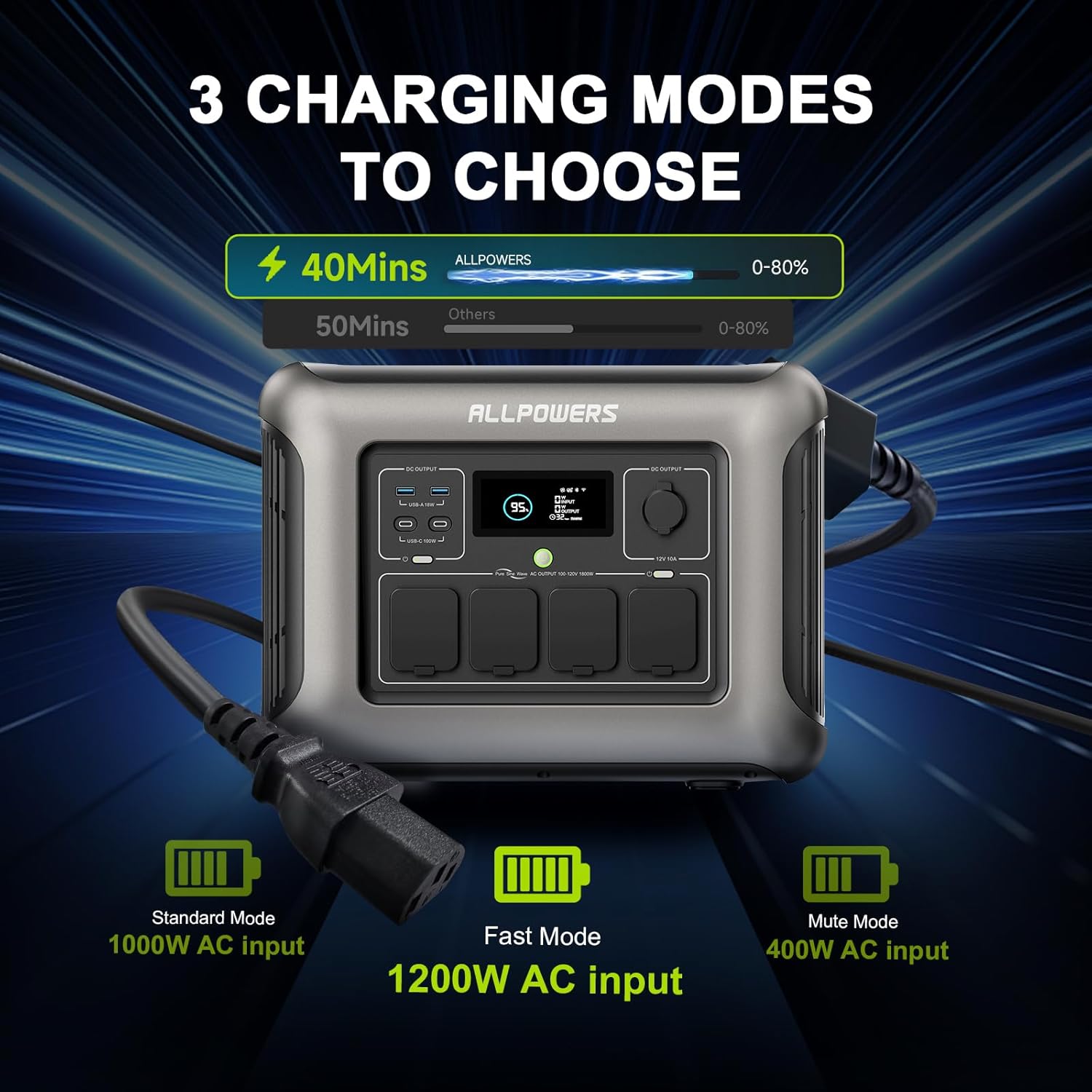
Figure 4: Visual representation of the three charging modes for the R1500 LITE: Standard, Fast, and Mute.
5.4 Funktionen af en uafbrydelig strømforsyning (UPS)
The R1500 LITE features a UPS function to protect sensitive electronics during power outages.
- Connect the R1500 LITE to a wall outlet using the AC charging cable.
- Connect your critical devices (e.g., desktop PC, server) to the AC output ports of the R1500 LITE.
- In the event of a power failure, the R1500 LITE will automatically switch to battery power within 15ms, providing continuous power to your connected devices.

Figure 5: Diagram illustrating the R1500 LITE's UPS function, showing seamless power transition during an outage.
5.5 Kontrol af mobilapps
The ALLPOWERS R1500 LITE can be controlled via a mobile application for convenient remote management.
- Download the ALLPOWERS app from your device's app store.
- Follow the in-app instructions to pair your R1500 LITE with your smartphone.
- Through the app, you can monitor battery status, switch Hertz, change charging modes, and activate Eco Mode.

Figure 6: The mobile application interface for controlling the R1500 LITE, showing various settings and monitoring options.
6. Vedligeholdelse
6.1 Opbevaring
When storing the R1500 LITE for extended periods, ensure the battery is charged to approximately 50-80%. Recharge every 3-6 months to maintain battery health. Store in a cool, dry place away from direct sunlight and extreme temperatures.
6.2 Pleje af batterier
The R1500 LITE uses LiFePO4 batteries, known for their long lifespan of over 3500 cycles, which translates to approximately 10 years of use under normal conditions. To maximize battery life, avoid consistently draining the battery to 0% or charging to 100% if not immediately needed.

Figure 7: A cutaway diagram of the R1500 LITE highlighting its LiFePO4 battery technology and its extended lifespan.
6.3 Rengøring
Use a dry, soft cloth to clean the exterior of the power station and solar panel. Do not use abrasive cleaners or immerse the unit in water. Ensure all ports are free of dust and debris.
7. Fejlfinding
If you encounter issues with your ALLPOWERS R1500 LITE, refer to the following common problems and solutions:
- Enheden tænder ikke: Ensure the battery is not completely depleted. Try connecting to an AC outlet for a few minutes.
- Ingen output fra porte: Verify that the specific output section (AC, DC, USB) is activated by pressing its respective button. Check if the device being charged is functioning correctly.
- Langsom opladning: Ensure you are using the appropriate charging mode (Fast Mode for quicker AC charging). For solar charging, ensure the solar panel is in direct sunlight and properly angled, and that the cables are securely connected.
- Overbelastningsbeskyttelse: If the unit shuts down due to overload, disconnect some devices and restart the power station. Ensure the total wattage of connected devices does not exceed the R1500 LITE's 1600W output.
- Skærm virker ikke: Prøv at genstarte enheden. Hvis problemet fortsætter, skal du kontakte kundesupport.
For persistent issues or error codes not listed, please contact ALLPOWERS customer support.
8. Specifikationer
8.1 ALLPOWERS R1500 LITE Portable Power Station
| Feature | Specifikation |
|---|---|
| Mærke | TILLADELSER |
| Modelnavn | R1500 BUNDLE |
| Wattage | 1600 Watts (Running), 3200 Watts (Surge) |
| Kapacitet | 1056Wh |
| Batteritype | LiFePO4 |
| Strømkilde | Batteridrevet, solcelle |
| AC indgang | Up to 1200W (Fast Mode) |
| Solindgang | MPPT 650W |
| Udgangsporte | 4x AC, 2x USB-C (100W), 2x USB-A, 1x Cigarette Lighter |
| Speciel funktion | UPS Function (15ms switching) |
| Varens vægt | 36.8 pund |
| Produktdimensioner | 16.25 cm L x 12.28 cm B x 10.43 cm H |
8.2 ALLPOWERS SP037 400W Solar Panel
| Feature | Specifikation |
|---|---|
| Nominel effekt | 400W |
| Celletype | Polykrystallinsk silicium |
| Effektivitet | 22 % |
| Open Circuit Voltage | 45.3V |
| Maksimal effekt Voltage | 37.4V |
| Kortslutningsstrøm | 11.45A |
| Maksimal strømstrøm | 10.6A |
| Udfoldet størrelse | 105 x 266 x 0.5 cm |
| Foldet størrelse | 105 x 53.2 x 6.5 cm |
| Nettovægt | 18.5 kg |
| Vandmodstand | IP67 |

Figure 8: Detailed specifications for the ALLPOWERS SP037 400W solar panel.
9. Garanti og support
ALLPOWERS products are designed for reliability and performance. For warranty information, please refer to the warranty card included with your product or visit the official ALLPOWERS webwebsted. Kunde reviews indicate that ALLPOWERS provides responsive customer service for product issues.
If you require technical assistance, have questions about your product, or need to report a defect, please contact ALLPOWERS customer support through their official channels. You can often find support contact information on the ALLPOWERS brand store page or their official webwebsted.
ALLPOWERS Brand Store: Visit ALLPOWERS Store on Amazon
10. Produktvideoer
Der blev ikke fundet nogen relevante officielle produktvideoer fra sælgeren i de angivne data, som kan integreres i denne manual.