
1. Introduktion
Thank you for choosing the CASCHO 33 Bluetooth 5.3 Wireless Headset. This manual provides detailed instructions for setting up, operating, and maintaining your headset to ensure optimal performance and longevity. Please read this manual thoroughly before using the product.
2. Produktet er slutview
2.1 Nøglefunktioner
- Bluetooth 5.3-teknologi: Sikrer stabil og effektiv trådløs forbindelse.
- Environmental Noise Cancellation (ENC): Forbedrer opkaldsklarheden ved at reducere baggrundsstøj.
- Forlænget spilletid: Op til 20 timer på en enkelt opladning og op til 100 timer med opladningsetuiet.
- LED-display opladningsetui: Provides clear battery status indication.
- Comfortable Hook Design: Secure and adjustable fit for both left and right ears.
- Dobbelt enhedsforbindelse: Connects to two Bluetooth-enabled devices simultaneously.
- Integreret kontrol: Combination of physical buttons and touch controls for easy operation.
2.2 Headsetkomponenter
The CASCHO 33 headset features an ergonomic design with an ear hook for secure placement and an in-ear earpiece for audio delivery. It includes integrated control buttons and a touch-sensitive area for various functions.
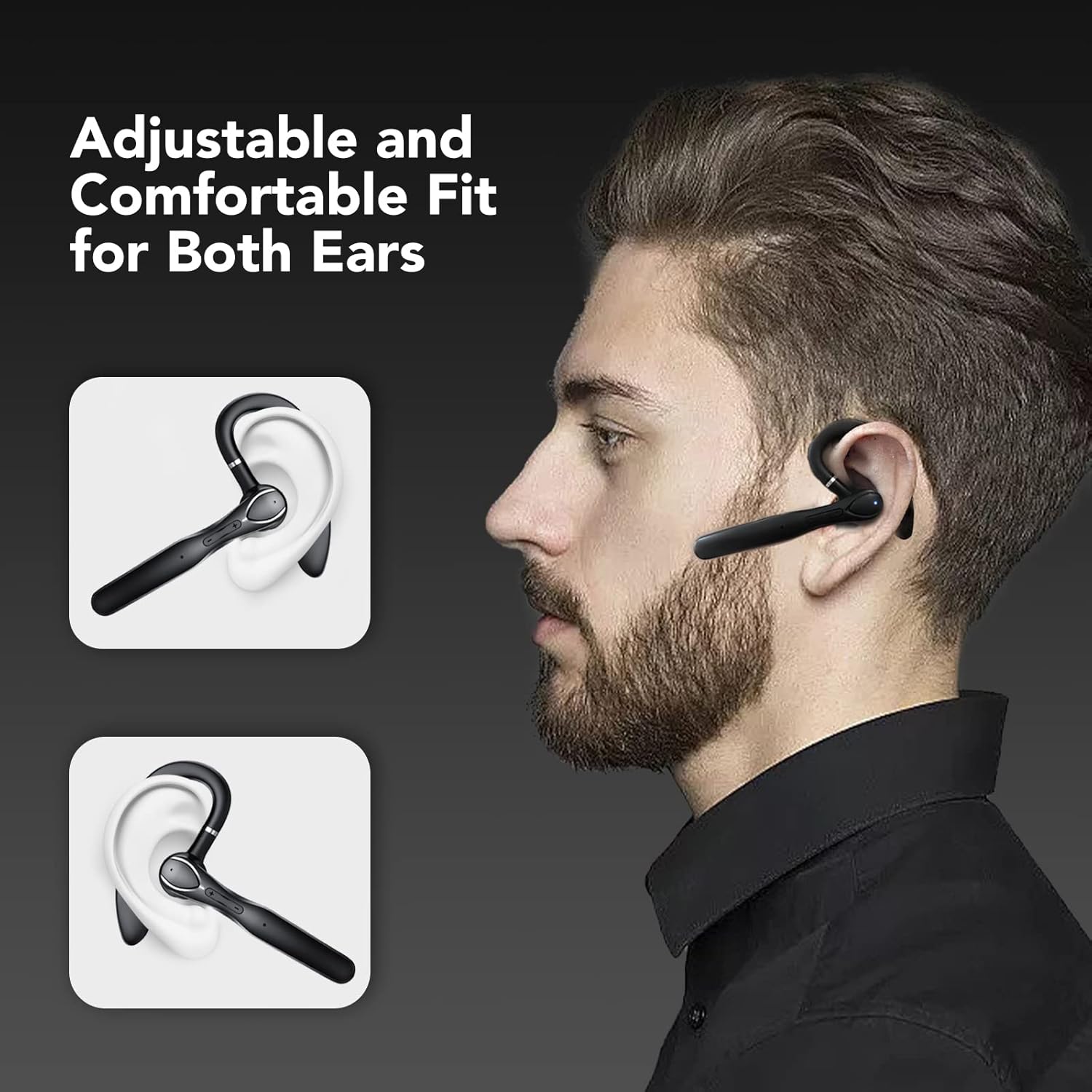
Figure 1: The CASCHO 33 headset is designed for an adjustable and comfortable fit, suitable for both the left and right ear. The ear hook ensures stability during use.
3. Opsætning
3.1 Opladning af headsettet og etuiet
Before first use, fully charge the headset and its charging case. The charging case features an LED display to show the current battery level.
- Place the headset into the charging case.
- Tilslut opladningsetuiet til en strømkilde ved hjælp af det medfølgende USB-kabel.
- The LED display on the case will indicate charging status and battery percentage.
- A full charge for the headset takes approximately 1.5 hours. The charging case provides multiple charges, extending total playtime up to 100 hours.

Figure 2: The charging case provides up to 80 hours of additional playtime, with the headset offering 20 hours on its own. Total playtime can reach 100 hours.
3.2 Parring med en enhed
The CASCHO 33 headset supports Bluetooth 5.3 for quick and stable pairing. It also features dual device connectivity, allowing it to be connected to two devices simultaneously.
- Sørg for, at headsettet er opladet og tændt.
- Open the Bluetooth settings on your smartphone, tablet, or computer.
- Søg efter available devices. The headset will appear as "CASCHO 33" or similar.
- Select "CASCHO 33" to initiate pairing. A voice prompt will confirm successful connection.
- To connect a second device, disable Bluetooth on the first device temporarily, pair with the second device, then re-enable Bluetooth on the first device. The headset should automatically connect to both.

Figure 3: The CASCHO 33 headset can connect to two devices simultaneously, such as a laptop and a smartphone, allowing seamless switching between calls and media.
4. Betjeningsvejledning
4.1 Tænd/sluk
- Tænd: Remove the headset from the charging case. It will automatically power on.
- Sluk: Place the headset back into the charging case. It will automatically power off and begin charging.
4.2 Opkaldshåndtering
The headset is optimized for clear communication, featuring Environmental Noise Cancellation (ENC) to minimize background distractions during calls.
- Besvar/afslut opkald: Tryk én gang på multifunktionsknappen.
- Afvis opkald: Tryk og hold multifunktionsknappen nede i 2 sekunder.
- Lydstyrkekontrol: Brug knapperne til at skrue op for lydstyrken (+) og ned for lydstyrken (-).

Figure 4: The headset provides clear call quality with Environmental Noise Cancellation (ENC) to reduce ambient noise, making it ideal for business, office, or commuting use.
4.3 Musikafspilning
- Afspil/pause: Tryk én gang på multifunktionsknappen.
- Næste nummer: Press and hold the volume up (+) button.
- Forrige nummer: Press and hold the volume down (-) button.
4.4 Stemmeassistent
Activate your device's voice assistant (Siri, Google Assistant, etc.) directly from the headset.
- Aktiver stemmeassistent: Double-tap the touch-sensitive area on the headset.
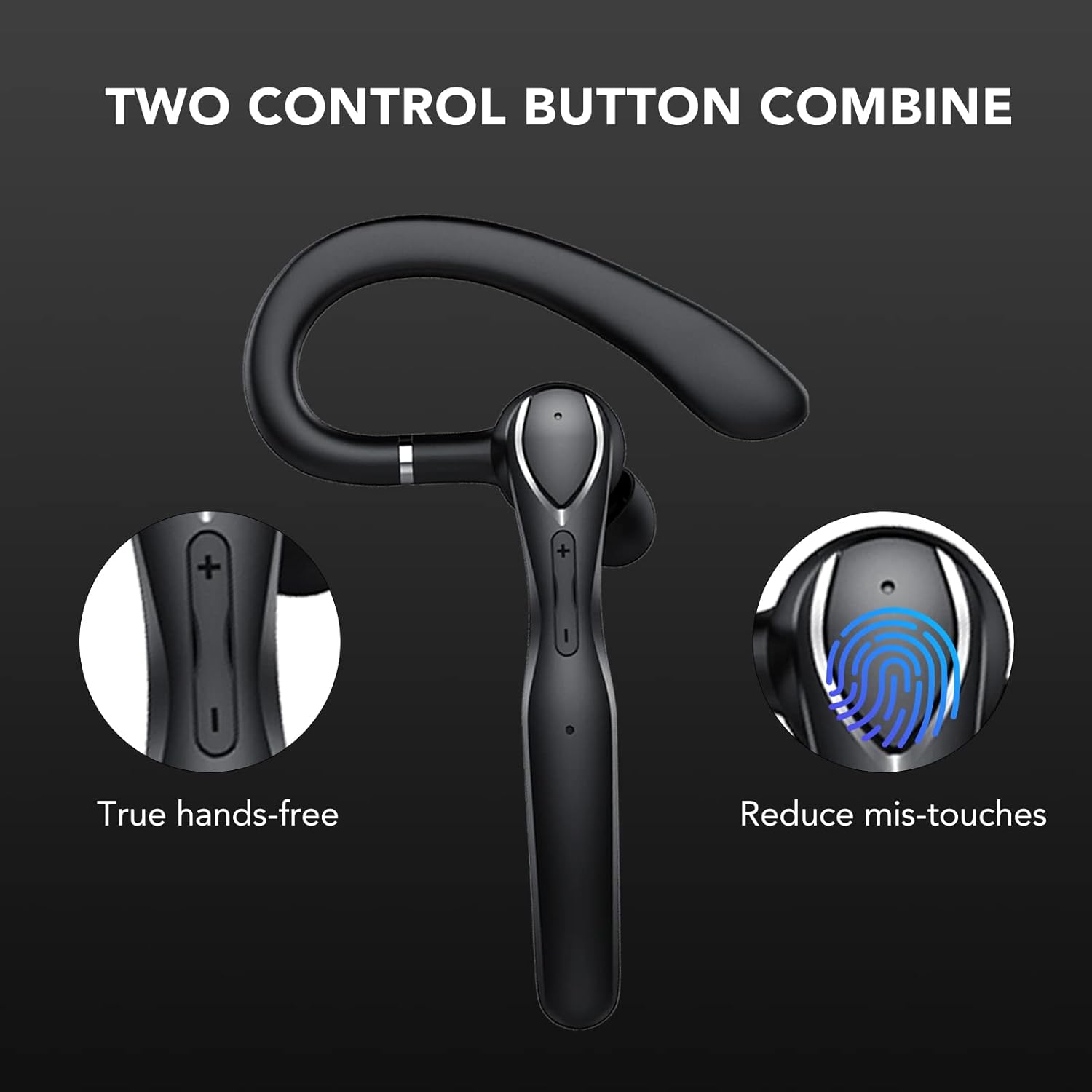
Figure 5: The headset features a combination of physical buttons for precise control and a touch-sensitive area to reduce accidental touches, enabling true hands-free operation.
5. Vedligeholdelse
- Rensning: Brug en blød, tør klud til at rengøre headsettet og opladningsetuiet. Undgå at bruge skrappe kemikalier eller slibende materialer.
- Opbevaring: When not in use, store the headset in its charging case to protect it from dust and damage. Store in a cool, dry place.
- Batteripleje: For at forlænge batteriets levetid bør du undgå at aflade headsettet helt ofte. Oplad det regelmæssigt, selvom det ikke er i konstant brug.
6. Fejlfinding
- Headsettet tænder ikke: Ensure the headset is charged. Place it in the charging case and connect the case to a power source.
- Kan ikke parres med enhed:
- Ensure Bluetooth is enabled on your device and the headset is in pairing mode (usually indicated by a flashing LED).
- Sørg for, at headsettet ikke allerede er tilsluttet en anden enhed.
- Flyt headsettet tættere på din enhed (inden for 10 meter).
- Restart both the headset (by placing it in the case and taking it out) and your device.
- Ingen lyd eller dårlig lydkvalitet:
- Kontroller lydstyrkeniveauerne på både headsettet og din tilsluttede enhed.
- Ensure the headset is properly seated in your ear.
- If connected to a computer, ensure the CASCHO 33 is selected as the audio output and input device in your system settings.
- Flyt væk fra kilder til stærk elektromagnetisk interferens.
- Headset does not turn off without charging case: The CASCHO 33 is designed to power off automatically when placed back into its charging case. To disconnect without powering off, simply disable Bluetooth on your connected device.
7. Specifikationer
| Modelnavn | 33 |
| Mærke | CASCHO |
| Forbindelsesteknologi | Bluetooth 5.3 |
| Trådløs kommunikation | Bluetooth |
| Ørestykke form | Krog |
| Øreplacering | In-Ear (med over-ear-krog) |
| Støjkontrol | Miljømæssig støjreduktion (ENC) |
| Kontrolmetode | Touch and Physical Buttons |
| Bluetooth rækkevidde | Op til 10 meter (33 fod) |
| Batterilevetid (headset) | Op til 20 timer |
| Batterilevetid (med opladningsetui) | Op til 100 timer |
| Opladningstid (headset) | Ca. 1.5 timer |
| Materiale | Plast |
| Farve | Sort |
| Varens vægt | 4.6 ounce |
| Kompatible enheder | Bluetooth-aktiverede enheder |
8. Garanti og support
For warranty information and customer support, please refer to the product packaging or contact CASCHO customer service directly. Keep your purchase receipt for any warranty claims.
For further assistance, please visit the official CASCHO website or contact their support team through the contact information provided with your purchase.