
LEMNOI SG7
LEMNOI SG7 Educational Day/Night Alarm Clock for Children - User Manual
Model: SG7
Indledning
This manual provides detailed instructions for the setup, operation, and maintenance of your LEMNOI SG7 Educational Day/Night Alarm Clock. Please read it thoroughly to ensure proper use and to maximize the product's features.
Sikkerhedsoplysninger
- Hold enheden væk fra vand og fugt.
- Må ikke udsættes for ekstreme temperaturer.
- Brug kun det medfølgende USB-C-kabel til opladning.
- Opbevares utilgængeligt for små børn for at undgå kvælningsfare fra små dele.
- Forsøg ikke selv at skille enheden ad eller reparere den. Kontakt kundesupport, hvis der opstår problemer.
Pakkens indhold
Tjek venligst pakken for følgende varer:
- LEMNOI SG7 Educational Day/Night Alarm Clock
- USB-C ladekabel
- Brugermanual
Produkt overview
The LEMNOI SG7 is designed to assist children with sleep training and morning routines. It features:
- Day/Night Educational Icons: Green sun for wake-up, blue moon for sleep.
- 5-farvet LED-natlys: Justerbar lysstyrke.
- 7 Musical Alarm Options: Gentle wake-up sounds.
- Dual Alarms & Snooze Function: Customizable for weekdays and weekends.
- Digital Display with Temperature Monitor: 12/24 hour format, F/C conversion.
- Touch/Sound Activated Screen: Skærmen slukker efter 20 sekunders inaktivitet.
- Indbygget 2000mAh lithiumbatteri: USB-C genopladelig.

Front view of the LEMNOI SG7 alarm clock, displaying time, temperature, and day/night icons.
Opsætning
1. Første opladning
Before first use, fully charge the alarm clock. Connect the provided USB-C cable to the charging port on the back of the device and plug it into a compatible USB power adapter (not included).
- Opladningsindikatorlampen lyser under opladning.
- En fuld opladning tager typisk cirka 3 timer.
- The battery icon on the display will show charging status.
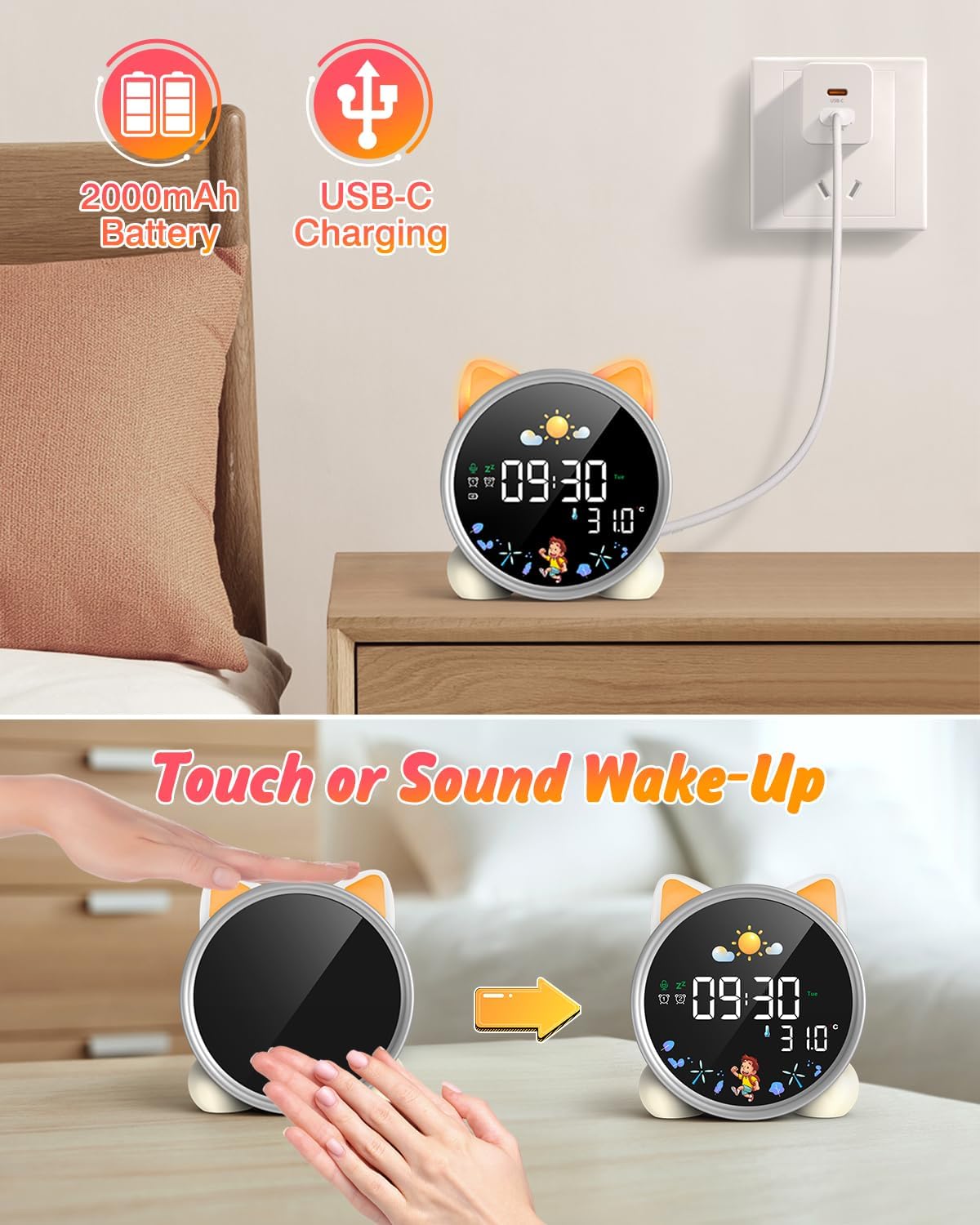
The alarm clock being charged via its USB-C port.
2. Tænd/sluk
The device powers on automatically when connected to power. To manually power on/off or wake the screen:
- Vækningsskærm: Tap the device or make a sound near it. The screen will illuminate for 20 seconds.
- Tænd/sluk: The device is designed to be always on for alarm functions.
Activating the screen by tapping the device.
Betjeningsvejledning
1. Indstilling af tid og dato
The alarm clock supports 12/24 hour format and displays the day of the week. Specific buttons for setting are not detailed in the provided text, but typically involve a "Set" or "Mode" button.
- Refer to the physical manual for exact button functions (e.g., "SET" button).
- Tryk og hold "SET"-knappen nede for at gå ind i tidsindstillingstilstand.
- Use "+" and "-" buttons to adjust hours, minutes, and other settings.
- Tryk på "SET" igen for at bekræfte hver indstilling og gå videre til den næste.
2. Day/Night Educational Mode
This feature uses color-changing lights and icons to signal wake-up and sleep times.
- Vågn op: Green light and sun icon appear to indicate it's time to wake up.
- Sove: Blue light and moon icon appear to indicate it's time to sleep.

Day/Night mode with green sun for wake-up and blue moon for sleep.
3. Dual Alarms and Snooze Function
Set two independent alarms for different routines.
- Indstilling af alarmer: The dual alarms can be customized for any day from Monday to Sunday. Consult the full manual for specific steps to set Alarm 1 and Alarm 2.
- Udsæt: When an alarm sounds, press the "SNOOZE" button on top for an additional 9 minutes of sleep. This can be repeated up to 3 times.

Illustration of the snooze function and dual alarm capability.
4. Night Light (5 Colors & Brightness Levels)
The alarm clock functions as a night light with 5 color options and adjustable brightness.
- Farvemuligheder: Yellow, Blue, Purple, White, and Gradient.
- Lysstyrke: 3 levels of brightness (0%, 30%, 70%, 100%) for the screen display. The night light itself also has adjustable brightness.
- Refer to the physical manual for instructions on cycling through colors and adjusting brightness.

The 5 available night light colors and screen brightness options.
5. Music and Sound Machine
The alarm clock offers 7 musical options for a gentle wake-up or soothing sleep environment.
- 7 musical options are available.
- Refer to the physical manual for instructions on selecting and setting music.

The 7 sound options available for the alarm clock.
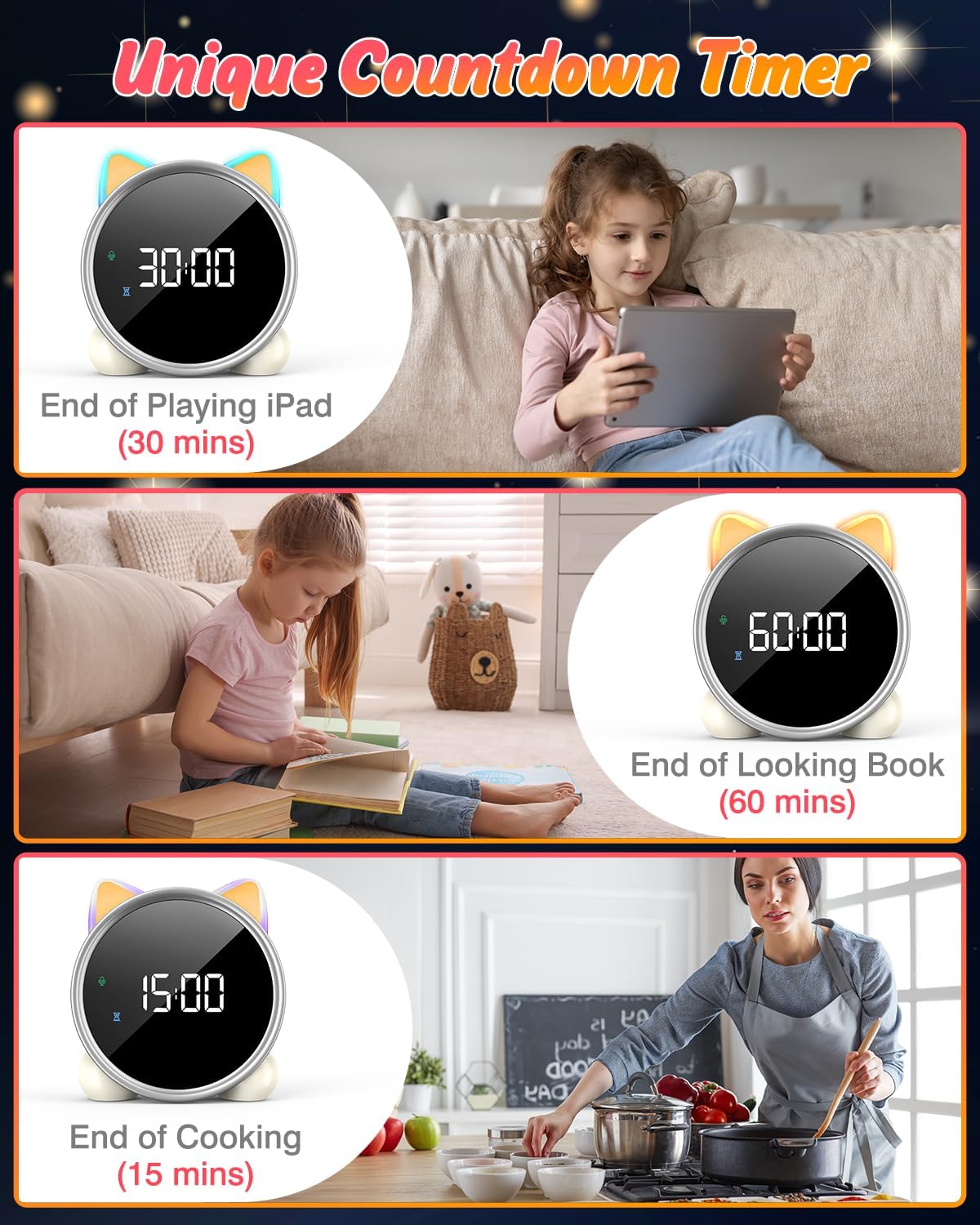
6. Nedtællingstimer
A unique countdown timer feature can be used for various activities.
- Useful for managing screen time, reading sessions, or cooking.
- Refer to the physical manual for instructions on setting the countdown timer.
Examples of the countdown timer in use for various activities.
7. Temperaturvisning
The alarm clock displays the ambient temperature and supports both Celsius and Fahrenheit units.
- Supports F/C temperature conversion.
- Refer to the physical manual for instructions on switching between units.
8. Screen Activation (Touch/Sound)
The screen can be activated by touch or sound and will automatically turn off after a period of inactivity to save power.
- Tap the device or make a sound to wake the screen.
- The screen will turn off after 20 seconds of no interaction.
Opretholdelse
- Rensning: Tør enheden af med en blød, tør klud. Brug ikke slibende rengøringsmidler eller opløsningsmidler.
- Opbevaring: Opbevares på et køligt, tørt sted, når det ikke er i brug i længere perioder.
- Batteripleje: To prolong battery life, avoid fully discharging the battery frequently. Recharge when the low battery indicator appears.
Fejlfinding
| Problem | Mulig årsag | Løsning |
|---|---|---|
| Skærmen tænder ikke. | Lavt batteri eller enheden er slukket. | Charge the device using the USB-C cable. Tap the device or make a sound to activate the screen. |
| Batteriet aflades hurtigt. | Night light mode consumes more power. | It is recommended to keep the device plugged in when using night light mode for extended periods. Ensure the screen brightness is not set too high if battery life is a concern. |
| Difficulty setting time/alarms. | Forkert knaprækkefølge eller manglende kendskab til betjeningselementer. | Refer to the "Operating Instructions" section and the detailed physical manual for precise button functions and sequences. |
| Screen remains on constantly. | Possible setting error or malfunction. | Ensure the screen auto-off feature is enabled (if applicable, check manual). If the issue persists, try a soft reset (if available, check manual) or contact customer support. |
Specifikationer
- Mærke: LEMNOI
- Modelnummer: SG7
- Farve: Rose
- Produktmål (L x B x H): 13.1 x 3.81 x 14.5 cm
- Materiale: Plast
- Funktioner: Adjustable brightness, Snooze function
- Varens vægt: 265 gram
- Skærmtype: Digital
- Strømkilde: Battery Powered (Built-in 2000mAh Lithium Battery, USB-C charging)
- Værelsestype: Soveværelse
- Form: Kat
- Indendørs/udendørs brug: Indendørs
Garanti og support
For warranty information or technical support, please refer to the contact details provided with your purchase or visit the official LEMNOI webwebsted. Gem din købsbevis i tilfælde af garantikrav.
Ask a question about this manual
Ask about setup, troubleshooting, compatibility, parts, safety, or missing instructions. Manuals+ will review the question and use this page’s manual context to help answer it.