
NBD NBD-EU-S110-QT
NBD 4K 48MP Digital Vlogging Camera User Manual
Model: NBD-EU-S110-QT
1. Introduktion
Tak for købetasing the NBD 4K 48MP Digital Vlogging Camera. This manual provides essential information for setting up, operating, and maintaining your camera. Please read it thoroughly before use to ensure optimal performance and longevity of your device.
2. Pakkens indhold
Bekræft, at alle nedenstående varer er inkluderet i din pakke:
- NBD 4K Camera x 1
- Mikrofon x 1
- Stativ x 1
- Wide-Angle Lens x 1
- Macro Lens x 1
- Rengøringssæt x 1
- Additional Light x 1
- 32 GB SD-kort x 1
- Kortlæser x 1
- Batteri x 2
- Oplader x 1
- Kamerataske x 1
- Nøglesnor x 1
- Fjernbetjening x 1
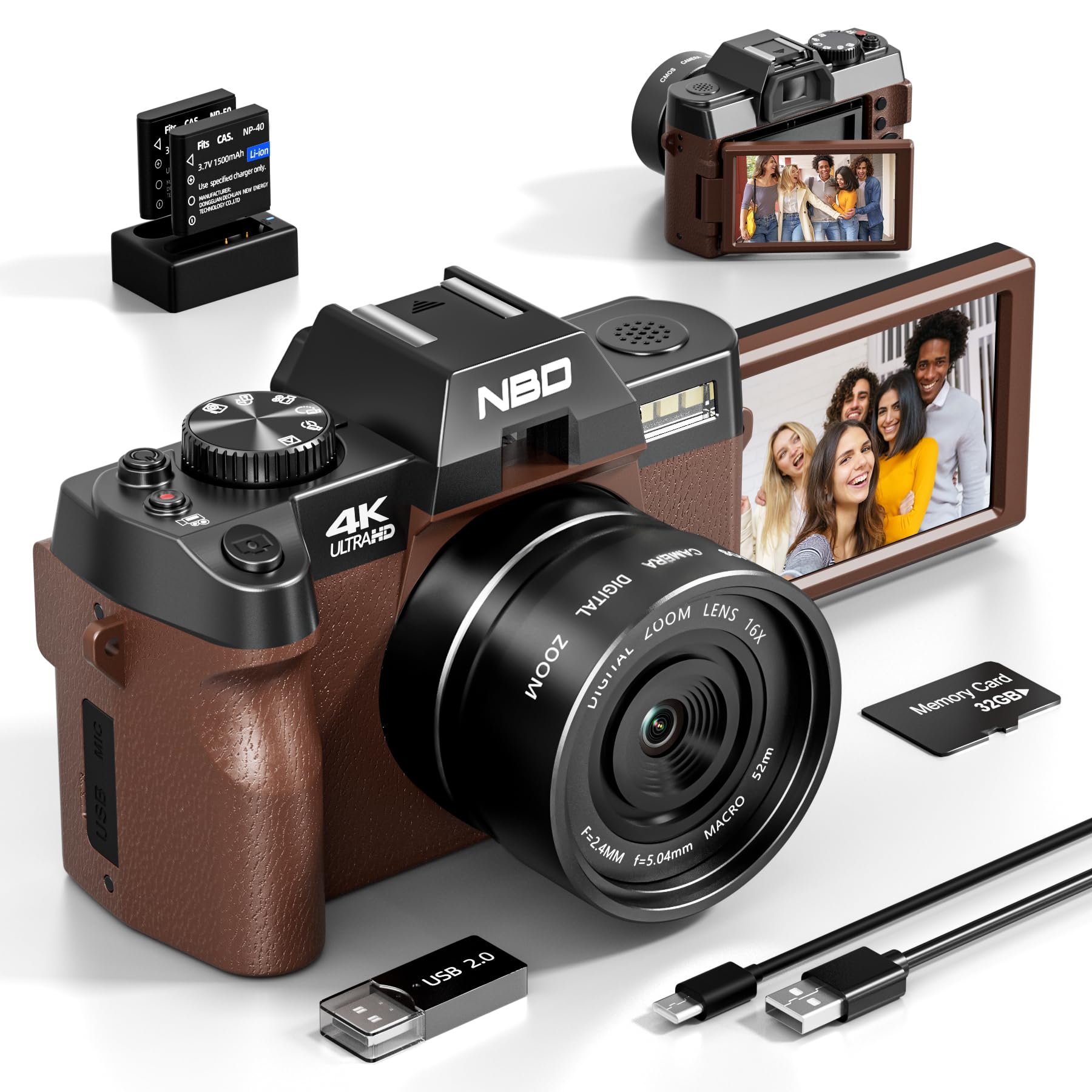
Image: NBD 4K Digital Camera with its complete set of accessories, including microphone, tripod, lenses, and other components.
3. Produktet er slutview
3.1 Kamerakomponenter
Familiarize yourself with the main parts of your NBD camera.
- Linse: Den primære optiske komponent til billedoptagelse.
- LCD skærm: 3-inch OLED display for viewing and navigating.
- Power knap: Tænder/slukker kameraet.
- Udløserknap: Tager billeder eller starter/stopper videooptagelse.
- Zoom kontrol: Adjusts digital zoom (up to 16x).
- Mode Dial/Buttons: Selects different shooting modes (photo, video, playback).
- Mikrofonindgang: Til tilslutning af ekstern mikrofon.
- USB-port: Til dataoverførsel og opladning.
- SD-kortplads: Til isætning af hukommelseskortet.
- Batterirum: Holds the rechargeable battery.
4. Opsætning
4.1 Opladning af batteriet
- Insert the provided battery into the charger.
- Tilslut opladeren til en strømkilde.
- The indicator light on the charger will show charging status. Charge fully before first use.
4.2 Isætning af SD-kortet
- Find SD-kortåbningen på kameraet.
- Indsæt 32 GB SD-kortet med metalkontakterne vendt i den rigtige retning, indtil det klikker på plads.
- For at fjerne det skal du forsigtigt skubbe kortet ind, indtil det springer ud.
4.3 Attaching Lenses and Accessories
- Vidvinkelobjektiv: Screw the wide-angle lens onto the front of the camera's main lens. This expands the field of view med 45 %.
- Makroobjektiv: The macro lens is typically integrated with the wide-angle lens or can be used separately for close-up shots. Refer to the lens markings for separation if applicable.
- Mikrofon: Connect the external microphone to the camera's microphone input port.
- Stativ: Screw the camera onto the tripod mount for stable shooting.
5. Betjeningsvejledning
5.1 Tænd/sluk
Tryk på tænd/sluk-knappen og hold den nede for at tænde eller slukke kameraet.
5.2 Optagelse af billeder
- Tænd kameraet.
- Select Photo mode using the mode dial or button.
- Komponer dit billede ved hjælp af LCD-skærmen.
- Press the Shutter button halfway to activate autofocus.
- Tryk udløserknappen helt ned for at tage billedet.
5.3 Optagelse af videoer
- Tænd kameraet.
- Select Video mode.
- Press the Shutter button to start recording. A red indicator will usually appear on the screen.
- Tryk på udløserknappen igen for at stoppe optagelsen.
5.4 Zoomfunktion
Use the zoom controls (usually a rocker switch) to digitally zoom in or out. The camera supports up to 16x digital zoom.
5.5 Autofocus and Night Vision
- Autofokus: The camera features autofocus for sharper images. Half-press the shutter button to engage.
- Nattesyn: Activate night vision mode for improved performance in low-light conditions. Refer to the camera's menu for this setting.
5.6 Selvudløser
The self-timer function allows for a delay before taking a photo. Access this setting through the camera's menu. Options include 2-second and 10-second delays.
5.7 Wi-Fi-forbindelse
The camera supports Wi-Fi connectivity for transferring photos and videos to compatible devices. Consult the camera's on-screen menu for Wi-Fi setup and connection instructions.
5.8 Brug som en Webcam
Tilslut kameraet til din computer via USB for at bruge det som en webcam for vlogging, video calls, or live streaming. Select the webcam mode on the camera when prompted.
6. Vedligeholdelse
- Rensning: Use the provided cleaning kit to gently clean the lens and screen. Avoid abrasive materials.
- Opbevaring: Store the camera in its bag in a cool, dry place when not in use. Remove the battery if storing for extended periods.
- Batteripleje: Do not expose batteries to extreme temperatures. Dispose of depleted batteries according to local regulations.
7. Fejlfinding
| Problem | Mulig årsag | Løsning |
|---|---|---|
| Kameraet tænder ikke. | Batteriet er afladet eller isat forkert. | Oplad batteriet helt. Sørg for, at batteriet er isat korrekt. |
| Kan ikke tage billeder/optage videoer. | SD-kortet er fuldt, låst eller ikke isat. | Check SD card capacity. Unlock the SD card. Reinsert the SD card. |
| Billeder er slørede. | Autofocus not engaged, lens dirty, or insufficient light. | Half-press shutter to focus. Clean the lens. Use additional light or night vision mode. |
| Problemer med Wi-Fi-forbindelse. | Forkert adgangskode eller uden for rækkevidde. | Verify Wi-Fi password. Move closer to the Wi-Fi source. |
| Mikrofonen optager ikke lyd. | Microphone not properly connected or settings incorrect. | Ensure microphone is securely plugged in. Check camera audio settings. |
| Kameraet fryser eller reagerer ikke. | Midlertidig softwarefejl. | Fjern og sæt batteriet i igen for at nulstille kameraet. |
8. Specifikationer
| Mærke: | NBD |
| Modelnavn: | NBD-EU-S110-QT |
| Effective Photo Resolution: | 48 MP |
| Videooptagelsesopløsning: | 4K |
| Digital zoom: | 16x |
| Skærmstørrelse: | 3 tommer |
| Skærmtype: | OLED |
| Image Sensor Technology: | CMOS |
| Max Aperture: | F/1.8 |
| Forbindelse teknologi: | Wi-Fi |
| Billedstabilisering: | Ja |
| Autofokus: | Ja |
| Nattesyn: | Ja |
| Selvudløser: | Yes (2s, 10s) |
| Batteritype: | Lithium-ion |
| Included Memory Card Size: | 32GB (SD Card) |
9. Garanti og support
For warranty information and technical support, please refer to the documentation provided with your purchase or visit the official NBD webwebsted. Gem din købsbevis til garantikrav.
Bemærk: Denne manual er kun til orientering. Specifikationerne kan ændres uden varsel.
Relaterede dokumenterNBD-EU-S110-QT

Ask a question about this manual
Ask about setup, troubleshooting, compatibility, parts, safety, or missing instructions. Manuals+ will review the question and use this page’s manual context to help answer it.