
1. Introduktion
This manual provides essential instructions for the installation, operation, and maintenance of your White Rodgers 1F96U-42WF Sensi Touch 2 Smart Thermostat. This smart thermostat offers advanced control over your home's heating and cooling system, featuring a touchscreen interface and Wi-Fi connectivity for remote management via the Sensi app, as well as compatibility with Amazon Alexa and Google Assistant.
2. Sikkerhedsoplysninger
Please read and understand all instructions before installing or operating this thermostat. Failure to follow these instructions could result in property damage, injury, or death. Always turn off power to the heating and cooling system at the circuit breaker or fuse box before beginning installation to prevent electrical shock. Installation should be performed by a qualified technician if you are unsure about any steps.
- Sørg for, at al ledningsføring overholder lokale elektriske forskrifter og bestemmelser.
- Brug ikke denne termostat med volumentages exceeding 30V AC.
- Hold termostaten væk fra vand og for høj luftfugtighed.
3. Pakkens indhold
Bekræft at alle varer er til stede i din pakke:
- White Rodgers 1F96U-42WF Sensi Touch 2 Smart Thermostat
- Monteringsbeslag
- Installationsvejledning (dette dokument)
4. Opsætning og installation
The Sensi Touch 2 Smart Thermostat is designed for wall mounting and requires a hardwired 24 Volts power source. A common wire (C-wire) is typically required for continuous power and Wi-Fi functionality. Refer to the detailed wiring diagrams in the Sensi app or the full installation guide for specific instructions tailored to your HVAC system.
4.1. Wiring Terminals
The thermostat supports universal system applications with the following terminal designations:
- RC: Power for cooling (24V AC)
- RH: Power for heating (24V AC)
- C: Common wire (required for smart features)
- VI: Heat/Emergency Heat
- W2: Anden Stage Varme
- Y: Først Stage Køling
- Y2/*: Anden Stage Cooling/Auxiliary
- O/B: Vendeventil (varmepumpe)
- G: Ventilator
- ACC+, ACC-: Accessory terminals
Ensure wires are securely connected to the correct terminals. Incorrect wiring can damage the thermostat or your HVAC system.
4.2. Fysisk installation
- Sluk: Sluk for strømmen til dit HVAC-system ved afbryderen.
- Fjern gammel termostat: Fjern forsigtigt din gamle termostat fra væggen. Tag et billede af ledningerne som reference.
- Monteringsbeslag: Install the Sensi mounting bracket to the wall using the provided hardware.
- Ledningsforbindelse: Connect the wires from your wall to the corresponding terminals on the Sensi thermostat.
- Fastgør termostat: Secure the Sensi thermostat onto the mounting bracket.
- Tænd: Genopret strømmen til dit HVAC-system.
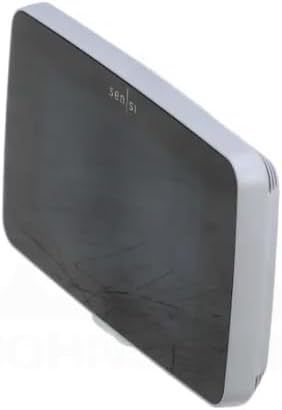
Figur 1: Forside view of the White Rodgers Sensi Touch 2 Smart Thermostat, showcasing its modern design and LCD touchscreen.
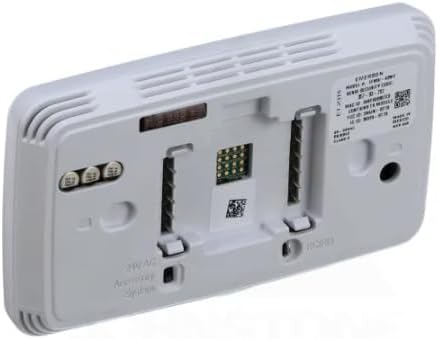
Figur 2: Bagside view of the White Rodgers Sensi Touch 2 Smart Thermostat, illustrating the wiring terminals for HVAC system connection.
4.3. App-opsætning og Wi-Fi-forbindelse
Download the Sensi app from your mobile device's app store. Follow the in-app instructions to create an account, connect your thermostat to your home Wi-Fi network, and configure your system settings. This step is crucial for enabling smart features, remote control, and integration with voice assistants like Amazon Alexa and Google Assistant.
5. Betjeningsvejledning
The Sensi Touch 2 Smart Thermostat can be operated directly via its LCD touchscreen or remotely through the Sensi mobile application.
5.1. Betjening af berøringsskærm
- Temperaturjustering: Tap the up or down arrows on the screen to change the set temperature.
- Systemtilstand: Select between Heat, Cool, Auto, or Off modes. The "Auto Changeover" feature allows the thermostat to automatically switch between heating and cooling to maintain your desired temperature range.
- Ventilatortilstand: Choose between Auto (fan runs only when heating/cooling) or On (fan runs continuously).
- Baggrundsbelysning: The LCD touchscreen features a backlight for easy viewunder forskellige lysforhold.
5.2. Sensi App and Smart Features
The Sensi app provides comprehensive control and scheduling capabilities:
- Fjernbetjening: Adjust settings from anywhere using your smartphone or tablet.
- Planlægning: Create custom heating and cooling schedules to optimize comfort and energy savings.
- Brugsrapporter: Monitor your HVAC system's run time and energy consumption.
- Geofencing: Automatically adjust temperature based on your proximity to home.
- Stemmestyring: Integrate with Amazon Alexa or Google Assistant for hands-free temperature adjustments.
6. Vedligeholdelse
The Sensi Touch 2 Smart Thermostat requires minimal maintenance to ensure optimal performance.
- Rensning: Tør forsigtigt berøringsskærmen og ydersiden af med en blød kludamp klæde. Brug ikke slibende rengøringsmidler eller opløsningsmidler.
- Luftfilter: Regularly check and replace your HVAC system's air filter as recommended by the filter manufacturer or your HVAC technician. A dirty filter can restrict airflow and reduce system efficiency.
- Softwareopdateringer: Ensure your Sensi app is up-to-date to receive the latest features and performance improvements for your thermostat.
7. Fejlfinding
If you encounter issues with your Sensi Touch 2 Smart Thermostat, refer to the following common troubleshooting steps:
- Ingen strøm/blank skærm:
- Check the circuit breaker for your HVAC system and ensure it is ON.
- Verify that the C-wire is properly connected at both the thermostat and the HVAC system control board.
- Wi-Fi afbrydelse:
- Ensure your home Wi-Fi network is operational.
- Genstart din Wi-Fi-router.
- Re-establish the Wi-Fi connection through the Sensi app's settings.
- Forkerte temperaturaflæsninger:
- Sørg for, at termostaten ikke udsættes for direkte sollys, træk eller varmekilder (f.eks.amps, apparater), der kan påvirke dens sensor.
- HVAC-systemet reagerer ikke:
- Check that the system mode (Heat, Cool, Auto) is correctly selected on the thermostat or in the app.
- Kontroller, at alle ledningsforbindelser er sikre.
- If the issue persists, contact a qualified HVAC technician.
For more detailed troubleshooting, visit the White-Rodgers support website or consult the Sensi app's help section.
8. Specifikationer
| Feature | Detalje |
|---|---|
| Mærke | White-Rodgers |
| Modelnavn | Sensi White Thermostat |
| Modelnummer | 1F96U-42WF |
| Produktmål (D x B x H) | 0.77" D x 3.25" B x 0.77" H |
| Controller type | Touchscreen, Amazon Alexa, Google Assistant |
| Speciel funktion | Automatisk omstilling |
| Temperaturkontrol type | Smart/Fjernbetjening |
| Forbindelsesteknologi | Wi-Fi |
| Strømkilde | Hardwire (24 Volts) |
| Display Type | LCD touchskærm |
| Kontrolmetode | Røre |
| Monteringstype | Vægmontering |
| Baggrundsbelysning | Ja |
| Farve | Hvid |
| Systemapplikation | Universel |
| Stages Varme/afkøling | 4/2 |
| Terminalbetegnelser | RC, RH, C W/E, W2, Y, Y2/*, O/B, G, ACC+, ACC- |
| UPC | 786710566738 |
9. Garanti og support
For warranty information, technical support, or to register your product, please visit the official White-Rodgers webwebstedet eller kontakt deres kundeservice. Behold din købskvittering som købsbevis.
Online support: sensi.emerson.com/en-us/support (Eksamplinket, det faktiske link kan variere)
Fabrikant: Hvide Rodgers