
1. Opsætningsvejledning
This section guides you through the initial setup and installation of your BIWIBON BCA-02 Smart Fingerprint Door Lock.
1.1 Pakkens indhold
Bekræft at alle komponenter er til stede i din pakke:
- Brugermanual
- Forreste håndtag
- Håndtag bagpå
- Enkelt lås
- Slagplade
- 2 mekaniske nøgler
- 2 IC-kort
- Square Cotter
- 2 Spiral Tubes
- Screws (Spare Package)
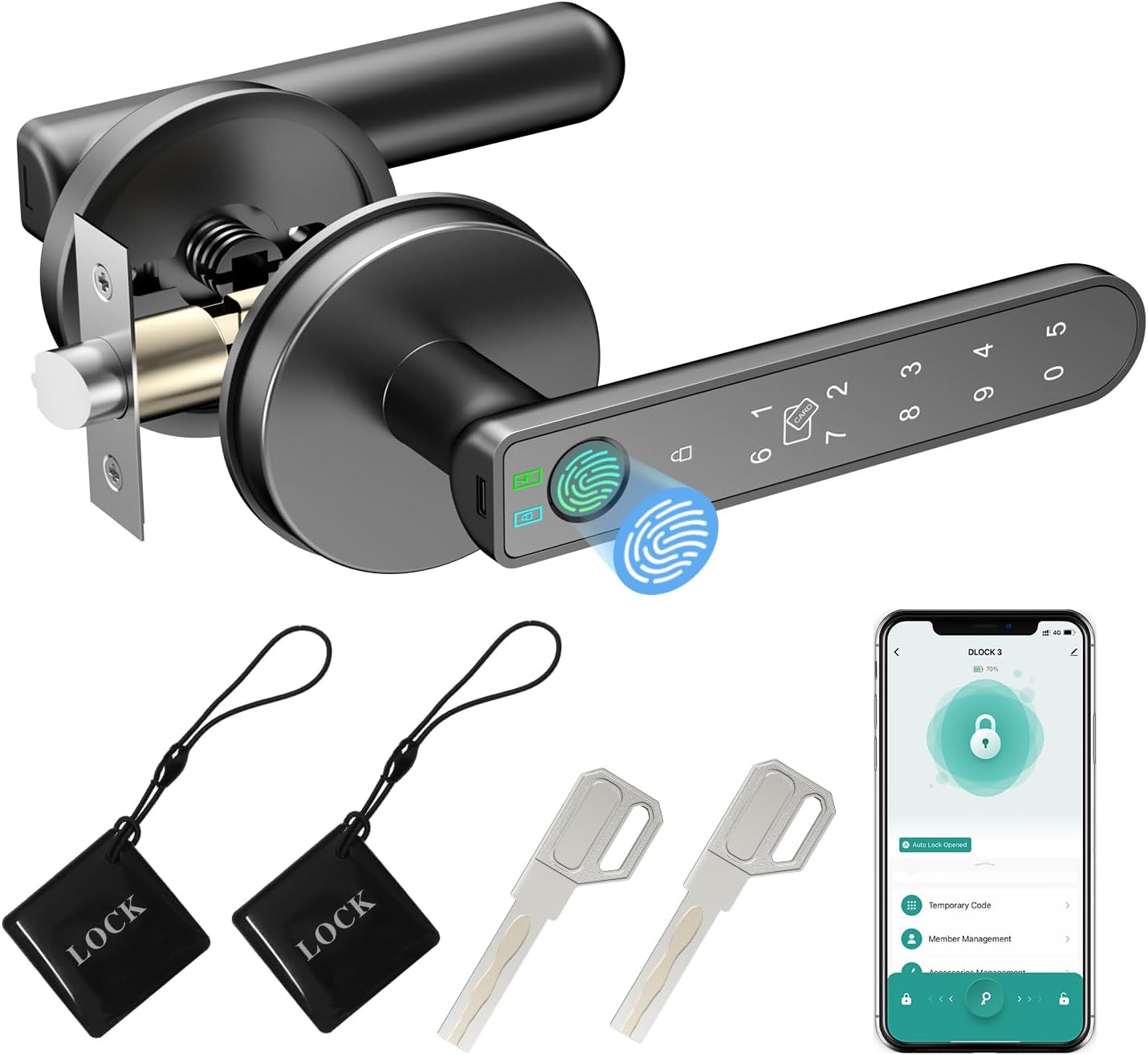
Image: All components included with the BIWIBON BCA-02 Smart Fingerprint Door Lock, including the front and back handles, latch, keys, and IC cards.
1.2 Nødvendigt værktøj
A basic screwdriver is typically sufficient for installation. No extra drilling or specialized tools are usually required.
1.3 Dørforberedelse
Sørg for, at din dør opfylder følgende specifikationer for korrekt installation:
- Dørtykkelse: 35 mm-55 mm (1.38-2.17 tommer)
- backset: Adjustable between 60mm (2-3/8 inches) and 70mm (2-3/4 inches)
- Dørhuls diameter: 54 mm (2-1/8 tommer)

Image: Diagram illustrating standard US door dimensions and how the lock components fit, including backset and hole diameter measurements.
1.4 Installationstrin
Follow these steps to install your smart door lock. For a visual guide, please refer to the installation video below.
- Juster låsens bagindstilling: The latch is initially set for 60mm (2-3/8 inches). Adjust it to 70mm (2-3/4 inches) if required by your door size. Ensure the latch is horizontal, not inclined.
- Installer lås: Insert the latch into the door edge and secure it with screw A. Ensure the slotted hole is centered in the door hole.
- Install Front Handle: Fix and tighten the spiral tubes onto the front handle. Route the wire through the square cotter and insert it into the latch hole, then fix the front panel. This lock is suitable for both left and right-handed doors without special adjustment for handle direction.
- Install Back Handle: Remove the battery cover from the back handle. Route the wire through the back panel. Connect the wire on the battery box and ensure a tight wire connection. Secure the back handle with screw B. When fixing screw B, press the handle down to insert the screw and tighten it through the hole in the back handle.
- Indsæt batterier: Install 4 AAA alkaline batteries (not included) into the battery box.
- Test drift: After installation, test all unlocking methods to ensure proper functionality.
Video: Official BIWIBON BCA-02 Fingerprint Door Lock Installation Guide. This video demonstrates the step-by-step process of installing the smart door lock, including latch adjustment, handle assembly, and wiring connections.
2. Betjeningsvejledning
Your BIWIBON BCA-02 Smart Fingerprint Door Lock offers multiple convenient ways to access your space.
2.1 Oplåsningsmetoder
The lock supports the following unlocking methods:
- Fingeraftryksgenkendelse: Place your registered finger on the sensor for quick access. The enhanced 508 DPI fingerprint sensor module provides a recognition rate of over 99% in 0.2 seconds.
- Smart APP kontrol: Use the dedicated mobile application (Tuya Smart App) to unlock the door remotely via Bluetooth. With the optional BIWIBON Gateway (sold separately), you can control the lock from anywhere.
- IC-kort: Tap a registered IC card on the designated area of the handle to unlock.
- Adgangskodeindtastning: Enter your programmed passcode on the touchscreen keypad. The anti-peeping feature allows you to input random digits before and after your actual code to protect your PIN.
- Mekaniske nøgler: For traditional backup, use the provided mechanical keys to unlock the door.

Image: Visual representation of the various unlocking methods available for the BIWIBON BCA-02 lock, including app, fingerprint, IC card, password, and backup key.

Image: Illustration of the smart app control features, such as keyless entry, share access, auto-lock, remote passcode generation, and access history viewing.
2.2 Låsemetoder
The lock can be secured in the following ways:
- Automatisk låsning: The lock can be configured to automatically lock after a set period once the door is closed.
- Manuel låsning: Press the lock button on the handle or use the mobile app to manually lock the door.
2.3 Særlige funktioner
- Passagetilstand: Activate Passage Mode to keep the door unlocked for extended periods, useful during gatherings or when frequent access is needed.
- Stemmekontrol (valgfrit): When paired with the BIWIBON Gateway (sold separately), the lock can be integrated with Alexa or Google Home for voice-activated unlocking.

Image: Highlights advanced features such as storage capacity for 100 fingerprints, 100 passwords, and 100 IC cards, along with optional voice control compatibility with Alexa and Google Assistant via the BIWIBON Gateway.
3. Vedligeholdelse
Korrekt vedligeholdelse sikrer din smarte dørlåss lange levetid og optimale ydeevne.
3.1 Batteristyring
- Batteritype: The lock requires 4 AAA alkaline batteries (not included).
- Advarsel om lavt batteri: The lock will provide a low battery warning signal when the batteries need replacement.
- Nødkraft: In case of a completely dead battery, you can use an external power bank connected via the emergency charge port (USB) to temporarily power the lock for unlocking. This port is for power only, not for charging the internal batteries.
- Backup nøgler: Always keep your spare mechanical keys within reach for emergency access.

Image: Details on how to manage battery life, including low battery alerts, emergency power bank usage, and the importance of keeping mechanical backup keys accessible.
3.2 Rengøring
Tør låsens overflade af med en blød, tør klud. Undgå at bruge slibende rengøringsmidler eller opløsningsmidler, der kan beskadige overfladen eller de elektroniske komponenter.
4. Fejlfinding
If you encounter issues with your BIWIBON BCA-02 Smart Fingerprint Door Lock, refer to the following common problems and solutions:
- Fingeraftryk ikke genkendt: Ensure your finger is clean and dry. Try repositioning your finger on the sensor. Re-register your fingerprint if the issue persists.
- Låsen svarer ikke: Check the battery level. If batteries are low or dead, replace them or use an emergency power bank. Ensure the wire connections are secure.
- Problemer med appforbindelse: Ensure Bluetooth is enabled on your phone and you are within range of the lock. If using the BIWIBON Gateway, ensure it is properly connected to Wi-Fi and within range of both the lock and your router. Try restarting the app or your phone.
- Incorrect Password Entry: Ensure you are entering the correct password. Utilize the anti-peeping feature by entering random digits before and after your actual code.
- IC Card Not Working: Ensure the IC card is properly registered. Try tapping the card firmly on the sensor.
- Mekanisk nøgle virker ikke: Sørg for, at nøglen er sat helt i og drejet korrekt. Tving ikke nøglen ind.
5. Produktspecifikationer
| Feature | Specifikation |
|---|---|
| Mærke | BIWIBON |
| Modelnavn | BCA-02 |
| Låsetype | Biometric, App Control, Touchscreen Keypad |
| Materiale | Metal |
| Farve | Sort |
| Varedimensioner (L x B x H) | 5.7 x 2.75 x 2.35 tommer |
| Varens vægt | 2.15 pund |
| Strømkilde | 4 AAA-batterier (påkrævet, ikke inkluderet) |
| Forbindelsesprotokol | Wi-Fi (with optional Gateway) |
| Særlige funktioner | Smart Door Knob, Up to 100 Fingerprints, 100 IC Cards, 100 Passwords, Bluetooth Unlock, One Touch Unlock, Smart Control with app, Auto Lock, Passage Mode, Silent Mode, Easy Install, Emergency Charge |
6. Garanti og support
For warranty information, product support, or technical assistance, please refer to the warranty card included in your product packaging or contact BIWIBON customer service directly. Keep your purchase receipt as proof of purchase.
For further assistance, please visit the official BIWIBON store or contact their support channels.